





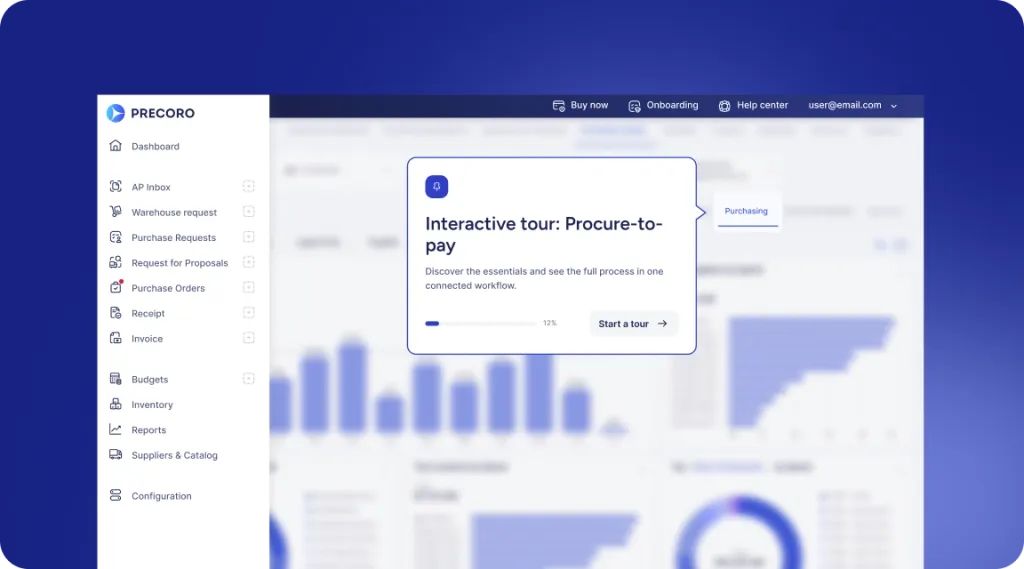
 Explore Precoro's features














Definition: Payment automation software helps businesses schedule, execute, track, and reconcile supplier payments using predefined rules and approval controls. Depending on the platform, it can support ACH transfers, wires, virtual cards, vendor verification, and accounting integrations. Finance personnel use it to reduce repetitive work, ensure visibility, and keep transaction records for auditing purposes. In simple terms, it's software for automating supplier payments.
Paper checks are becoming less common in business-to-business (B2B) payments, but they’re still far from gone. Checks accounted for 26% of surveyed organizations’ B2B payments in 2025, down from 33% in 2022, according to the AFP 2025 Digital Payments Survey. Yet, almost every business relies on them: the Federal Reserve Bank of Cleveland found that 87% of companies still used checks for at least some B2B payments in 2025.
But it’s hard to argue that checks are outdated. Compared to other payment methods, they’re the easiest to exploit by fraudsters because of very few automated verification controls around them.
Moving away from checks helps reduce risks, but the payment process still needs proper safeguards. A payment automation solution both speeds up transfers and gives finance teams more control over how they're approved and released. With the right tool, you lower fraud risk and cut the manual work behind each supplier payment.
In this article, we'll explain how payment automation software works and which features and security standards to require. We'll also cover how to pick a platform for your company size and roll it out without interrupting the accounts payable (AP) process.
Key takeaways
- Payment automation takes over once a supplier payment is approved. The system schedules and executes each payment, then tracks its status through reconciliation.
- Full accounts payable automation starts earlier, with invoice capture and matching. Some platforms also route invoices for approval.
- When you compare providers, start with payment methods and ERP integrations. Approval controls and fraud prevention matter just as much, and total cost often decides the final choice.
- Ask each provider to confirm the payment methods and currencies it supports. Check its country coverage and compatibility with your accounting system as well.
- A phased rollout starts with clean supplier data and documented approval rules. Test the integrations next, then run a controlled pilot before the full launch.
What is payment automation?
Payment automation refers to solutions used to run a company's payment workflow with minimal manual input. They typically manage the process through payment execution. Once the bill is approved, the tool pays it on the right date via the vendor's preferred method. It then records the transaction in the general ledger (GL).
Payment automation handles the final stage of accounts payable automation: payment execution and reconciliation. Invoice capture and approval happen earlier. Some companies buy a standalone solution, while others use a procure-to-pay platform that covers the whole procurement process from purchase request to payments, like Precoro.
Payment automation vs. AP automation
Although payment automation and AP automation overlap, they cover different stages. Payment automation handles only the payment, after the invoice is approved. AP automation, on the other hand, covers the full invoice lifecycle. Comprehensive procure-to-pay platforms add purchasing controls to steps before that.
| Capability | Standalone payment automation | End-to-end AP automation |
|---|---|---|
| Schedule approved payments | Core function | Often included |
| Execute supplier payments | Core function | Depends on provider |
| Capture invoice data | Optional | Typically included |
| Route invoice approvals | Optional | Typically included |
| 3-way matching | Optional | Common capability |
| Reconcile payments | Common capability | Depends on integration |
| Purchase requests and POs | Not included | Available in procure-to-pay platforms |
| Manage budgets | Usually separate | Available in broader procurement platforms |
How does a payment automation platform work?
Payment automation uses software to schedule, execute, track, and reconcile approved business payments. It then records the transaction in your accounting system.
Invoice capture and matching usually belong to broader AP automation. Some payment platforms include those steps. Standalone tools expect invoices to arrive already approved from your AP or procure-to-pay system.
Although the actual automation of the payment process doesn’t begin until you receive the invoice, it’s always safer to start with the authorized purchase request and the PO. The PO specifically sets the expected price and quantity, giving the system something to check the bill against later.
A complete automated payment process follows these steps:
- Purchase request and PO approval. An employee submits a purchase request explaining what they need. Once a manager approves it, the system generates a PO and sends it to the supplier.
- Invoice capture. The platform collects invoices from inboxes and supplier portals. Scanned copies of paper documents can be sent there too or added as attachments.
- Data extraction. To read each invoice, the software uses intelligent document processing (IDP), which combines optical character recognition (OCR) and machine learning (ML). It extracts key details such as vendor name, invoice number, due date, totals, and individual line items. Compared to OCR alone, IDP is capable of recognizing data even in non-standard formats and has a better contextual understanding.
- Validation and GL coding. The system checks that the extracted data meets predefined rules. It looks for missing fields, incorrect formats, and other issues, then assigns the right GL accounts based on your coding setup.
- Matching. The platform compares the invoice with the PO and goods receipt (2-way or 3-way matching) or with the contract for services. Any mismatches are redirected to the employee for review, while some solutions go as far as flagging suspicious fraud-like activity.
- Approval routing. Rules based on amount, vendor, or department send each invoice to the appropriate approver. The system can also remind them about pending items. Some platforms flag early-payment discounts so teams can take advantage of them.
- Payment scheduling and execution. Once an invoice receives approval, the platform adds it to a scheduled payment run. It then automatically pays the vendor using their preferred method (e.g., ACH (Automated Clearing House) or a wire transfer).
- Payment confirmation and remittance. The system confirms each payment and sends the vendor a remittance advice listing the invoices covered.
- Reconciliation. The platform matches each payment to its invoice and flags discrepancies. If the system integrates with the ERP and the bank, both update as well.
- Reporting and audit trail. Dashboards show payment status and upcoming cash needs. Everything is recorded in the system and can be traced back to its source.
Some solutions also include vendor management as part of the package, with self-service portals where suppliers can update their banking details and payment terms.
The quality of the automation relies on the provided rules and data. For example, if vendor bank details are outdated, the platform can send money to the wrong account just as easily as the right one.
How does automated payment processing differ from manual processing?
In a manual process, your AP team does everything on their own, from data entry to the final bank transfer. Automated payment processing uses software to handle these steps based on predefined rules. However, that switch affects nearly every aspect of the accounts payable process. Let's look at each factor more closely.
| Factor | Manual processing | Automated processing |
|---|---|---|
| Cost | Employees spend time processing every invoice. Paper checks also add printing and postage costs. | Software handles routine payments through electronic transfers, which typically cost less than checks. |
| Speed | Invoice backlog is growing, approvals stall if someone’s unavailable. | Invoices are routed to the right approver, with backup routing when needed. |
| Accuracy | Manual data entry leads to typos, missing details, and duplicate payments. | OCR and IDP capture invoice data, while matching rules flag price and quantity mismatches. |
| Workload | AP staff handle every invoice from receipt to payment. | Staff focus on exceptions, such as missing receipts or price discrepancies. |
| Fraud and security | Checks are vulnerable to fraud, and controls depend heavily on employees following procedures. | The system enforces approval rules and verifies changes to vendor bank details. |
| Payment status | Teams track payments across emails and spreadsheets. | Finance can see invoice and payment statuses in one place. |
| Audit and compliance | Records are scattered across folders and inboxes. | Every action has a timestamp and relevant user details. |
| Scalability | More invoices often mean more AP staff. | Teams can process more invoices with the same headcount. |
| Supplier relationships | Late payments and missed early-payment discounts can strain vendor relationships. | Scheduled payments help teams pay vendors on time and capture available discounts. |
What business problems can payment automation solve?
Payment automation solves four common AP problems: payment fraud, high processing costs, poor cash forecasting, and time lost to supplier inquiries. Each of them is often encountered in AP teams that still handle their invoices by hand.
Payment fraud
Fraud attempts are the unfortunate norm for US companies. According to the AFP 2026 Payments Fraud and Control Survey, 76% of US organizations faced attempted or actual payment fraud in 2025, and 74% were affected by business email compromise (BEC). Checks were the most targeted payment method, reported by 58% of companies, followed by ACH debits at 30% and wires at 25%.
Payment automation helps reduce these risks. Firstly, it pushes companies to drop paper checks or at least use fewer of them. With electronic payments, there’s no paper to steal or alter.
Automated solutions protect against some of the most common BEC schemes, like an email from a “vendor” asking to update the bank details. A busy AP employee might miss any inconsistencies, swap in the new account, and send the payment without a second thought. With automation, all supplier information is stored within a single record. Any edit requires approval or direct intervention by the vendor.
However, it can't prevent every fraudulent request. For example, an attacker may submit fake invoices through an otherwise valid process. Businesses still need approval controls, vendor verification procedures, and employee training in order to stop such cases.
Processing costs
Manual payments become more expensive as the number of invoices you handle increases. According to Ardent Partners' State of ePayables 2025 report, AP teams spend an average of $9.84 to process a single invoice. Best-in-class teams, which rely heavily on automation, do the same work 79% cheaper.
If your company still uses paper checks, you also pay for printing and mailing. On top of that, AP staff spend more time manually processing payments and reconciling bank statements. Software can automate routine steps while employees handle exceptions.
Cash forecasting
Finance teams struggle to predict outflows when using spreadsheets. A dedicated platform, on the other hand, holds every approved and scheduled payment in one place, which provides visibility into upcoming cash needs.
Those outflows are only half of the forecast, though. Actual cash balance, however, is kept in the company’s bank accounts. Treasury still needs that balance to compare scheduled payments with available cash and plan payment runs.
Supplier inquiries
Vendors often contact AP when they don't know whether a payment has been sent or when to expect it. Ardent Partners found that AP staff spend 21.9% of their time on supplier inquiries. A remittance notification is a short message the payer sends to a supplier after a payment. It contains the invoice numbers, the amount paid against each one, the date the payment was completed, and the method used.
A payment automation platform sends the remittance notices and status updates with each transaction. This approach solves inquiries from vendors before they appear and gives the team more time for processing and cash flow planning.
How can payment automation support non-commodity spend?
To support non-commodity spend, payment automation links each payment to the relevant contract, blanket PO, or budget. Non-commodity spend, also known as indirect spend, covers purchases that keep the company’s operations running but aren’t included in the end product, such as software subscriptions, professional services, facilities, or maintenance costs. According to the Activant Research ‘AI in Procurement’ report from Q2 2025, these transactions often account for 20-40% of all expenditures.
These purchases rarely follow the classic PO → Receipt → Invoice pattern. Subscriptions are billed on a monthly basis, while consultants may require prepayment. Many of these invoices don’t have a PO at all, so the AP team approves them relying solely on trust or past experience.
Without a PO, it’s easy to lose control of indirect spend. Your team simply won’t be able to tell whether the vendor charged more than the contract commitment or whether you’ve overrun the budget. A payment automation platform keeps all relevant information in a single hub and connects the dots across documents.
How can businesses automate payments for software, services, and operating expenses?
Automating payments for software, services, and operating expenses is possible through combining purchase approval workflows, controlled payment methods, and invoice processing. Employees submit requests for approval before committing. After it’s approved, the system applies predefined payment rules, matches incoming invoices against contracts or POs, and schedules each transfer by its due date.
The purchase type and category often determine the company’s approach to automation:
- Dedicated virtual cards for software and Software as a Service (SaaS) subscriptions. Before obtaining any solutions, route such requests through IT and budget owners. It’s often recommended to assign a separate virtual card to each subscription, with spending limits and expiry dates. If the software supports contract management, upload the agreement into the system and set up renewal reminders. Then, the team can review the terms or cancel the service prior to renewal.
- Blanket POs for recurring services and contractors. If a service bills you monthly, create a blanket PO for a set period of the agreement. Each invoice will then match against that PO and its approved budget. If something goes over the limit, the system will flag it.
- Recurring payments for operating expenses. Expenses like rent or insurance often require a set fixed amount each month for a long period of time. Rather than approve each bill monthly, you can approve the underlying contract and set up recurring payments.
- Invoice capture and budget verification for variable expenses. Utilities and maintenance fees often vary, but they still have to be paid consistently. To minimize manual work without compromising accuracy, schedule payments on a fixed cycle and use AI-powered invoice processing to collect data, match amounts against the budget or PO, and flag inconsistencies.
Regardless of the purchase category, apply a set of controls across the entire process:
- Approval thresholds based on purchase amount, department, and available budget.
- Separation of approval, payment, and reconciliation responsibilities.
- Duplicate-invoice detection and change logs.
- Integration with the ERP or accounting system to sync payment statuses and GL entries.
Indirect or non-commodity purchases deserve the same controls as direct spend. Even more so, sometimes, since they seem insignificant, they can quickly pile up and accumulate substantial unregulated expenses. Enforcing approval and spending controls helps your finance team track these costs and catch unauthorized purchases before they go through.
Which B2B payment workflows need approval controls?
Approval controls are essential for those B2B payment workflows that involve sensitive information, high-value transactions, or are vulnerable to external risks. If any step directly affects the amount and direction of money leaving the company, it should have some degree of oversight.
Updates to vendor bank details and large or urgent wires carry the highest risk. Fraudsters target these areas because one approved change is enough to reroute every subsequent payment to a supplier. The AFP 2025 Payments Fraud and Control Survey revealed that in 2024, 45% of organizations experienced vendor impersonation fraud. Wires were the most common payment method that the BEC scams targeted.
Let’s go over the main B2B workflows that need controls, reasons why, and how to implement them:
New vendor setup
Risk: Someone could add a fake supplier to the company's records and use that account to submit fraudulent invoices. Without proper verification during vendor onboarding, the organization ultimately ends up paying a vendor that doesn't actually exist.
When it occurs: During onboarding, especially when one person can both create a supplier record and approve it.
Recommended control: Verify the supplier's tax ID and bank account before adding them. Require another person to approve the new vendor.
Responsible role: Procurement or vendor management creates the record, and an AP or finance manager approves it.
Vendor bank detail changes
Risk: Fraudsters replace a legitimate supplier's bank details and redirect future payments to their own accounts. One simple change made without authorization can jeopardize every subsequent transfer to that company.
When it occurs: When a supplier, or someone posing as one, requests a change of bank info by email or phone, often before a large upcoming payment.
Recommended control: Require a second approver and confirm every change by calling a known supplier contact.
Responsible role: Vendor management enters the change, which is approved by someone from AP or finance.
Purchase orders and amendments
Risk: Changes to a previously approved PO can increase the original purchase amount or quantity past the limit. As a result, suppliers may be compensated for expenditures that a budget owner didn’t authorize.
When it occurs: After a PO is approved, when a requester or buyer edits it to add items or raise prices.
Recommended control: Require budget owner approval for new POs and any changes to their content.
Responsible role: The budget owner or department head.
Non-PO invoices
Risk: If there’s no PO, the AP team won’t have a verified document to match the invoice against. Employees have to manually confirm that the company actually requested the goods or services and that the expense belongs to the department's budget.
When it occurs: For services and one-off purchases made outside the procurement process.
Recommended control: Require the budget owner to confirm that the expense is valid and within limits before payment.
Responsible role: The budget owner signs off, and AP processes the payment.
Large payments
Risk: A fraudulent transaction with a large amount might result in significant financial losses, even if it’s legitimate but lacks sufficient management.
When it occurs: Whenever a payment exceeds the approval threshold.
Recommended control: Define approval limits based on payment amounts. Require additional sign-off for transactions above those thresholds.
Responsible role: The controller or CFO, depending on the amount.
Urgent and off-cycle payments
Risk: With urgent payments, employees might feel pressure to skip the usual process. Scammers often use this tactic to get money transferred before anyone notices an illegal transaction.
When it occurs: When a request is made outside the regular payment cycle, often emphasizing urgency or supposedly made by a senior executive.
Recommended control: Follow the same approval steps as standard payments. Before sending the money, confirm the request with the employee.
Responsible role: AP verifies the request, and the finance manager signs off on the payment.
Payment runs
Risk: During a payment run, the company typically pays multiple suppliers at once. One mistake, in the form of a duplicate invoice or wrong bank account, can affect several payments.
When it occurs: Every time AP releases a scheduled batch of payments to multiple suppliers.
Recommended control: Have a second person review and approve the payments before they’re released. Require two approvals for large wire transfers and ACH payments.
Responsible role: AP prepares the batch, which is then approved by the controller or finance manager.
Advance and partial payments
Risk: The company pays before receiving all the goods or services covered by the contract. If the supplier doesn’t deliver, recovering the funds can be difficult.
When it occurs: For deposits, milestone-based contracts, and partial payments done ahead of final delivery.
Recommended control: Link each payment to the contract terms or agreed milestones. Require confirmation from the responsible person before payout.
Responsible role: The contract or project owner confirms the milestone, and finance releases the disbursement.
Which payment automation software features matter most?
Prioritize payment automation features that reduce manual processing and remove any friction points from the traditional workflow. At the same time, the software should still maintain accurate financial records. Look for AI-powered invoice capture, 2-way or 3-way matching, payment scheduling, ERP and accounting system integrations, fraud prevention controls, and automatic reconciliation.
Which payment methods should a payment automation solution support?
At the minimum, a payment automation solution should support ACH (including Same Day ACH) and wires, plus checks for vendors who still use them. Virtual cards and real-time payments are worth adding if your vendors accept them. If you pay international suppliers, look for coverage of different currencies and local bank transfer methods in their countries. Platforms built for cross-border transfers usually offer multi-currency handling and regional networks, such as SEPA.
ACH is a priority right now as it has essentially become a widely used B2B payment network in the US. Such popularity might have something to do with it having the lowest fee per payment for senders and receivers, while the other methods cost more. The Federal Reserve Bank of Cleveland reports that ACH has been the top B2B payment method since 2020. Wires, on the other hand, carry far fewer payments but most of the value: in 2024, they made up about 2% of B2B transactions by count but 92% by value.
A newer method, known as instant payments, lets you pay suppliers 24/7 instead of waiting for bank processing hours. They also provide immediate transfer confirmation and can carry detailed remittance data that helps your accounting system match payments to invoices. However, adoption is still low, plus both your bank and the supplier's bank must support the same payment network.
Here’s a breakdown of the best use case for each payment method, their typical speed, plus approximate costs.
Note that these figures are valid at the time of publication and are subject to change. Verify fee and speed information at the official payment provider sources.
| Payment method | Typical speed | Typical cost to the payer | Best for |
|---|---|---|---|
| ACH | 1–3 business days | Approximately 0.26-0.50 per payment | Routine domestic vendor payments |
| Same Day ACH | Same business day | $1-$3 per payment, depending on the bank | Time-sensitive domestic payments |
| Domestic wire | Same day | $15-$40 for outgoing wire, depending on the bank | Large or urgent payments |
| International wire | 1–5 business days | $25-$45 median bank fee for USD wires, plus FX markup and intermediary bank fees | Foreign suppliers without local rails |
| Local rails (SEPA, BACS) | SEPA: 1 business day; BACS: 3 business days | SEPA: same price as a domestic euro transfer in the payer’s country. BACS: about 5–60p per payment, may depend on the bank | Recurring payments to EU or UK suppliers |
| Virtual card | Instant authorization | Usually free for the buyer, and some programs pay a rebate. The supplier pays an interchange fee of about 2.70% + $0.10 | SaaS and card-only vendors |
| Real-time payments (RTP, FedNow) | Seconds | Around $0.75 per payment for RTP in the US Bank. The Fed charges banks $0.045 per FedNow transfer | Urgent payments to vendors whose banks support them |
| Check | 5–10 days, including mail | $2.01-$4.00 to issue on average | Vendors that refuse electronic payment |
How do payment validation and fraud detection work?
Payment validation and fraud detection protect your business at different stages of the process. Validation checks that the supplier and bank details are legitimate and match your records. Fraud detection looks for unusual activity, such as a sudden increase in invoice amounts, a new supplier requesting immediate payment, or a bank account in an unexpected country. Payments that fail to pass these checks are flagged until someone reviews them.
See the following process breakdown for validation and fraud detection:
- Verify the vendor. When you add a supplier, some solutions can check their legal name, tax ID, and registration against official records. They can also verify that the bank account exists and belongs to the company, either through a verification service or a direct confirmation.
- Validate the invoice. Once the first invoice comes in, the platform compares it against the vendor record and looks for duplicates. It also matches the document against the purchase order and goods or service receipt. If something doesn’t line up, it’s a duplicate, or the amounts and quantities fall outside limits, the system flags it for review.
- Check payment details. The system validates the account number, the routing or Society for Worldwide Interbank Financial Telecommunication (SWIFT)/Business Identifier Code (BIC), and the currency before payment. Where available, the payer’s bank also checks that the account holder’s name matches the supplier. In the euro area, Verification of Payee alerts the payer to a name mismatch before the transfer goes through, though you can still decide to proceed.
- Screen for unusual activity. The platform applies rules and analyzes patterns, such as a supplier's usual invoice amounts, payment frequency, timing, and destination country. A sudden increase in billed value or a new vendor requesting to be paid immediately might trigger a warning.
- Send flagged payments for review. If a check fails or a payment triggers a fraud alert, the system holds it for an approver. They can verify bank detail changes by calling a known supplier contact, request supporting documents, or reject it. Large transfers may also require a second approval in the banking portal.
What vendor management and onboarding features are useful?
The most useful features for vendor management and onboarding include self-service portals, automatic data collection, payment preference settings, and a detailed change history. Vendor adoption is often the slowest part of payment automation implementation, as many suppliers are reluctant to move away from familiar methods. Features that simplify onboarding and make requirements clear can help speed up the transition.
- Self-service vendor portal. Vendors enter legal name, address, bank account, and preferred payment method themselves.
- Tax form collection. The platform collects W-9 forms from US vendors and W-8 forms from foreign ones, with IRS Taxpayer Identification Number (TIN) matching.
- Sanctions screening. New vendors are checked against the Office of Foreign Assets Control (OFAC) sanctions lists.
- Payment preference capture. Each vendor record stores the preferred payment method.
- Change history. Every edit to vendor data is logged with the user and timestamp.
- E-invoicing. Vendors submit invoices electronically in a standardized format, so your team can capture the data automatically and reduce manual entry and processing errors.
How do reporting, payment information, and audit trails support payment operations?
Reporting, payment information, and audit trails help finance teams track payments, plan cash flow, reconcile accounts, and investigate issues. Reports show what is due, paid, or delayed, while remittance data links each payment to the invoices it covers. Audit trails capture who made changes, approved bills, and released funds, giving your team a clear record of every transaction.
Audit preparation can be an extremely lengthy process and often involves a lot of paperwork. According to PwC Switzerland's Redefining the Audit research, 71% of respondents say providing documentation to auditors takes up the most time of the entire engagement. A payment automation solution is able to cut down that work to a few clicks and an export.
How does ERP integration affect payment automation?
An enterprise resource planning (ERP) integration keeps supplier payments, invoice statuses, and accounting records synchronized between connected systems.
It can be the backbone of your financial operations, so if the payment automation solution doesn’t integrate with it, you’re essentially creating another set of records your team has to maintain.
On the other hand, with a real-time two-way sync, the data stays consistent across both tools, creating a more convenient way to manage payments.
Which ERP systems and accounting software can a payment platform connect with?
Most payment platforms connect with QuickBooks and Xero for smaller companies, and with NetSuite or Sage Intacct for mid-size ones. Enterprise-focused tools add connectors for Microsoft Dynamics and SAP. However, even if the payment solution features the software logo on its website, look for in-depth information on what data moves between them and how it works. During the demo, ask whether the sync is native or built on a third-party connector. Then have the vendor show what happens to a payment record when the connection fails.
For most companies using a legacy system, the cost of switching completely is too high to justify it. You need to transition the entire financial structure built over the years from an ERP into a new, unfamiliar solution. An integration offers the best of both worlds: faster payments through an intuitive platform with your existing ERP in place.
Let’s take Precoro as an example. It offers native integrations with QuickBooks Online, Xero, NetSuite, Sage Intacct, and Microsoft Dynamics 365 Business Central. Other systems connect through third-party connectors, API, or SFTP. Besides invoices, Precoro also transfers approved POs, receipts, and supplier data to the ERP, while accounting details such as departments, accounts, and tax codes sync back into the platform. Payment syncing depends on the system.
How can payment automation integrate with legacy systems?
Payment automation can integrate with legacy systems through file-based exchange or middleware, even when the older software doesn’t support a modern API. Most banks and payment platforms still accept flat files, so an aging ERP can export the data on a schedule and import results back.
Let’s go over the main integration methods:
- Application programming interface (API) integration and middleware. Middleware connects the payment platform to legacy systems, translates data between formats, and supports two-way exchanges. It's useful for regular updates across tools.
- SSH File Transfer Protocol (SFTP). The platform exchanges encrypted files with legacy systems and banks. It can send payment instructions and import statements or transfer statuses. Updates usually happen in batches.
- Direct database integration. The platform reads or exchanges data through database connections when no suitable API is available. Database changes can disrupt the integration, and direct write access may bypass built-in validation.
- Change data capture (CDC) and event-driven integration. These methods detect database changes or system events, such as invoice approvals, and trigger updates in connected tools. They support frequent data exchange but require database-log access or event infrastructure.
- Robotic process automation (RPA). Bots interact with legacy applications through their user interfaces to enter payment details or retrieve statements.
- Custom connectors. Vendors or implementation partners build tailored integrations for systems with proprietary formats, older protocols, or unique requirements. Such connectors are far more flexible but cost more to develop and maintain.
Whatever method you choose, make sure the integration supports a two-way data exchange. Your ERP needs to receive payment confirmations, rejection notices, return details, and bank statements. Additionally, confirm that the platform supports the file formats your systems and financial institutions require. These may include ISO 20022 or Nacha’s standard for US ACH payments.
National Automated Clearing House Association (Nacha) is the organization that governs the US ACH Network. It writes the operating rules every ACH payment must follow, including the standard file format banks use to send and receive ACH batches.
| Integration method | Best for | Main trade-off |
|---|---|---|
| API and middleware | Systems that support APIs and regular data exchange | May require custom setup |
| SFTP and batch transfers | Systems that exchange scheduled files | Updates aren't immediate |
| Direct database integration | Systems with accessible database tables | Database changes can break the connection |
| CDC and event-driven integration | High-volume systems that need frequent updates | Requires technical infrastructure |
| RPA | Applications without APIs or database access | Sensitive to interface changes |
| Custom connectors | Systems with proprietary formats or unique requirements | Higher development and maintenance costs |
What payment data is needed for implementation?
Payment automation implementation requires data about your company, suppliers, bank accounts, invoices, and internal payment processes. Gather and validate this information before configuration starts. Missing or incorrect data can lead to payment failures or delays in implementation.
Prepare the following data sets:
- Company and banking details. Registered business name, address, tax ID, and information on beneficial owners or authorized signers if required for verification. Also include the bank accounts used to fund payments, with account and routing numbers, IBAN, or SWIFT/BIC codes as applicable. For multiple legal entities, prepare separate records and specify which ones serve each entity or currency.
- Supplier master data. Each supplier's legal name, address, tax ID, bank details, preferred payment method, currency, payment terms, and remittance contact. Banking requirements vary by method: ACH needs an account number and ABA routing number, while international wires may also require a SWIFT/BIC code and intermediary bank information. Remove duplicate or inactive vendors, verify bank details, and collect missing tax forms before importing records.
- Invoices and accounting data. Unpaid invoices, purchase orders, receipts, and recent payment history. Include invoice numbers, dates, amounts, due dates, and PO references for matching and duplicate checks. Also prepare your chart of accounts, cost centers, departments, locations, tax codes, and project codes so payments can be assigned to the right ledger lines in your ERP.
- Payment rules and execution details. Schedules, bank cutoff times, supported payment methods, currencies, and rules for choosing between ACH, wires, virtual cards, or other rails. Each payment also needs an amount, execution date, and unique reference for tracking across systems.
- Approval workflows and user roles. Approval thresholds by amount, department, entity, or expense category, along with approvers and their backups. Define who can add suppliers, change bank details, approve invoices, and release payments. Include any dual-approval requirements configured at your bank.
- Remittance and compliance data. Invoice and PO references, credit notes, discounts, deductions, and supplier contact details for remittance notifications. Depending on your location and payment methods, you may also need tax forms, sanctions-screening information, and payment purpose codes.
Pay particular attention to supplier bank details and address formats. Outdated account numbers and incomplete addresses can lead to rejected or returned payments. Validate this information before import and make sure the platform can convert it into the formats required by your banks and payment networks.
What security and compliance controls should a payment automation solution include?
A payment automation solution should include role-based access with segregation of duties and independently audited security, backed by encryption of all payment data. These controls protect the company both from outside fraud and from internal errors. They also answer the questions auditors and banks will ask during due diligence.
How do access controls and segregation of duties protect payments?
Access controls and segregation of duties secure payments by making sure no single person can both create a payee and send them money. For example, whoever adds a supplier or changes their bank details shouldn't be able to approve and release payments to them. Assign these tasks to different users and require additional approval for high-value transfers or edits.
Here's how you can split responsibilities across the payment process so that one employee doesn’t control a transaction from start to finish:
- Supplier onboarding: One employee creates the supplier record or enters bank detail changes. A second employee verifies the information and approves the update. Vendor management staff who maintain these records shouldn't sign off on or release payments to those companies.
- Payment preparation: AP staff review invoices and prepare payment batches but can’t edit supplier bank details or release funds.
- Payment approval and release: Authorized managers or treasury staff review payment details and approve transactions. High-value payments should require two sign-offs.
- Reconciliation: A separate accounting team matches bank statements against payment records and reconciles the general ledger. Employees who release payments shouldn't perform these checks.
Use role-based access controls (RBAC) to assign permissions according to job responsibilities. Set approval thresholds so larger transactions require additional authorization. Also, restrict system administration rights: users who manage roles and permissions shouldn't approve or release payments.
Add extra safeguards for sensitive changes and actions:
- Require multi-factor authentication (MFA) for payment approvals and releases.
- Temporarily hold payments to suppliers with recently changed bank details until a second employee verifies the update.
- Keep audit logs of who performed each action and when.
- Review user permissions regularly and remove access when employees change roles or leave.
Which payment compliance standards should businesses check?
Businesses should check that a payment platform holds current SOC 1 Type II and SOC 2 Type II reports and complies with PCI DSS if it handles card transactions. US companies that send ACH payments also need to meet Nacha’s 2026 fraud monitoring rules. ISO 27001 certification and ISO 20022 support are strong signals for international operations.
Before buying payment automation software, check that the vendor complies with the following standards:
- System and Organization Controls (SOC) 1 Type II. It’s used to examine the provider's controls that could affect your financial statements, following American Institute of Certified Public Accountants (AICPA) standards. Your auditors rely on this report to test controls over payments that a third party runs for you. For companies subject to the Sarbanes-Oxley Act (SOX), it's a must.
- System and Organization Controls (SOC) 2 Type II. The SOC 2 report covers the provider's own controls against the AICPA Trust Services Criteria, from security and availability to data privacy. A Type I report only checks how controls are designed at a single point in time. A Type II report tests whether those controls actually worked over a period, usually 6–12 months, so it’s best to ask for Type II.
- PCI DSS. The Payment Card Industry Data Security Standard applies if the platform handles card data in any way, for example, when it issues virtual cards or accepts card payments.
- ISO/IEC 27001. The international certification for information security management. You'll see it most often with vendors that sell in the EU.
- GDPR. The General Data Protection Regulation applies when the platform handles personal data of people in the EU, such as supplier contacts or the bank details of sole traders. Ask for a data processing agreement (DPA) and confirm where your information is hosted. It's also worth reviewing the vendor's list of subprocessors.
- Money transmission and KYB/AML. The provider or its banking partner must hold the licenses required to move funds. It also has to verify each client before they can send payments, a process known as know your business (KYB) and anti-money laundering (AML) checks. Precoro Payments, for example, runs business verification through Stripe.
Besides obligations on the vendor’s side, the company also has to watch out for compliance obligations. During evaluation, your job is to check that the platform supports them.
- Nacha fraud monitoring rules (US ACH). Every business that originates ACH payments must now have documented, risk-based processes to detect fraudulent transfers. In a platform, look for approval controls and verification of bank detail changes. Audit logs then give you evidence that your documented process works.
- Sanctions screening. Businesses can't pay sanctioned parties, whether they appear on the OFAC list in the US or on EU and UK registers. Check whether the platform or your bank screens suppliers and payment recipients.
- Tax reporting. In the US, you need W-9 forms from vendors and must issue 1099s to eligible ones at year-end. A platform that stores this data saves your team hours of manual work every January.
- Sarbanes-Oxley Act (SOX) for US public companies. SOX requires effective internal controls over financial reporting. The platform should support separation of duties and approval workflows with full audit trails. The vendor's SOC 1 report then helps your auditors test those controls.
During vendor evaluation, ask for current audit reports and certifications, confirm which bank or licensed partner processes payments, and check how the platform supports the regulations that apply to your business.
How does a platform protect payment information?
A platform protects payment information by encrypting it and limiting who can see or change it. Every edit should be recorded in an internal audit log. Bank account numbers are the most sensitive data in the system because anyone who can change them can redirect payments.
Look for these protections:
- Encryption in transit and at rest. Data stays encrypted when it moves between systems and when it sits in the database.
- Tokenization or masking. Users see only the last four digits of a bank account unless they have a specific permission.
- MFA for sensitive actions. Changing bank details or releasing a payment requires a second factor.
- Out-of-band verification. Bank detail changes are confirmed through a separate channel, such as a phone call to a known contact.
- Tamper-resistant logs. Activity logs with restricted modification rights.
Ask the vendor to walk you through what happens when a supplier's bank details change.
How do you choose a payment automation solution?
Choose payment automation software based on transaction volume, supported methods, accounting integrations, security controls, and total cost. Consider how the number of payments might grow as the business scales. These factors help set the foundation for the shortlist, while required features like internal controls, integrations, or currency functionality narrow it down.
Compare providers by following this framework:
- Assess your payment needs. Look at the actual numbers: how many payments your company makes each month and how many vendors it works with. Next, think of the legal entities you’d like to implement this solution in and the countries where it operates.
- Check available payment methods. Reach out to your suppliers and ask for their preferred payment method. Typically, US teams need ACH and wires, while virtual cards and international transfers work best for foreign or SaaS providers. If top vendors require checks, look for tools that support attachments and AI-powered document scanning.
- Evaluate approval controls. A good approval workflow should be flexible and support configuration by department or category. Role-based permissions are important too, as with them, you can split responsibilities and avoid having one person handle everything.
- Check integrations. Confirm that the platform connects to your ERP or accounting software and syncs data automatically. Ask the provider to show it in action, as the actual connection might sound good on paper but may not be ideal for your particular case.
- Review security and reporting. Check which compliance standards the provider meets and how it prevents fraud, especially when someone changes a vendor’s bank details. Ideally, your team should also be able to see the status of every payment without calling the bank.
- Compare total costs. Subscription price isn’t final. Any transaction charges, implementation costs, and international transfer fees can quickly add up, so read the contract terms before signing.
Note: Don’t rush the process. After going through with implementation, the cost of switching might outweigh the losses from inefficient workflows. Ask providers for case-by-case demos and a full walkthrough of the payment process, from invoice to final reconciliation.
Which payment platform fits a small business or mid-market company?
A small business usually needs a payment platform with a native QuickBooks or Xero sync and simple per-transaction pricing. A mid-market company needs more advanced AP automation, ERP integrations, multi-entity support, and stronger purchasing controls.
Small businesses benefit from payment platforms that are easy to set up, affordable, and compatible with their existing accounting software. Look for basic invoice management, ACH and card payments, simple approval workflows, and automatic synchronization with QuickBooks or Xero.
Recommended: QuickBooks Bill Pay (if you already use QuickBooks Online), Precoro (if you also need purchasing, budget controls, and invoice approvals), BILL (for more advanced AP workflows).
Mid-market companies often manage larger invoice volumes, multiple departments, legal entities, and more complex approval structures. Each site may add its own vendors and approve its own invoices, so those approvals have to be centralized with payment workflows to avoid accidental transfers. Such firms need a configurable interface, PO matching, budget controls, ERP integrations, and detailed audit trails.
Recommended: Precoro (for integrated procurement, PO matching, budget controls, and AP automation), Tipalti (for international supplier payments), AvidXchange (for real estate and construction), Stampli (for complex invoice approval workflows).
Here’s a quick overview of payment solutions for small businesses and mid-sized organizations. Pricing data is current as of November 2026.
| Platform | Best fit | Key integrations | Published pricing |
|---|---|---|---|
| Precoro | Mid-market teams that need purchasing and AP controls | QuickBooks, Xero, NetSuite, Sage Intacct, Business Central | From $499/mo |
| QuickBooks Bill Pay | Small businesses using QuickBooks | QuickBooks Online | Premium $15/mo; Elite $45/mo (included in QuickBooks Advanced) |
| BILL | Small businesses and accounting firms | QuickBooks, Xero; advanced ERP integrations | $49-$89/user/mo |
| Ramp | Small and growing businesses | QuickBooks, Xero | Free plan available |
| Ramp Plus | Growing mid-market companies | NetSuite, Sage Intacct, Acumatica, Business Central | $15/user/mo plus platform fee |
| Tipalti | Mid-market companies with international suppliers | NetSuite, Sage Intacct, SAP Business One, Business Central | From $99/mo plus transaction fees |
| AvidXchange | Mid-market, especially real estate and construction | 240+ accounting system integrations | Custom pricing |
| Stampli | Mid-market AP teams | 70+ ERP systems | Custom pricing |
What should enterprise teams check for global payments operations?
Besides currency coverage, enterprise teams should check which countries and local payment rails the platform supports, how it handles foreign exchange (FX) fees, how quickly payments reach suppliers, and whether it provides the data, compliance checks, and controls required across multiple entities.
Local payment rails such as Single Euro Payments Area (SEPA) in the EU and Bankers' Automated Clearing Services (BACS) in the UK can make recurring transfers faster and cheaper than international wires. However, availability depends on the supplier's country, currency, and domestic banking requirements.
Use this checklist when you evaluate a platform for global operations:
- Currency coverage. Which currencies can you pay in, and does the platform hold balances or convert at payment?
- FX rates. Does the platform show the exchange rate and markup before you approve a payment? Who covers intermediary bank fees, and will suppliers receive the full invoice amount?
- Payment speed and tracking. How long do payments take to reach the supplier's account, and how can you track them?
- Local rails. Can you pay through local rails such as SEPA and BACS, or only through international wires?
- Payment data standards. Does the platform support ISO 20022, including structured supplier addresses and detailed remittance data?
- Compliance and payee verification. Does the platform screen suppliers and beneficiary banks against OFAC, EU, and UK sanctions lists?
- Entity-level controls. Can you manage separate bank accounts, approval chains, and charts of accounts for each entity?
- Bank and ERP connectivity. Does the platform connect to multiple banks through SWIFT, host-to-host links, or direct APIs? Can it integrate with your main and regional ERPs and sync payment statuses to the general ledger?
- Tax and compliance data. Does onboarding collect W-8 forms and value-added tax (VAT) numbers for foreign vendors?
For instance, Precoro offers an integrated approach. Precoro Payments currently supports US customers through ACH, Same Day ACH, and wire transfers. For global operations, the platform connects with ERPs and BILL, helping businesses coordinate procurement, invoice approvals, and payment workflows across their finance stack.
How should businesses compare vendors, pricing, and contract terms?
Compare vendors based on how well they fit your workflows and their total cost over the contract period. Check renewal, cancellation, and terms for price increases before signing.
Evaluate vendor fit
Shortlist vendors based on your invoice volume, number of entities, ERP, and payment destinations. Then give each one the same demo scenarios: that way, you’ll be able to compare how different solutions handle identical use cases.
Check whether ERP integrations are native or rely on third-party connectors, and ask what happens when a sync fails. Request SOC 1 and SOC 2 Type II reports, a DPA, and PCI DSS documentation if the platform handles card data. Finally, speak with customers of a similar size who use the same ERP.
Compare the total cost of ownership
Look beyond the subscription fee. Compare all charges over the contract term:
| Pricing element | How it works | What to check |
|---|---|---|
| Subscription | Fee per user, entity, or plan | User and payment-volume limits |
| Transaction fees | Charges per ACH, wire, or check | Higher fees for Same Day ACH and international wires |
| FX markup | Margin added to the exchange rate | Ask for the markup on a sample payment |
| Implementation | One-time setup fee | Extra charges for integrations, migration, and testing |
| Card programs | Fees paid by vendors accepting card payments | Vendors may refuse cards or add surcharges |
Compare costs at your current payment volume and at twice that volume to see how these fees could affect your company as it grows.
Review the contract terms
Carefully review and consult with the legal team regarding these points:
- Term and renewal: Check the contract length and whether it renews automatically. If the notice period is 30–90 days, set a reminder well before the renewal date.
- Pricing: Look for a cap on increases at renewal and fixed prices for add-ons. Also check minimum commitments, overage fees, and whether unused volume carries over.
- Service levels: The vendor should guarantee uptime and support response times. Service credits apply when it misses those targets.
- Data and exit: Confirm that you own your data and can export it in a usable format. Ask how long the vendor keeps your records after cancellation and whether it charges exit fees.
- Liability and security: The contract should state who pays for payment errors or fraud on the vendor’s side. It should also set a deadline for reporting a data breach.
- Payment rails: Find out whether you have to use the vendor’s payment network or can keep your current bank.
- Implementation: Agree on go-live milestones and who owns each one. Then define what happens if the launch is delayed.
How does Precoro support payment automation workflows?
Precoro combines purchasing controls, invoice approvals, and supplier payments in one platform. Most payment systems pick up the process at the approved invoice. Precoro, an agentic procurement and AP centralization platform, also covers the steps before it, from the first purchase request to the final payment.
Watch Precoro Payments in action:
Control spend before the invoice arrives
Precoro's Intake Crew takes care of the work before approval. Its Intake Agent turns a quick message into a policy-compliant purchase request, while Quote Processing turns an uploaded supplier quote into a PR draft. Requests then go through approval workflows based on amount, department, location, or other criteria, and approvers can sign off from the mobile app, Slack, Microsoft Teams, or email.
From there, approved PRs easily turn into POs, while budgets update the moment an order is signed off. Your team sees committed spend long before it receives the invoice.
Match invoices before payment
No more manual entry. Intelligent AP Automation captures invoice data with AI and runs 2-way and 3-way matching against the PO and receipt. Precoro flags any document that doesn't line up, along with the reason. Your AP team only needs to fix the mismatch before going through with the payment.
Pay suppliers directly from Precoro
US customers can pay approved invoices without leaving the platform. Precoro Payments runs on Stripe, with funds held at Fifth Third Bank, N.A.
- ACH and wire. Pay by standard or Same Day ACH, or by wire. Vendor bank details stay in the supplier profile, preventing any retyping.
- Approved invoices only. Precoro only lets you pay invoices that have already been approved. Only users with payment permissions can send them.
- Drafts and partial payments. Save a payment as a draft and review it before release. You can also pay part of an invoice now and settle the rest later.
- Automatic status updates. Precoro updates each payment’s status automatically. If a transfer fails or comes back, the amount returns to the invoice.
- Accounting sync. Payment data flows to QuickBooks, Xero, NetSuite, Microsoft Business Central, or Sage Intacct. Teams that pay through BILL can send approved invoices there with the Precoro BILL integration.
Set spending limits with Precoro Virtual Cards
Pay card-only vendors, like many SaaS tools, with cards that finance controls from day one. US-registered legal entities with an active Precoro Financial Account can issue virtual cards right in Precoro, powered by Stripe and issued by Celtic Bank. Each card draws from your existing Precoro balance, and employees can pay online or add the card to Apple Pay and Google Pay.
Precoro stops overspending at the point of purchase. Finance sets per-transaction, monthly, or yearly limits before anyone spends. Precoro then checks every purchase against those limits and your available balance, and declines anything that goes over.
Keep the full payment history in one place
Every payment links back to its original purchase request and approval chain, and Precoro logs each step along the way. When auditors ask for evidence, your team can simply export the full history in a few clicks.
Coming soon: Payment Agent
Precoro is building a payment agent that decides when and how to pay each supplier. The agent will time and batch payments so your team captures early-payment discounts and gets the most out of favorable terms, while saving on transaction costs.
How to implement payment automation and improve adoption
To successfully implement payment automation and not hinder adoption, prepare a thorough migration plan that involves data cleaning, control configuration, and pilot launch. Test with a small group first to make sure each step of the process actually makes payments more efficient.
What is a practical migration plan from manual payment processing?
A practical migration plan includes process assessment, data cleanup, approval configuration, integration testing, and a phased rollout.
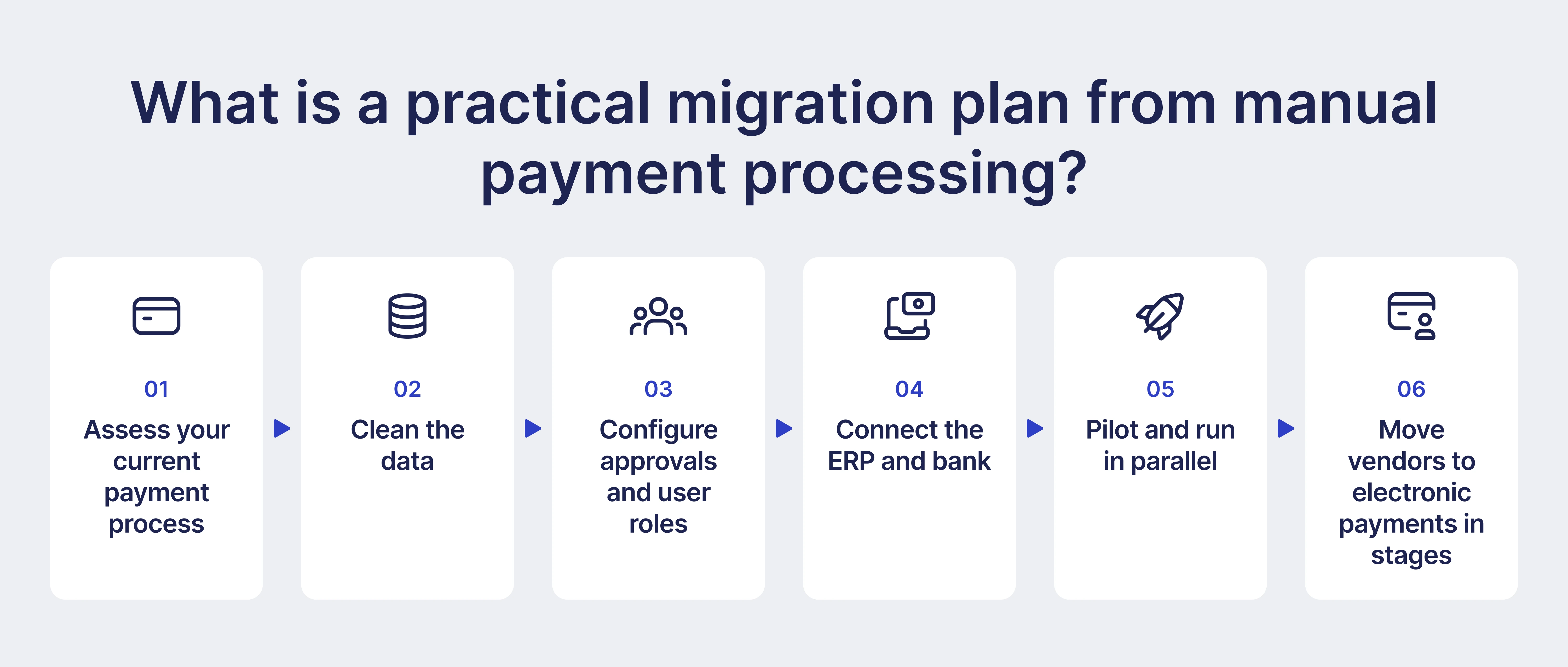
Step 1: Assess your current payment process
Map how payments move today, from invoice approval to bank reconciliation. Count monthly transactions by method and note how many exceptions AP handles. These numbers will be your baseline and show where automation will save the most.
Step 2: Clean the data
Merge duplicate vendors and archive inactive ones before you import anything into the new system. Fill in missing tax IDs while you’re at it. Then verify each vendor’s bank details through a trusted channel, such as a call to a known contact.
Step 3: Configure approvals and user roles
Decide who approves invoices and who releases payments for each entity and amount range. Give those jobs to different people.
Step 4: Connect the ERP and bank
Set up the accounting sync and link the bank accounts you’ll pay from. Send a few small test payments and check that each one posts to the right GL account.
Step 5: Pilot and run in parallel
Pick one entity or vendor group with steady volume and few exceptions. For one payment cycle, run the old and new processes side by side. Fix any gaps you find before the full switch.
Step 6: Move vendors to electronic payments in stages
Start with your highest-volume vendors, since every payment you move off paper saves more there. Use checks for the suppliers who take longer to switch.
How should teams handle data migration and vendor onboarding?
Treat data migration and supplier onboarding as one controlled project. Clean the supplier list before you import it, and re-verify every bank account outside email. Then migrate open items at a set date and invite vendors to keep their own records current through a portal. Bank details carry the most risk. If the old system holds a wrong or fraudulent account, the migration copies it over, and the new system pays it automatically.
Verify bank details before import: Reach out to each supplier through a known contact. Pay extra attention to any vendor whose bank details changed in the last 90 days, because fraudsters often time their requests around a system switch. Record who verified each account and when.
Migrate open items at a set date: Pay or close as many open items as you can in the old system before the rollout date. Migrate the rest, such as unpaid invoices and outstanding POs, with their approval status. Bring over 12–24 months of payment history for duplicate checks, or keep it archived in the old system. Import a small sample batch first and review it in the ERP before the full upload.
Onboard suppliers to the new process: Inform vendors of the switch date and how payments and remittance details will reach them from now on. If a self-service portal is available, provide guidance on how to use it.
What payment automation best practices help prevent implementation delays?
The best practices that prevent implementation delays involve careful preparation, data organization, and early involvement from IT and suppliers. With everything in order, the rollout will go more smoothly.
Keep these practices in mind:
- Finalize the approval matrix first. Set approval rules by amount and department, then add entity-level conditions and backup approvers. Any change during configuration forces your team to retest workflows.
- Start with a limited scope. Launch with one entity and a core group of suppliers, paid by one method, usually ACH. Add other entities and payment options once the initial set runs smoothly.
- Secure ERP and bank access early. Request integration permissions and a sandbox in the first week. Bank verification and account linking take time, so start them alongside the payment limit approvals.
- Test real payment scenarios. Run a non-PO invoice and a bank detail change through the system, along with a partial payment. Also test what happens when an ERP sync fails, or a payment comes back. Send small trial transfers to confirm the bank file format and account mapping.
- Run a parallel payment cycle. Compare transactions and totals between the old and new systems before you switch over.
Implementation speed also depends on the platform. ERP procurement suites often take 6-12 months to deploy, while Precoro customers typically go live in 2-8 weeks.
How do businesses improve payment workflows after implementation?
Improve payment workflows after implementation by reviewing your data every month and acting on its results. Start with analytics: approval times and exceptions reveal the bottlenecks that stall the process. Track a short set of key performance indicators (KPIs), such as cost per payment and on-time payment rate, to measure progress.
How can analytics help detect payment bottlenecks and exceptions?
Payment analytics show where transactions slow down, which approvals cause delays, and what types of errors need repeated manual work. Instead of reviewing each payment individually, AP teams can use dashboards and reports to spot patterns and fix the underlying issues.
Find bottlenecks:
- Cycle time by stage. Measure request-to-approval and invoice-to-payment separately. Start with the longest stage.
- Approval time per approver. See who takes the longest to approve documents. Add reminders or a backup approver, or raise auto-approval limits for low-risk spend.
- Aging of pending items. List invoices that have waited longer than a set number of days, sorted by due date, so payments don't run late.
- Volume per user. Check whether one clerk or approver carries too much of the workload.
Find exceptions:
- Exception rate by cause. Separate price and quantity mismatches from missing receipts and duplicates. Each cause needs its own fix.
- Exceptions by supplier. Repeat offenders may need a catalog update or tighter PO terms.
- Share of non-PO invoices. A high share shows that spend skips approval before the purchase.
- Payment failures and returns. A pattern with one supplier often points to outdated bank details.
- Budget overruns. Compare committed and invoiced spend against budget before the payment goes out.
Precoro's Spend Intelligence Crew works through the AI Assistant, so your team gets answers by simply asking a question. Bottleneck Detection shows where the process stalls. Spend Forecasting estimates upcoming cash outflow, while Risk Insights catches duplicate invoices and other mismatches before they reach payment. In the Supplier Management Crew, Supplier Analysis rates each vendor's delivery timing and price consistency, so you know whether to renegotiate or switch.
Which payment performance KPIs should teams track?
Teams should track KPIs that cover both payment efficiency and cash management. For instance, metrics like cost per payment and the share of electronic payments show the difference in performance between the old and the new system. On-time payment rate and days payable outstanding (DPO) reveal how well your team manages cash and vendor terms.
| KPI | What it measures | Calculation | How it helps |
|---|---|---|---|
| Cost per payment | Cost to issue one payment | (Labor cost + bank fees + other processing costs) ÷ Number of payments | Tracks processing costs and savings from automation. |
| Electronic payment rate | Share of payments made without checks | Electronic payments ÷ Total payments × 100 | Measures adoption of digital payments. |
| Payment cycle time | Time from invoice approval to payment | Average days between approval date and payment date | Identifies delays in automated vendor payment processing. |
| On-time payment rate | Share of invoices paid by the due date | Invoices paid on time ÷ Total invoices paid × 100 | Tracks payment reliability and late payment risk. |
| Early-payment discount capture | Share of available discounts taken | Discounts captured ÷ Discounts available × 100 | Shows whether teams capture available discounts. |
| DPO | Average days the company takes to pay suppliers | (Average accounts payable ÷ Cost of goods sold) × Days in period | Helps monitor working capital. |
| Exception rate | Share of invoices that need manual review | Invoices with exceptions ÷ Total invoices × 100 | Highlights recurring processing issues. |
| Failed payment rate | Share of payments that fail or are returned | Failed or returned payments ÷ Total payments × 100 | Identifies payment errors and bank detail issues. |
| Vendor inquiry volume | Supplier questions AP handles | Number of inquiries per month | Reveals gaps in payment communication. |
How can payment automation extend to treasury and receivables?
Payment automation sends approved invoices and scheduled payments straight into the cash forecast. Open purchase orders feed it too, so treasury teams can see outflows weeks before the money leaves the account. With that view, they can plan bank balances and pick the right day to pay each supplier. They can also buy foreign currency ahead of international payments. Once a transfer goes out, its status and remittance data sync with the ERP, which makes bank reconciliation faster.
Automation works the same way for incoming payments. Businesses send electronic invoices and let customers pay by ACH or card. They can also accept request-for-payment transactions. The system then matches each incoming transfer to its open invoice using the remittance data. For late payers, automated reminders and overdue invoice reports tell accounts receivable (AR) teams who to contact.
