









 Explore Precoro's features



















At most companies, the burden of the intake process falls completely on the requester’s shoulders. Anytime a member of an operations team needs something, they’re expected to make procurement decisions they don’t have the context to make, like which supplier to choose or how to code the purchase.
Your average requester isn’t a procurement expert. They work in departments far off from procurement, often in frontline operations, and have no clear guidelines on purchasing. Asking them to navigate unfamiliar software only hinders adoption: 60% of workers say new software has occasionally frustrated them. A lengthy intake form that requires procurement-specific knowledge only makes the process harder.
Procurement ends up with incomplete, hastily put-together requests they have to fix. Reviewing PRs one by one costs the company hours that could be spent getting the teams the goods they need. There’s a much bigger risk, too: requesters may simply pick the vendor they know, completely bypassing existing contracts.
Precoro's Intake Agent fixes these issues at the first step of intake-to-pay. Requesters describe what they need in plain words. The agent asks a few questions, finds the right supplier and item in line with your company's policy, and fills in the requisition for the employee to confirm.
Where other AI tools guess, the Intake Agent works from your rules. See it in action:
How Precoro's Intake Agent works
The typical intake process requires a long form for the requester to fill in. With Precoro’s Intake Agent, your team needs only one short conversation to submit a requisition that complies with company rules from the get-go.
1. Describe what you need in your own words
Requesters open the Intake Agent right from Precoro's AI Assistant and type their request the moment they need something. A brief description is enough; they can just explain it as they would to a colleague. They don't need to know which form or supplier to choose in advance. The agent understands the context and recognizes what type of purchase they're asking for. It then finds the policy rule that applies and uses it to choose the right requisition form, supplier, and item. If anything is missing, it'll ask to confirm later on in the conversation.
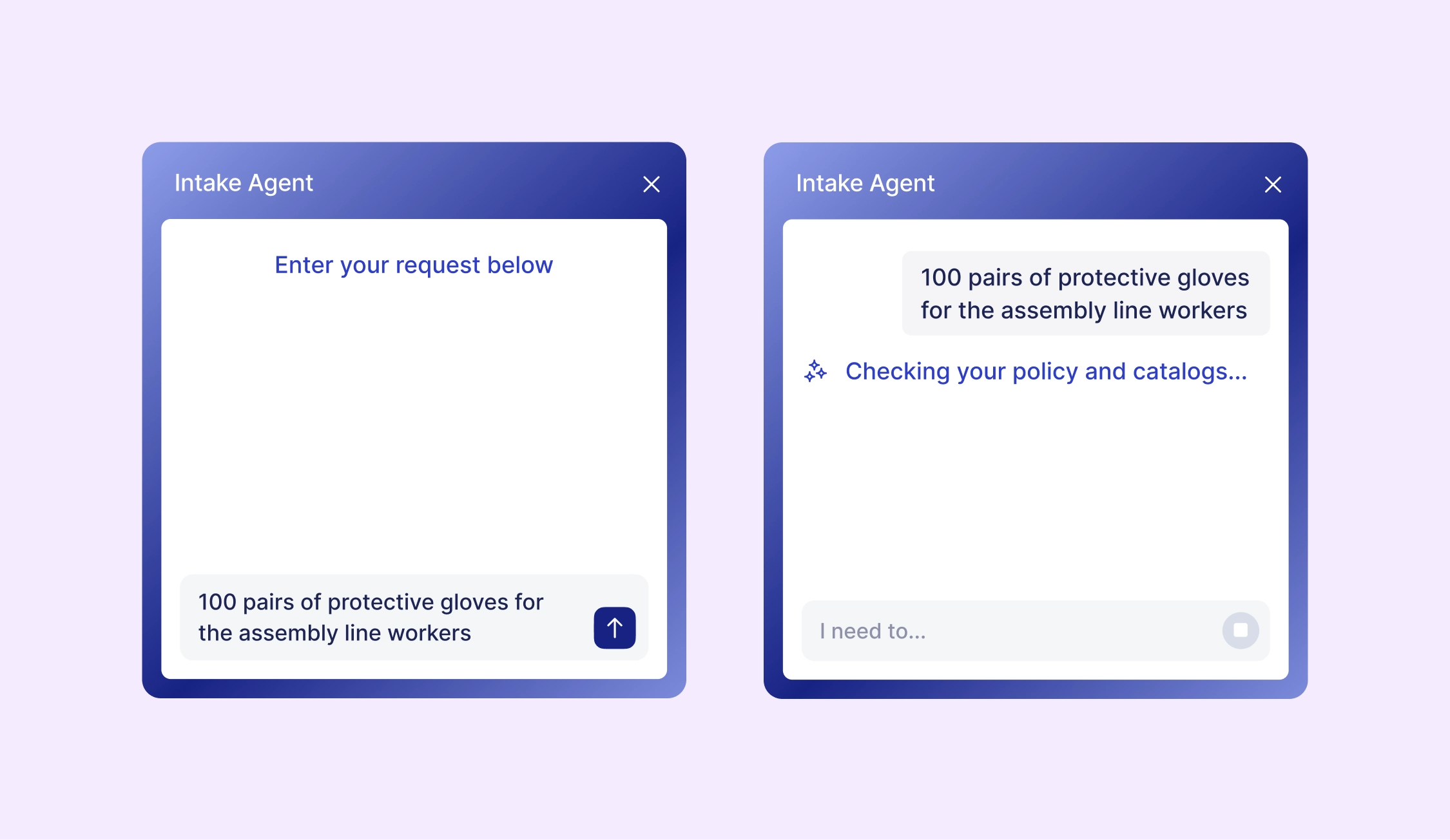
💡 Anyone on the team can submit a request, even if they only use Precoro a few times a year.
2. Answer a few clarifying questions
Missing information is one of the most common reasons why requests are sent back by approvers. The Intake Agent addresses any gaps at the very start. If the description lacks important details, the agent asks a few follow-up questions based on the context it already has. For instance, if the requester didn’t specify the location, it’ll prompt them with a few options to choose from.
Before the agent is live, Precoro classifies your purchasing data and creates a structured foundation for any suggestions made. The Intake Agent has the full context of your Precoro account from day one, including:
- Suppliers
- Catalog items
- Departments, locations, and projects
- Forms
- Legal entities
- Past purchases
The agent uses that data to complete the procurement fields and checks with the requester only when something is unclear. If your policy requires justification for purchases above a set amount, the Intake Agent asks the requester to provide one and adds it to the requisition notes.
3. Get the preferred supplier and item that the Intake Agent selects
The agent searches your catalog, contracted suppliers, and purchase history, then selects the pre-approved vendor and item. If several items or suppliers fit the request, it can show the requester the options, so they can pick the one they need.
Either way, the choice depends on your company’s policy, which specifies what the agent should prioritize for each type of purchase, such as a better price or faster delivery.
The Intake Agent will find products from approved suppliers, even when they aren't in your catalog. If your policy allows it, it searches approved vendors' websites, checks details like size, pack, and price, and adds a direct link. Requester is still in control: if something’s unclear, the agent will ask to confirm the item before adding it to the PR.
Even if the employee doesn’t know about the contract that covers the requested item, the Intake Agent will guide them to the contracted supplier. That way, any negotiated agreements are actively used before procurement gets a chance to review the PR.
💡 The Intake Agent guides the user to the right supplier and item, so the purchase follows your rules by default.
4. Review and confirm the completed requisition
The requester gets a finished requisition to check, not an empty form they have no idea how to fill in. The agent selects the form your policy assigns to the purchase type, adds the supplier and item, and codes the requisition according to the set rules and past documents.
Before the request goes to approval, your team gets a chance to review the completed requisition. The agent explains how it arrived at each detail, from the delivery date to GL accounts, and the requester can correct anything that seems off. Once confirmed, they know exactly what was submitted and where the spend will be allocated.
All that’s left is to hit “Confirm.” The completed requisition is sent for approval under the rules you've already set in Precoro. On the approver's side, the request arrives complete and already routed to the right people.
Your policy sets the rules for the Intake Agent
The agent's choices are only as good as the data behind them. Before launch, Precoro classifies your past requisitions, orders, and catalog items into standard categories. Your policy can then set rules per category, and the agent always knows what type of purchase it's handling.
Intake Agent does the work, but the control is still completely in your hands. Only your team defines how the agent decides, and while doing that, it doesn’t have to compromise governance for speed.
An Intake Agent Policy is the playbook behind every decision the agent makes. It provides instructions on:
- Which contracts and suppliers to prioritize
- When to pick a catalog item automatically and when to ask the requester
- What to do with items that aren't in your catalog
- Which item and form to use
- How to code the requisition
- When to escalate to procurement
- Spend thresholds that require justification
You don't start from a blank page. Our team builds the first policy with you, based on your own requisition history and a ready template, and tests it on real examples before launch.
Requisitions before and after the Intake Agent
Discover the changes you’ll experience once the Intake Agent goes live.
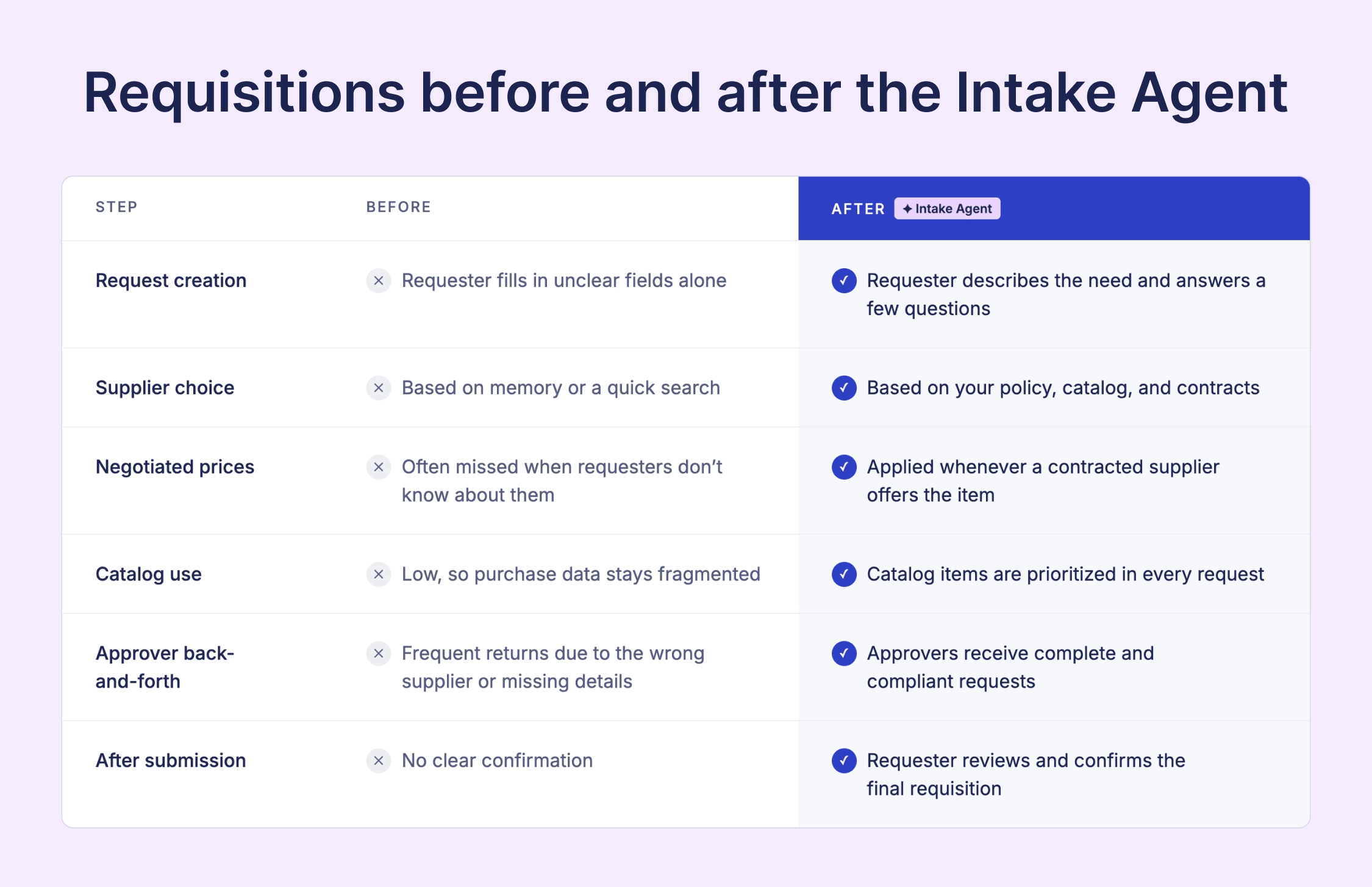
How Precoro’s Intake Agent impacts every role
The Intake Agent improves the first step of the intake-to-pay workflow, setting the stage for everything that follows. Every requisition then passes through several stakeholders, so a better request benefits the entire team down the line. Here’s how key employees benefit from faster, more complete requisitions.
For requesters: Faster purchases and fewer follow-ups
For requesters, the hardest part of buying something is often simply filling in the details. Unfamiliar fields can lead to the wrong supplier, missing information, or a request that comes back from the approver days later.
With the Intake Agent, PRs are sent with full context on the first try, so requesters get what they need sooner. The agent recommends the supplier and item your policy prefers, so there’s no need to pore over the catalog or ask procurement for help. They know exactly what they’re sending for approval and don’t have to deal with follow-ups that delay crucial purchases.
For procurement: More on-contract spend and time for strategy
Procurement teams often learn about off-contract purchases only after the money is spent. A requester picks a familiar vendor, and that deal they negotiated is never put to use.
Precoro’s Intake Agent applies these negotiated terms to every purchase according to your policy. It recommends contracted suppliers and catalog items based on the type of purchase, so the employee doesn’t have an excuse to seek out unapproved vendors. Most of the spend is kept completely on-contract, with maverick buying becoming a rare exception.
Purchase data improves along the way. When more buying happens through the approved system, procurement sees exactly what teams actually buy and has a good starting point for the next supplier negotiation. The agent handles the routine; your team can dedicate that newfound time to selecting suppliers and capturing savings.
For approvers and controllers: Faster sign-offs and accurate books
Approvers often need to spend more time simply confirming the request details, rather than deciding if the purchase is needed. They look for missing fields, message the requester, and wait for answers. Controllers face the same problem later, when spend is coded to the wrong department or project and needs fixing.
Precoro’s Intake Agent ensures that each requisition now arrives complete, so approvers can focus on the decision itself: whether the purchase makes sense and fits the budget. Spend is assigned to the right GL account, department, and project from the start, so controllers don’t have to correct it after the money is committed.
For CFOs: Stronger margins without adding headcount
Although minor everyday purchases don’t reach the CFO’s desk, they can quietly chip away at the company’s margins if contracts aren’t followed. The savings CFOs expected to see are never realized in actual spend.
Precoro helps contract savings reach the P&L. The Intake Agent directs routine purchases to contracted suppliers and negotiated prices, so teams are less likely to buy the same goods at higher off-contract prices. Requisitions also arrive coded to the right department and project before approval, giving you a clearer view of budget consumption.
The company can also handle more purchase requests without adding procurement headcount. The agent takes over the repetitive work on each request, and approvals still follow the rules you've set in Precoro. Faster buying comes with the same level of control.
AI Crews across your entire purchasing cycle
Precoro is an agentic procurement and AP centralization platform that brings every step from request to payment into one workflow. More than 1,000 businesses use Precoro to control maverick spend and standardize purchasing data across teams and entities.
AI is the next step in that evolution. Your best employees are valuable because they know how the company works, and AI Crews are built on the same idea. They act on your own data and policies, so every action reflects how your company actually buys. AI agents and document processing take on the repetitive work across intake-to-pay, and the AI Assistant gives you insights on risks and bottlenecks in your spend.
💡 Your team owns the policies and the decisions. AI Crews take over the routine in between.
See how AI Crews put your company’s knowledge to work at every step of purchasing.
Check the open roadmap to see what we’re building next and submit your own ideas to shape the product from within.