









 Explore Precoro's features




















Pricing is rarely absolute. Whether it’s in an RFP or on a luxury item’s sticker tag, prices are based more on consumer psychology than hard costs. Sure, it reflects some production or labor costs, but more importantly, it’s rooted in perception. That $5,000 handbag? It’s not priced on materials alone—it reflects what the brand believes you feel it’s worth.
That’s why prices can often be negotiated down, especially when paired with a should-cost model. Read on for more insights about pricing, the benefits of the should-cost model, tips on how to build one, and what software can automate the process.
What is the should-cost model?
A should-cost model (SCM), also known as clean-sheet costing or cost breakdown analysis, is a tool used to estimate a fair price for a product or service. The should-cost model analyzes all associated costs—such as raw materials, labor, overhead, logistics, and profit margins—and builds up the ideal cost from scratch. Essentially, the should-cost model is used to verify whether supplier quotes are reasonable.
And the stakes are high, 74% of users churned over a perceived gap between price and value, which makes it clear—how something is valued matters more than what it costs.
How to build a should-cost model
Don’t dive in blind. Define your objectives, consider real-world constraints, plan your analysis ahead of time, and swing into a detailed step-by-step guide on how to build the should-cost model. Follow the steps below and explore the difference between a spreadsheet and a strategic asset:
1. Define objectives and scope.
What is the goal?
Is it for supplier negotiation, make-or-buy decisions, design-to-cost initiatives, or internal cost optimization? The objective will influence the level of detail and complexity required.
What will be modeled?
Clearly define the product, component, or service you want to analyze. Be as specific as possible (e.g., "aluminum bracket for XYZ machine," "marketing campaign for Q3 product launch").
What is the scope?
Identify the level of detail needed and the timeframe for the should-cost analysis. A simple spreadsheet might suffice for low-value, stable items and tail spend, while complex products might require specialized should-cost model software and in-depth analysis.
2. Gather data.
Lean into procurement intelligence. Collect internal data from ERP, BOMs, invoices, and spend records, then enrich with market benchmarks, supplier info, labor rates, and manufacturing documentation.
Sources:
- Industry reports (e.g., IHS Markit, Bloomberg).
- Supplier interviews or RFQs (Request for Quotations).
- Internal data from similar projects.
- Public databases or trade publications.
3. Analyze cost drivers.
Break the product or service down into all its cost drivers, which usually fall into the following categories:
- Material costs: Raw materials, packaging, waste factors.
- Labor costs: Assembly, direct/indirect labor hours × rates. Use regional wage rates that factor in benefits, overtime, and the production location.
- Overhead: Utilities, rent, admin, and equipment depreciation.
- Manufacturing process: Machining, forming, casting, molding, QA, etc. Calculate costs based on machine rates, energy consumption, and maintenance.
- Logistics: Estimate shipping, packaging, and handling costs. Also, consider import/export duties or tariffs if applicable.
- Margins & markups: Include reasonable profit margins for suppliers (typically 5-20%, depending on industry and complexity).
- Tooling & NRE: Initial setup and non-recurring engineering.
- Other costs: Compliance, certifications, and software licenses.
4. Build the framework.
Use a spreadsheet (e.g., Excel, Google Sheets) or specialized should-cost model software (e.g., aPriori, Costimator) to map relationships between cost drivers and costs. Develop formulas to calculate the cost of each element based on the gathered data and identified cost drivers.
5. Validate and test the model.
Take a look at how the model stacks up against historical trends or benchmarks. If something feels off, tweak the numbers with sensitivity and risk analysis to make sure the outcome still makes logical sense.
How to calculate should-cost
A should-cost model estimates the expected cost to produce a product by summing all relevant cost components. The formula is:
Should-Cost = Material Cost + Labor Cost + Manufacturing Overhead + Other Costs
Note!
The more details you can include in your should-cost calculation, the better you can see whether the prices you’re paying for certain supplies are in line with the amounts you should be paying. After all, it’s the core principle behind what should-cost modeling is: using facts, not assumptions, to determine value.
Once you've calculated the should-cost, add a reasonable profit margin to determine the target selling price.
Then, use this target price to assess whether the supplier’s quote exceeds your estimated cost plus profit.
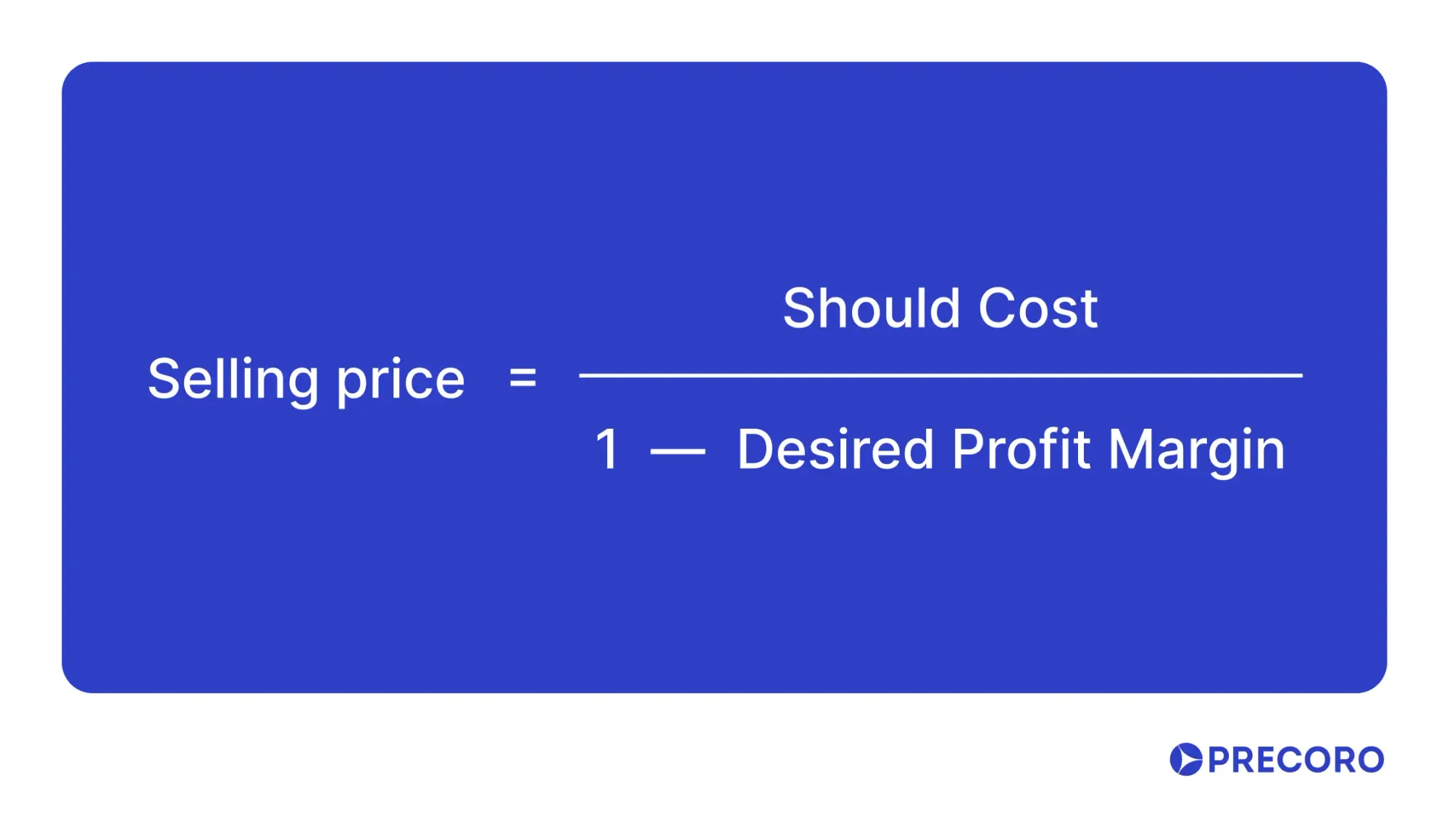
This way, you can assess whether the price you pay exceeds your estimated should-cost plus reasonable profit.
For example, a customer of a manufacturing company wants to estimate the should-cost of producing one custom metal part.
- Direct Materials: Steel and other raw materials cost $25 per part.
- Direct Labor: Machining and assembly take 1.2 hours per part at a labor rate of $25/hour →Labor cost = 1.2 × 25 = $30
- Manufacturing Overhead: Overhead costs, including machine depreciation, electricity, and quality inspection, are allocated per part: $12
Calculation:
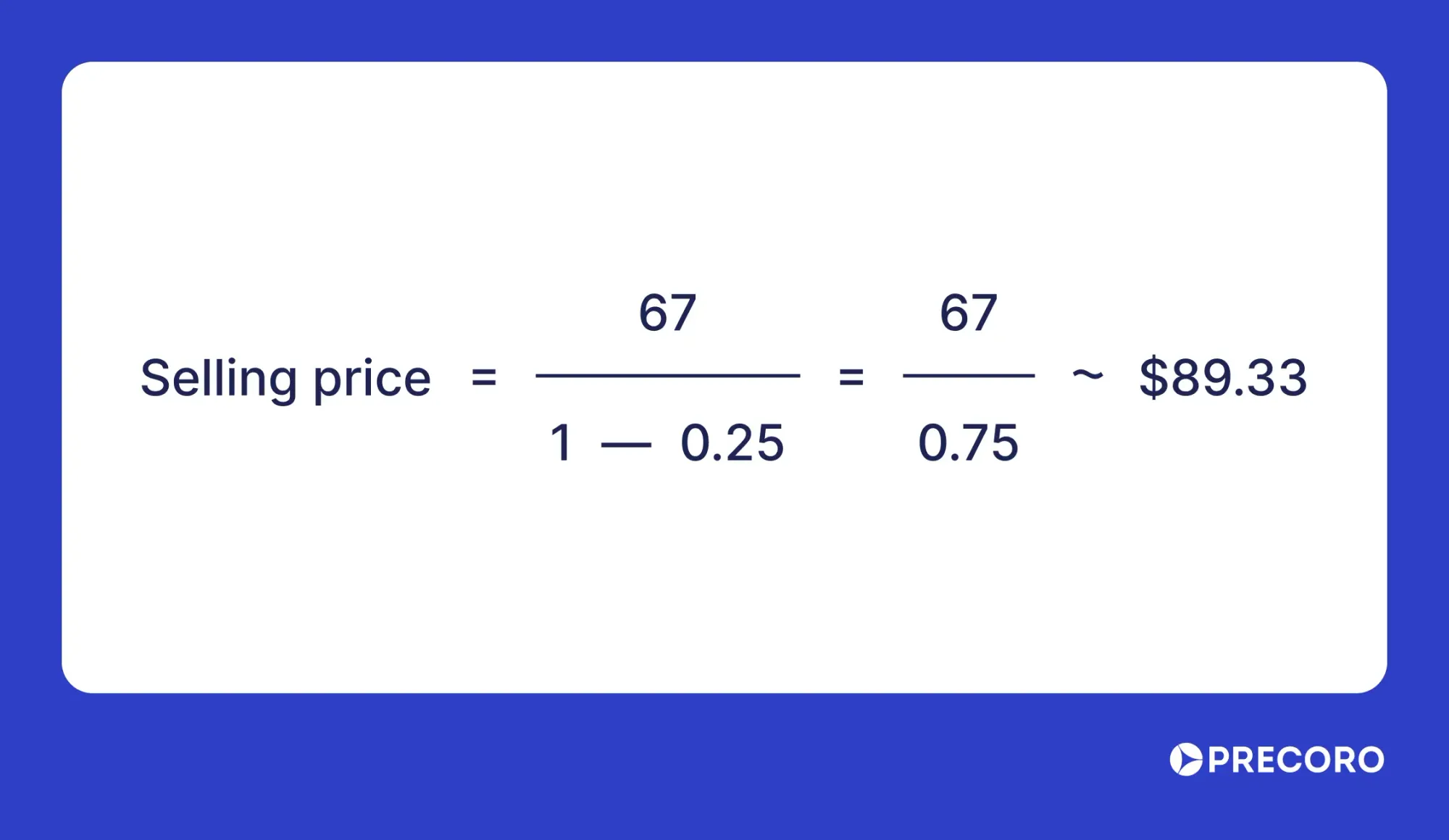
25+30+12=$67
Interpretation:
- The should-cost to manufacture one custom metal part is $67.
- If the current supplier price is above $67, there may be room for negotiation or alternative sourcing.
- To achieve a 25% profit margin, the selling price should be:
Example of a should-cost model for a jeans manufacturer
Think of a should-cost model as a construction plan—you start with the foundation of cost drivers (cost categories), frame the manufacturing process (descriptions and quantities), and finalize the project with the total should cost.
Anyone can develop a should-cost model if they understand two things:
- What raw materials are used to make the product?
- The steps involved in producing and delivering it.
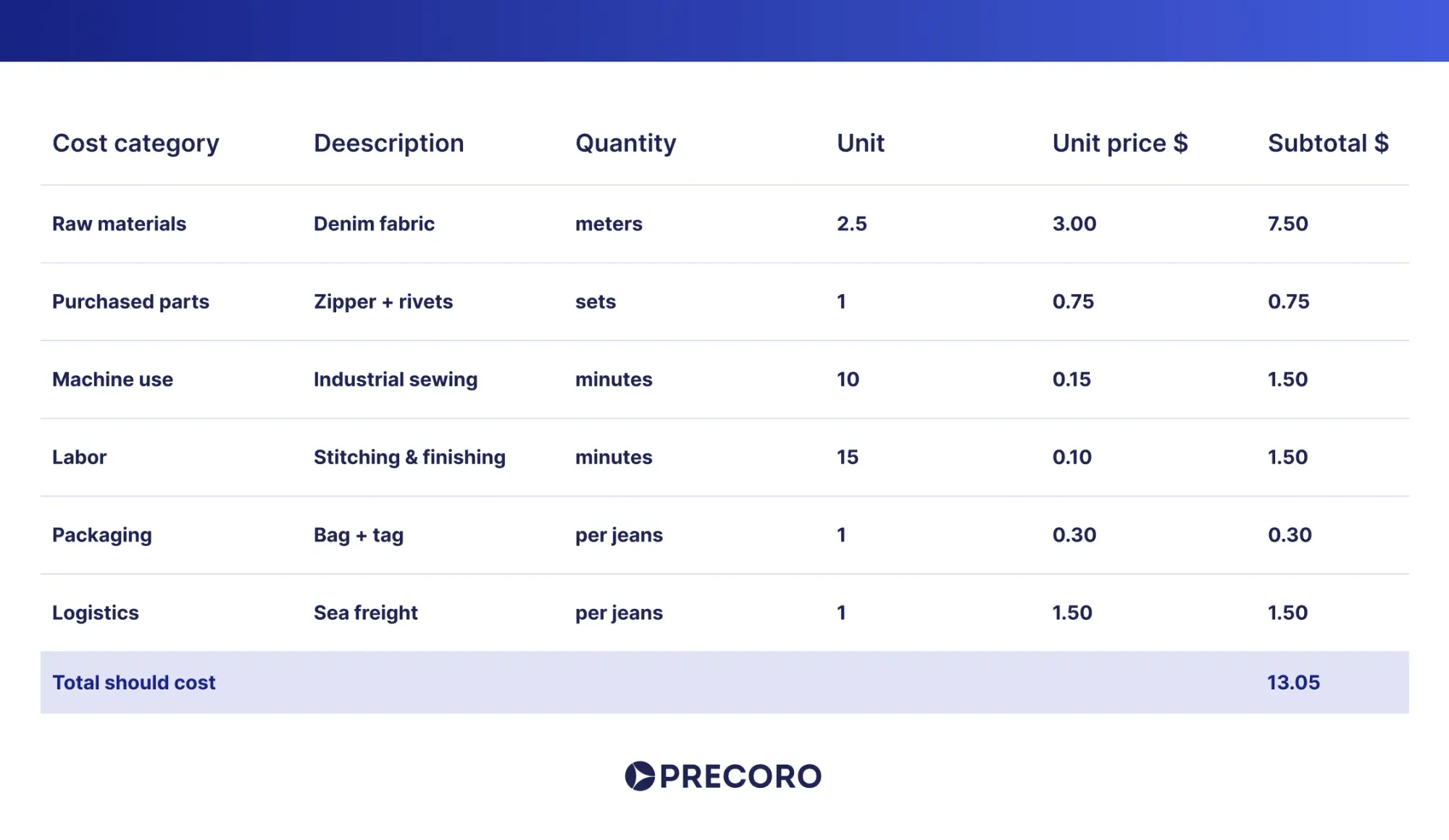
Context and industry benchmarks:
- Raw materials: Denim fabric cost is a major component, with 2.5 meters of fabric priced at $3.00 per meter, totaling $7.50.
- Purchased parts: Zipper and rivets are included for $0.75 per set.
- Machine use & labor: Machine use for industrial sewing is calculated at 10 minutes with a unit price of $0.15 per minute, amounting to $1.50. Labor for stitching and finishing is 15 minutes at $0.10 per minute, totaling $1.50.
- Packaging and logistics: Packaging (bag and tag) is $0.30 per unit, and sea freight logistics cost $1.50 per unit.
- Total should cost: The sum of these costs results in a total estimated manufacturing cost of $13.05 before adding overheads, finishing, or profit margin.
Additional cost factors common in jeans manufacturing:
- Utilities & overheads: Energy, water, factory overhead, and administrative costs are sometimes embedded in machine use or labor rates but could be itemized separately if needed.
- Profit margin: In a should-cost model, profit margin is typically excluded or added at the negotiation stages. Your example reflects the base cost before margin.
- Washing & finishing: Some jeans require additional washing or finishing treatments that add to the cost. They aren’t shown in this basic model, but are relevant for premium products.
To develop the should-costing methodology for jeans, add up several basic components. They include raw materials, such as denim and thread, plus bought parts like buttons and rivets. Also, add the cost of machine time at the supplier’s facility, the labor for all assembly steps, and the expenses for packaging and logistics.
Even though this sounds simple, it’s actually a clear example of what should-cost modeling is in practice: breaking down every element that contributes to the final cost. The same approach is used for far more complex products, like car parts or molded plastic items.
The role of should-cost modelling in procurement
Should-cost modelling is a powerful procurement tool that helps buyers understand the total cost of a product or service, including direct and indirect costs. This approach enables fair and transparent price negotiations. The benefits of the should-cost model procurement also include the ability to benchmark prices against the market, evaluate the total cost of ownership over a product’s lifecycle, and make value-driven decisions.
A disciplined and thorough approach is essential for effective should-cost modelling. Below are key strategies to maximize its impact:
1. Prioritize accurate data collection
The reliability of any should-costing methodology depends on the accuracy of its input data. Invest time and effort in verifying data sources and documenting assumptions clearly. Inaccurate or unsupported data can mislead decisions and undermine negotiations.
2. Break down costs into detailed components
Avoid lumping costs into broad categories in your should-cost model procurement process. Instead, separate direct materials, labor, overhead, and profit margins. This granularity reveals specific cost drivers and highlights precise areas for cost optimization.
3. Foster collaborative supplier engagement
View suppliers as strategic partners rather than adversaries. Open dialogue about cost structures can uncover improvement opportunities. However, maintain confidentiality agreements to protect sensitive information and ensure fairness.
4. Apply value engineering principles
Use value engineering alongside the should-cost model procurement to challenge current designs and materials. Seek cost-saving alternatives that maintain or improve functionality and quality to reduce costs without sacrificing performance.
5. Use technology for efficiency
Try specialized should-cost modeling tools to automate cost data analysis, build models, and simulate scenarios. That way, you can boost productivity, reduce errors, and allow procurement teams to focus on strategic initiatives.
6. Regularly update the model
The should-cost model procurement landscape evolves continuously due to market shifts, technology changes, and supplier dynamics. Regular reviews and updates ensure the cost model remains relevant and reliable.
7. Focus on actionable outcomes
The goal of the should-cost model procurement is to convert insights into concrete actions—whether redesigning products, improving processes, or negotiating better deals. Don’t get lost in data details; rule yourself with a clear implementation plan.
Benefits and drawbacks of using a should-cost model
Before building one, take a moment to review both the benefits and limitations of a should-cost model.
Top benefits of SCM:
- Improves supplier negotiation.
- Ensures suppliers earn realistic profits.
- Provides clear insight into costs to estimate potential savings.
- Helps manage market volatility and price changes.
- Strengthens supplier relationships.
- Supports supply chain management.
- Drives innovation.
- Optimizes costs.
- Aids in forecasting budgets, expenses, and revenue.
Top disadvantages of SCM:
- Creating a should-cost model can be complex and may need expert knowledge, especially for custom products.
- This model isn’t suitable for all products; it works best for unique, one-of-a-kind items.
- Should-cost estimates are not always fully accurate.
- The concept can be difficult for some stakeholders to understand.
- Bureaucratic hurdles and regional regulations can complicate the modeling process.
Popular should-cost modeling software
These platforms range from straightforward spreadsheet-based should-cost modeling tools to advanced AI-driven and simulation-based solutions. Different systems cater to varied industry needs and complexity levels in should-cost modeling. Selection depends on the scale, sophistication, integration needs, and domain-specific requirements of the user or organization.

- GEP NEXXE
This should-cost model software creates detailed, customizable cost models and tracks market trends in real time. With AI-driven should-cost analysis and sourcing integration, it improves cost visibility and helps achieve considerable savings. - Microsoft Excel (with Add-ins like Crystal Ball and @RISK)
Thanks to its formulas and flexibility, Excel is a common choice for cost modeling. Add-ons such as Crystal Ball and @RISK bring in advanced features like simulations and risk modeling. They're great for finance, engineering, and project work—but they can be expensive. - Galorath SEER and SEERai
This platform focuses on parametric cost modeling and AI integration to deliver structured, explainable, and defendable cost estimates. It helps engineering, sourcing, and finance teams benchmark supplier quotes, uncover savings, and improve planning across complex projects. It’s a strong example of effective should-cost model software. - aPriori
This platform applies digital twins to simulate manufacturing and provide actionable insights on costs, sustainability, and manufacturability. It automates should-cost analysis within design workflows, enabling faster decisions, cost reductions, and better collaboration between manufacturers and suppliers.
Note!
With should-cost modeling software, businesses can break down and predict actual costs. These systems help them design better products, source more efficiently, and save money through informed decisions. Yet even the most tailored should-cost modeling tools can mislead if you don’t ensure accurate and reliable data, manage data complexity, secure buy-in from internal stakeholders, and maintain the cost model over time.
Wrapping up
Should-cost modeling isn’t some kind of magic fix that immediately solves all procurement problems or guarantees big savings by itself. It’s really just a systematic way to figure out what a product or service should cost, based on real numbers from factors like materials, labor, overhead, and market conditions. That’s exactly what reflects the idea of what should-cost modeling is. When done right, it helps avoid overpaying and negotiate smarter deals—but it does take accurate data, experience, and sometimes a fair bit of work.
That said, the future looks good for strategic cost management because it’s getting more sophisticated with better analytical tools. As supply chains become more complex, knowing how to nail down a fair price and master the complex should-costing methodology will be crucial. Companies that get on board with these approaches will boost their profits and stay competitive in a fast-changing market. Should-cost modeling is just one tool in the procurement toolbox, but when used properly, it can make a real difference.