









 Explore Precoro's features



















As mid-market companies grow, spend gaps add up quickly: unapproved purchases, scattered data, missed savings, and work left behind when employees leave.
Precoro’s October updates close all these gaps across the purchasing lifecycle. The Consolidated P2P Report provides visibility from request to payment, Precoro Cards help control spending before funds are used, the Intake Agent turns a short description into a complete PR, contract tracking captures negotiated savings, and user hand-off reassigns a departing employee’s work in one step.
Read on to discover what’s new in Precoro this October and how these improvements can help your team manage spend with greater confidence:
Full control over spend, from the first request to the final report
This October, Precoro helps close the gaps between purchasing, payments, and reporting, so finance can track every dollar, procurement can prove its value, and teams can stay productive through role changes.
| Update | What’s new | Business impact |
|---|---|---|
| Consolidated P2P Report | Export the full purchase lifecycle, from PR to payment, in one report. | Instant answers to “Where is this purchase?” and “What did we actually pay?” with no manual reconciliation. |
| Precoro Cards (US clients only) | Issue virtual cards with spend limits and match every transaction to an invoice or expense record. | Spend controlled before it happens and fewer out-of-pocket reimbursements. |
| Intake Agent | Describe a purchase in plain words and get a complete PR built from your contracts, catalogs, and past purchases. | Compliant requests from employees who aren’t procurement experts, with less rework. |
| PR creation | Create PRs in one step, reorder fields on the default form, and autofill custom fields with repeated choices. | Faster, more complete requests and fewer corrections. |
| Contract savings | Automatically calculate negotiated savings against the supplier’s initial offer. | Documented proof of negotiation value, with no manual calculations. |
| Deactivated user hand-off | Assign who takes over each part of a deactivated user’s work, including default creator duties. | No orphaned documents or stuck approvals when people leave. |
| Role removal delegation | Delegate items and approval steps when a Create or Approve role is removed. | Processes keep running through restructuring. |
| AP Inbox | Automatically create suppliers and accept .XLSX, .DOCX, and .MSG files. | Fewer AP bottlenecks and faster invoice processing. |
| Stock levels and receipts | See stock details when ordering low-stock items, and add receipts faster for one PO or several at once. | No duplicate orders and faster three-way matching. |
| Supplier follow-up | Get PO confirmations by email, Slack, or Microsoft Teams, track Amazon Business orders on the PO, and resend RFP reminders to one supplier. | Faster supplier responses with less chasing. |
| PunchOut and PO updates | Keep PunchOut shipping addresses consistent, auto-cancel PunchOut PRs with their POs, and print PO revision numbers. | Fewer shipping and order errors and a clean pipeline of open orders. |
Now, let’s take a closer look at each update.
Track every purchase, from request to payment, in one report
Finance teams no longer have to piece together separate PR, PO, receipt, invoice, and payment reports to understand what happened to a purchase. The new Consolidated Procure-to-Pay (P2P) Report brings the full cycle into one export: PR, PO, receipt, invoice, credit note, and payment.
- One row per item, end to end. Each item gets a single row that combines its data from all stages available to the report creator, so you can follow it from request to payment without switching reports.
- Grouped by purchase, sorted by activity. Items from the same purchase stay together, and purchases with the most recent activity come first. Stalled purchases stand out immediately.
- Built around your process. Choose which fields to include and in what order, so the report matches how your team actually works.
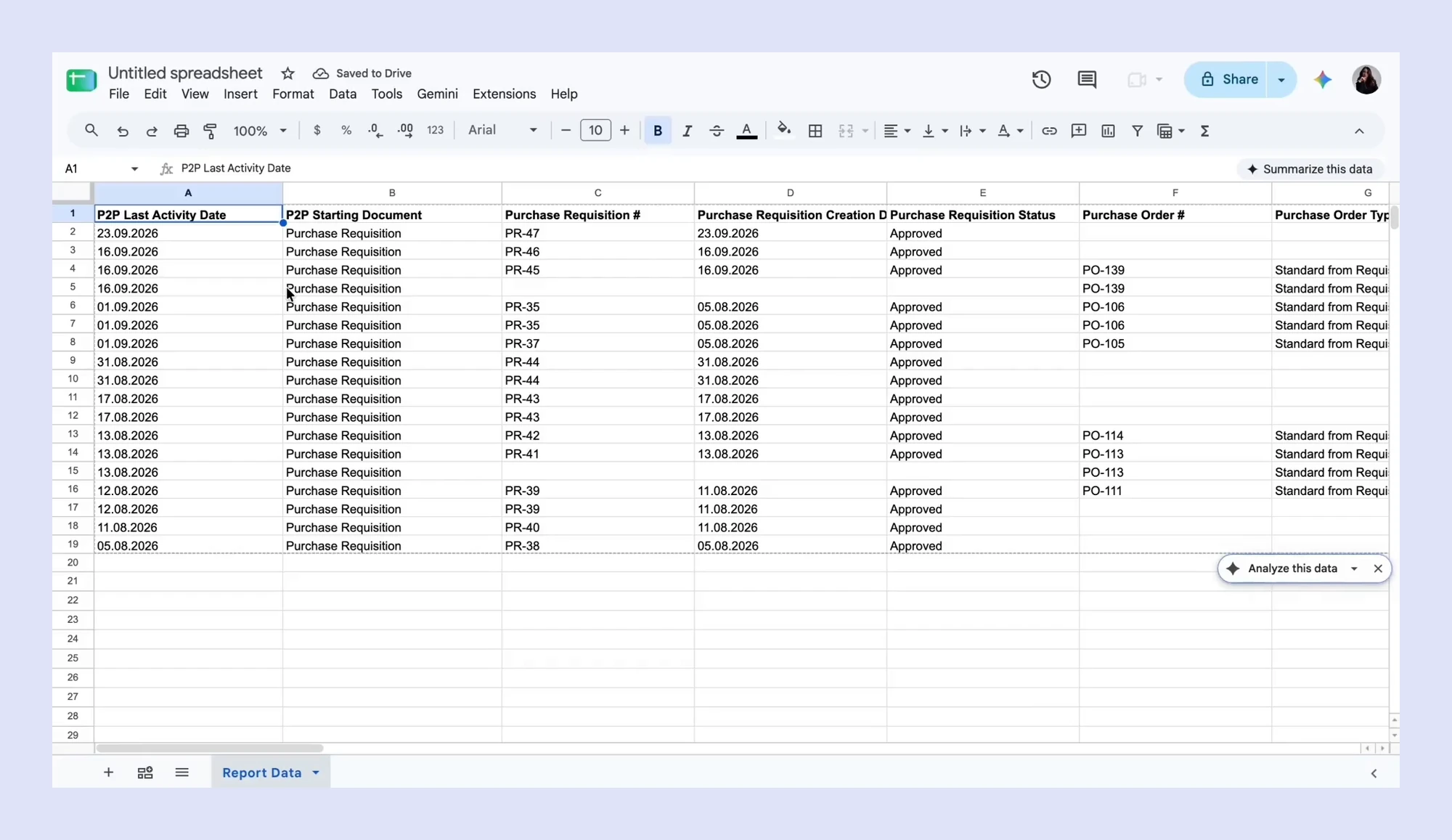
Here’s how it plays out. A department head asks why a supplier still hasn’t been paid. Instead of opening four documents, you find the purchase in the report and see exactly where it stopped: received but not yet invoiced, or invoiced but not yet paid. Auditors get the same view in reverse, tracing any payment back to the request that started it.
Learn how to create and customize the report in How to Create a Consolidated P2P Report.
💡Month-end close and audits no longer depend on manual reconciliation. Stalled purchases surface before suppliers start chasing you, and every payment has a complete paper trail.
Pay instantly with pre-approved virtual cards
Everyday team purchases often end up paid out of pocket and reimbursed later, which leaves finance with little control before the money is spent. With Precoro Cards, your team gets a fast way to pay while Finance keeps full control.
Here’s how it works:
- Issue virtual cards instantly, with no issuance or per-transaction fees.
- Set precise spend limits per transaction, month, year, or for all time, and combine several limits on one card.
- Pay on any website, or add cards to Apple Pay and Google Pay.
- Match every card transaction to an invoice or expense record in a few clicks.
For example, you can give a marketing manager a card with a monthly limit for ad tools and a cap on each transaction. Every purchase stays within the budget you approved, without a separate request each time.
Precoro Cards are currently available only for US clients. Learn more about prepaid virtual cards in Precoro or see how to get started in How to Use Virtual Cards in Precoro.
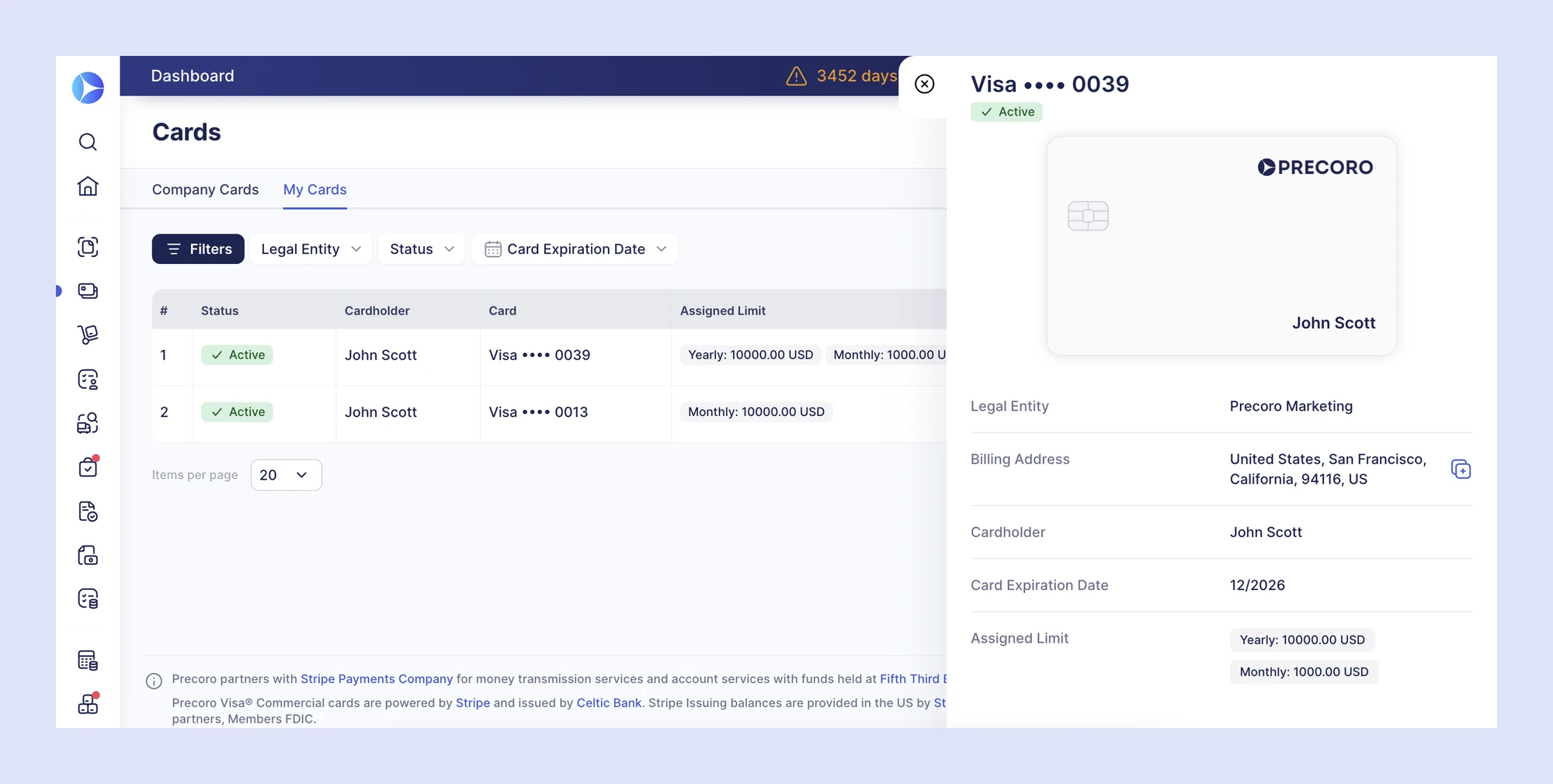
💡Teams pay instantly without waiting for reimbursement, while Finance controls spend before it happens and every card transaction is tied to a related record.
Make requesting easier for every employee
Most requesters aren’t procurement experts, and every extra step is a reason to skip the process. This October, there are two faster ways to request: describe the purchase to the new Intake Agent, or fill in a PR that now takes fewer clicks.
Describe what you need, and let the Intake Agent build the PR
The Intake Agent turns a short description into a complete PR. It draws on your contracted suppliers, catalogs, and past purchases in Precoro, so requests start from negotiated terms and company policy, even when the requester has never placed an order before.
Admins define how the agent makes decisions, and requesters review and confirm every PR before submitting it.
💡Requests match your contracts and policies from the start, so fewer of them come back for rework.
Prefer to fill in a PR yourself? It now takes fewer steps
Three updates remove extra steps for requesters who create PRs manually:
- One page instead of two. PR creation now fits on a single page: requesters add details, items, and attachments, check the total and approval flow, then save or confirm.
- A default form in the right order. Admins can reorder fields on the default PR form. Companies with the Intake Forms add-on can also manage all PR forms in one place, set any form as the default, and edit every form, including the default one.
- Repeat choices filled in. When a requester picks the same value in a custom field on three PRs in a row, Precoro pre-fills it on their next ones. Requesters can still change it, and supplier default values always take priority.
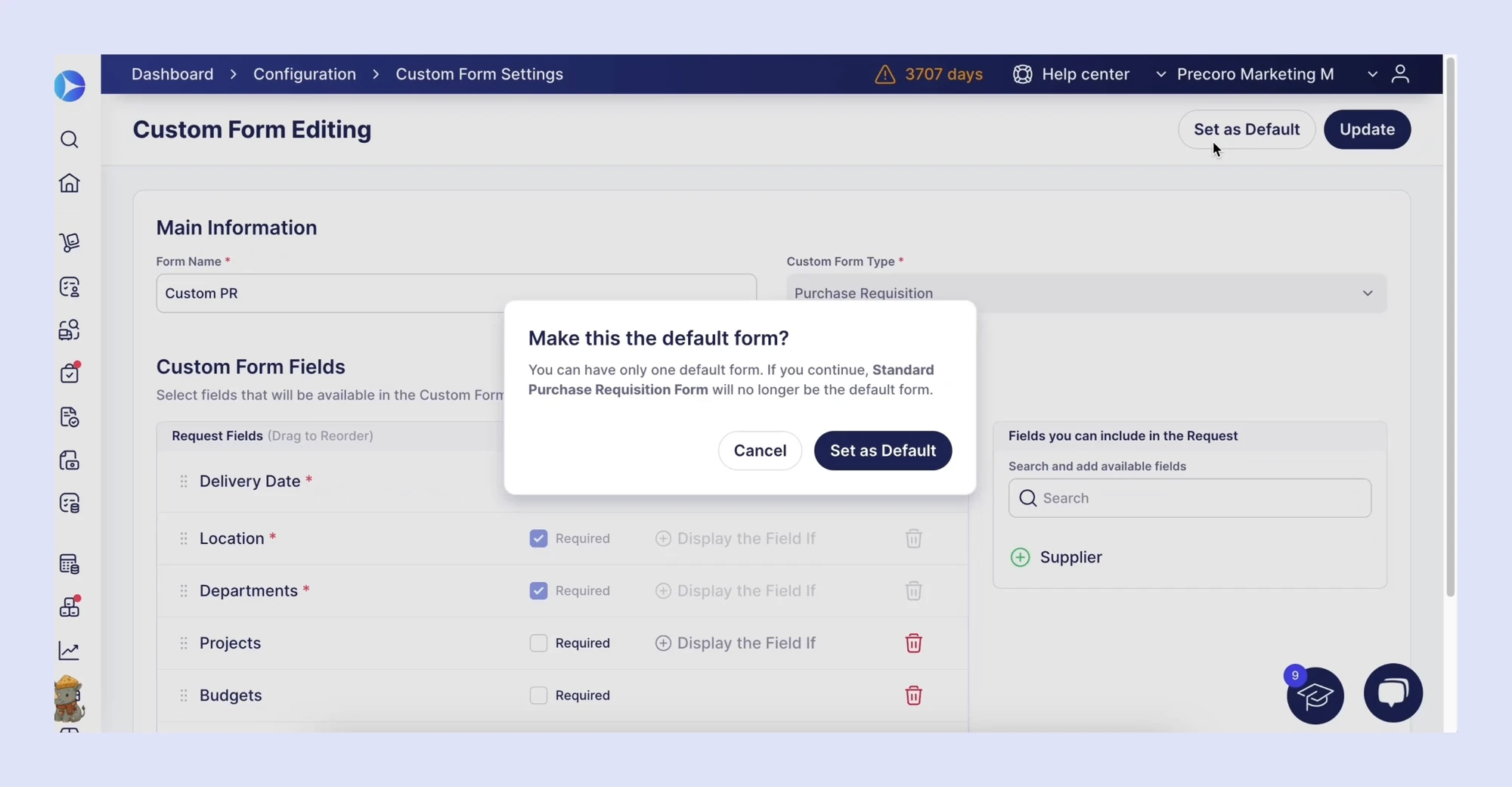
💡Whichever way employees request, it takes less effort, which keeps more purchases inside your approval flow.
See exactly what each contract negotiation saved
Procurement teams work hard to negotiate better contract terms, but the results rarely make it into a report. Without a record of the supplier’s first offer, there’s no easy way to show what a negotiation was worth. In August, we added savings tracking to POs, and in September, we brought savings to the dashboard. Now, Precoro tracks negotiated savings on every contract, too.
When creating a contract, teams enter the final negotiated price in the Gross Contract Amount field, as before. Then they enter the supplier’s initial offer in the new Supplier Baseline Amount field. Precoro calculates negotiated savings automatically as the difference between the two.
The baseline amount is also available in the Contract Revision History report and in custom contract reports. That way, savings data is ready when it’s time to renew a contract or defend the procurement budget.
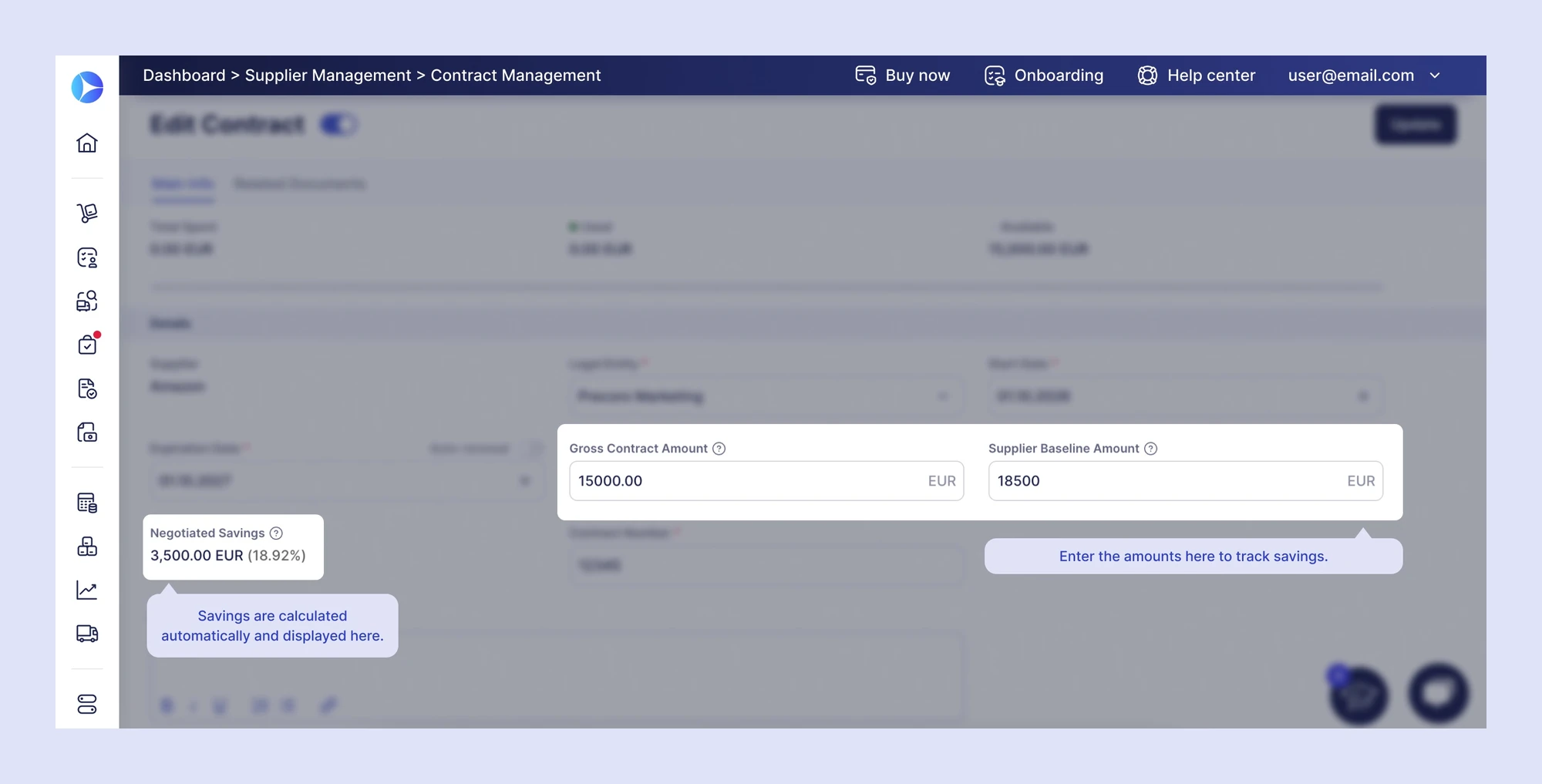
💡Every negotiation comes with documented proof of what it saved, with no spreadsheets or manual calculations.
Explore how Precoro supports contract management from negotiation to renewal.
Keep work moving when people leave or change roles
People leave, teams restructure, and responsibilities shift. When that happens, approvals can stall for days, and documents can sit without an owner until someone notices.
In September, we made it possible to replace an approver in an approval flow. October goes further: admins can now hand off all of a user’s work at once, whether that user leaves the company or moves to a new role.
Hand off a departing user’s work during offboarding
When you deactivate a user, Precoro now asks who takes over each part of their work, so documents, settings, and approval flows don’t end up without an owner. In the deactivation dialog, admins can:
- Assign a substitute for each document module, so different colleagues can take over POs, invoices, or other documents.
- Permanently transfer ownership of reports, budgets, contracts, suppliers, supplier questionnaires, and AP Inbox documents.
- Replace the user on every approval step they were part of, across all approval workflows.
Only users with the right roles, module access, locations, and custom document fields appear as options, so hand-offs never create new compliance gaps.
Offboarding often happens under time pressure, and a single forgotten approval step can hold up orders for days. With everything reassigned in one dialog, nothing is left for someone to discover after the person is gone.
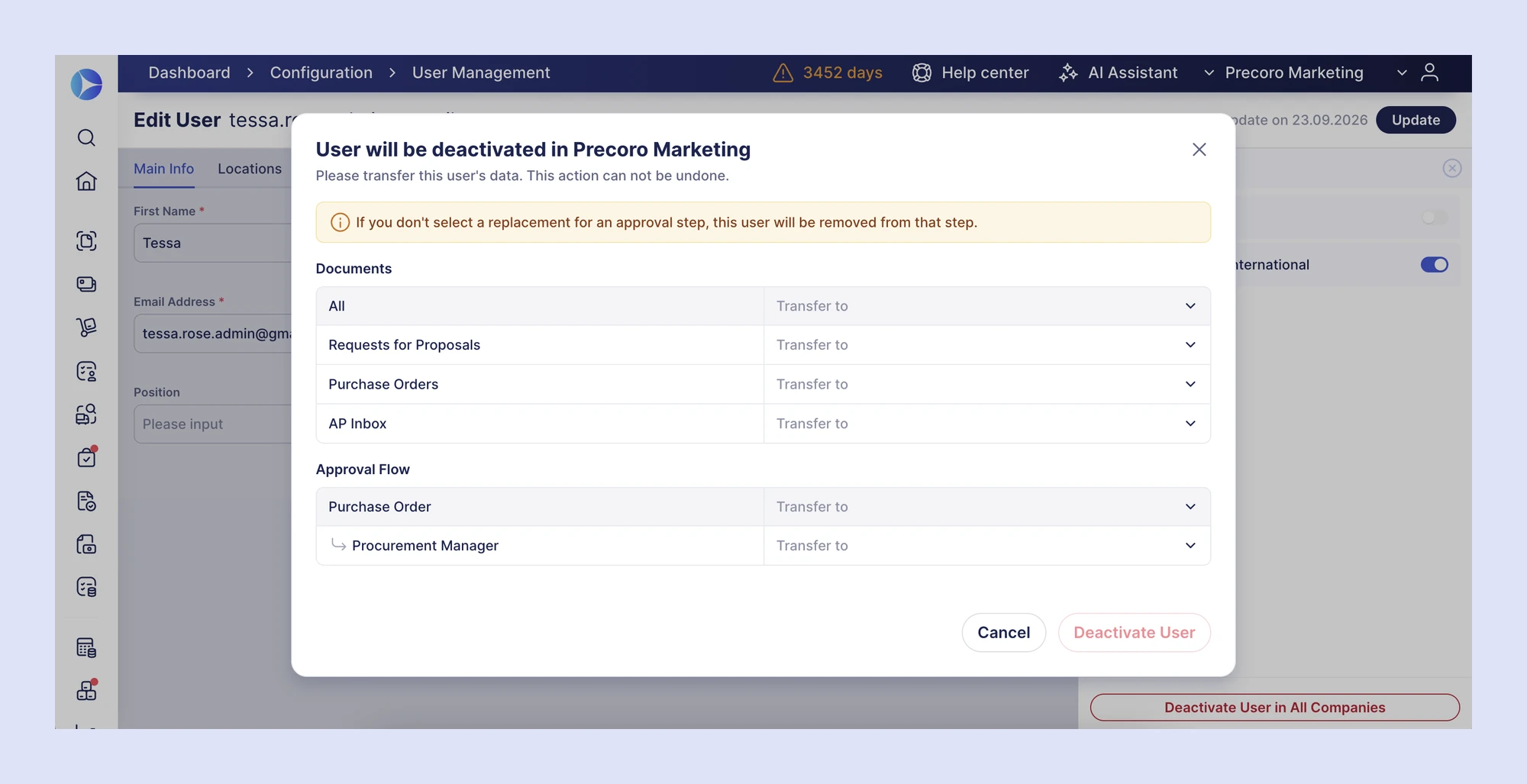
💡Offboarding no longer leaves orphaned documents or stuck approvals behind, and your access controls stay intact during the hand-off.
Delegate responsibilities when a role is removed
The same applies when you remove a Create or Approve role. Precoro now shows a dialog where admins:
- Choose a delegate for each item the role covers, such as documents, suppliers, custom reports, and budgets.
- Choose a replacement for each approval step.
Promotions, team moves, and restructuring change responsibilities far more often than people leave. Handling those changes with the same care as offboarding keeps every responsibility covered as your organization grows.
💡Restructuring no longer leaves approvals stuck or documents orphaned, and no responsibility is dropped without an admin’s decision.
Keep invoices moving, whoever sent them
AP automation only saves time if invoices don’t get stuck waiting for someone to fix the setup. A common blocker is an invoice from a supplier that hasn’t been added to Precoro yet.
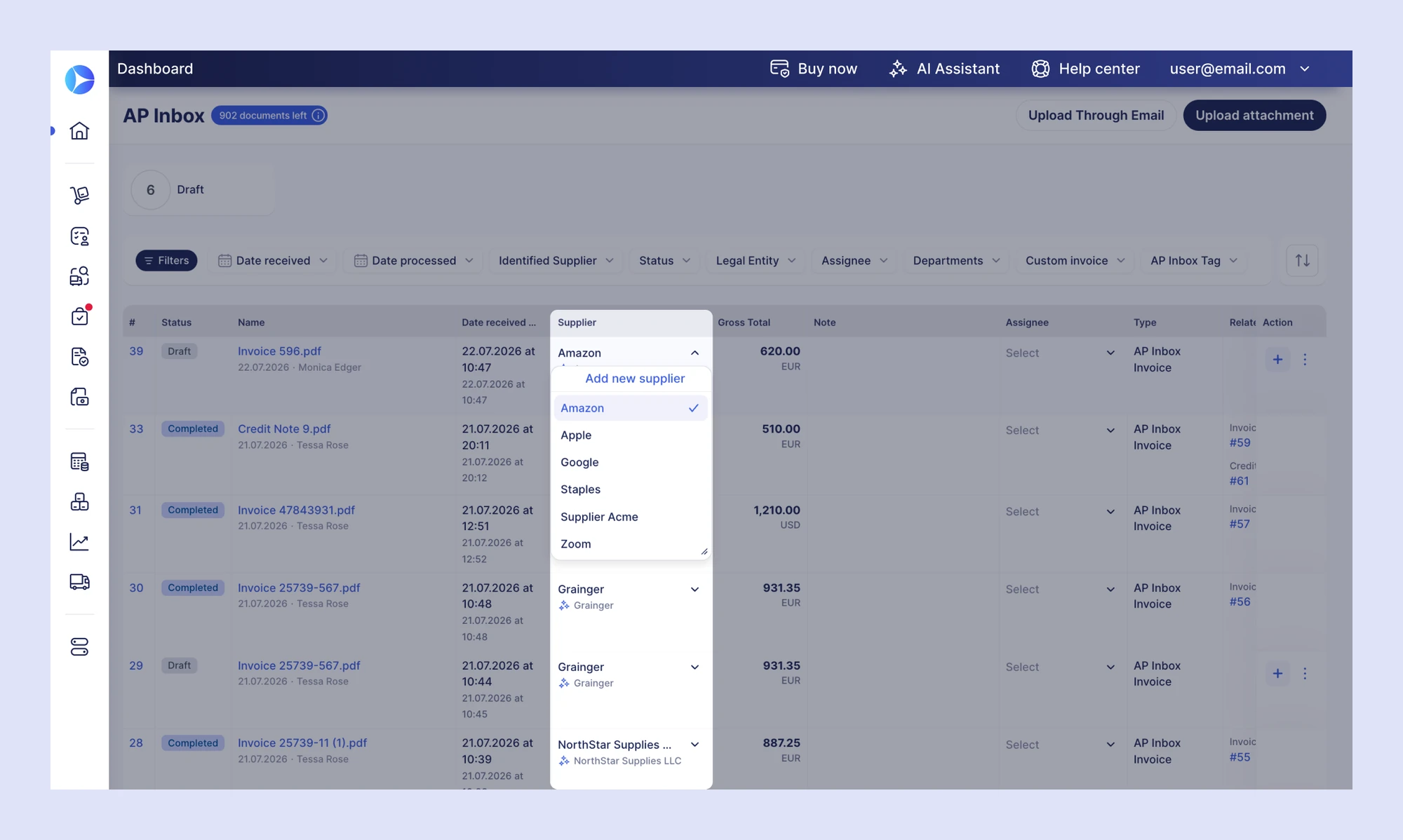
Now, when AP Inbox processes a document from an unknown supplier, Precoro creates the supplier automatically, just as AI-powered PO creation already does. The invoice moves forward right away instead of waiting for manual supplier setup.
Teams that want more oversight stay in control. Automatic supplier creation can be turned on or off in settings, and you can pair it with a Supplier Approval Workflow to review new suppliers before your team uses them.
AP Inbox also accepts more formats now: .XLSX, .DOCX, and .MSG files, whether uploaded manually or received by email, with no conversion needed.
💡Fewer AP bottlenecks, less manual data entry, and faster invoice processing, whoever the supplier is and whatever format they use.
Order exactly what’s needed and receive it in fewer clicks
Over-ordering ties up cash in excess inventory, and slow receiving delays invoice matching. October’s updates tackle both ends of the order.
See stock levels while ordering low-stock items
When teams order low-stock items, the Select Items step now shows the inventory details to help them decide how much to buy: Quantity, Minimum Stock Level, Reorder To, Ordered, and Need To Order.
The new Ordered column counts units already on purchase orders that haven’t been received yet, drafts included. Need To Order takes those units into account, so teams don’t reorder items that are already on the way.
Without that context, two people can reorder the same item in the same week, and the second order turns into excess stock and tied-up cash.
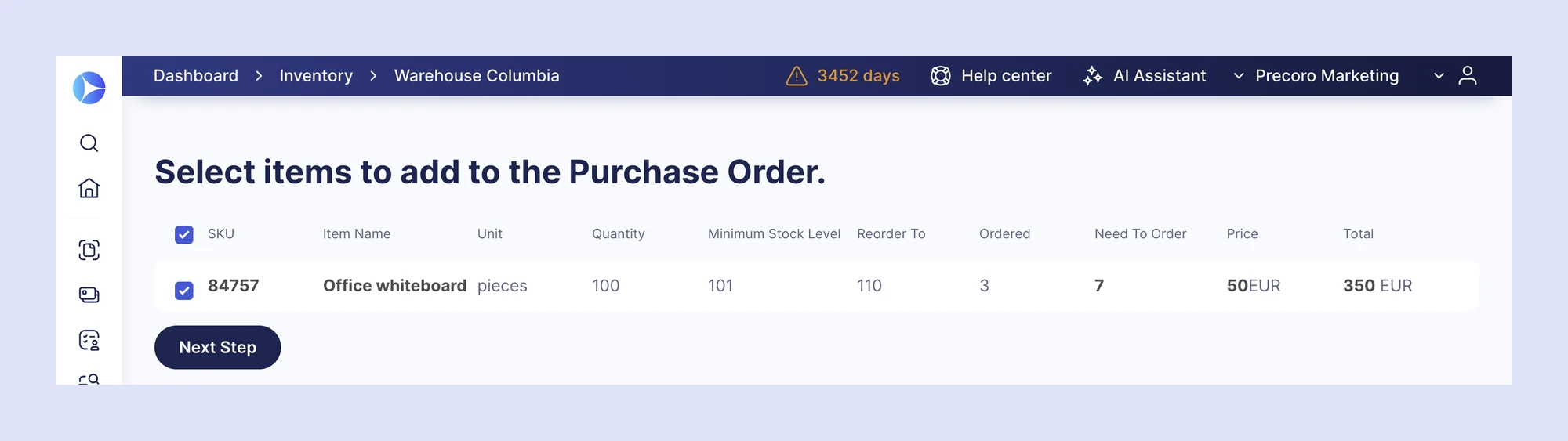
💡Teams order exactly what’s needed, so you avoid duplicate orders and keep less cash tied up in inventory.
Add receipts faster to one order or several at a time
On a purchase order, Add Receipt now goes straight to item selection, and Quick Receipt receives the whole order in one step. Warehouse and operations teams can also select multiple POs in the Pending Receipt infocard and add receipts for all of them at once.
Receipts are the step that unlocks three-way matching. The sooner they’re recorded, the sooner AP can approve and pay the invoice.
💡Receipts are recorded as soon as goods arrive, so three-way matching and invoice approval start sooner.
Keep your team and suppliers on the same page
Once an order is sent, small gaps in communication turn into real costs: a shipment to the wrong address, a supplier working from an outdated PO, or an order that was declined without anyone noticing. October’s updates keep everyone working from the same up-to-date information.
Know the moment a supplier confirms your order
PO creators and followers are notified by email, Slack, or Microsoft Teams as soon as a supplier confirms a PO.
For Amazon Business orders, Precoro shows whether the order was confirmed or declined right on the PO. A declined order automatically cancels the PO and its PR.
Your team no longer checks each PO or chases suppliers to learn whether an order is moving, and a declined Amazon order never sits unnoticed.
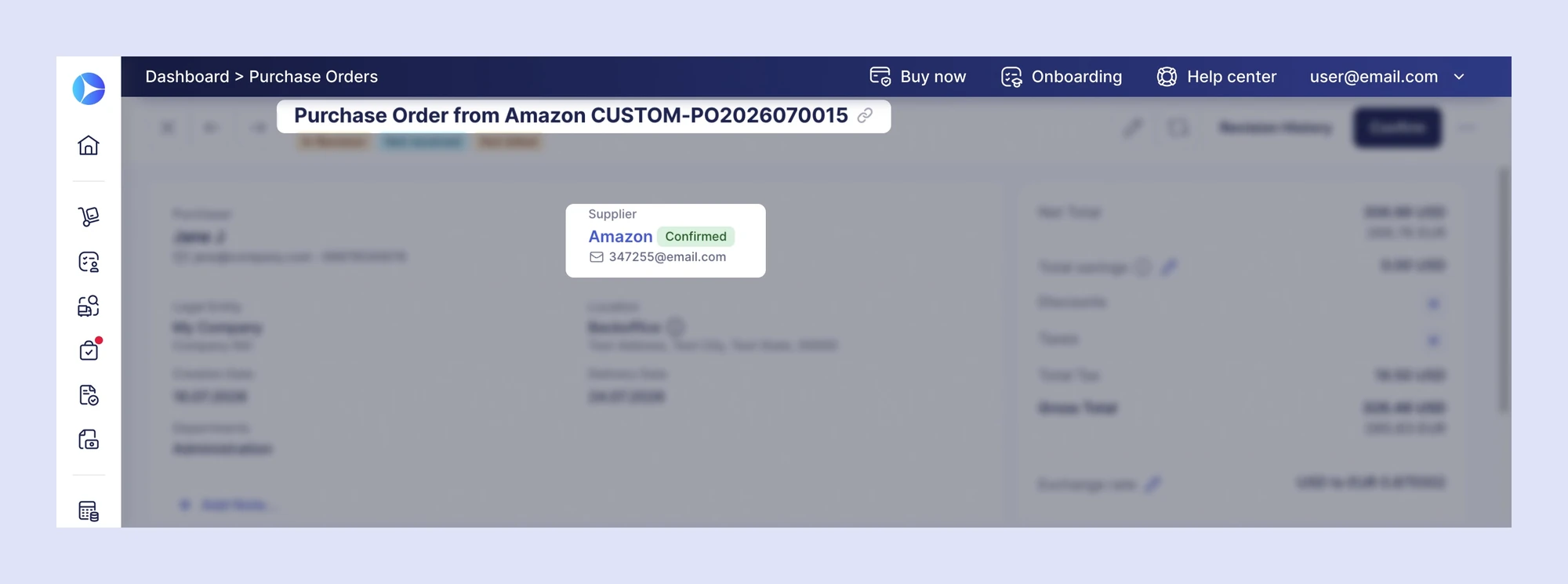
💡Order issues surface right away, and confirmed orders move toward delivery without follow-up emails.
Remind a single supplier about an RFP
On an approved RFP, teams can resend the reminder to one supplier who hasn’t responded yet, without emailing everyone else in the RFP again.
Sourcing timelines often slip because one supplier hasn’t replied. A targeted reminder keeps the RFP on schedule without spamming suppliers who already responded.
💡Proposals arrive on time, and supplier relationships stay on good terms.
Send accurate shipping details and the latest PO version
- A dedicated PunchOut Shipping Address. PunchOut documents have their own Shipping Address that stays the same from PR to PO and is sent to the supplier.
- Revision numbers on printed POs. Printed POs can show a revision number, so suppliers always know they’re working from the latest version.
Shipping and version errors are cheap to prevent and expensive to fix after delivery.
💡Orders ship to the right address, and suppliers always fulfill the latest version of the PO.
Keep your pipeline of open orders clean
When a sent PunchOut PO is canceled, its PR is now canceled automatically and no longer stays open as Not Ordered.
PRs that will never be ordered distort your view of pending spend and send buyers chasing orders that no longer exist.
💡Your list of open orders reflects only what’s actually in progress.
Learn more about PunchOut catalogs in Precoro.
