




 Explore Precoro's features











A contract management platform is software for handling contracts. Depending on the product, it can cover drafting, approvals, electronic signatures, centralized storage, renewal reminders, and obligation tracking.
Contract management software helps businesses create, approve, store, and track agreements. The right platform depends on contract volume, legal complexity, procurement integrations, and budget. Dedicated contract lifecycle management platforms support complex workflows, while procurement platforms connect supplier agreements to purchasing.
Without a contract management platform, contracts often sit in inboxes and shared drives, renewal deadlines slip by, and it's hard to tell whether spend matches what was agreed. This guide explains how contract management platforms work, where AI comes into play, which features matter, how the main types compare, what they cost, and how contract management connects to procurement.
Key takeaways
- A contract management platform handles contracts from request to renewal, while simpler tools cover only one or two stages.
- AI can extract terms and flag risks, but people still make the final call.
- Core features include a central repository, structured contract data, renewal alerts, and reporting.
- There are four main platform types to choose from: dedicated CLM, procurement platforms, enterprise resource planning (ERP) modules, and lightweight tools.
- Pricing runs from hundreds of dollars a month to tens of thousands of dollars a year.
- Returns mostly come from avoiding unwanted auto-renewals and overspend, plus time saved on each contract.
Which type of platform should you start with?
The quickest way to narrow your options is to start with the problem you need to solve:
| Your main problem | Start by evaluating | What to check |
|---|---|---|
| Contracts sit in folders and renewals get missed | A lightweight contract tool | Search and renewal alerts, and whether data can be exported |
| Supplier agreements are disconnected from purchasing | A procurement platform with contract features | Whether purchase orders and invoices can be linked to contract terms and limits |
| Complex drafting, negotiation, and multi-party approvals | A dedicated CLM platform | Legal workflows and clause management, and how much effort setup takes |
| Straightforward contracts inside an established ERP | The ERP’s contract module | Whether it covers your real workflow before you buy anything extra |
| Legal and procurement both have their own demands | A dedicated CLM platform with a procurement integration | Who owns which system and how data syncs between them |
What is a contract management platform?
What does contract lifecycle management software cover?
A contract management platform manages all phases of the contract lifecycle. That's why it's also called contract lifecycle management (CLM) software. The lifecycle is longer than many people expect and typically runs through seven steps:
- A request is submitted through a short form that states the counterparty, the value, the contract type, and the start date.
- The contract is drafted from approved templates and clause libraries, so no one starts from scratch.
- Review and negotiation happen in one place, with all edits and comments kept in the same document.
- The contract is then routed to the people with sign-off authority.
- It's signed, usually electronically.
- The signed contract goes into a searchable repository that tracks its obligations, including payment terms, renewal dates, notice periods, service levels, and more.
- Alerts flag the expiration date early, leaving time to renegotiate, renew, or end the contract.
Signing is only one of the seven steps, and much of the platform’s value shows up after it.
Several teams take part. Procurement or sales submit the request, legal handles drafting and review, finance checks payment terms and commissions, and managers approve. A contract management platform keeps these hand-offs in one place, so no one has to chase contract status by email. Products vary in how many of these steps they cover, which explains the terminology confusion covered below.
Contract management tool vs. CLM platform: What’s the difference?
A contract management tool specializes in getting a specific task right, like storing agreements or collecting e-signatures. A CLM platform links those separate jobs into one workflow. The table below shows the difference.
| Contract management tool | CLM platform | |
|---|---|---|
| Scope | One or two stages | Request through renewal |
| Workflow | Manual hand-offs between apps | Automated routing and approvals |
| Contract data | Often limited to the document itself | Structured terms shared across stages |
| Integrations | Few, or none | Procurement, finance, and CRM systems |
| Reporting | Basic lists and search | Dashboards about renewals and obligations |
| Typical fit | Small contract volumes, simple needs | Growing volumes, several teams |
For teams with just a handful of contracts, a basic tool does the job without paying for features they don't need. As volume grows, problems show up in familiar ways: renewal dates are discovered too late, approval statuses get lost in email, and contract terms are retyped by hand into procurement or finance systems. These are all symptoms of a team that has outgrown a single-purpose tool.
A platform isn’t always the best choice, though. It takes much more time to set up and run, and templates and approval rules have to be defined up front. It also costs more, so a small team with a CLM platform could end up paying for features they’re never going to use. Vendors also use these labels inconsistently, so check what a product actually does rather than what it calls itself.
Is a contract management system the same as a platform?
“Contract management systems” and “contract management platforms” are often used interchangeably across vendor sites and in buyer searches, and the same goes for “contract management software” and “contract management solution.” When there is a difference, a “system” often means the record-keeping core with the repository, while a “platform” suggests a broader set of tools, integrations, and analytics.
Contract management can also be built into other software. ERP suites and procurement platforms often include contract modules. They keep your contracts close to POs and invoices, but usually don’t offer as many drafting or negotiation capabilities as a dedicated solution. We’ll come back to this trade-off later.
When a vendor page doesn’t define a clear scope, three questions can help cut through the naming confusion:
- What happens after signature?
- Are contract terms stored as searchable data or only as documents?
- Which other systems can the product connect to?
How does a contract management platform handle drafting and execution?
With a contract management platform, each new contract starts from an approved template and clause library. Once created, it's routed for approval and e-signature. The initial request determines both the template and the approvers. This part of the process has three stages: drafting, creation, and execution.
How does contract management software standardize drafting?
Templates are the starting point for every contract, and legal usually maintains them. Each contract type has its own template, with fields such as contract value and counterparty prefilled from the request. When legal updates a template, every new contract uses the current approved wording, so outdated clauses don't linger for years. Signed contracts retain the terms under which they were executed.
Each template comes with a clause library: preferred wording, approved fallback positions, and notes on when each fallback is appropriate. Some clauses can be locked so business users can't edit them. If the other side insists on using its own paper, the platform can handle that document too, keeping redlines and version comparisons in one place.
How do teams create contracts using software?
A contract usually starts with a request from someone outside legal, like a sales manager who needs an agreement for a new customer or a department head buying from a new supplier. Instead of emailing legal, that person fills out a form. The questions also adapt to the answers: a low-value non-disclosure agreement asks for very little, but a multi-year supply agreement would need extra fields about payment terms and renewal rules.
The answers do more than fill in blanks. They determine which template is used and who needs to approve. The form can also pull data that already exists elsewhere (in a procurement system or the account in a CRM), so no one enters the same address twice.
For legal, this means fewer incomplete requests and less back-and-forth before work starts. Standard agreements that follow the same pattern often don’t need legal involvement at all, leaving lawyers more time for work that requires their judgment.
How are contracts approved, signed, and stored?
Execution starts with approval. The finished draft goes to the people who need to sign off, in sequence or in parallel, with optional delegation and escalation if a request stalls. Signing follows, either through built-in e-signature or an integration with a separate provider. The platform should handle signing order and any countersignatures.
Electronic signatures are usually accepted in business contracts, but the rules vary by country and document type. In the U.S., for example, the federal ESIGN Act excludes documents like wills and family law matters (15 U.S.C. §7003). Other countries have their own exceptions, so legal should confirm the requirements in every jurisdiction where the company operates.
After the contract is signed, the final copy and audit trail are saved in the repository.
How does AI contract management software work?
AI contract management software reads contract language, extracts the key terms, and passes them to your workflows and reports, so no one has to dig for them by hand. The same capability appears at several points, from the moment you receive a contract to long after it’s signed.
How does AI review contracts and identify risks?
Take a supplier agreement that lands in the review queue. The software identifies the parties, value, duration, and jurisdiction, then compares clauses against your company's standard positions, such as those in a legal playbook. If it finds an auto-renewal with 90 days' notice or a lower-than-usual liability cap, it flags the clause for review.
Behind this are language models that classify clauses and extract values. Their output is a recommendation that legal can accept or overrule. Some tools go further, suggesting changes or summarizing a long contract in plain language. The biggest gain usually comes from the first pass: routine contracts get cleared quickly, leaving more time for the ones that don’t fit the usual pattern.
Extraction is only as good as the document. Poor scans, handwritten notes, and unusual layouts lower accuracy. Contracts in languages the model wasn't trained on, or heavily negotiated contracts with amendments that change other clauses, may need extra manual review.
Even a confident-looking highlight can still be wrong, making the reviewer’s check an essential part of this process.
How does automated contract approval work?
Rules do most of the work in intelligent contract automation. Anything above a set value goes to finance, unusual liability terms go to legal, and any request sitting with the same approver for three days triggers a reminder. AI also helps review contract changes by identifying deviations from standard clauses, explaining what the counterparty changed, and flagging terms that may need legal review.
A contract’s key terms can flow into connected procurement and finance systems as soon as it’s signed, with no retyping. People still need to set up and maintain the rules and handle exceptions.
How does software track contract obligations?
After signing, the extracted data becomes a searchable record for the entire portfolio. Questions that used to mean opening dozens of PDFs can be answered with a filter or a plain-language question, like “which supplier agreements auto-renew next quarter?” Established businesses can run the same extraction on their contract archive: optical character recognition (OCR) reads scanned documents first, and the repository is loaded in bulk rather than file by file.
Obligation management goes a step further and turns commitments like delivery dates or minimum purchase quantities into tracked items with an owner and a due date. Finance sees upcoming commitments, procurement knows which renewals need action, and no one learns about a notice period after it has passed.
One caution: contract data is sensitive, so ask vendors where they store it and whether it’s used to train models shared with other customers.
Which contract management features matter most?
Which features matter most depends on how many contracts a company manages and who handles them. A small team needs reliable storage and renewal alerts, while a large legal department needs deeper workflows and reporting.
When should a business replace contract spreadsheets?
A business should consider replacing contract spreadsheets when missed renewals, outdated records, or scattered ownership start affecting day-to-day operations. For example, when multiple teams manage supplier contracts, renewal dates are easy to overlook, signed PDFs end up in different folders, and contract owners aren't always clear. The same problem arises when employees have to retype contract terms into the purchasing system instead of accessing them directly.
As the number of contracts grows into the hundreds, these issues become harder to manage. A contract management platform replaces the spreadsheet with fields tied to each contract, turning information like renewal dates, value, owner, and counterparty into searchable data. Teams can find the latest details, track responsibilities, and act on upcoming renewals before they become a problem.
Contract repository, storage, and templates
A repository earns its place by being the single home for the current, signed version of every contract. Without that, document control and reporting become unreliable.
Take access control. To test it, ask the vendor to show what a user from another team sees when searching for a contract they shouldn’t be able to access. In a CLM, permissions can follow team or sensitivity labels, so sales managers see customer agreements while employment contracts stay visible only to HR and legal. Version history keeps drafts separate from the signed copy and shows who changed what and when, which helps settle disputes about what was originally agreed.
Search deserves its own mention. Full-text search finds a phrase inside any document, while filters on contract fields narrow results by supplier or expiration date. Together, they're much stronger than either alone. Linking each contract to a supplier or customer record surfaces every agreement and amendment with that counterparty. Test both on a sample of your own contracts when possible, since vendor demo data may not reflect your situation.
Retention rules cover the end of a contract’s life. Your policy should set how long a contract is kept before it’s flagged for review or deletion, in line with local regulations.
Templates sit alongside the repository and feed the drafting features. They should be versioned and retired like any other document, so no one picks an outdated one by mistake.
Contract terms, analytics, and vendor tests
The easiest way to judge analytics, and most other features, is to ask for specific reports in a demo using your own contracts. Useful questions here include:
- Which contracts are due for renewal in the next 90 days, and what is their aggregate value?
- Can we compare contract terms across all suppliers?
- Can we add custom fields to reports?
- How accurate is data extraction on scanned and older contracts? Who corrects the mistakes?
- Who migrates our existing data, and how long would it take?
- Are there ready-made connectors available? If not, what would custom integrations cost?
- If we switch platforms, can we export everything?
Legal teams and complex contracts
Complexity usually comes from structure. A master services agreement (MSA) has order forms and amendments hanging from it, so the platform has to show them as a family, with the parent’s terms visible in each child document. Multi-party agreements also require conditional approvals: a clause touching liability would pull in a different approver than one that changes a delivery date.
Legal teams often need controls that other users rarely do. Clause-level permissions restrict who can edit negotiated language, and an audit trail records every change and every override of an automated suggestion. The redline view has to cope with long documents and many contributors without losing track of versions.
Security questions belong here too:
- Which certifications does the vendor hold?
- Where is the data hosted?
How access is logged and revoked also matters for any work shared with outside counsel.
How do modern contract management platforms compare?
Contract management platforms fall into four large groups:
- Dedicated CLM suites
- Procurement platforms with contract features
- ERP modules
- Lightweight tools
They differ most in how much of the contract lifecycle they cover and how deeply they connect to the surrounding systems.
What are the main types of contract management platforms?
These descriptions reflect typical patterns drawn from vendors’ published materials — individual products may differ.
Dedicated CLM solutions like Icertis and Ironclad specialize in contracts and usually offer deeper drafting and analytics. The trade-off is a longer setup, since templates and approval rules have to be configured and many teams are involved. They pay off when contract volume justifies the effort, which is why companies with high volumes or demanding legal teams usually choose them.
Procurement platforms with contract features, such as Coupa, focus on buying-side problems. Contracts sit next to purchase requests and orders, so every purchase can be checked against agreed terms and prices. Spend reports then show how much buying happens under contract, which standalone CLM products usually need integrations to do. Drafting and negotiation tools are less comprehensive than in dedicated products, which makes this type a good fit for teams whose contracts are mostly with suppliers.
ERP suites also have their own contract modules. Most of their appeal is a shared database with finance and inventory. The trade-off is weaker contract-specific usability than specialized products offer. Their rollout often follows the ERP project’s timeline, meaning the contract module may arrive later or in a reduced form.
Lightweight tools cover the basics: a repository, reminders, and sometimes e-signatures. For a small company with a couple of hundred agreements, that may be all it needs. As approval and reporting needs grow, the limits start to show. Pricing is usually simple, and these tools are easy to trial before committing to anything larger.
How should you compare contract management platforms?
When comparing products, ask four questions: how much of the lifecycle a product covers, how well it connects to procurement and finance, how long implementation takes, and how pricing is structured. The table gives a quick overview of each type, but individual products vary, so use it as a starting point for vendor questions.
| Dedicated CLM | Procurement platform | ERP module | Lightweight tool | |
|---|---|---|---|---|
| Lifecycle coverage | Request through renewal | Strongest on supplier contracts and purchasing | Varies, often records and approvals | Storage and reminders, sometimes signature |
| Integration depth | Broad, usually through connectors | Native link to purchasing and spend | Native inside the suite, limited outside of it | Few integrations |
| Setup effort | Highest | Moderate | Moderate to high, tied to the ERP project | Lowest |
| Typical pricing model | Often quote-based, scaled to users or volumes | Often part of a procurement subscription | Often bundled into the suite license | Often fixed plans or per-user pricing |
| Best suited to | High volumes and complex legal needs | Supplier-heavy contracts linked to purchases | Companies already standardized on the ERP | Small portfolios and simple needs |
Pricing depends on contract volume, user count, and vendor, so we cover it in its own section below.
Which contract management platform type fits your team?
Team size and contract mix usually decide this, and the table at the top of this guide maps the most common scenarios. If you have just a few hundred contracts being managed by one or two people, start with a lightweight tool and revisit the choice when approvals start slowing you down.
If your business predominantly manages supplier contracts and you want to be sure purchases don't deviate from the contractual relationship, contract features built into your purchasing system will likely help more.
Your choice of the best contract management software isn’t permanent, either. Contract data from a lightweight tool can usually be imported into a larger one later, but confirm export options with each vendor.
How can Precoro help in the contract management process?
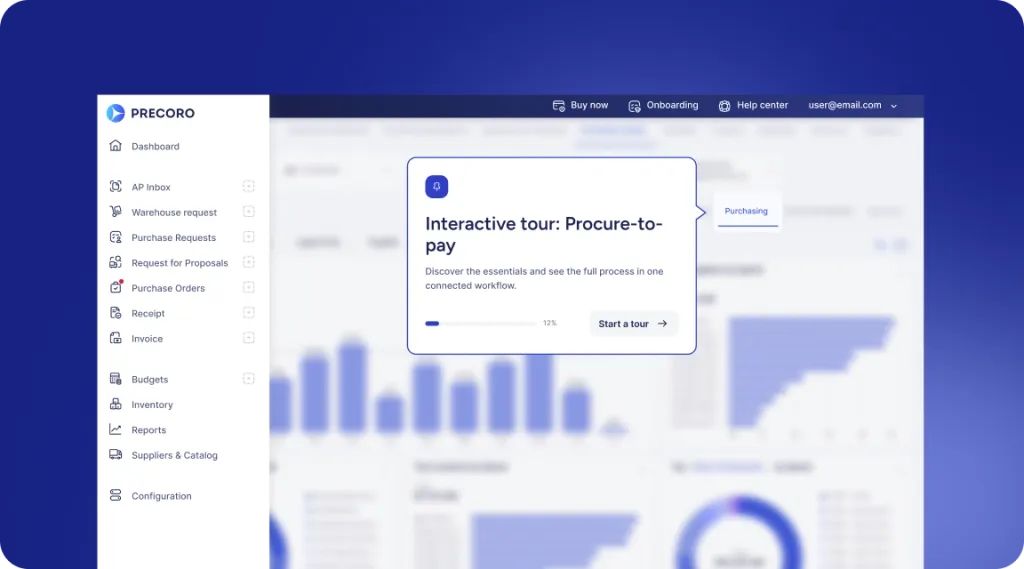
Precoro approaches contract management from the purchasing side, keeping contracts inside a procure-to-pay platform next to the invoices and purchase orders they govern. That places Precoro in the procurement-platform group above. More than 1,000 customers in over 80 countries use it to manage $150 billion in spend.
How does Precoro link contracts to purchase orders and invoices?
In Precoro, each contract is linked to its supplier and to the purchase orders and invoices it governs. The contract number appears on every related PO and invoice, so any document can be traced back to the original agreement.
That link keeps the contract working after signature, where much of the value shows up. As orders and invoices add up, Precoro tracks them against the contract total and sends automatic alerts when a purchase exceeds the agreed limit, so overspending is visible while it can still be corrected.
With purchase orders, receipts, invoices, and approvals all stored together, you'll have a complete record to present during audits. Precoro integrates with accounting and ERP programs such as QuickBooks Online and NetSuite, so contract-related data doesn't have to be entered twice.
How do you manage a supplier contract in Precoro?
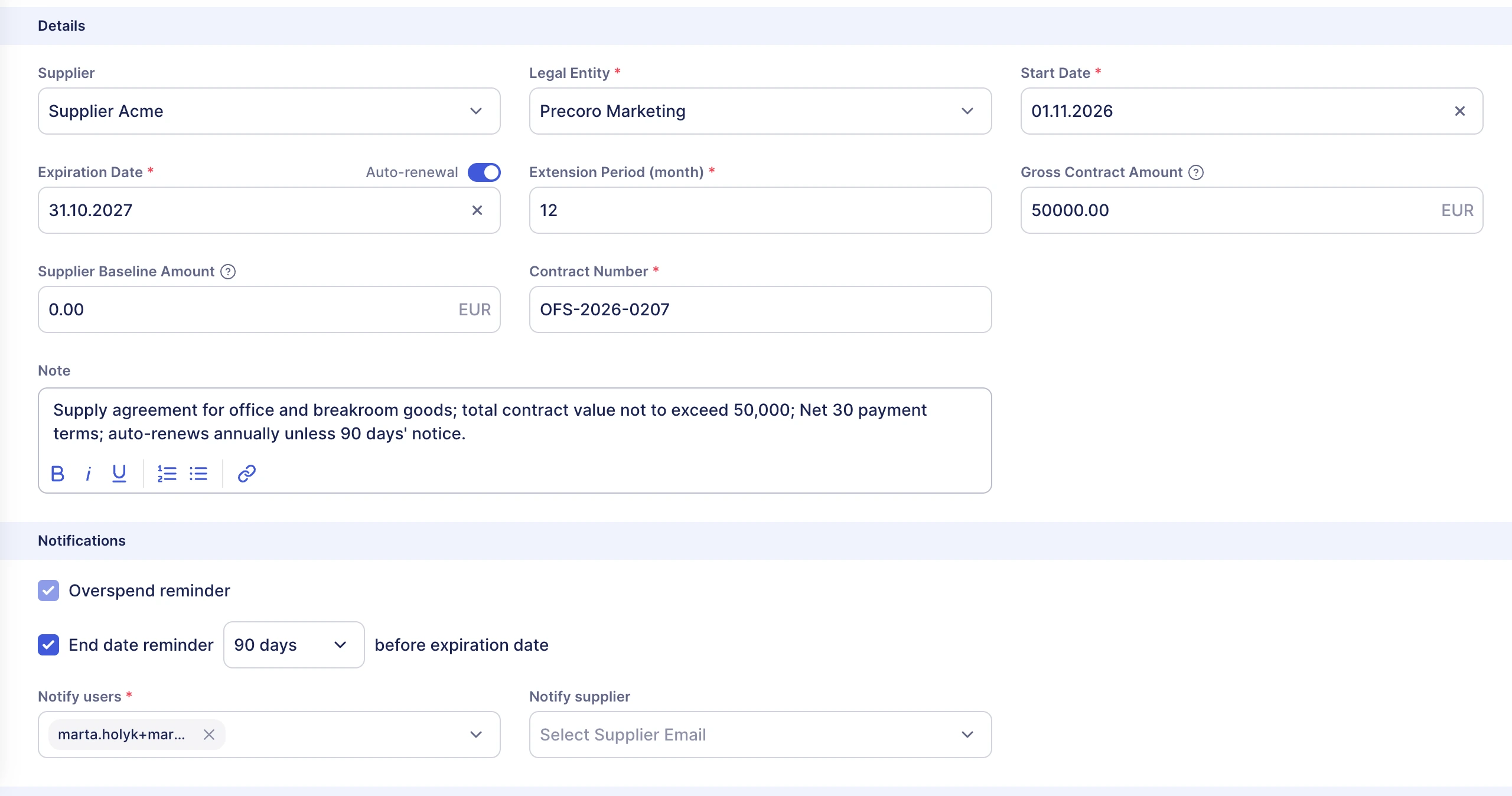
In Precoro, you add a contract once, then link purchase orders, invoices, and credit notes to it, so spending is tracked against the agreed amount. Here’s how that works for an illustrative €50,000 supply contract:
- The contract is added from the Contract Management page or the supplier’s profile, with a contract number, start and expiration dates, and a Gross Contract Amount of €50,000. You also choose when to get an end-date reminder and which users (and, optionally, the supplier) receive contract emails. On the Automation plan, you can upload the signed file instead, and the Contract Agent fills in the fields for you. If it recognizes all the required information, the contract is active right away. If not, it’s saved as an AI Draft for someone to review and confirm.
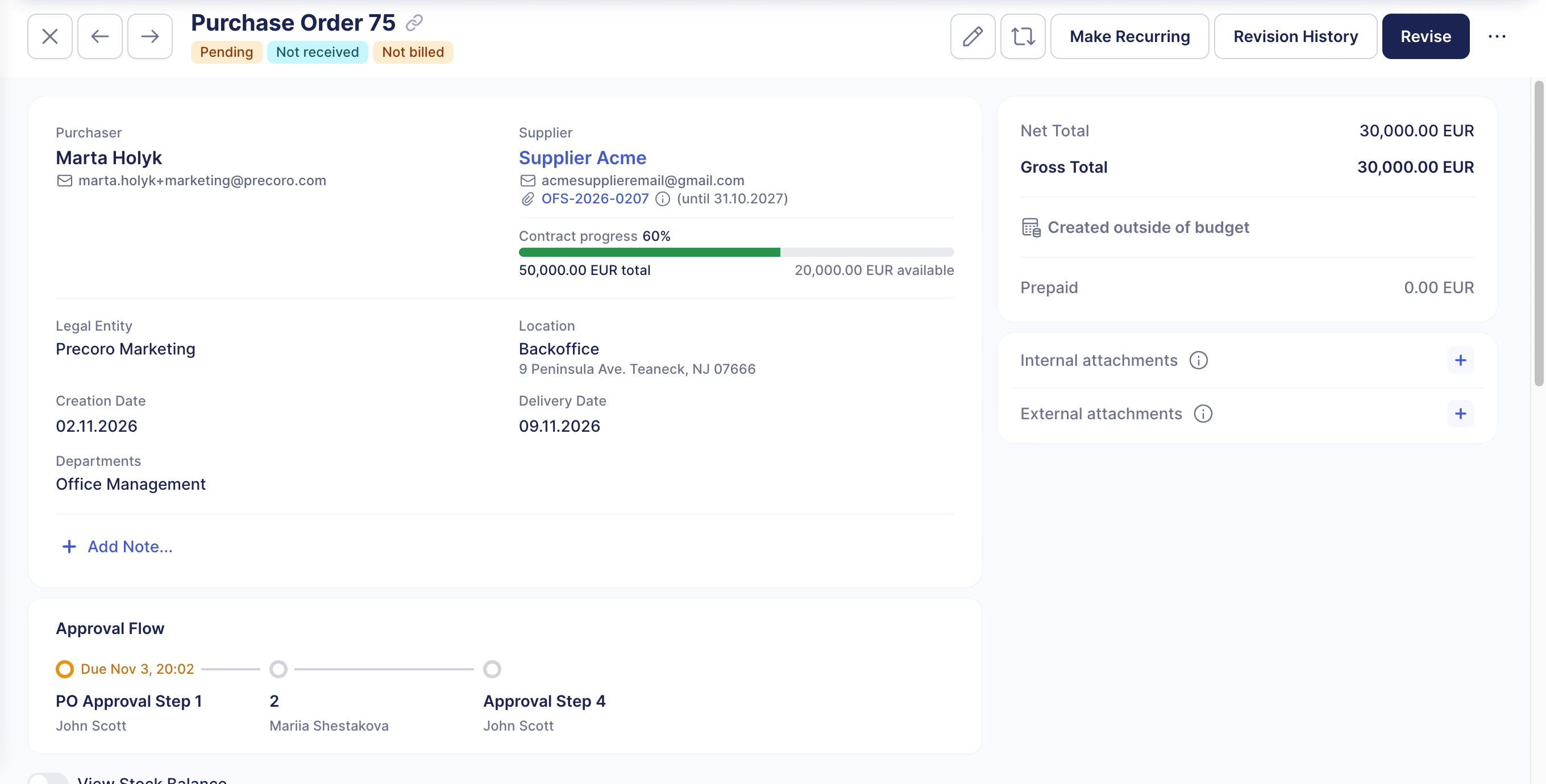
- The buyer creates a €30,000 purchase order for that supplier and selects the contract on the order. The PO total is deducted from the contract, leaving €20,000 available.
- When the supplier’s invoice arrives, it’s linked to the same contract. Precoro then recalculates the spent and available amounts using the invoiced prices, taxes, and discounts. If a credit note is added to that invoice, its amount goes back to the contract and can be spent again.
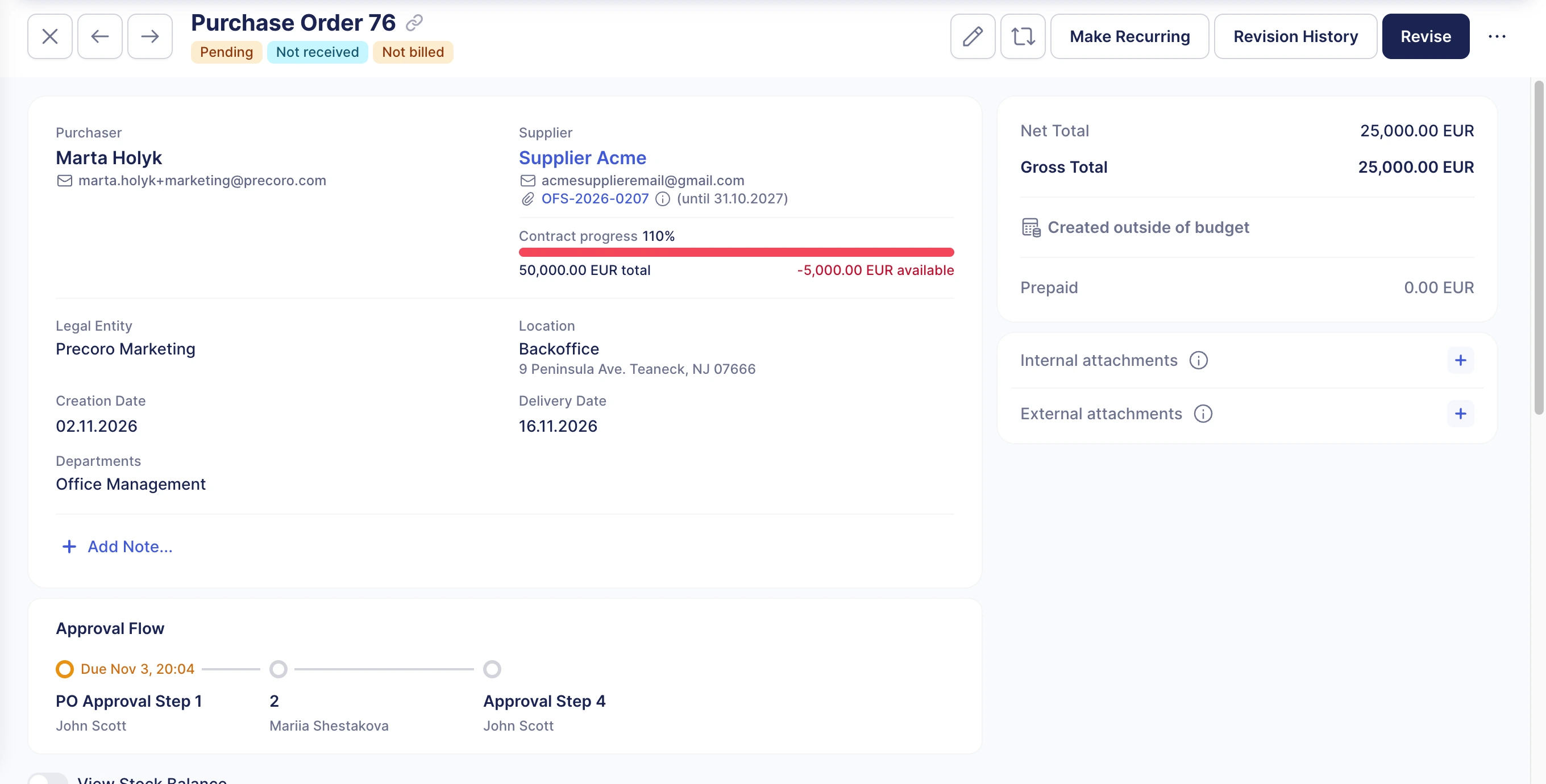
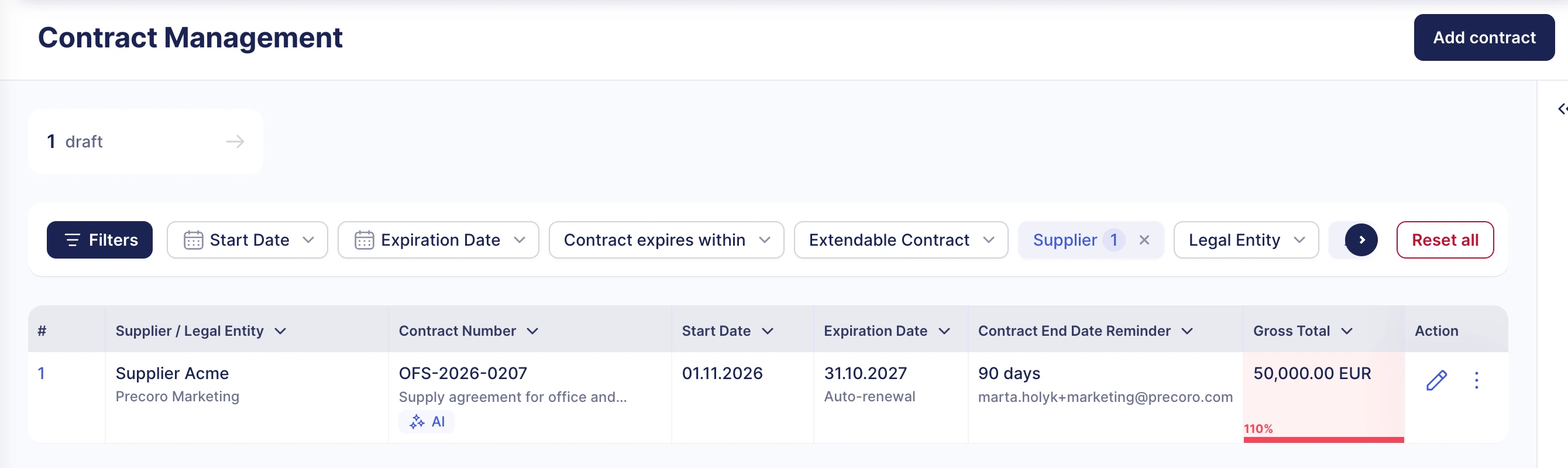
- A second purchase order for €25,000 pushes spending past the contract amount. Precoro sends an alert to everyone on the notification list, and the contract is highlighted in red on the Contract Management page.
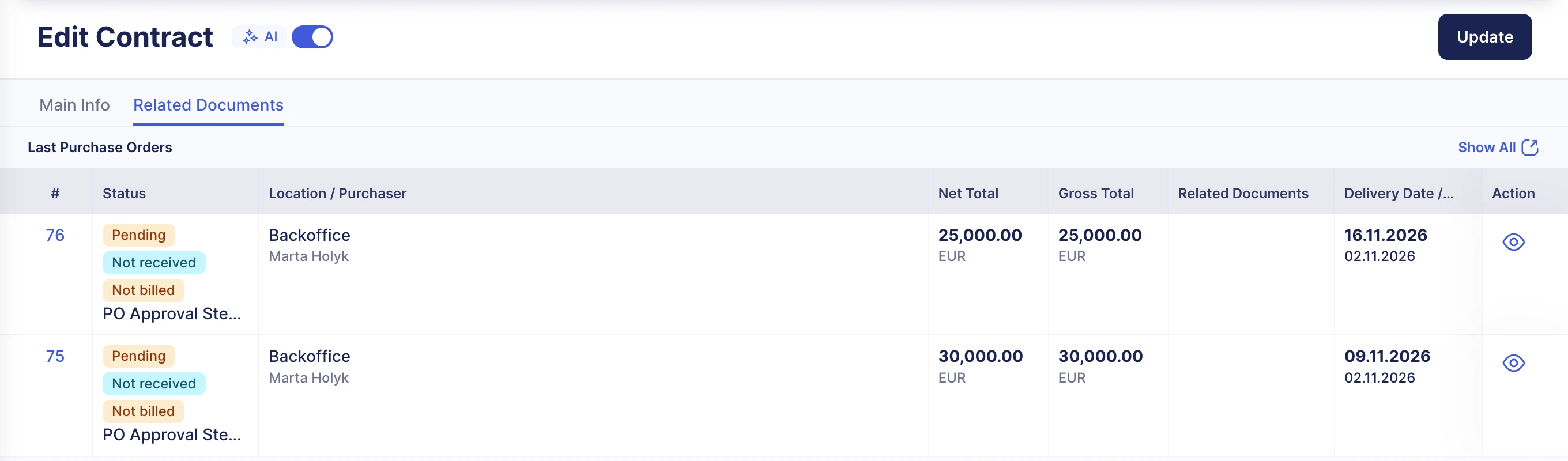
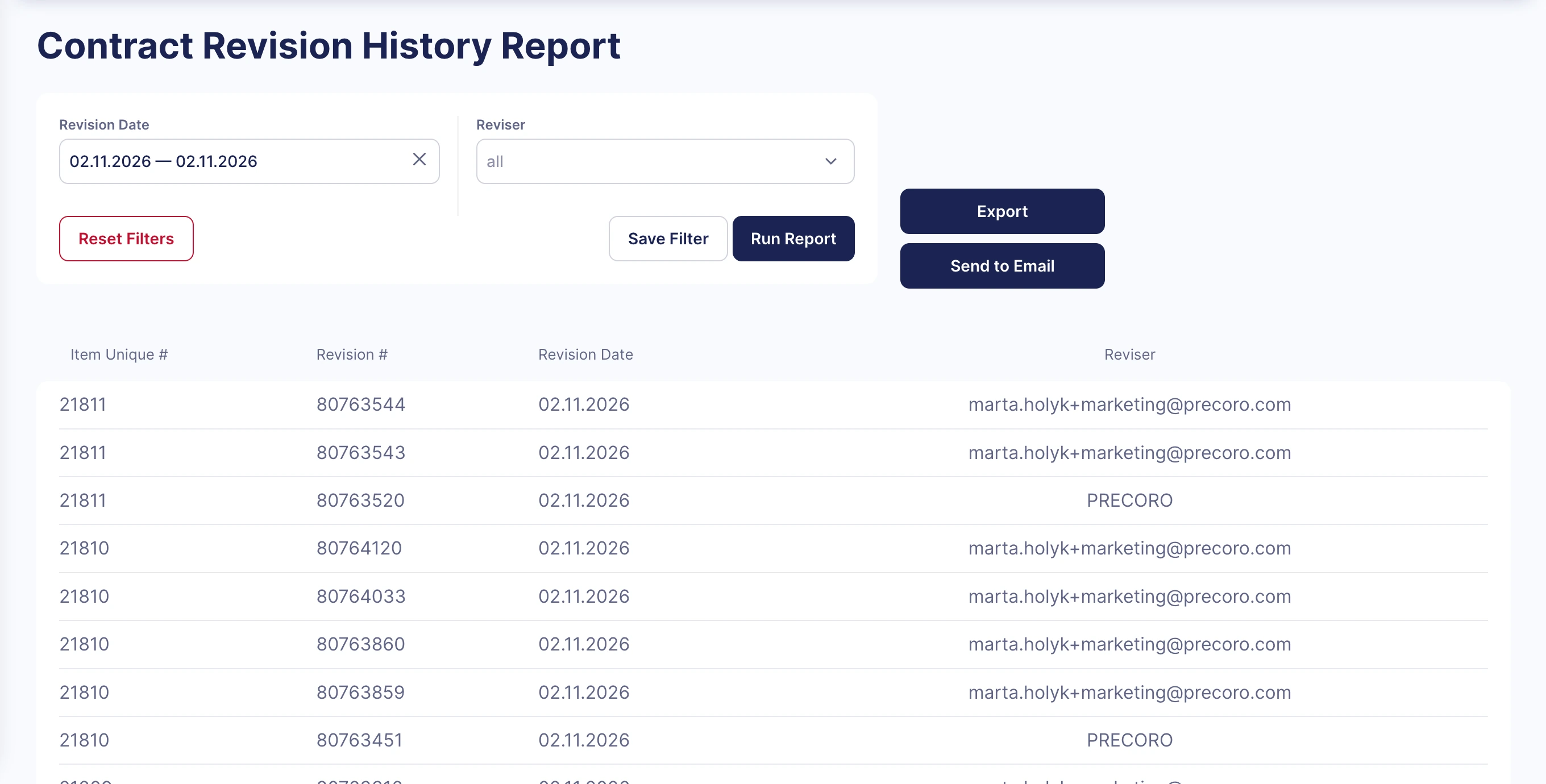
- The contract’s Related Documents tab shows the latest POs, invoices, and credit notes linked to it. Changes to the contract itself appear in the Contract Revision History Report.
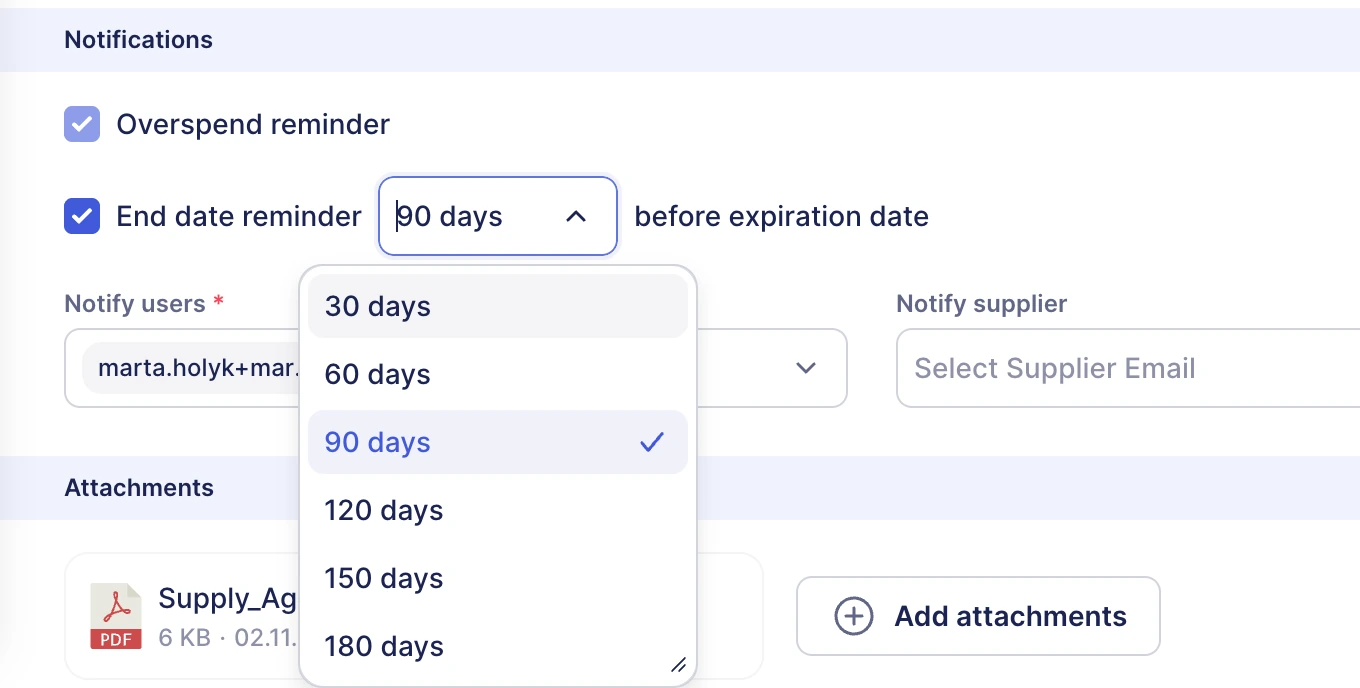
- Before the expiration date, people on the notification list receive reminders 30, 60, 90, 120, 150, or 180 days in advance, depending on the setting. If auto-renewal is on, the email says the contract will be extended for the same term, so there’s time to decide whether to renegotiate or let it renew.
All amounts in this example are purely illustrative.
How does Precoro handle renewal alerts and AI contract review?
Automated renewal alerts appear from 30 to 180 days before an agreement expires, leaving time to renegotiate or cancel before it rolls over. The Contract Agent reads the contract to extract key data, summarize terms, flag important dates, and answer follow-up questions. A separate AI Assistant works across the platform and answers questions about spend trends and contract compliance.
What does contract management software cost?
How much does contract management software cost in 2026?
Published prices start at a few hundred dollars a month for smaller products, while higher-end platforms cost tens of thousands of dollars a year. The figures here are in U.S. dollars, taken from each vendor’s published pricing page, and may change. ContractSafe advertises plans from $450 a month scaled with contract volume. Concord’s plans run from $499 to $1,299 a month, with five users included and extra users at additional cost. Precoro’s Core plan starts at $499 a month and Automation at $999.
All prices are billed annually and current as of October 2026.
Outside the subscription fee, the budget might also have to cover:
- Setup and data migration
- Training for the teams using the platform
- Add-ons such as extra users or integrations
- Ongoing support
ROI, renewals, and the contract cycle
There are two parts to a platform’s return: costs avoided (real money) and time saved (capacity to do other work).
Take an example company that handles 150 contracts a year and pays $18,000 a year for a platform, plus a one-time $6,000 for setup and migration. Say renewal tracking catches two unwanted rollovers worth $10,000 each, and each contract takes two fewer hours to process. That’s 300 hours saved, worth $13,500 at $45 an hour.
| Year one | Year two | |
|---|---|---|
| Platform subscription | $18,000 | $18,000 |
| Setup and migration | $6,000 | None |
| Total cost | $24,000 | $18,000 |
| Unwanted renewals avoided | $20,000 | $20,000 |
| Admin time saved (300 hours x $45) | $13,500 | $13,500 |
| Net, avoided costs only | -$4,000 | +$2,000 |
| Net, counting time saved | +$9,500 | +$15,500 |
Year two assumes two more unwanted $10,000 renewals are prevented; these aren't the same agreements canceled in year one.
In year one, cash savings alone don’t cover the cost, so the case depends on what the freed-up time is worth. From year two, setup costs drop out, and the balance improves. Shorter contract cycles can add more value, since purchases spend less time waiting for an agreement, but that benefit is harder to price.
Industry-wide estimates are bigger but much looser. World Commerce & Contracting’s research claims “The average value erosion (the deviation from expected results) is 8.6%,” as of August 2025. That figure measures total erosion across contracting practices, not the amount software alone can recover. As an industry average, it also says little about any specific company.
In practice, the calculation focuses mostly on two sums:
- The cost of what goes wrong without the software (renewals, overspend)
- The time saved on each contract multiplied by yearly volume
Then compare the total with the platform’s annual cost.
All the figures in the example above are illustrative. Your own contract count, hourly rates, and renewal history will give a more reliable estimate.
Conclusion
A contract management platform becomes a necessity once spreadsheets and shared folders can't keep up with your contracts. At that point, the question isn't whether to adopt one but which type fits: a lightweight tool for a small portfolio or a dedicated CLM platform for legal-led teams with complex agreements. If most contracts are with suppliers, a procurement platform with contract capabilities would keep each agreement tied to the purchase it governs.
AI speeds up the reading side by extracting terms and flagging unusual clauses, but people still make the final call. Most of the savings come from avoided problems, like an auto-renewal nobody noticed or spending above an agreed limit, and the most accurate ROI estimate uses your own contract data.
Before committing, pin down your contract volume and the systems the platform needs to connect to, then test renewal reports on real contracts in a demo. For teams that want contracts managed alongside purchasing, Precoro links agreements to purchase orders and invoices and includes built-in renewal alerts.
