What is Accounts Payable Automation? AP Automation Benefits & Best Practices
Finance teams lose time, money, and supplier trust to invoice backlogs and slow approvals. Learn how AP automation works and how to implement it for fast, measurable results.

Common problems experienced in an accounts payable department at a company still operating under a manual process include late-approved invoices and missed early-payment discounts, among others. There’s also a constant stream of vendor emails asking about the current payment status, as well. As your volume of invoices rises, the strain on a manual AP process becomes an ever-growing problem.
That equation is changed dramatically by automation software. Accounts payable automation offers capabilities to capture, match, route, and pay for invoices with a whole lot less manual work. That means a process that finance can depend on without chasing every invoice over email.
This guide explains how exactly accounts payable automation works, walking you through the avoidable issues during implementation so that your project doesn’t fall apart halfway through.
Read on to find out:
What is accounts payable automation, and how does it work
Accounts payable automation vs. manual accounts payable
Integrating AP with your accounting system
Key benefits of AP automation in 2026
Which AP processes to automate first
KPIs to evaluate AP automation
Common risks and challenges
How to choose AP automation vendor
Real-world use cases of AP automation
The future of AP automation with AI
How Precoro supports AP automation
Key takeaways
FAQs
What is accounts payable automation, and how does it work?
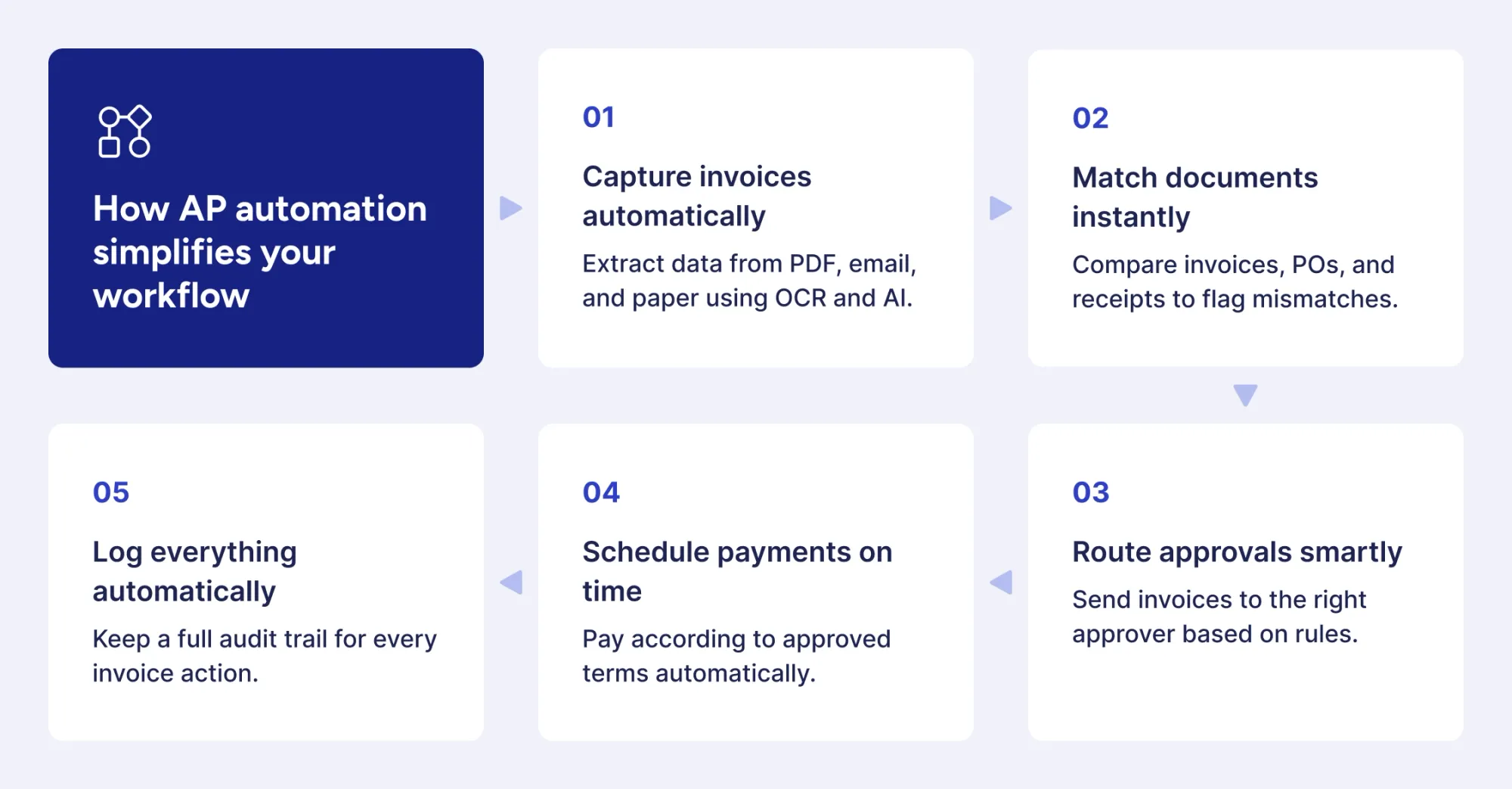
Accounts payable automation (AP automation) involves replacing manual tasks associated with invoice handling — data entry, matching, routing, approval, and payment — with software that can complete all those tasks with little to no human decisions or actions necessary. Below, we try to break down the underlying process of AP automation and its individual components.
Understanding the accounts payable process
A standard process occurs every time an invoice enters accounts payable, no matter how big the company is or which industry it belongs to. Automation software intervenes at different points of this stage; it doesn’t take over the entire thing at once, so knowing about the distinct AP process stages is important:
- An invoice arrives from a vendor or supplier through email, regular mail, fax, or a supplier portal.
- The invoice is matched to a purchase order (PO) and a delivery receipt to verify the dollar amounts, quantities, vendor details, and line-item descriptions.
- The expense is routed to the right account and cost center.
- The invoice moves to a certain approver depending on the vendor or department.
- Upon approval, payment is ordered and issued, maybe even early enough to take advantage of an early-payment discount.
- The purchase itself is added to the system of record for audit and reporting, and reconciled to the general ledger.
In manual AP processes, all these steps are completed by hand, sometimes with the help of email chains and disconnected spreadsheets. Automation software, in the meantime, focuses on the first four steps before anything else; both receipt and end-of-day reconciliation tend to stay manual even for bigger companies.
What manual accounts payable tasks are most commonly automated?
AP tasks differ wildly when it comes to their suitability for automation. The best candidates for automation are AP tasks where the person doing the work manually mostly adds delay and generates errors without much room for actual human judgment.
Optical Character Recognition (OCR) pulls invoice data from PDFs, scans, e-mails, and portal uploads, so no line items or vendor details have to be re-typed. More advanced systems like Precoro offer AI-powered Invoice Processing that works well even for multi-page invoices and lengthy tables.
Matching invoices against POs and delivery receipts operates the same way for the most part, with the program comparing everything automatically while flagging any duplicate submissions and invoice fraud patterns before the payment.
Approval routing is different. It systematically enforces all internal controls and compliance requirements around each decision, preventing an invoice from being routed to sign-off by mistake. When approval is obtained, though, the invoice gets posted directly into the linked Enterprise Resource Planning (ERP) systems, triggering a scheduled payment run to close the loop between the books and the money that actually goes out.
Some platforms also include the built-in payments module, so companies can pay without switching systems.
Roles of the AP team in automation
Automation shifts the attention of the AP team away from repetitive tasks toward those aspects of the job that still require human judgment:
| Before automation | After automation |
|---|---|
| Manually keying invoice data into the system | Reviewing only exceptions flagged by the software |
| Chasing approvers via email for sign-off | Owning approval policies and routing rules |
| Manually reconciling accounts at month-end | Tracking Key Performance Indicators (KPIs) and spotting trends across the AP |
| Fielding vendor “where’s my payment” calls | Pointing vendors to self-service status tracking |
The shift from manual to automated AP is so real that many postings for AP roles list “exception handling” and “vendor relationship management” more than regular data entry — truly, a sign of what’s to come.
How to streamline AP automation workflows?
Proper configuration is how you get the most out of AP automation software. It’s all about the way approval thresholds and routing rules are set up after the go-live. Approval limits should align with a company's historical sign-off workflow, because off-the-shelf defaults rarely correspond to sign-off realities.
Set an approval SLA (a hard deadline for each stage in the sign-off chain) so invoices don't sit with an approver who hasn't logged in for 7 days. Precoro and other systems also let you configure routing rules to change by department, project, vendor, or dollar amount, which is more important than most realize during rollout.

Accounts payable automation vs. manual accounts payable: What’s the real difference?
When you boil it down, comparing manual accounts payable work to using an automated AP software solution isn't rocket science. They're totally different when it comes to costs and how much time it takes for each invoice to pass before making a payment.
How do error rates, costs, and processing times compare?
Manual AP work has costs that become evident once you actually measure them:
- Cost per invoice, which industry benchmarks estimate at anywhere from $12 to $40, is primarily reflected in people hours dedicated to data entry and paper handling.
- Processing time can amount to about 14.6 business days from the moment the invoice arrives at the business and until it gets paid; most of those days are spent with the invoice sitting in someone’s inbox rather than actively being processed.
- Error rates of around 2% include miskeyed amounts and duplicate invoice entries that get uncovered only during an audit.
Automated AP software positively affects all those metrics as well:
- Cost per invoice falls to $2–$4 once there’s no more data entry and matching to be done manually.
- Processing time shrinks to just a few days once you don’t have to wait around for a person to physically sign something or respond to someone anymore.
- And error rates follow suit once your AP software can flag mismatched totals and duplicate invoices well before payment is even scheduled.
- The actual difference can be mostly summed up in where the time and cost go, with manual AP spending both resources while simply waiting. In the meantime, automated AP spends almost none of those during operation.
The actual difference can be mostly summed up in where the time and cost go, with manual AP spending both resources while simply waiting. In the meantime, automated AP spends almost none of those during operation.
What are the hidden costs of manual AP processes?
There’s seldom just one number that can cover all manual AP costs. The one that’s mentioned in an invoice is definitely not that number. The fees for late payments pile up silently every time an invoice languishes in the inbox for too long. Vendors that don’t get their payments in full and on time could also start including the risk of unpredictability into their total price tags, as well.
Missed early-payment discounts are another hidden cost of slow AP processes: money left on the table simply because nobody made the payment within the discount window.
Of course, there’s also the overall staff time that could be wasted tracking down a missing approval, reissuing a lost invoice, reconciling a misdirected payment manually, or re-explaining the cause of a delay to a frustrated vendor.
Combine all these “quiet” costs, and your true AP number would easily exceed any pre-invoice benchmark value. The added fact that all of this is never visible at the single line-item level makes it easy for CFOs to overlook everything until these values are measured directly.
At what scale does automation become necessary?
There’s no universal invoice volume threshold after which automation becomes mandatory. What actually does matter is when the total manual processing costs in staff time and lost discounts start exceeding the total cost of a working automation software.
Picture a five-person startup with 40 invoices a month; one AP team member works on processing those for a few hours per week and can cover the entire process without significant issues — a weak case for software implementation. However, if the same use case received 400 invoices a month instead, the situation changes very quickly. The same person is now buried under a pile of approvals and exception tasks that don’t get resolved on time, spending more time following up on approvals than actually processing new invoices.
That alone can be a consistent crossing point: the moment a team starts spending more time correcting and following up on invoices than processing new ones.
Integrating AP with your accounting system
AP automation software doesn’t generally act in isolation. Its true benefits become evident as data begins to flow into the system that finance already uses to report and reconcile information.
How do AP workflows connect with ERP, procurement, and accounting processes?
Whenever an invoice is approved in an AP automation platform, the way the connection to the rest of the finance stack is set up determines whether that approved data goes anywhere to begin with. It's important that AP automation tools are directly integrated with ERP systems, so that approved invoices are automatically posted to the general ledger without duplicated data entry. Standard integrations include:
Procurement is just as important because purchase orders and receiving records are the basis for 3-way matching. Get rid of that link, and finance teams will once again have to manually reconcile data across disconnected environments.
Integrating purchase orders into AP automation
Purchase orders are something tangible for AP automation to compare against when performing automated matching. Because the invoice is backed by a purchase order, it includes a predetermined amount, vendor, and line-item details. In this case, affirmation remains the main task of automated matching.
A mid-sized company that issues a PO for office equipment at a certain quantity and price would have something to compare the invoice against once it arrives in an automated matching system. If everything’s correct, the invoice gets paid immediately without any human intervention. However, if the vendor invoices for 10 more units than specified in a PO, the system flags the invoice as a mismatch and forwards it to a human reviewer.
The differences tend to show up the most in the extremes at both sides. A PO-backed invoice is quickly matched against known values from the database before anyone in accounting sees it. Without a PO to match with, an invoice would still be processed, but would also have to rely on a manual review further down the procurement process.
Key benefits of AP automation in 2026
The automation case for accounts payable was primarily about time savings for a while. By 2026, the more compelling advantages will be about supplier relationships and, just as often, how confidently a finance team can defend its numbers in case of an audit.
How much time and cost savings are realistic in 2026 with AP automation?
The savings automation provides depend on how much of the AP process actually works without manual intervention, and that factor has changed a lot in recent years.
A growing number of platforms now work with invoice capture end-to-end (including matching and routing) and only need human intervention when there’s an actual exception to the rules.
The pragmatic evaluation for most mid-market teams is in the ballpark of freeing up a few hours of staff capacity per week without reducing headcount, opening up more opportunities for spend analysis or vendor negotiation.
How does automation improve supplier relationships and payment terms?
Vendors don't care as much about your company's payment speed as they do about its predictability. Automated approval workflows remove the variability created by an invoice sitting in a person's inbox — and that's precisely what's actually damaging to vendor relationships. In practice, predictability would look like two separate things to a supplier:
- A payment date they can count on before the payment arrives;
- The ability to track invoice status on their own.
That same dependability creates a leverage that manual AP struggles to capture on a regular basis: if a business can consistently pay an invoice within a vendor's discount window, early-pay discounts start adding up really quickly. Dynamic discounting programs built around that dependability have generated annual savings of roughly 1-2% of addressable spend for organizations that deploy them.
What compliance, auditability, and fraud-reduction benefits arise?
Automated actions create consistent trails everywhere, recording factors such as who approved the action and when. That’s the real data you check during an audit; it’s far more valuable than the underlying accuracy of any single invoice.
You can also apply the same approach to fraud prevention. For example, bank account change requests have been on the rise recently and keep growing in volume with each passing month. These requests would be a lot more difficult to perform in a system that flags every change to a vendor’s payment information and creates a standalone notification for it — a far cry from a routine-looking invoice email carrying an updated bank number on a random Tuesday.
Which accounts payable processes should be automated first and why?
Trying to automate the entire AP workflow at once is a fool’s errand: not all parts of the workflow benefit equally from moving away from manual processes. The ones worth prioritizing are usually those that require the greatest manual effort and have the most room for error. Everything else can wait until the foundation works well.
How do you prioritize based on volume, value, and error rates?
The biggest clue as to what to automate first can be found in where the real pain sits today. Automating a process that handles hundreds of invoices each month can deliver more value than automating one that handles only a handful. The more often the process runs, the more the same automation investment pays off over time.
The same logic applies to value, but in reverse: a high-value invoice processed through the same rushed review pipeline as a small invoice is a big business risk in plain sight, with automation often the easiest way to resolve it.
A process can be worth automating when it shows signs like these:
- A single approver that everyone has to wait for;
- Errors no one bothers to fix until they disrupt business processes;
- The same invoice results in a different total cost every month.
In reality, this means invoice capture gets automated first: it impacts every invoice, large or small, and the addition of optical character recognition (OCR) is removing one of the most mundane steps in the entire chain. Approval routing tends to be the next one in line, considering its dependency on clean data arriving correctly.
Payment automation usually comes last, and the reason is obvious: most finance teams want everything upstream to work correctly before allowing financial processes to run on their own. The financial risk of automation here becomes much greater if invoice capture or approval routing is somehow broken.
How do you measure readiness for automation in your current processes?
A handful of reliable signals can reveal readiness more clearly than the results of a full formal audit.
Approval rules being recorded somewhere, in addition to being in a single manager’s head, is one such signal. GL and vendor data being clean enough that the team’s reconciliation work doesn’t involve a lot of manual correction also contributes to this idea. At least one of the team members estimating the current cost-per-invoice is its own signal, too, even if the estimate is only in the rough ballpark.
A team with all three of these signals present might be more ready for automation than what their invoice volume currently suggests.
Managing AP automation workload efficiently
Automation done right is less about the software than it is about when the rollout is scheduled, so the team doesn't drown in exceptions while they are still trying to learn the new system.
Incorporating change management into the plan early on (ahead of the software even launching, rather than 8 weeks after staff begins to ask questions about it) almost always distinguishes the rollout that works from those that quietly fall by the wayside six months later.
There’s a nice trick here businesses can use: you don't want your approval routing rules to be perfect on your first day. For a mid-size company transitioning from e-mail approvals, you might want to implement only a handful of routing rules initially and then add more granular rules once you have a couple of months of actual exception data. A good example of that would be a low-dollar auto-approve threshold and a manual-review threshold for anything above that.
Trying to anticipate every possible situation and incorporating every edge case into your system from day one almost always results in more work, since many of those rules turn out to be wrong when you get your first invoices.
What metrics and KPIs should you track to evaluate AP automation?
Monitoring the correct figures transforms AP automation from a one-off project into something your finance team can actually sustain long-term. A few dozen metrics really matter much more than the rest, especially once invoices start flowing through PO-backed workflows with minimal human interaction.
What KPIs indicate improved accuracy and fewer exceptions?
A short list of KPIs is enough to cover most of the important factors here:
- Touchless invoice rates;
- Exception rates;
- First-pass match rates;
- Average days of an invoice sitting in the exception queue.
Touchless rate and exception rate go in opposite directions as automation matures: one rises, the other dips, and watching their relative movements together says more than either number alone. First-pass match rate reveals a less obvious problem: a platform that repeatedly fails to match invoices correctly is more likely to be the gateway to unruly upstream vendor or PO data than to a software bug.
How do you calculate ROI and payback period for Accounts Payable automation?
The return on investment calculation for automating AP usually begins with the two figures already mentioned: the cost per invoice before automation and the cost per invoice after automation.
For example, a team processing 2,000 invoices a month that cost $18 per invoice manually will see their costs per invoice drop to $3 with automation — saving $30,000 a month on this alone. When compared with the $90,000 implementation cost, it’ll take only three months for the investment to pay off and start building up savings from there on.
This estimate only works if it starts from the current, measured invoice volume. If you build a projected payoff graph using expected future invoice volumes, you’ll just end up kicking the payback period further down the road, as the entire forecast stops being meaningful if it’s based on numbers that never happened.
What common AP automation risks and challenges should organizations anticipate?
Automation has the power to solve real problems, but you may encounter some technical and cultural barriers along the way. Working out how to address these issues before rollout should be the priority for any competent business.
How do you address data privacy, security, and vendor risk?
Invoice data stores a lot more sensitive data than what most people might assume, including:
- Bank account numbers;
- Tax IDs;
- Negotiated contract pricing;
- Vendor contact details.
All of these are more than enough to make security a valid evaluation criterion in AP software selection, on the same level as factors like target business size and compliance certificates. Both encryption and role-based access should be treated as baseline security capabilities everyone should have, with the former securing the data itself, while the latter limits user access to valuable files.
Vendor risk deserves the same level of scrutiny, too. Securing the invoices that flow through the environment is important, but performing a risk assessment of the AP software provider matters just as much.
Imagine that you have a mid-sized company that’s currently reviewing a shortlisted AP vendor. Your IT security team would routinely ask for the most recent SOC 2 report that the vendor has, and then push for a written policy detailing data retention and breach notification to have everything documented beforehand.
It’s great if a vendor responds to both requests quickly and without hesitation — odds are, their security has enough maturity for your tasks. On the other hand, if it takes a vendor an entire week to “check internally,” that might be a good warning sign for the rest of your business relationship.
What pitfalls cause automation projects to fail or underperform?
The real failure mode few vendors bring up is that automation isn’t fixing a broken process — it’s speeding up the process irrespective of its state, making it run faster, no matter if it’s broken or working just fine.
If there’s an approval process consisting of three steps where there isn’t a single person with the jurisdiction to make the final decision, it’ll just be a faster version of the same bottleneck pipeline as before, combined with a newly added confusion of people assuming automation would solve it.
It has to be solved before go-live. A platform can’t invent ownership that never existed to begin with.
There’s also a second pattern that’s more straightforward: data too messy to use day one. All the vendor records and GL codes are inherited as-is without any prior cleanup by the automation software, so every exception that data would create can be considered a “software problem” to a team that didn’t even make the connection between the input and the issue yet.
Practically every other issue in this area can be traced back to one of these two root causes: unclear ownership or messy underlying data.
How can you mitigate resistance from staff and stakeholders?
The fiercest pushback often surfaces in a single moment rather than building gradually: a CFO asks why current exception rates aren’t as low as those promised in the vendor’s pitch deck.
If you’ve been recording your own baseline cost-per-invoice from day one, then you actually have hard data to answer such a question. If not — if you’ve only been using the vendor’s original projections — then you may have no choice but to answer with “give it more time,” which rarely goes well in this context.
The same dynamic happens in IT, only the volume is a little lower. You won’t hear them loudly complaining about the project per se, but the issues will start showing up as friction with scheduling, with integration work quietly sliding to the bottom of a sprint backlog because the team didn’t realize it required a real effort during vendor selection.
This problem appears at the worst possible moment: right when the finance team is ready to go live, even though IT still treats the integration as a side task in between higher-priority tickets.
Even though cases like these look completely different, their solutions are remarkably similar: offering the skeptical stakeholder something specific to hold onto before a friction point appears. It can be a tracked baseline metric for the CFO or a scoped-out integration timeline for the IT team. Either would work a lot better than asking them to trust that the rollout will work itself out.
How do you evaluate and choose the right accounts payable automation vendor?
After a certain point, a lot of the vendor feature lists start to look alike, especially when going through vendor demos one after another. The questions below help get down to the actual differences that appear once a platform is up and running against real invoice volumes.
What core features should you require for the right accounts payable automation solution?
All the core features that should be in any AP automation software can be summarized in the short table below. These would help you find a genuinely capable platform among competitors that only check boxes on a sales page:
| Feature | Why it matters |
|---|---|
| OCR or AI accuracy on messy invoices | Determine how much manual correction would remain after automation |
| Duplicate invoice detection | Prevent duplicate invoices from being processed and paid |
| Flexible approval routing | Rules have to match how a business actually makes decisions |
| Invoice-to-PO/receipt matching | Determine how reliably the system can validate invoices against what was ordered and received |
| Payment controls | Make sure automation has the controls that prevent unauthorized or incorrect payments |
| Full audit trail | See who changed, approved, or processed each invoice and when |
| Exception handling visibility | Show where exactly automation is failing quietly already |
| ERP/accounting integrations | Prevent AP automation from becoming another disconnected system that requires manual data transfer |
Company size determines which options are most important for different companies. As a small AP team with just five people, you’ll be caring more about fast implementation and flexible routing since you don’t have any IT resources that could smooth over a clunky implementation. As a multinational finance org, you’ll concentrate more on the audit trail depth and multi-entity support; the lack of these features might mean a compliance gap for you instead of a simple inconvenience.
How important are integrations with ERPs, banks, and procurement systems?
Even if the platform of your choice has all of the above-mentioned features, it can still perform well under expectations if its integrations aren’t deep enough.
For example, if a vendor demo shows a clean connection to a major ERP but its sync capabilities are strictly one-sided, you’ll be forced to maintain a manual export-import pipeline months after go-live, consuming time you were supposed to save through automation.
The best way to avoid these is to ask to see a real two-way sync as part of your demo showcase, which helps prevent finding out dangerous gaps in software capabilities way after the contract is signed.
What questions should you ask about implementation support and SLAs?
Vendors are usually happy to discuss their features during a sales call, but the details of implementation and support rarely appear without someone asking for them directly, including the following questions.
On implementation itself:
- Who owns the data migration process?
- Who handles issues that surface during go-live, and how quickly?
On ongoing support:
- Are there limits on support based on invoice volume, users, entities, or plan?
- Does the level of support change as invoice volume, entities, or integrations increase?
If a vendor can answer these clearly and specifically, using real data as an example without resorting to vague claims, it’s a good signal of how the entire business-vendor relationship will work from that point onward.
What are real-world use cases of AP automation?
Let’s look at what companies have actually achieved with AP automation, based on Precoro customer case studies.
For example, there’s a fintech startup called Tymit that used to spend several days each month reconciling invoices manually before beginning to close the month, chasing approvals in emails, and matching payments with vendors by hand. Yet, when they moved their entire invoice capture and approval routing process to Precoro, their month-end close time was reduced to just a couple of days, an outstanding result from tightening a single workflow.
We’ve split the other four examples into two clear categories based on the challenges the companies hoped to resolve.
Ridgeline Discovery and Capital City Public Charter School (CCPCS) were both seeking greater control over spending as their environments outgrew manual approval chains. They successfully achieved their goals by integrating automated routing without adding headcount in the AP department. As a result, Ridgeline Discovery cut invoice processing time by 90%, and CCPCS eliminated the duplicate-payment issues it had been experiencing.
TESTEX and PassportCard were dealing with slightly different issues of multi-entity operations that made consolidated procurement problematic. Centralization was the solution for both — bringing regional processes under one system with AP automation.
How are different industries using AI-driven AP automation uniquely?
AI in accounts payable uses genuinely similar mechanics across industries, like matching or exception flagging. What does change is the definition of an exception.
For example, your AI as a healthcare organization would be tuned to identifying HIPAA-compliant vendor categories that wouldn’t be necessary for a retail operation. Alternatively, your automation capabilities as a construction firm are more likely to focus on matching invoices to multi-phase POs spanning multiple months.
We can even use the manufacturing field as another example, reflecting their push for automation in high-volume, low-dollar invoices from raw material suppliers; these are situations where the sheer number of invoices is more important than the value of an individual invoice.
What does the future hold for accounts payable automation with AI?
AI is pushing AP automation beyond simply reducing manual work. The next step is to let it make more decisions while keeping people involved where judgment and oversight still matter.
Will full end-to-end autonomous accounts payable become feasible, and when?
Most platforms these days aren’t autonomous. They’re assisted: the software proposes an action, and a person approves it, even if the approval takes a second and is barely considered a decision. Agentic AI is starting to change that by closing the gap in low-risk, high-confidence cases where a system should already be sufficiently consistent to approve its own actions in certain contexts.
Full autonomy for the entire AP workflow might be some time away, though. You can see how recurring, PO-backed invoices from known vendors are close to being fully automated in certain cases. Anything related to new vendors or exceptions still needs human judgment, though.
How should organizations prepare for emerging AI capabilities and regulatory changes?
The practical preparation work you’ll be doing splits into two routes. On the tech side of things, data quality remains highly impactful and can even determine whether your team can use AI to its full potential. Yes, an amazing agentic platform would still need clean vendor and GL data so that you can trust its recommendations. This issue would have to be addressed by humans because no amount of AI can solve it on its own.
As for the regulatory part of the topic, things are moving here, too: not only on the commercial side, but also in terms of regulation. E-invoicing mandates are jumping from a handful of countries to most regions that do international business. It’s something no one should forget, even if you consider yourself a 100% domestic company, as a single cross-border supplier will put you under the scope of those mandates with incredible speed.
Suppose you work for a mid-sized US company and purchase components from two European vendors. While neither sale would trigger a formal compliance review internally, your vendors may soon need to issue invoices in a structured e-invoicing format following regional mandates.
You can take one step in the right direction straight away by verifying that your chosen AP platform supports those formats. It’s a lot easier and cheaper than finding out about this once the mandate has been applied, and with a signed vendor agreement, it would mean you’ll have only the expensive ways to resolve the issue left.
How does Precoro support accounts payable automation?
Precoro takes the ideas discussed in this article and implements them as part of its agentic procurement and AP centralization platform. Invoices are received in a single, centralized AP inbox for AI to extract all the information from them within seconds. From there:
- The Matching Agent cross-references invoices with POs.
- Configurable rules route invoices to the right approver.
- Approved invoices are synchronized automatically with NetSuite, QuickBooks Online, Xero, or Sage Intacct.
- Payment gets initiated directly from an approved invoice via ACH or wire.
Real-time budgeting controls with full audit trails are interwoven into the foundation of the entire platform. Potential customers can see Precoro in action using a guided AP product tour or check current pricing directly.
Key takeaways
- AP automation replaces manual invoice processing with software capable of doing most tasks with barely any human input, be it capture, matching, routing, or payment.
- Manual AP costs are roughly $12-$40 per invoice; automation brings that cost down to about $2-$4.
- Invoice capture is often the first action to automate, while payment is often relegated to the very last step, only after the upstream workflow is stabilized.
- No single feature is as important as clean GL and vendor data when it comes to vendor evaluation.
- Payment speed isn’t the only factor contributing to positive supplier relationships, as predictable payment timing also plays its part.
- Full audit trails and routing controls get tested during an audit.
- Full autonomy is still some time away, with routine, PO-backed invoices being much closer to that reality than exceptions and complex tasks.
AP automation FAQs
Generally speaking, yes, but the primary case for them changes dramatically. The main goal is to reduce error counts while spending less staff time on chasing approvals.
Core workflows like matching and approval routing tend to go live within 2-6 weeks for a mid-size team. However, it’ll take at least a few months for the system to become stable, with exception rates settling in and the team trusting the system enough not to resort to manual fallbacks unless necessary.
Yes to both, Precoro supports both. You can manage multiple legal entities with separate budgets, approval workflows, currencies, tax settings, and other controls as part of one account.
Book a Precoro demo to see AP automation in action.