







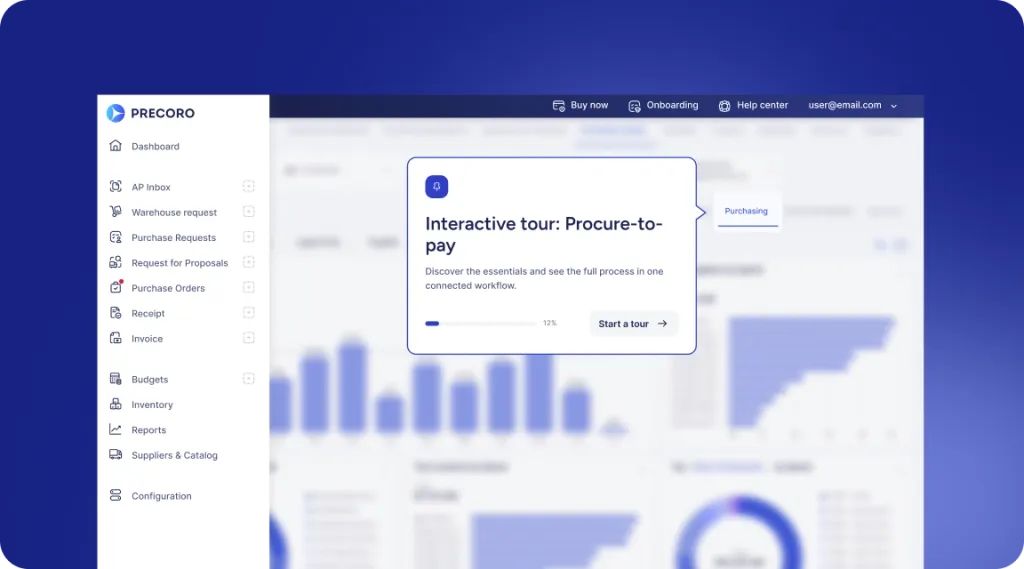
 Explore Precoro's features


















The purchase order process turns an approved purchasing need into a formal order to the supplier and tracks it through delivery, invoice checking, payment, and closure. It usually includes creating and approving the PO, sending it to the supplier, confirming terms, recording delivery, and matching documents before closing the order.
A PO connects what you ordered with what was delivered and paid for, so each step matters. Below, we’ll walk you through each step with a simple flowchart, then cover common pitfalls and ways to optimize the process.
What is a purchase order in the procurement process?
A purchase order (PO) is an official document a buyer sends to a supplier to confirm a purchase and its key details.
The purchase order process starts with identifying a need, then moves to creating and approving a purchase requisition. Next, a purchase order lists the items, quantities, prices, and delivery terms, and the buyer sends it to the vendor. Once accepted, the vendor delivers the goods or services.
The buyer receives and inspects the order for accuracy and quality, then performs a three-way match by comparing the PO, receiving report, and vendor invoice to authorize payment. Afterward, the PO is closed and all records are stored for future reference.
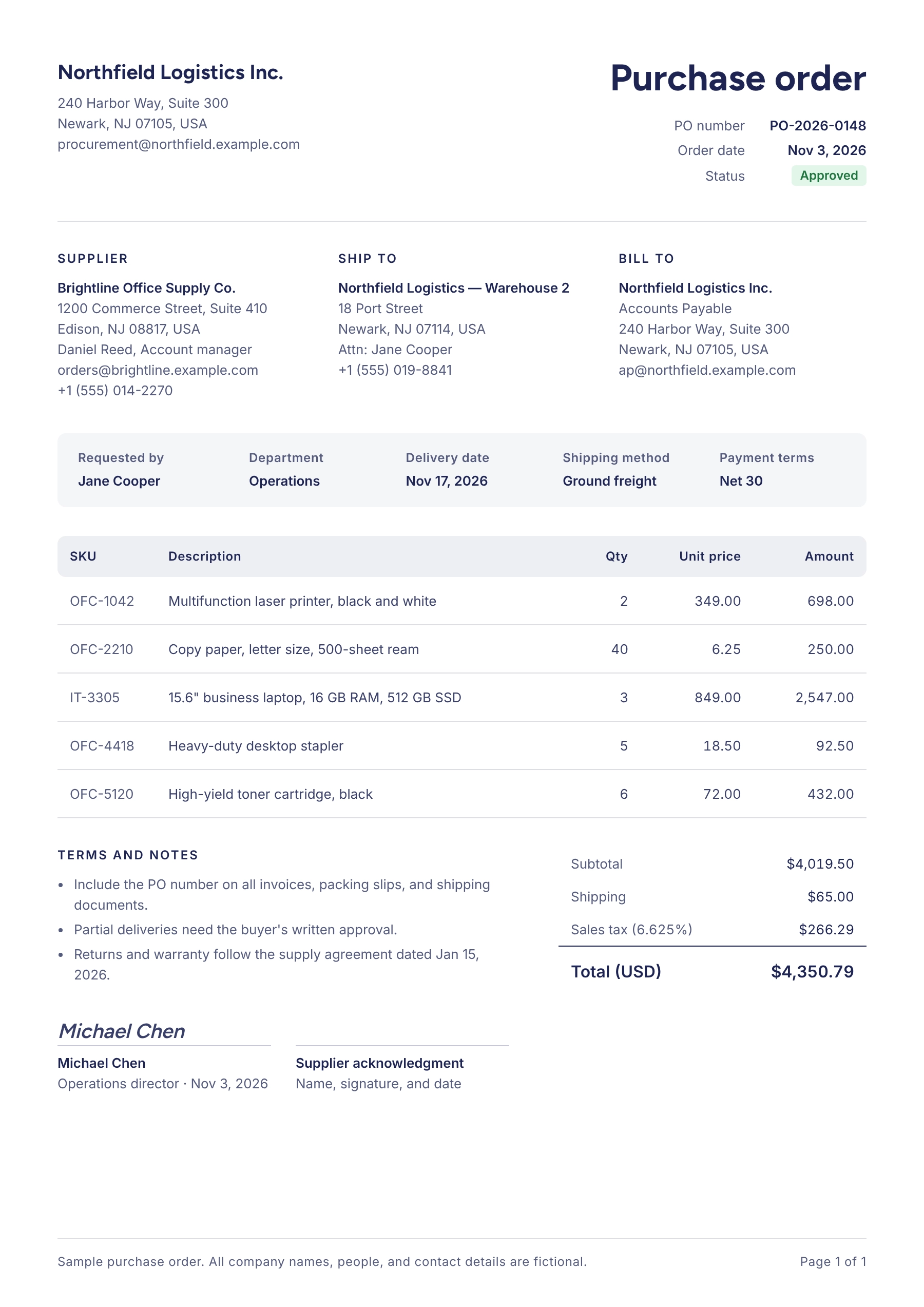
We’ll cover why companies use POs later. First, here’s what a purchase order should contain:
- Order date and a PO number
- Buyer and supplier information (full contact details for both parties, including the primary contact person, email, address, and phone number)
- Order details (item descriptions, quantity, unit price, and total cost)
- Payment information and payment terms (due dates, any discounts, tax details, and agreed payment conditions)
- Shipping method (if applicable)
- Delivery date and address
- Invoice address
- Sign-offs from authorized personnel to ensure compliance and accountability (if required)
- Any additional contractual agreements, warranty policies, or return conditions specific to the order
Here’s an example of a typical purchase order:
Why is the purchase order process important?
Purchase orders are an essential part of an organization’s purchasing process flowchart and can help businesses improve budget control. Here are the advantages of using POs:
- They help set clear expectations with suppliers, enhance communication with vendors, and ensure that a company gets what it needs.
- Once a supplier accepts a PO, it can form a binding agreement (depending on the applicable law and agreed terms), helping protect both parties from unsatisfactory outcomes.
- They make it easier to track purchase history, avoid duplicate purchases or unexpected invoices, and prevent uncontrolled spending, so cash flow is easier to forecast.
- POs increase financial control and provide evidence for auditing transactions.
What does the purchase order process include?
The purchase order (PO) process is a structured method businesses use to buy goods and services from vendors. It includes submitting a purchase request, getting approvals, issuing a PO, sending it to the vendor, receiving and checking the goods or services, and completing the payment. This workflow helps ensure every purchase is properly authorized, documented, and tracked, which leaves less room for errors and fraud.
The PO workflow is a key piece of the bigger procurement process flow. Procurement covers the entire process of acquiring goods and services, from finding suppliers and negotiating deals to managing inventory. The PO process is the operational core, where purchases are requested, tracked, and managed to keep spending organized and on budget.
The process works best as a clear, repeatable set of steps. A strong purchase order process makes sure everyone involved has the resources and approvals to order the right products in line with company policy. It also gives approvals and documentation a structured workflow and keeps complete records of every transaction for budgeting, spend oversight, and future analysis.
How does the purchase order process work?
The PO process can vary depending on a company’s size, structure, and spending needs. However, it typically includes these steps:
- Create a PO
- Review and approve the PO
- Send the PO to the supplier
- Confirm the PO and contract terms
- Receive the ordered goods or services
- Complete three-way matching
- Pay the invoice, close the PO, and store records
Step 1: Create a purchase order
In most cases, the procurement process flow begins with an employee submitting a purchase requisition (PR), which key stakeholders, such as department heads and the chief financial officer (CFO), then need to approve.
After the PR is approved, the next step in the procurement process flowchart is selecting a supplier. In some cases, the PR may already specify a supplier if one has been pre-approved or is the preferred vendor for the item or service. In other cases, the company may need to choose a new supplier, for example, through a request for proposal (RFP).
Once the supplier is chosen, the procurement team (in larger organizations) or a designated individual, such as a financial or operations manager (in smaller companies), creates a purchase order based on the approved requisition.
Where company policy or an existing arrangement allows it, a PO can often be created directly, without a purchase requisition. This simplifies the procurement process flow for routine orders without losing proper documentation.
Step 2: Review and approve the purchase order
Next, the PO goes through internal approval. Who needs to approve it depends on the company’s approval workflow, which can vary based on company size, hierarchy, spending thresholds, and the type of purchase.
For example:
- In a small business, the PO might only require approval from the operations or financial manager.
- In a large corporation, it might pass through several layers, such as the department head, procurement manager, and financial director, before final sign-off.
- For high-value purchases, additional approvals may be required, such as from the CFO or chief executive officer (CEO), to ensure alignment with strategic priorities.
- For specific categories of spend, like IT or marketing, the PO might need approval from the relevant department head or a category-specific manager.
Step 3: Send the purchase order to the supplier
Once the PO is approved, the business sends it to the supplier. Some companies upload the PO directly to a supplier portal in their procurement system, while others simply email it.
Step 4: Confirm the purchase order and contract terms
After receiving the PO, your supplier will review and accept it as issued or request changes. Depending on the applicable law and any existing contract terms, an accepted PO could create a binding agreement between the parties. The supplier can accept the PO in writing or through action, like shipping the order. Either way, both sides should agree on all terms before delivery begins.
Step 5: Receive the ordered goods or services
Once the delivered items have been inspected and meet the requirements, the next step in the purchasing flowchart is to formally acknowledge receipt by issuing a Goods Received Note (GRN) or a similar document. For services, the equivalent is a documented acceptance, such as a signed completion confirmation or an approved milestone. The receipt serves as official confirmation that the items were delivered as specified in the PO.
Step 6: Complete three-way matching
After the goods or services are delivered and inspected, the next critical step in the purchase order process is to make sure everything is in order before payment. This is where three-way matching comes in: a PO invoice processing step that compares the PO, the goods receipt (or service acceptance record), and the supplier’s invoice.
For example, if the supplier ships 90 units instead of the 100 ordered, or if the price listed on the invoice is higher than agreed upon, the company can flag these issues and resolve them with the supplier before releasing payment for the disputed amount.
The same logic applies to services. If an invoice bills 40 hours of work but the approved timesheet or milestone acceptance only covers 32, the 8-hour difference gets flagged for review before the full amount is paid.
Ultimately, three-way matching makes sure the company only pays for what was actually ordered and received, at the correct quantity and price. It guards against errors, fraud, and miscommunication and creates an audit trail that protects the business financially.
How to handle purchase order, receipt, and invoice mismatches
Even when the process is solid, discrepancies can still happen. When the documents don’t match on quantities or prices, flag the invoice for additional review and go through the following steps:
- Identify what specifically is different: a quantity, a unit price, a tax amount, or a missing receipt.
- Check your own records first, since the goods receipt may simply not have been posted yet.
- Contact the vendor with the PO number and details of the discrepancy.
- Agree with the supplier on how to proceed, whether that’s a corrected invoice, a credit memo (a document from the supplier that reduces the amount owed), a shipment of the missing items, or a return.
- For partial deliveries, match the invoice against the quantity actually received and keep the outstanding balance open on the PO.
- Hold payment until the issue is resolved. Whether you can pay the undisputed part depends on your company policy and the payment terms agreed with the supplier.
- Escalate the issue to procurement or finance management if it drags on past the deadline your policy sets.
- Finally, document the outcome so the audit trail explains why the final amount differs from the original PO.
Many companies also set a “tolerance threshold” (a small percentage or fixed amount) so minor differences between documents can still be accepted while larger ones get caught. Anything above the threshold goes to the person responsible for exceptions, who’s usually named in the company policy.
Step 7: Pay the invoice, close the purchase order, and store records
If all documents match, or any differences have been resolved, the confirmed invoice goes to the finance department, which pays it according to the agreed terms.
Before closing the PO, make sure there are no outstanding deliveries, invoices, or exceptions left to process. Then, archive the purchase order along with the associated documents (invoice, GRN/service acceptance record, and payment details). Keeping these records matters for a few reasons:
- The records serve as a trail of documentation for audits, helping the company prove that payments were made for legitimate, correctly priced, and correctly delivered goods or services.
- Proper documentation ensures compliance with internal policies, tax regulations, and legal requirements, making it easier to resolve any potential disputes or claims.
- These records are useful for future orders with the same supplier and for reviewing historical spending data when making budget decisions or negotiating with vendors.
PO process flow: step-by-step flowchart
Here’s a purchase order flowchart to guide you through the process.
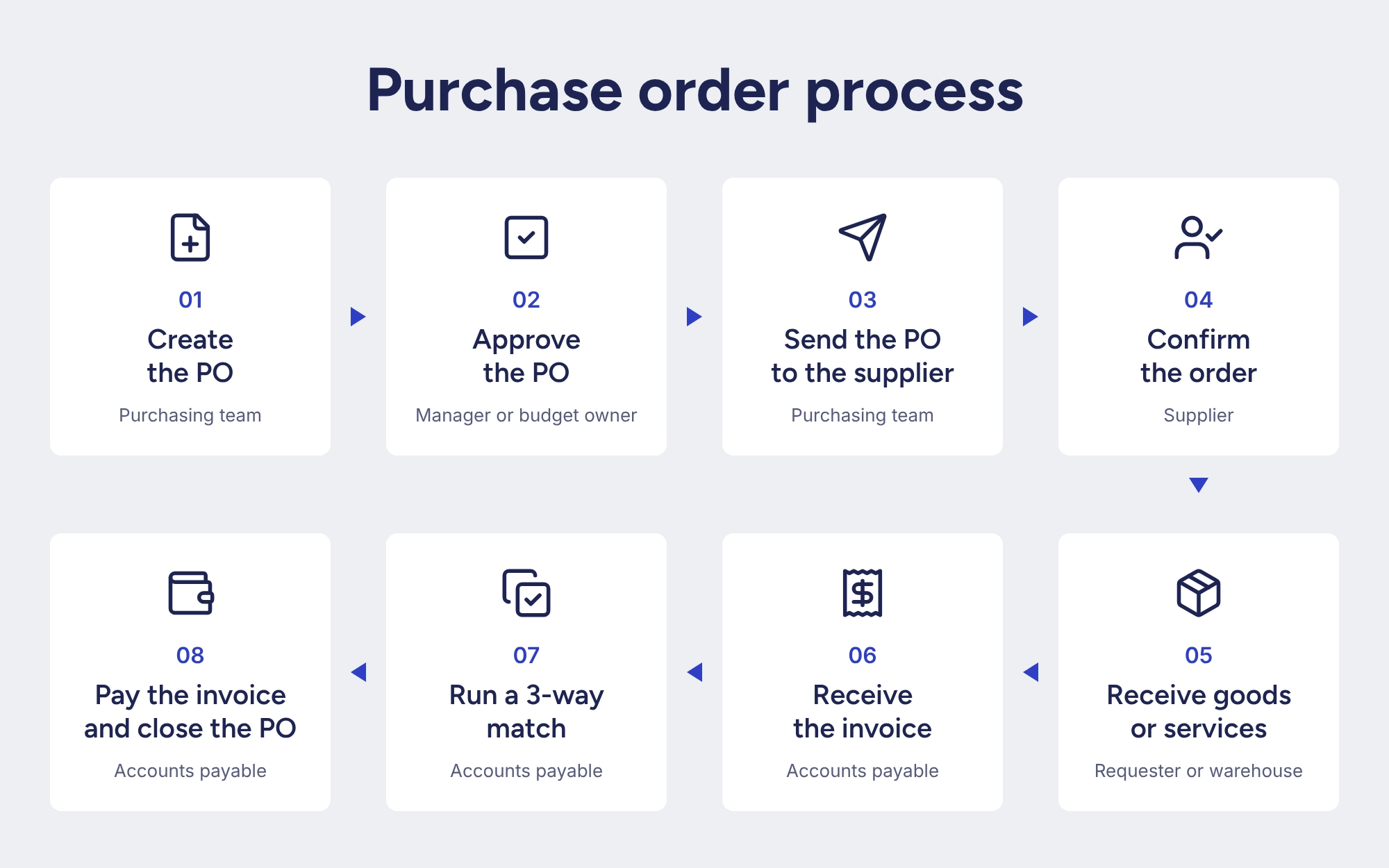
Let’s sum up the steps from the purchase order process flowchart that a company takes to process a PO and buy what it needs.
So, what are the required steps in the purchase order process?
- Create a purchase order (purchasing team);
- Get the PO approved by management;
- Send the PO to the chosen supplier;
- Receive the supplier’s confirmation of the PO;
- Receive the goods or services;
- Perform three-way matching of the PO, receipt, and invoice;
- Pay the invoice, then record and close the PO.
Common purchase order process challenges
A poorly designed purchase order process causes delays, added costs, and headaches. Here are the most common challenges to watch out for:
Inconsistent purchase order procedures
When departments or teams set their own rules for creating POs, the result is confusion, delays, and errors. For example, one department might approve orders based on a simple email confirmation while another requires detailed paperwork and multiple sign-offs. Or a department might approve a purchase without checking budget limits. This inconsistency makes orders hard to track, keeps teams out of sync, and often leads to unapproved purchases or missed deadlines.
Limited visibility into purchase order status
Without a centralized system for the procurement process flow, it’s hard to track where each order stands. This lack of visibility makes it difficult for teams to know what’s been ordered, what’s been approved, and whether the purchases are staying on budget. For example, if multiple departments order the same product without knowing what others have already ordered, the company can end up with excess stock and unnecessary expenses.
Delays in purchase order approvals
In larger organizations, the PO approval process can quickly become a bottleneck. When multiple people need to sign off on an order, things can easily get stuck if an approver is unavailable or if the approval steps aren’t clear. A single missed or delayed approval can disrupt the entire purchase order processing timeline and lead to stockouts, production halts, or customer dissatisfaction, especially in fast-paced industries.
Supplier management and data issues
Choosing and managing the right suppliers is a crucial part of the procurement process flowchart. But if your supplier records are out of date, you can’t be confident in your choices. You might end up ordering from a supplier who no longer gives you the best price or, worse, from one who can’t deliver on time.
Imagine setting up a PO for a product you need fast, only to find out that your supplier has changed delivery times without anyone updating their record. Suddenly, you’re stuck waiting for goods that should have arrived yesterday! And if your supplier details aren’t up to date, you might accidentally order the wrong product or the wrong quantity, leading to returns and extra costs.
Procurement technology integration problems
Switching from manual work to an e-procurement system can be tricky, especially when you need the new system to work with your existing tools. For example, if the new PO system doesn’t sync well with your accounting software, you may experience issues like duplicate orders, delays in processing, and mistakes in reporting. Careful planning can help you avoid or resolve most of these integration problems.
Best practices for purchase order management
Ready to tackle these PO process challenges? These best practices can help.
Standardize purchase order procedures
To keep purchase order processing smooth, standardize POs across departments. One of the best ways to do this is with unified templates that make sure every PO includes the essential information — like supplier details, quantities, payment terms, and delivery dates.
A consistent PO format makes missing information easy to spot and helps teams track orders. For example, you can use a template in the procurement software that lets users select the correct options from drop-down menus for key details like budget codes and addresses, minimizing the risk of errors.
Approval workflows also need to be standardized but can vary depending on the PO creator, department, or order size. A smaller order might only need approval from a team leader, while larger orders will require more levels of approval — like from a finance manager or senior executive. Automated PO management systems route each order to the right approvers based on preset rules, so everyone knows who needs to approve what and when.
Manage purchase order changes and amendments
Plans can change even after a PO goes out, from new delivery dates to quantity shifts. Because an accepted PO can form a binding agreement, handle these changes through a formal, documented process. Change orders and re-approvals are purchasing controls, and their rules come from the contract terms and your company policy.
A common approach is to issue a formal amendment (sometimes called a “change order”) that references the original PO number and explains exactly what’s changed. The supplier should acknowledge everything in the amendment in writing. Again, your company policy and the contract terms define which changes need one.
Be clear about when fresh approval is required for amendments. If the change is simply a date correction, you might only need the requester’s sign-off. But if a change raises the total value of the order, it should go back through the entire approval workflow. For example, a department adding 30% to an existing order could mean that the new total crosses a higher approval threshold than before — even if the original PO was already approved.
Keep a close eye on version control. Procurement tools can track every revision, including who made each change and when. This reduces the risk of working from outdated data or breaking the audit trail, and it prevents a classic problem: a supplier shipping against an outdated PO.
Improve purchase order management and tracking
Visibility is what streamlines the PO process. With procurement software, you can easily track POs in real time — from creation to approval to delivery. This means fewer missed steps; everyone involved knows exactly where the order stands at any moment. For example, automated reminders keep approval workflows moving smoothly, helping prevent delays when an approver is unavailable.
Beyond tracking, visibility provides valuable insights. Procurement software lets companies spot recurring issues, like slow approvals or late deliveries, so you can take action before they become bigger problems. With real-time data and reporting tools, you can proactively manage suppliers, adjust timelines, and negotiate better deals.
Improve the purchase order approval process
To speed up approvals and reduce delays in the purchase order flowchart, companies can automate approval workflows. In an automated PO system, approval hierarchies are predefined, and the system routes POs to the right people at each step.
For example, if a financial manager is unavailable, the system can automatically forward the PO to a backup approver, which helps keep the purchase order process from stalling. With automated alerts and tracking, you can quickly see where a PO is in the approval process, helping to avoid bottlenecks and keep orders moving on time.
Automate three-way matching
For faster, more accurate invoice processing and order completion, automate the three-way matching between POs, invoices, and receipts. Many modern procurement systems compare the details automatically and alert users to any discrepancies.
For instance, if the quantity on an invoice doesn’t match what was ordered, the system flags it for review before payment is processed. Automating this step of the purchasing process flowchart reduces manual checks, saves time, and lowers the chance of errors. It also minimizes the risk of overpaying for a product or paying for something that was never delivered.
Manage inventory and supplier relationships proactively
Most stockouts and rush orders don’t start in the warehouse. They start when each team or location reorders on its own, so nobody sees total demand until something runs out and someone places an urgent order outside the usual process.
With Precoro’s inventory management, you can track stock levels across locations and get notified when an item drops below its minimum. That gives you time to raise a regular request and send it through your normal approvals, instead of paying rush prices for an order nobody checked.
Having every request in one system also helps with supplier relationships. When you can see that five locations are ordering the same items from five different vendors, you can combine those requests into one larger order with a preferred supplier and ask for volume pricing.
Spend reports by supplier and category show which vendors get most of your budget. That’s where you have the most room to negotiate discounts, payment terms, or delivery schedules. Supplier performance data, like on-time delivery and price consistency, shows which vendors have earned that extra volume.
Choose a purchase order system that integrates with your existing tools
To get the most out of your procurement system, integrate it with key tools like enterprise resource planning (ERP) systems, accounting software, and PunchOut catalogs. This connects your workflow, reduces manual data entry, and lowers the risk of errors across departments.
When your procurement system is linked to your ERP, data moves between the two systems instead of being re-entered by hand. Which records sync (POs, suppliers, budgets, invoices) and how often depends on the integration, so check whether it syncs in real time or on a schedule.
Syncing data this way helps keep budgets accurate and supports better decisions. In addition, integrating with accounting software automates financial processes by passing invoice and payment data between the two systems, again within the records the integration supports.
The integration between a procurement system and suppliers’ PunchOut catalogs further simplifies buying and purchase order creation by letting employees browse items from pre-approved suppliers directly within the procurement system. This keeps purchases compliant with company standards, speeds up ordering, and reduces friction between procurement and other teams.
Which purchase order process metrics should you track?
You can’t improve what you don’t measure. Use the metrics below to see where your PO process works as intended and where it loses money or slows down:
| Metric | What it shows | How to calculate it |
|---|---|---|
| Cost per PO | What the purchasing process costs for each order | Purchasing process costs in the period / number of POs processed in that period |
| PO issue cycle time | How long it takes to turn an approved requisition into an issued PO | PO issue date – approved requisition date |
| PO approval time | Where approvals get stuck | Final internal approval date – submission date |
| On-time delivery rate | How reliable your suppliers are | Deliveries received on or before the promised date / deliveries due in the period x 100 |
| First-pass match rate | How often invoices pass the first matching check without an exception | Invoices matched without discrepancies / total invoices checked x 100 |
| PO compliance rate | How much spend that requires a PO is covered by an approved one | Spend covered by an approved PO / total spend requiring a PO x 100 |
You don’t need to track every metric at once. Start with a few that match your biggest pain points, like approval time if orders keep stalling. Review them at least monthly, and report time-based metrics as averages for the period.
Define each metric before you start measuring. For cost per PO, state which costs are included, and separate PO processing from broader procurement spending. For on-time delivery, decide whether to count per order or per shipment, and stay consistent.
For approval time, decide how resubmitted POs are counted: as a new submission or as a continuation of the previous one. For PO compliance, note any spend that’s excluded from the PO requirement and how you treat POs raised after the invoice arrives.
Procurement software can calculate most of these automatically, as long as it has accurate timestamps and spend data.
Why automate the purchase order process?
Automating the purchase order process reduces repetitive data entry, routes approvals, and helps teams track orders and matching exceptions. More and more companies are realizing that spreadsheets and paper no longer cut it for the purchase order process.
Sure, manual processing may feel tried and true, but it’s error-prone and time-consuming, and those errors and delays cost money.
As your company grows and buys more goods and services, the volume of purchase orders and invoices eventually becomes too much for your finance team to handle manually. That’s when it makes sense to turn to e-procurement and automate your PO process in a centralized system.
Changing internal processes may seem daunting, but with purchase order software like Precoro, onboarding and implementation typically take 2–8 weeks, depending on company size.
Here are some of the benefits of automating your procurement process:
- Get rid of stacks of paperwork or multiple spreadsheets and the inefficiency that comes with them.
- Create purchase orders from customizable templates or convert them directly from purchase requisitions in one click.
- Minimize manual data entry with the ability to choose from drop-down menus and item and supplier catalogs.
- Set up a smooth approval process in the system, where POs are automatically routed to the right people.
- Show the available budget to requesters, buyers, and approvers.
- Manage your supplier base and inventory, store contact information, and receive invoices in one place.
- Perform three-way matching automatically and sync documents with your ERP or accounting system.
And much more.
Purchase order process checklist: from requisition to payment
Use this checklist to make sure each stage is complete before you move an order to the next one.
Before the PO
- Need confirmed, purchase requisition approved
- Budget available for the amount stated in the request
- Supplier selected, either via a request for proposal (RFP) or from the list of preferred vendors
- Prices and terms are negotiated and documented
Issuing the PO
- PO number is assigned
- All fields in a PO are complete, from items and quantities to prices, payment terms, delivery, and invoice addresses
- The required approvals are recorded for the order’s value and category
- A completed PO is sent to the supplier
- Supplier confirmation is received
Receiving
- Delivery inspected for both quality and quantity, or service completion verified
- The Goods Received Note (or documented service or milestone acceptance) is issued and matched to the PO
Matching and payment
- Invoice matches the PO and the GRN (or service acceptance record) on price/quantity
- Any discrepancies are resolved and then documented
- Payment is scheduled to proceed according to the agreed terms
- PO, GRN/acceptance record, invoice, and payment records are all archived
- PO is closed once all deliveries and invoices are settled and no exceptions remain open
Purchase order process recap
Purchase orders (POs) are documents a buyer sends to a supplier to request goods or services. Depending on the applicable law and agreed terms, a PO can become a binding agreement once the vendor accepts it. The PO should include a description of requested goods or services, the quantity of items, and the agreed pricing and payment terms.
A purchase order process is a subset of the broader procurement process flow. It includes the following steps: PO creation with an assigned PO number, approval, dispatch to a supplier, supplier confirmation, receipt of delivery, three-way match, payment, and PO closure. Depending on your company size, industry, and requirements, the PO process steps may vary.
Key best practices for purchase order processing include establishing a company-wide purchase order process flow and automating it using procurement software. Automation improves visibility into order status and routes approvals according to preset rules, supporting tighter control over inventory and budgets if the system is configured to match your process. Plus, it saves your employees valuable time and reduces paperwork.
How to improve purchase order process efficiency
Standardize approvals, record receipts consistently, and monitor matching exceptions to improve PO efficiency. Book a Precoro demo to see how these controls can work in your purchasing workflow.
