Procurement System Guide: How Procurement Systems Transform Digital Purchasing
Read our guide to see exactly how modern procurement systems transform digital purchasing and cut costs.

Many organizations struggle to maintain purchasing control after budgets are approved. Procurement teams negotiate strong contracts, but leakage occurs when buying moves outside governed channels. Business units bypass processes because approvals are slow, systems are fragmented, and operational urgency wins over compliance.
The result is predictable but costly: according to the Umbrex Maverick Spend Rate analysis, off-contract spend accounts for ~10–20% of total procurement spend in most organizations. Organizations can reduce uncontrolled spending by implementing stronger procurement controls and automation. Read our guide about the best procurement management systems and find the one you actually need.
Keep reading to learn:
What is a modern procurement system?
Main challenges of manual procurement
Problems procurement systems solve
Essential automation features in procurement systems
How to choose the right procurement system for your organization
How to implement the procurement system
Procurement system integrations
Security, compliance, and auditability
Cost and pricing models of procurement systems
Vendors and products to consider
FAQs
What is a modern procurement system?
A modern procurement system is a platform that organizations use to manage purchasing activities such as requisitioning, approvals, ordering, and supplier coordination. It centralizes and digitizes the entire business-to-business (B2B) purchasing flow.
An e-procurement platform is a digital platform that automates and simplifies the entire purchasing process, including sourcing, ordering, payments, and contract management. By replacing manual, paper-based methods with digital tools such as Electronic Data Interchange (EDI), Enterprise Resource Planning systems (ERP), and cloud-based platforms, e-procurement helps organizations increase efficiency, cut costs, strengthen compliance, and gain clearer visibility into spending.
At its core, an online procurement system centralizes purchasing activities. It offers a single interface where users can submit purchase requests, get approvals, select suppliers, place orders, process invoices, create receipts, and track payments. Online procurement management systems help companies avoid risks and inefficiencies associated with paper- or spreadsheet-based processes.
Additionally, automated systems and built-in monitoring tools help reduce procurement teams' workloads, improve performance, boost process efficiency, and drive cost savings. They also help prevent maverick spending, when employees make purchases outside of approved contracts and policies.
With purchasing software, companies gain access to a broader range of products and services tailored to their needs. Quickly finding items from preferred suppliers makes it easier to manage inventory levels and control costs.
By automating manual, repetitive, or low-value tasks, procurement teams can focus more on strategic activities like negotiating better contracts and building supplier relationships.
What are the core components of a procurement system?
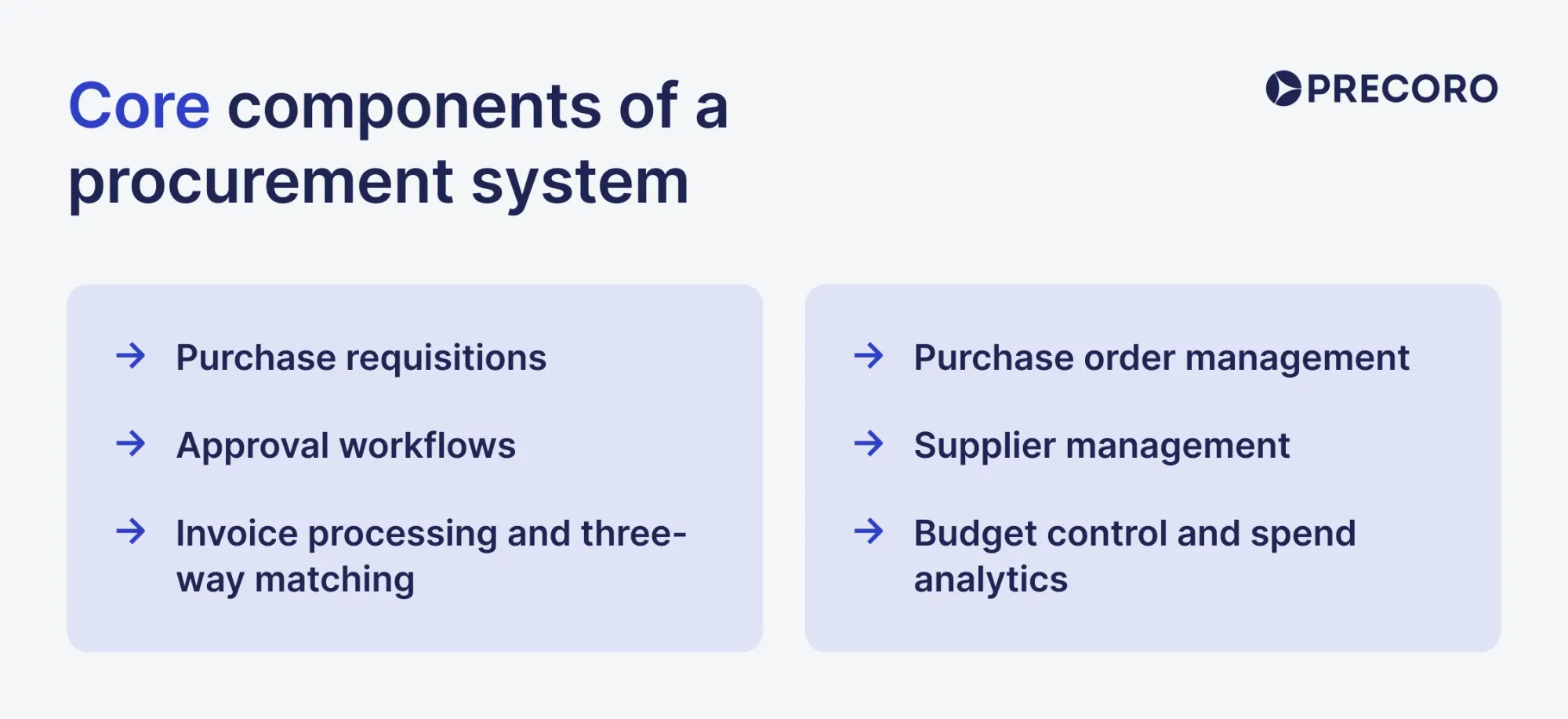
Most platforms organize around the same core functional areas, even if they call them different things:
Purchase requisitions — structured intake of purchasing needs. Employees submit structured requests that capture what they need, how much it costs, which budget it hits, and who needs to approve it. This is the first control point where the off-contract spending either gets stopped or gets through.
Approval workflows — authorization and control of purchasing decisions. Rules determine who approves what, based on amount thresholds, departments, cost centers, or supplier type. Well-configured workflows within procurement software mean no purchase moves forward without the right people seeing it first.
Purchase order management — creation and tracking of purchase orders. Once a request is approved, a purchase order is generated and sent to the supplier, and tracked. Receipt confirmations are logged, so invoices are only approved after goods or services are delivered.
Invoice processing and three-way matching — validation of invoices against purchase orders and delivery records. The procurement system compares the invoice against the purchase order (PO) and goods receipt. Discrepancies trigger exceptions; matches move automatically toward payment. This is where AI-powered Optical Character Recognition (OCR) has made the biggest difference in recent years, pulling invoice data out of PDFs and images out of email inboxes without human intervention.
Supplier management — centralized management of supplier information and interactions. This includes maintaining vendor profiles, contact details, contract terms, tax documentation, onboarding status, and performance history — all centralized instead of scattered across people's inboxes.
Budget control and spend analytics — monitoring and analysis of procurement spending. The system tracks expenditures against budgets in real time and breaks them down by dimensions such as department, location, category, project, or cost center to support purchasing and financial decisions.
How does the procurement system differ from a manual purchasing process?
A procurement system automates and digitizes the entire purchasing lifecycle — from sourcing and vendor management to invoicing — through centralized software, reducing approval times, minimizing errors, and providing real-time spend tracking. In contrast, manual purchasing relies on paper trails, emails, and spreadsheets and depends on human input at every step, which makes the process slower, more error-prone, and difficult to audit.
Key differences include:
- Efficiency and speed: Purchasing software uses automated approvals and digital catalogs, drastically reducing cycle times. Manual processes suffer from bottlenecks, lost paperwork, and redundant data entry.
- Visibility and tracking: Automated systems provide real-time dashboards for order tracking and spend analysis. Manual systems make it difficult to track spending or locate specific purchase orders without digging through physical filing cabinets.
- Cost control: Digital procurement solution enforces strict budget limits and preferred-vendor contracts, preventing unauthorized purchasing. Manual processes struggle to catch duplicate invoices or enforce policy compliance.
- Vendor management: Procurement systems maintain centralized, searchable databases for supplier performance, contracts, and communication. Manual methods rely on disconnected email threads and decentralized vendor files.
| Aspect | Manual purchasing | Procurement system |
|---|---|---|
| Efficiency and speed | Slow, manual, and paper-heavy | Fast, automated, and streamlined |
| Visibility and tracking | Hard to track orders and spend | Real-time dashboards and tracking |
| Cost control | Weaker budget and policy control | Stronger control and less maverick spend |
| Vendor management | Scattered emails and files | Centralized supplier records |
Why should organizations prioritize digital purchasing now?
The urgency is clear: PwC’s Digital Procurement Survey shows 64% of enterprises plan to reach procurement digitalization by 2027, up from 36% in 2024. Now organizations need more speed, more visibility, and tighter cost control without adding risk. Digital purchasing reduces friction, speeds up decision-making, and allows people to buy within clear compliance guardrails.
- Resilience: Global supply chains face disruptions; digital purchasing ensures agility and faster response times.
- Efficiency: Manual processes slow down procurement; digital procurement solutions reduce paperwork and accelerate approvals.
- Transparency: Digital procurement solutions provide real-time visibility into spend, suppliers, and compliance.
- Cost control: Organizations can track spending patterns and negotiate better deals in procurement systems.
- Sustainability: Digital tools help monitor Environmental, Social, and Governance (ESG) compliance and supplier sustainability metrics.
What are the main challenges of manual procurement?
While familiar, the manual approach to procurement introduces significant inefficiencies and risks that can hinder a company’s ability to manage its procurement activities effectively. These challenges are relevant for organizations across different industries, whether it's a construction business, the renewable energy sector, hospitality, healthcare, or other industries. Let’s break them down.
How does a procurement system reduce manual data entry errors and inaccurate records?
Manual data entry is inherently susceptible to human error. While tools like Google Sheets and Excel offer features to help users identify typographical mistakes and ensure accurate calculations, data misalignment remains a common issue. It’s easy to enter incorrect item data or select the wrong budget line, particularly in companies with numerous budget categories.
These errors lead to inaccuracies in procurement records, resulting in incorrect orders, duplicated purchases, and increased costs. Moreover, procurement or accounts payable teams must spend considerable time identifying and correcting these mistakes, further reducing efficiency.
Why does a procurement system improve spend visibility and purchasing control?
Spreadsheet-based records are often fragmented across departments, which makes it difficult to obtain a comprehensive view of spending, supplier performance, and order statuses. This scattered approach presents challenges for various stakeholders:
For requesters
Requesters can't easily check if an item is already in stock at a warehouse, leading to unnecessary purchases. Additionally, they lack visibility into order statuses and must frequently communicate with approvers for updates.
For approvers
Approvers don't have immediate access to budget information, making it difficult to determine if a purchase is within the allocated budget. They also need to verify item availability separately. Receivers must locate purchase orders (POs) to verify if items have been delivered in full. Payers struggle to identify the relevant requester when receiving invoices, which makes it challenging to verify and process payments accurately.
For finance teams
Finance teams encounter delays in financial reporting and budgeting due to the time-consuming process of consolidating data from multiple sources. Unlike users of top purchasing platforms, those who follow manual processes lack visibility and must switch between various spreadsheets and tools to find the necessary data. At best, this fragmentation leads to delays; at worst, it can hinder strategic planning and result in overspending.
For inventory teams
Inventory managers face difficulties maintaining accurate inventory levels due to disconnected systems, which can lead to overstocking or stockouts. Procurement managers find it challenging to track supplier performance and compliance, which can result in missed opportunities for better pricing and terms.
Unlike users of top purchasing platforms, those who follow manual processes lack visibility and must switch between various spreadsheets and tools to find the necessary data. At best, this fragmentation leads to delays; at worst, it can hinder strategic planning and result in overspending.
How does a procurement system strengthen procurement compliance and approval governance?
Maintaining compliance with procurement policies and external regulations is challenging when processes are manual. Without a centralized procurement management system where employees can follow established workflows and locate pre-approved items, they may turn to unvetted suppliers or overpriced goods.
Additionally, manual procurement processes may lead to issues such as:
- Employees may rely on verbal approvals with approximate pricing, resulting in overspending when the final cost includes higher-than-expected prices, taxes, or shipping fees.
- Manual processes can result in incomplete or missing documentation, making it difficult to enforce procurement policies and comply with external regulations.
- The absence of a digital audit trail makes it challenging to track who approved what, when, and why, increasing the risk of non-compliance and fraud.
- Without an online procurement management system, tracking supplier performance and compliance with contractual terms becomes cumbersome, increasing the risk of working with non-compliant or underperforming vendors.
Why is a procurement system necessary for scaling procurement across teams and locations?
Spreadsheets might work for a company that’s just starting out, but as a business grows and increases its volume of purchases and number of suppliers, things tend to get out of control. For starters, the manual entry and processing workload of procurement documents becomes unmanageable, leading to delays in order placement and fulfillment.
The larger the organization, the more stakeholders are involved in the procurement process, and the more approvers have to give the green light to purchase requisitions or purchase orders. Manual systems can create communication bottlenecks, slowing down approvals.
Additionally, manually handling a growing number of suppliers can lead to poor relationship management. Without specialized software, e-procurement tasks such as tracking supplier performance, supplier spending, and contract terms become difficult, often leading to missed opportunities for cost savings.
A clear example comes from one of Precoro’s customers, Riverstone Logistics. Decentralized, manual procurement across multiple locations led to inefficiencies and uncontrolled spending. After implementing a centralized procurement management system, the logistics company gained better visibility and control over purchasing and was able to save around $100K.
How does a procurement system reduce fraud risks, duplicate orders, and unauthorized spend?
Manual processes lack the controls and audit trails that an e-procurement platform provides. One of the major risks associated with a lack of transparency is fraudulent invoices. Reviewing them is time-consuming and prone to oversight by the accounts payable team when they manually reconcile each invoice to the related PO and receipt. Thus, manual reconciliation increases the likelihood that fraudulent invoices slip through and are paid.
One more risk is that manual processes make it easier to bypass proper vetting and approval steps for new suppliers, which increases supply chain vulnerabilities. Additionally, manual systems make it difficult to enforce segregation of duties, where different individuals handle requisition, approval, and payment. This lack of segregation, combined with the difficulty in tracking the creation and approval times of procurement documents, heightens the risk of unauthorized purchases and overspending.
When the challenges of manual procurement processes become too noticeable and overwhelming, companies seek efficient ways to centralize their procurement activities. They move beyond customizable spreadsheets and turn to procurement management systems.
These challenges are well documented in procurement research, which consistently points to centralization and automation as key ways to improve visibility, strengthen control, and reduce operational risk, as highlighted in the Precoro whitepaper on the cost of manual procurement.
What procurement and spend problems can procurement systems solve?
Procurement systems solve spend and procurement problems by automating workflows, improving purchasing visibility, enforcing compliance, and reducing costs. They also help manage contracts, reduce supplier risk, and remove manual inefficiencies across the procurement process.
How can procurement systems automate procurement, reduce costs, and improve savings?
Procurement systems automate all the repetitive manual buying work, such as purchase requests, approvals, invoice matching, and supplier onboarding. That reduces errors, speeds things up, and makes the whole procurement process much more consistent and predictable.
How procurement management systems automate procurement:
| Automation area | What the system does | Impact |
|---|---|---|
| Requisition-to-order | Automatically generates purchase orders from requisitions, routes them for multi-level approvals, and sends them to suppliers. | Eliminates delays from human error; accelerates cycle times. |
| Invoice processing | Matches invoices to POs and receipts automatically; triggers electronic payments. | Reduces manual data entry and processing costs. |
| Supplier onboarding & management | Automates vendor onboarding, performance assessments, and contract-status tracking. | Cuts administrative workload; improves compliance. |
| Inventory replenishment | Triggers orders based on real-time stock levels, production needs, and demand forecasts. | Prevents overstocking/stockouts; reduces holding costs. |
| AI & RPA | AI aggregates internal/supplier/market data to find savings; RPA automates repetitive tasks like invoice matching. | AI can reduce procurement work by ~30% and analysis time by ~90% . |
Can procurement systems shorten cycle times and improve supplier management?
Yes. Procurement systems do both — they cut cycle times through automated approvals and improve supplier management through centralized communication.
Take, for instance, Serial 1 Cycle Company. Before Precoro, users had to wait days for approval emails and had to call suppliers to confirm POs, chase invoices, and follow up on orders. After implementation, POs are passed directly to suppliers through a centralized Supplier Portal, invoices are submitted in the same system, and all supplier communication is handled in one place — eliminating the delays entirely.

How does digital purchasing improve compliance and risk management?
Digital purchasing makes compliance and risk management much stronger because the controls are built directly into every transaction. Instead of relying on manual checks, approvals are enforced automatically at each step of the process. Every action is logged in the background, so the system stays audit-ready without any extra effort from the team.
It also gives real-time visibility into supplier risk. Teams can spot potential issues early, before they turn into real disruptions. In practice, this means lower exposure to fraud, fewer compliance errors, and a much more transparent and accountable supply chain.
How digital purchasing improves compliance
- Embedded controls: Compliance rules (approval matrices, budget limits, role-based authority) are built directly into e-procurement platforms, preventing unauthorized or non-compliant purchases.
- Automated checks: Systems automatically verify transactions against internal policies, external regulations (e.g., ESG, Sarbanes-Oxley Act (SOX)), and supplier contracts.
- Audit-ready workflows: Every purchase is logged with digital records, making audits faster and reducing the risk of hidden gaps.
- Unified platforms: Cuts down on fragmented tools and manual workarounds, ensuring consistent enforcement across regions and departments.
How digital purchasing enhances risk management
- Real-time monitoring: Instead of periodic reviews, digital procurement uses Big Data and IoT signals to continuously track supplier performance and financial health.
- Predictive intelligence: AI-driven analytics anticipate disruptions (e.g., geopolitical tensions, market volatility) before they impact operations.
- Supplier transparency: Digital platforms provide visibility into supplier commitments, delivery timelines, and compliance with sustainability standards.
Which automation features are essential in procurement systems?
While the functionality differs from one e-procurement system to another, there are some core features to watch out for. When it comes to selecting purchasing software, the following modules will help employees overcome most, if not all, procurement challenges.
Key features of e-procurement software solutions
- Budget control with the ability to set up and manage budgets for different locations, departments, and projects, ensuring that all expenditures stay within allocated limits.
- Requisition management with the ability for users to generate purchase requisitions, assign requisition numbers, track their statuses, and seamlessly convert them into purchase orders.
- PO management with easy-to-use templates, the ability to send POs to suppliers, along with support for file attachments, internal notes, and PO status visibility.
- Invoice management with straightforward invoice generation from purchase orders or from scratch, and the ability to add attachments of relevant documents, and monitor the invoice status.
- Receipt management that allows users to create and manage receipts. This ensures that all deliveries are accounted for and meet the specified requirements.
- Expense reimbursement capabilities allow employees to submit claims for work-related expenses.
- Multi-level approval workflows for purchase requisitions, purchase orders, invoices, expense reimbursements, and receipts, ensuring thorough review and authorization processes.
- Three-way matching for purchase orders, invoices, and receipts. This feature helps the Accounts Payable (AP) team identify discrepancies between documents and ensure that only valid invoices are paid.
- Warehouse management with the ability to track and transfer stock to help companies maintain optimal inventory levels and prevent stockouts.
- Vendor management, featuring vendor contact information, contract management, onboarding and approvals of new vendors, and catalogs with pre-approved products to make sure purchasing policies are followed.
- Expense tracking capabilities that allow users to monitor expenditures in real-time, preferably by department, project, location, supplier, and category of goods.
- Advanced reporting with insights into procurement activities, spending patterns, and budget utilization. This feature helps organizations make data-driven decisions and identify cost-saving opportunities.
Ideally, digital procurement solutions should include all of the above to cover end-to-end procurement activities.
What capabilities should an e-procurement module include?
An e-procurement module should digitize and automate the entire purchasing lifecycle, from sourcing → contracting → ordering → receiving → invoicing → payment.
| Core capability | Description |
|---|---|
| E-sourcing | Identify, evaluate, and select suppliers through digital supplier discovery and qualification. |
| E-tendering / E-bidding | Publish tenders, collect electronic bids, score and rank offers, and manage auction processes. |
| Digital requisition & approval | Create online purchase requests with multi-level approval workflows by cost center, supplier, and hierarchy. |
| Purchase order management | Generate and transmit digital purchase orders to suppliers instantly. |
| Supplier management | Maintain vendor database, manage supplier catalogs, track performance, and store compliance documents. |
| Contract management | Store contracts securely, track expiration dates, and manage innovations and terms. |
| E-Invoicing & payments | Process invoices with OCR automation, integrate with accounting/ERP, and accelerate supplier payments. |
| Receiving / Goods receipt | Record and manage electronic acceptance acts or receipts for delivered goods/services. |
| Budget & inventory tracking | Monitor budgets across account codes, prevent overspending, and track inventory across locations. |
| Reporting & analytics | Real-time dashboards, procurement data visualization, vendor performance analysis. |
| System integration | Sync with ERP/accounting systems (e.g., QuickBooks), support multi-currency, and OAuth security. |
How important are requisitioning, purchase order approvals, and workflow automation?
Requisitioning, purchase order approvals, and workflow automation are critical because they prevent unauthorized spending, ensure budget compliance, and streamline procurement efficiency. Without them, organizations face delays, errors, and compliance risks that can disrupt operations and increase costs.
Should sourcing, contract management, and supplier portals be built-in or integrated?
It depends. For most organizations, sourcing, contract management, and supplier portals are better integrated (via Application Programming Interfaces (API) or a unified data layer) than tightly “built-in” as a monolithic system.
Integration is preferred because it allows each function to be best-of-breed, independently updated, and more flexible, while still sharing data like suppliers, contracts, and pricing across systems.
Monolithic, fully built-in procurement suites are only preferable when an organization prioritizes simplicity, centralized control, and single-vendor standardization over flexibility and modular upgrades.
Key trade-offs:
| Aspect | Built-in (Native module) | Integrated (Best-of-breed + connections) |
|---|---|---|
| Data consistency | Single database, no sync issues. | Requires real-time API sync; risk of data drift. |
| Implementation speed | Faster setup (no integration work). | Longer initial setup, but flexible. |
| Functionality depth | Good general features; may lack specialists. | Can choose best-in-class for each function. |
| Vendor lock-in | High (stuck with one vendor’s roadmap). | Low (swap components independently). |
| Cost | Lower upfront; potential upgrade limits. | Higher integration cost; better long-term ROI. |
| User experience | Unified interface, single login. | May require multiple logins unless SSO is configured. |
When built-in works best:
- You need a quick deployment with minimal IT overhead
- Your procurement process is standard (not highly specialized)
- You already use an ERP/procurement suite (e.g., SAP Ariba, Oracle Coupa, Ivalua) that includes these modules natively
- Budget is constrained, and you can’t afford integration development
When integrated is superior:
- You require advanced features (e.g., AI-powered supplier risk scoring, complex contract clause analytics) that best-of-breed tools offer
- You already have legacy systems you can’t replace (e.g., existing contract management or ERP)
- You need scalability to swap components as needs evolve
- Your organization values vendor flexibility and wants to avoid lock-in
What analytics and reporting features do procurement teams need?
The analytics capabilities of procurement software solutions, that consistently deliver value are:
- Spend by category, supplier, and department. The foundational view. How much was spent, with whom, by which teams? This should be available in real time, not only at month-end.
- On-contract vs. off-contract spend. What percentage of spend in each category goes to preferred, contracted suppliers? Where is the gap between negotiated savings potential and realized savings?
- Cycle time analysis. How long does the average purchase take from requisition to PO? Where are the bottlenecks — in the approval chain, in supplier response times, in goods receipt?
- Budget vs. committed vs. actual spend. Three different numbers that matter for budget management. Committed spend (approved but not yet invoiced) is one of the most actionable for budget owners, but the hardest to see in manual environments.
- Supplier performance tracking. Delivery lead times, on-time delivery rates, quality incident rates, and invoice accuracy. This data supports supplier conversations and sourcing decisions in the procurement management systems.
- Maverick spend identification. Purchases that bypassed the procurement process — identified by analyzing spend that doesn't originate from an approved requisition or isn't matched to a purchase order.
- Savings tracking. Documenting the difference between pre-negotiation and post-negotiation pricing, or between off-contract and on-contract purchasing, to quantify and communicate procurement's contribution to the business.
How do you choose the right procurement system for your organization?
To choose the right procurement system, focus on aligning the software’s features with your organization’s size, industry, and workflow needs — prioritize vendor management, automation, integration with ERP/finance tools, and strong analytics. Cloud-based purchasing platforms are now the standard, offering scalability, compliance, and cost control.
Key considerations:
- Business size: Small firms may need lightweight, affordable tools; large enterprises might require ERP-integrated solutions.
- Core features: Look for vendor management, purchase order tracking, approval workflows, inventory control, and reporting.
- Integration: Ensure compatibility with existing ERP, finance, or CRM systems.
- Automation: Automating requisitions, approvals, and payments reduces errors and speeds up workflows.
- Analytics: Real-time expenditure visibility and compliance monitoring are essential for strategic decision-making.
- Scalability: Cloud solutions allow flexibility as your organization grows.
What are the key selection criteria for small, mid-market, and enterprise buyers?
The right procurement software depends on an organization's size and complexity, which significantly influence the appropriate solutions.
Small organizations (under 200 employees) typically need straightforward requisition and approval workflows, basic supplier management, and strong integration with their accounting software. Implementation simplicity and time-to-value matter more than feature depth. Overly complex enterprise platforms can create configuration overhead that small procurement teams struggle to manage.
Mid-market organizations (200–2,000 employees) generally need more solid approval workflows, stronger spend analytics, and the ability to manage a larger supplier base systematically. Integration with ERP systems becomes critical. The question shifts from "does it work?" to "can it handle our process complexity and grow with us?"
Enterprise buyers (2,000+ employees) typically require multi-entity support, advanced workflow configurability, sophisticated analytics, robust API capabilities for ERP and other system integration, strong security controls, and the ability to support procurement teams across multiple geographies. Implementation complexity and change management requirements are proportionally larger.
The most common mistake across all segments is choosing a purchasing software based on its feature list rather than the actual use case. A platform might offer a lot of functionality, but that doesn’t mean it will perform well in the specific areas your organization actually depends on.
| Criteria | Small | Mid-market | Enterprise |
|---|---|---|---|
| Approval workflows | Basic requisition & approval workflows | Sophisticated, multi-level workflows | Advanced, highly configurable workflows |
| Supplier management | Basic supplier management | Systematic management of a larger supplier base | Multi-geography, multi-entity supplier support |
| ERP/Accounting integration | Good accounting software integration | Critical ERP integration | Robust API capabilities for ERP & multiple systems |
| Spend analytics | Minimal | Stronger spend analytics | Sophisticated, enterprise-grade analytics |
| Implementation complexity | Low — simplicity & time-to-value are top priorities | Moderate — must handle process complexity | High — significant change management required |
| Scalability | Less critical | Must grow with the organization | Must support global, multi-entity operations |
| Security controls | Standard | Moderate | Robust, enterprise-grade security |
How do you evaluate cloud vs on-premise procurement platforms?
To evaluate cloud vs. on-premise procurement platforms, focus on cost structure, scalability, security, IT resource requirements, and regulatory compliance. Cloud solutions excel in flexibility and rapid deployment, while on-premise systems provide stronger data control and customization. The right choice of digital procurement solution depends on your organization’s size, budget, and industry compliance needs. Here’s a detailed overview of cloud vs. on-premises procurement platforms:
| Criteria | Cloud procurement system | On-premise procurement system |
|---|---|---|
| Cost model | Operating Expenditure (OPEX) — Subscription-based. Lower upfront costs, predictable monthly fees. | Capital Expenditure (CAPEX) — Large upfront investment. Long-term ownership may reduce costs over time. |
| Scalability | Highly scalable; add users/features instantly. Ideal for growth. | Limited scalability; requires new hardware/software investments. |
| Deployment speed | Rapid implementation; minimal IT setup. | Longer deployment; requires hardware installation and configuration. |
| Maintenance | Vendor handles updates, patches, and backups. | Organization responsible for upgrades, security, and support. |
| Accessibility | Accessible anywhere with internet; supports remote teams. | Restricted to the internal network unless VPNs are set up. |
| Security & compliance | Vendor-managed security: potential concerns for sensitive industries. | Full control over data security; better for strict compliance needs. |
| Customization | Standardized features; limited deep customization. | Highly customizable to integrate with legacy systems. |
| Reliability | Dependent on internet connectivity. | Independent of the internet, reliable if internal infrastructure is strong. |
What vendor questions should you ask during demos and RFPs?
When evaluating software vendors, the questions you ask depend on the stage of the buying process. During demos, the goal is to confirm that the product actually works for your specific use case using real or realistic data. During Requests for Proposals (RFPs), the focus shifts to assessing whether the vendor is reliable, secure, and fairly priced before you commit.
Here are the essential vendor questions to ask during demos and RFPs, organized by category.
Questions for demos:
- Show me how you handle [specific workflow/use case] — watch it live
- Can you customize this for our unique requirements? — test customization live
- How does this integrate with [our existing systems]? — see integration in action
- What happens when [edge case/error scenario] occurs? — test robustness
- Can you demonstrate this with our actual data/format? — validate real-world fit
Prepare a list of questions revealing how the vendor performs in your specific scenario.
Questions during RFPs:
RFPs should assess vendor stability, security, pricing, and risk before you shortlist.
| Category | Key questions |
|---|---|
| Company background | What's your company's history, size, revenue, and industry experience? |
| Product features | How does your solution meet our specific requirements? What differentiates you? |
| Integrations | What ERP/CRM/procurement management systems do you integrate with? |
| Security | What certifications do you have (SOC 2, ISO 27001)? How do you handle data protection? |
| Implementation | What's your timeline? What are the fees for implementation, training, and onboarding? |
| Support | What support levels do you offer? How do you handle technical challenges? |
| Pricing | What's your pricing model? Any hidden costs? Payment terms? Discounts available? |
| References | Can you provide customer references from companies similar to ours? |
How can you run a proof of concept effectively?
A proof of concept (POC) validates that a procurement platform can handle your organization's specific requirements under realistic conditions. To run PoC effectively for digital procurement solutions, treat it as a small, focused project that tests the solution with your real data and workflows before committing to a full investment. The goal is to validate feasibility and quantify savings potential, not just demo features.
Key steps for a successful procurement PoC:
Step 1. Define the problem & scope precisely
List exact outcomes you need to validate (e.g., reduce requisition-to-order time by 30%, cut unauthorized purchasing).
Why it matters:
Avoids vague goals and overloads the PoC with too many objectives.
Step 2. Set clear pass/fail metrics early
Establish quantitative benchmarks: speed, cost savings, error rate, and user satisfaction scores.
Why it matters:
Enables objective go/no-go decisions instead of subjective opinions.
Step 3. Select vendors based on fit
Evaluate how closely they meet your specific use case, beyond reputation.
Why it matters:
Ensure the solution addresses your actual procurement challenges.
Step 4. Use real, representative data
Test with actual procurement data (thousands of Stock Keeping Units (SKU), multiple suppliers/categories).
Why it matters:
Clean, representative data reveals true capabilities and data quality issues.
Step 5. Assign a single leadership owner
One accountable person drives decisions, reports results, and keeps momentum.
Why it matters:
Prevents decision paralysis and maintains urgency.
Step 6. Test with real end users
Involve the actual procurement team, not just IT or leadership.
Why it matters:
Uncovers usability issues and builds buy-in from.
Step 7. Evaluate the vendor, too
Assess how easy they are to work with during setup, not just the software.
Why it matters:
A PoC reveals the quality of the implementation partnership before a long-term commitment.
Step 8. Make a decision quickly
Set a tight timeline (typically 3-4 weeks) and decide yes/no promptly.
Why it matters:
Dragging evaluations erodes urgency and stakeholder buy-in.
How should the procurement system be implemented?
Implementation is where procurement system projects succeed or fail, rather than the selection phase. A well-chosen platform can still underperform when implementation is poorly managed. A platform with some feature gaps can still deliver strong value when implemented well.
The most important framing for the implementation of procurement software: it's a process change project that happens to involve software configuration. Organizations that approach it primarily as an IT project and underinvest in process design and change management consistently underperform against their expectations.
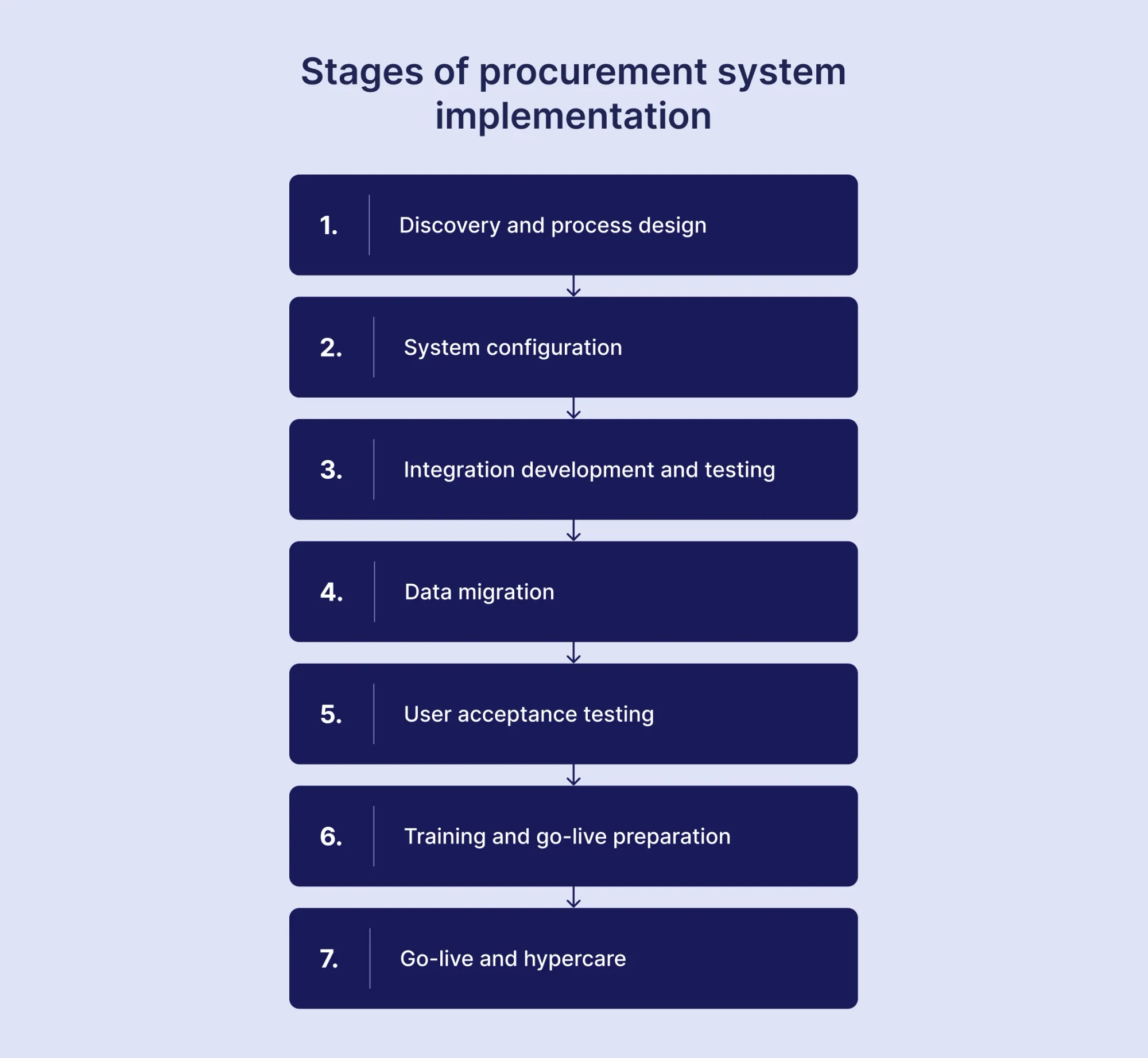
What are the stages of a successful implementation project?
Discovery and process design (weeks 1–4)
Document the current purchasing process — including all informal variations in practice, beyond the documented policy. Define the future-state process: how should purchasing work after the purchasing software goes live? Identify the gaps between the current and future states.
System configuration (weeks 3–8)
Configure approval workflows, category hierarchies, user roles, and supplier data so they match the future-state process design. This is the stage where decisions made during the discovery of procurement management systems are translated into system configuration. It requires active involvement from both procurement and IT, as well as the implementation team.
Integration development and testing (weeks 4–10)
Build and test integrations with ERP, finance, and other connected systems. Integration testing should go beyond basic “happy path” scenarios and use realistic data volumes and real-world transaction patterns.
Data migration (weeks 6–10)
Migrate supplier master data, open purchase orders, and historical spend data as needed. Data quality issues might appear during migration, so don’t forget to include the cleanup in your project plan.
User acceptance testing (weeks 9–12)
Business users test the configured system against the actual purchasing scenarios they'll encounter. Issues discovered here should drive configuration adjustments.
Training and go-live preparation (weeks 11–14)
Deliver the generic platform training and train users on the actual purchasing platform. Go-live communication that explains why the change is happening and what's different matters as much as technical training.
Go-live and hypercare (weeks 14–18)
Go-live with active support available for the first several weeks. Issue resolution during this period shapes user confidence in the procurement software.
How can you prepare stakeholders and drive user adoption?
Adoption starts with understanding resistance. The most common reasons for purchasing software adoption stalls:
- The process is perceived as slower or more complicated than what it replaced.
- Users don't understand why the change is happening — they see compliance as an imposition.
- The system wasn't configured to reflect how the organization actually works.
- Training was too generic or happened too far in advance of go-live.
Addressing these takes more than a training session. It requires involving key user groups in process design, communicating the business case for the change in terms that matter to them, and ensuring that the configured system actually reflects the workflows they'll experience.
Executive sponsorship drives adoption. When leaders use and support the procurement software, it reinforces its importance. When they bypass it, adoption drops.
Track adoption in the first three to six months after go-live. Focus on process adherence, not just logins — specifically, how much spend flows through the system versus outside it. Use the data to fix gaps early with targeted actions.
What data migration and cleanup steps are required?
Data migration for an e-procurement platform implementation typically covers three categories of data: supplier master data, historical purchasing data, and open transaction data.
Supplier master data is almost always messier. Duplicate records, incomplete information, outdated contact details, missing tax documentation, and inconsistent naming conventions are standard. Before migrating supplier data to a new system, aggressively deduplicate, validate that the information is current, and collect any missing documentation.
Historical purchasing data provides the baseline for spend analytics. How much historical data to migrate — and in how much detail — depends on the analytics requirements. Transaction-level data for the past 12–24 months is typically sufficient for most analysis; older data can be summarized.
Open purchase orders and requisitions are the most operationally critical. Any PO that will need to be received or invoiced against after go-live needs to exist in the new system. The cutover plan needs to account for transactions in flight at the moment of go-live.
The data migration process should include:
- Source data extraction and quality assessment
- Data transformation into the target system's format
- Validation testing (does the migrated data look right in the new system?)
- Reconciliation (does the migrated total match the source total?)
- A defined approach for handling data that can't be migrated cleanly
Data cleanup decisions made under time pressure at the end of an implementation are usually regretted. Allocate time early.
How long does implementation typically take, and what are common pitfalls?
Implementation timelines for procurement software vary based on organizational complexity, integration needs, and project management. Typical ranges are:
- Small organization, limited integration requirements: 8–12 weeks
- Mid-market, standard ERP integration: 3–5 months
- Enterprise, multiple ERP systems, global rollout: 6–18 months
These timelines assume a properly resourced implementation of the e-procurement platform, with a dedicated focus. They do not apply when the project is run alongside competing business-as-usual priorities.
Common pitfalls that extend timelines and reduce outcomes:
Underestimating the process design effort. Organizations that skip the step of documenting and agreeing on future-state processes before configuring the system spend significant time reconfiguring after the fact.
Integration complexity. ERP integrations almost always take longer than estimated. The integration between a purchasing platform and a legacy ERP is not a plug-and-play connection; it requires technical expertise on both sides and thorough testing.
Scope creep. The desire to solve every procurement problem in the initial implementation leads to stretched timelines and projects that never reach go-live. Disciplined scope management — delivering the core capability and phasing subsequent functionality — produces better outcomes.
Insufficient business user involvement. Implementations managed primarily by IT or an implementation partner without active engagement from the procurement and finance teams that will use the system tend to produce systems that work technically but don't fit how the business actually operates.
Underinvesting in change management. The technical implementation can be perfect and still fail if users don't adopt it. Change management isn't a communications afterthought; it's a core work stream.
How do procurement systems integrate with other business systems?
Procurement systems integrate with other business systems primarily through APIs, ERP connections, and middleware platforms, enabling seamless data flow between purchasing, finance, inventory, and supplier management. This integration reduces manual work, improves visibility, and ensures compliance across the organization.
What integrations are most important: ERP, finance, inventory, and HR?
ERP integration is the most critical and complex. The purchasing software needs to read cost centers, account codes, budget data, and supplier master records from the ERP, and it needs to write approved purchase orders, goods receipts, and invoice data back to the ERP for accounting and payment.
The specific integration requirements depend on how the ERP is used. In some organizations, the ERP is the system of record for all supplier master data — changes made in the procurement management system need to flow back. In others, the procurement system becomes the system of record, and the ERP receives approved data.
Finance and accounts payable integration ensures that approved invoices flow to payment without manual re-entry. When the three-way match is complete in the purchasing platform, the invoice should transfer to the AP system automatically with all relevant metadata (PO reference, cost center, account code).
Inventory management integration matters in organizations with physical goods procurement. When purchase orders trigger inventory receipts, the digital procurement solution and inventory management system need to maintain a consistent view of what's on order, what's been received, and what's available.
HR system integration supports user management and approval routing. When an employee changes roles, leaves the organization, or joins a new department, the procurement software's access rights and approval assignments should update accordingly. Managing this manually creates gaps in access control.
| Criteria | Procurement system | ERP |
|---|---|---|
| Primary focus | Purchasing, sourcing, and supplier management. | Company-wide operations across finance, HR, supply chain, and other business functions. |
| Best for | Teams that need dedicated spend control and procurement workflows. | Organizations needing a unified system across all business functions. |
| Implementation | Faster deployment — typically completed within weeks to a few months. | Longer implementation — often takes several months to years. |
| Cost | Lower upfront investment; subscription-based pricing is common. | Higher total cost of ownership due to licensing, implementation, and training. |
| Spend visibility | Real-time visibility into budgets, purchase orders, and supplier spending. | Spend data is available but often requires additional configuration or custom reporting. |
| Approval workflows | Built-in, customizable multi-level approval workflows. | Approval workflows are available but typically less flexible out of the box. |
| Supplier management | Dedicated supplier onboarding, performance tracking, and compliance tools. | Basic vendor master data management with limited supplier performance tracking. |
| Inventory tracking | Limited — focused on purchasing rather than warehouse management. | Full inventory and warehouse management capabilities. |
| Finance integration | Integrates with ERP or accounting tools via API. | Native — finance is a core module. |
| Contract management | Native — built-in contract creation, tracking, and renewal alerts. | Varies by vendor; often requires add-ons or customization. |
| Typical users | Procurement teams, finance, approvers, and requesters. | Finance, HR, operations, IT, procurement — entire organization. |
How do APIs, middleware, and iPaaS systems simplify integration?
APIs define the rules for how applications exchange data, middleware connects and manages communication between systems, and Integration Platform as a Service (iPaaS) moves that integration capability into the cloud with ready-made connectors and automation.
How they differ:
- APIs are the interface.
- Middleware is the integration and coordination layer.
- iPaaS is the cloud platform that packages integration tools, connectors, and monitoring into a managed service.
Together, these technologies of a digital procurement solution standardize data exchange, connect disparate systems, and centralize integration management, improving efficiency, scalability, and flexibility.
What integration risks should you be aware of, and how do you mitigate them?
Legacy system limitations. Older ERP systems may have limited integration capabilities. They lack modern APIs or store data in formats that require extensive conversion. Clarify the full implementation cost of a purchasing platform to avoid unexpected integration challenges after the contract is signed.
Data model mismatches. The way the procurement system structures supplier, cost center, and account code data may not align neatly with how the ERP structures the same data. Mapping these data models is detailed, time-consuming work.
Performance under load. Integrations that perform well in testing with sample data may behave differently in production with real transaction volumes. Prioritize load testing integration scenarios.
ERP upgrade impact. Every time an ERP gets upgraded, integrations might break. So it’s better not to assume it’s a one-time job, and plan for ongoing maintenance, rather than assuming it’s a one-time job.
Mitigation approach: Involve technical teams from both the procurement software vendor and the ERP side early, before implementation starts, to define how the integration will work. Plan integration testing as its own phase in the project. And document the integration setup clearly so future changes don’t require rebuilding everything from scratch.
How is security, compliance, and auditability addressed in procurement systems?
Procurement systems strengthen security, compliance, and auditability by enforcing strong data governance, role-based access controls, and automated compliance checks throughout the source-to-pay process. They also maintain audit-ready workflows end to end, helping organizations meet regulatory standards such as SOX, GDPR, and ESG requirements while reducing fraud risk and improving transparency.
What security controls should the procurement system provide?
Role-based access control (RBAC). Users should only have access to the data and functions their role requires. A purchase requester doesn't need access to contract financial terms. A supplier portal user shouldn't see other suppliers' data. Role granularity matters: broad access assignments that give everyone everything undermine the segregation of duties that makes the system's controls meaningful.
Single sign-on (SSO) integration. An e-procurement platform should integrate with the organization's identity provider (Okta, Azure AD, Google Workspace) to manage access centrally and automatically deprovision accounts when employees leave.
Multi-factor authentication (MFA). Required for all users, not optional.
Encryption in transit and at rest. All data moving between users and the system, and all data stored within the system, should be encrypted.
Supplier portal security. The supplier-facing interface is a separate access point that requires its own security controls — authentication, session management, and data isolation between suppliers.
Penetration testing and security audits. Vendors should conduct regular security testing and be willing to share results (or provide evidence of third-party certifications).
SOC 2 Type II certification. For SaaS purchasing software, this is the standard evidence of operational security controls. It should be a baseline requirement in vendor evaluation.
How does the system support regulatory and internal compliance requirements?
Procurement systems are designed to embed compliance into every stage of the purchasing process, ensuring organizations meet both external regulatory requirements and internal policies. Here’s how they support compliance:
- Automated audit trails – Every transaction is logged in the procurement software for transparency and accountability.
- Tax compliance – Ensures correct application of Value-Added Tax (VAT), sales tax, and statutory rules.
- Supplier due diligence – Screens suppliers against sanctions lists, ESG standards, and risk criteria.
- Contract compliance – Procurement management system tracks contract terms, renewals, and adherence to legal requirements.
- Policy enforcement – Prevents unauthorized purchases and enforces approval workflows.
- Segregation of duties – Role-based access reduces fraud by separating responsibilities.
- Spend visibility – Dashboards highlight off-contract or off-contract spend.
- Risk management – Flags unusual transactions or suppliers with poor performance.
What audit trails and access controls are necessary for accountability?
Audit trails are the evidence that controls were followed. In procurement, this means complete, tamper-proof records of:
- Who submitted a purchase request, and when
- Who approved or rejected it, at each step, and when
- What justification was provided for approval or rejection
- What changes were made to the purchase order after creation, by whom
- When goods were received, and confirmed by whom
- When the invoice was submitted, matched, and approved for payment
Any exceptions, overrides, or policy deviations, and who authorized them
These records need to be:
- Immutable. The audit log cannot be edited after the fact. Every action is recorded and preserved as it happened.
- Attributed. Every action is linked to a specific authenticated user, not a shared account or generic role.
- Timestamped. Actions are recorded with accurate system timestamps.
- Exportable. Auditors need to be able to export audit data in formats they can work with.
- Retained for the appropriate duration. Depending on regulatory requirements, audit records may need to be retained for several years. The system's retention policies should align with the organization's compliance obligations.
For organizations subject to external audit, the audit trail produced by a properly configured digital procurement solution significantly reduces the documentation burden and the time required to respond to auditor requests.
How much does the procurement system cost, and what pricing models exist?
Procurement systems typically cost anywhere from a few thousand dollars per year for small SaaS solutions to several million dollars for enterprise-level platforms, depending on scale, features, and deployment model. Pricing models vary widely, including subscription-based, fixed price, unit-based, and performance-linked structures.
What are common pricing models: subscription, per-user, per-transaction?
Per-user subscription is the most common model for SaaS purchasing software. A defined monthly or annual fee per named user or per active user. The distinction between named users (all users with access) and active users (those who log in during a period) matters in organizations where many occasional users need access.
Module-based pricing is common in platforms with distinct functional areas. Organizations pay for the modules they activate — procurement, sourcing, contract management, supplier management — and add capacity as they expand scope. This can be effective for phased adoption, but tends to make the total cost of ownership harder to predict.
Transaction-based pricing charges per purchase order, invoice, or other transaction processed. Less common for core procurement modules, more common for invoice automation and AP-specific tools. This model aligns cost with usage but creates uncertainty in high-volume environments.
Enterprise licensing for larger organizations involves negotiated annual contracts based on spend volume, user count, or transaction volume. Pricing is less transparent but more flexible.
How do you calculate ROI and total cost of ownership (TCO)?
Before selecting a procurement software, you need to quantify both the value gained and the true cost of running the system over its lifetime.
ROI formula
ROI (%) = ((Benefits – Total Cost) / Total Cost) × 100
Common quantifiable benefits to include in the numerator:
- Maverick spend reduction
Typical savings: 5–15% of addressable spend when purchasing is centralized - Process cycle time savings
Automated PO creation cuts approval cycles from days to hours - Invoice processing cost
Manual invoice handling averages $12–$15; automated drops to $2–$4 - Compliance & penalty avoidance
Contract visibility prevents missed renewals and off-contract buying
TCO components
TCO = Licensing + Implementation + Integration + Training + Ongoing support + Upgrades
What hidden costs should you watch for during procurement?
Implementation fees beyond the base quote are the most common surprise. Configuration, integration, data migration, and training might be quoted separately from the platform subscription. The full implementation cost of the procurement system is estimated before contract signature.
Integration development costs tend to be underestimated — particularly for legacy ERP integrations. Build contingency into the integration budget.
Ongoing configuration management requires ongoing resources. As the organization changes — new cost centers, new approval rules, new supplier categories — the digital procurement solution needs to be updated. Whether that's done by a vendor-managed service, an internal administrator, or a consulting partner, there's a cost.
User license expansion costs. If the organization grows, or if adoption expands to more users than initially anticipated, license costs increase. Understand the pricing model for growth before signing.
Customization costs. Platforms that require development work to accommodate requirements that should be standard configuration create costs that compound over time. Customizations need to be maintained through upgrades.
Annual price escalation. Multi-year contracts include annual price increases. Understand what the contract allows before signing a long-term deal.
Which vendors and products should you consider?
The procurement software market spans a wide range of architectures, price points, and organizational targets — from lightweight SMB platforms that can be deployed in days to enterprise suites requiring months of implementation work.
What differentiates leading procurement vendors from niche providers?
Leading procurement vendors differentiate themselves from niche providers by offering end-to-end platforms with global scalability, advanced analytics, and deep integration capabilities, while niche providers focus on specialized functionality, agility, and lower cost entry points.
| Feature | Leading vendors | Niche providers |
|---|---|---|
| Coverage | End-to-end Source-to-Pay (S2P) capabilities across the full procurement lifecycle. | Specialized modules focusing on specific procurement functions. |
| Integration | Deep integration with ERP and finance systems for seamless data flow. | Limited integrations; often requires middleware or custom connectors. |
| Scalability | Built for global, enterprise-scale operations with high transaction volumes. | More suited for regional or mid-market organizations. |
| Analytics | AI-driven analytics with predictive insights and advanced reporting. | Basic dashboards with limited predictive capabilities. |
| Compliance | Supports global regulatory frameworks and enterprise-grade compliance requirements. | Focused on localized or narrow compliance needs. |
| Cost | Higher upfront and ongoing investment due to enterprise capabilities. | Lower entry cost, making it accessible for smaller organizations. |
How do open-source or platform-based options compare to commercial suites?
Open-source platforms excel in cost savings, transparency, and customization, while commercial suites stand out for polished user experience, reliability, and professional support. The choice depends on whether flexibility and budget or stability and service are your top priorities.
Key comparison: open-source vs. commercial suites
| Feature | Open-source | Commercial suites |
|---|---|---|
| Cost | Typically free, often supported by community contributions or donations. | Requires paid licenses and recurring subscription fees. |
| Customization | Full access to source code enables deep customization and flexibility. | Limited customization, controlled by vendor capabilities and roadmap. |
| Support | Community-driven support via forums, documentation, and user groups. | Professional support with SLAs, dedicated help desks, and vendor assistance. |
| Security | Transparent codebase allows quick identification of issues, but vulnerabilities are publicly visible. | Vendor-managed security patches with less transparency into internal fixes. |
| Ease of use | Can be more complex and less polished in terms of user experience. | More user-friendly with streamlined interfaces and guided workflows. |
| Compatibility | May face integration challenges with proprietary or legacy systems. | Strong compatibility with mainstream enterprise software ecosystems. |
| Innovation | Driven by community contributions and collaborative development. | Driven by vendor R&D priorities and product roadmaps. |
What questions help shortlist vendors for your use case?
These questions help cut through the feature lists and identify which vendors are genuinely suited to your organization's requirements:
1. What does your implementation typically look like for an organization of our size and complexity? What's the realistic timeline? This surfaces the implementation model (direct vs. partner-led), the level of configuration effort required, and whether the vendor's expectations align with organizational capacity.
2. How do you handle our specific ERP integration? Could you provide references? Reference checks on integrations are more valuable than vendor-provided integration diagrams.
3. What does your approval workflow engine look like when the approval logic gets complex? Show us a configuration that matches our specific rules. This forces a live demonstration of the capability that matters most operationally.
4. What's the configuration model for ongoing changes — who makes changes, how long does it take, and is it included in the subscription? This reveals the operational overhead that will persist after go-live.
5. How has your product roadmap evolved in the past 18 months, and where is investment going in the next 12? This indicates whether the vendor is investing in the capabilities that matter for the organization's trajectory.
6. What does your support model look like — response times, escalation paths, account management? Support quality is most visible after go-live, when it's too late to use it as a selection criterion. Ask about it before.
Two or three vendors that perform well on these questions and key features form a solid evaluation shortlist.
If you’re looking for a clear, end-to-end way to handle the selection process, the ‘Everything You Need to Know for an Effective Procure-to-Pay (P2P) Process’ guide takes you from process design all the way to vendor selection.
How to choose a procurement system in 7 steps
- Define requirements → map current procurement gaps, involve stakeholders, set must-have vs nice-to-have.
- Set budget → include total cost of ownership (license, implementation, training, integration, support), choose SaaS or on-prem.
- Define feature needs → prioritize key modules like POs, supplier management, contracts, spend analytics, invoicing, ERP integration.
- Market research → identify vendors using analyst and review platforms.
- Shortlist vendors → reduce to 3–5 based on fit, size, industry, and budget.
- Evaluate and demo → run RFP, test real use cases, score usability, integration, security, support.
- Validate references → check real customer experience, ROI, and hidden costs.
- Decision and contract → compare scores, align stakeholders, negotiate terms.
- Implementation → plan migration, integration, training, pilot, then full rollout.
If you’re unsure what to choose, here’s a simple comparison of a procurement system vs a spend management platform to guide your decision:
| Feature | Procurement system | Spend management platform |
|---|---|---|
| Primary focus | Purchasing workflows — requisitions, purchase orders, approvals, and supplier management. | Total company spend management — procurement, expenses, corporate cards, travel, and budgets. |
| Scope | Narrower focus on the buy-side procurement process. | Broader coverage across all categories of organizational spending. |
| Expense management | Not included; typically requires integration with a separate expense tool. | Built-in expense submission, approval, and reimbursement workflows. |
| Corporate cards | Not typically included as part of the core system. | Often includes virtual and physical corporate cards with spending controls. |
| Travel management | Not included in core procurement functionality. | Integrated travel booking and policy enforcement in many platforms. |
| Budget control | Budget checks primarily at requisition and purchase order level. | Real-time, organization-wide budget tracking across all spending categories. |
| Approval workflows | Strong, multi-step approval workflows tailored to procurement processes. | Unified approval flows covering procurement, expenses, and card spend. |
| Supplier management | Dedicated tools for onboarding, compliance, and supplier performance tracking. | Included but often less detailed than dedicated procurement platforms. |
| Spend analytics | Focused on purchase orders and supplier spend insights. | Holistic analytics across cards, expenses, invoices, and procurement data. |
| Contract management | Typically included as a native or tightly integrated feature. | Varies by vendor; may be included or require integration with CLM tools. |
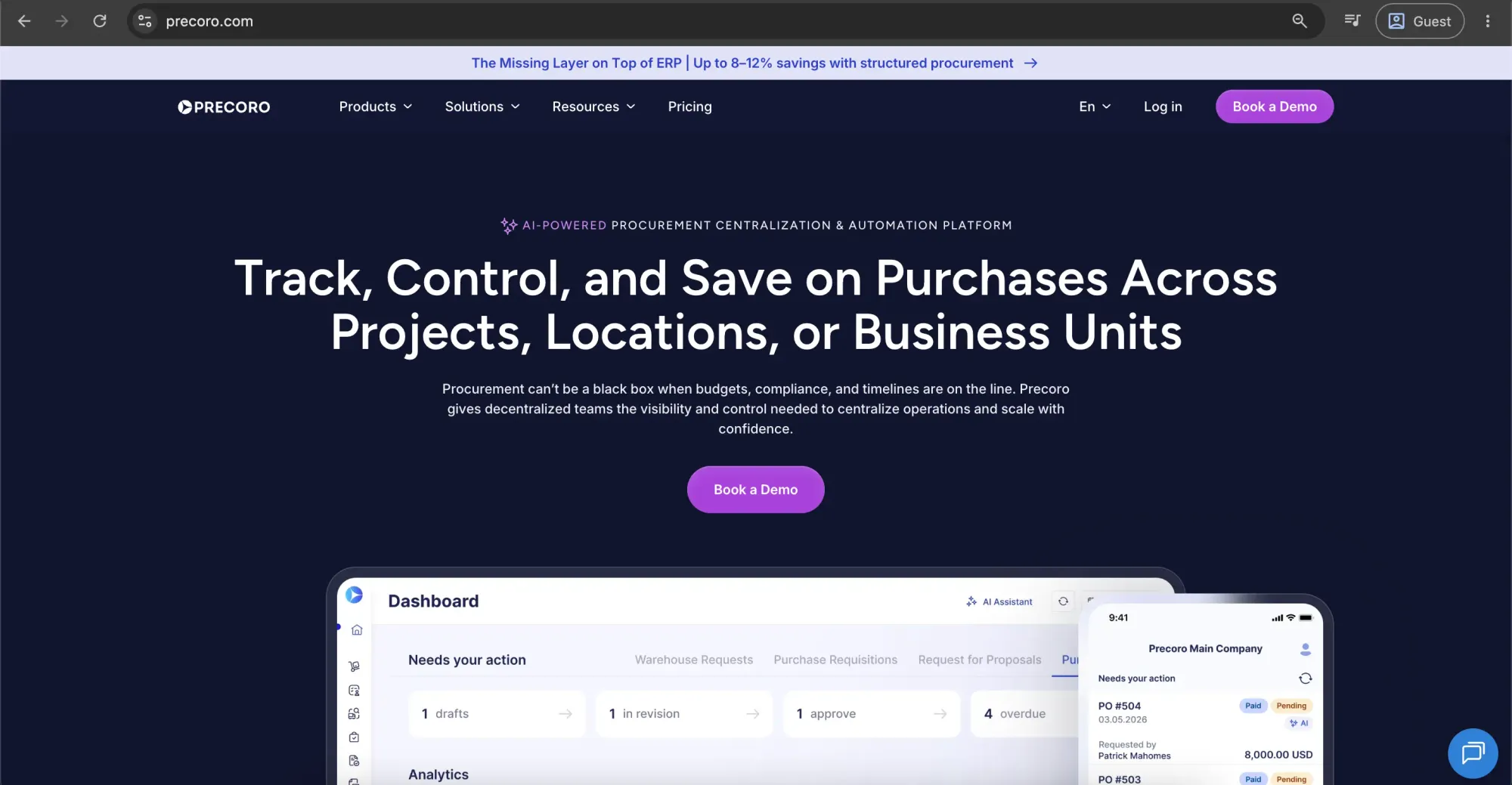
If you're looking for an e-procurement platform, Precoro is one option to consider. It's a procurement centralization platform designed for mid-sized organizations with distributed operations. The platform supports the full procurement lifecycle in a single system, including intake, purchasing, supplier management, spend control, accounts payable, and payments.
One of Precoro's notable features is its multi-entity management, which helps organizations manage procurement across multiple subsidiaries, locations, or business units from a single platform.
Customer ratings:
Advantages:
- Clean, intuitive interface that’s frequently recognized as one of the easiest procurement platforms to adopt.
- Quick, smooth implementation that doesn’t require IT involvement, supported by guided onboarding and a responsive customer success team.
- Built-in AI agents that streamline procurement and accounts payable workflows.
- Detailed spend visibility across any business segment, powered by custom reporting, clear dashboards, and an AI assistant.
- Virtual card management, so teams don't have to wait for a physical card, chase receipts, or process reimbursements afterward.
Shortcomings:
- Precoro is built to complement your ERP, not replace it. It handles purchasing controls and structure before data is passed into the ERP, which remains the main system for accounting and financial compliance.
- It provides only lightweight inventory and receiving functions for basic tracking, so it’s not meant to serve as a full inventory or warehouse management solution.
- It requires a thorough initial configuration of workflows, budgets, and approval rules, which can take time — particularly for teams moving away from spreadsheets or manual processes. Once set up, it enforces consistent, automated processes across the organization.
Pricing:
Precoro’s pricing model is relatively simple and consists of three pricing tiers:
- Core — starts at $499 per month billed annually, offers basic procurement features like automated approvals and three-way matching, along with spend & vendor management, a number of integrations (Xero, QuickBooks Online, NetSuite), and reporting analytics.
- Automation — starts at $999 per month billed annually, expanding upon the previous tier with AI-powered AP automation, several procurement operations (intake management, PunchOut catalogs), real-time budget tracking, SSO support, and more.
- The Enterprise tier offers no public pricing information but includes additional integrations, advanced admin controls, no user number limitations, and enterprise-grade data protection.
There is also a separate pricing option for companies interested only in AP automation, starting at $499 per month (billed annually). It includes advanced features for invoice processing, budget and vendor management, approval workflows, accounting integrations, and more.
Customer reviews (original spelling):
Joni T. — Capterra — “Precoro has been a huge improvement for our organization! It was easy to customize to fit our needs and has been a game-changer for our approval and purchasing process. The support folks at Precoro are so responsive and super helpful, they are dedicated and genuinely care about our success in using the product.”
Blaine L. — G2 — “I really appreciate the simplicity and user-friendliness of Precoro's interface. Everything is in predictable places, which makes navigating the software straightforward and intuitive. It's impressive how organized the process of sending purchase orders to suppliers has become with Precoro, streamlining the procurement workflow significantly. I also found the initial setup to be very easy, which made the transition smooth and hassle-free. Furthermore, I've found extracting order reports for internal replenishment to be quite efficient with Precoro. Overall, these aspects contribute to a positive and effective user experience with the platform.”
The author’s note:
Precoro is a strong fit for mid-market teams that are moving away from manual procurement or basic tools, but don’t want something heavy or overly complex to implement. It’s really straightforward to get up and running, and you don’t need a big consulting setup to do it.
It handles the core procurement flow well — things like purchase requests, approvals, purchase orders, budgeting, invoices, payments, and spend tracking — so everything is kept in one place without overcomplicating things.
And it also has a mobile app, which is handy because you can approve requests and handle basic procurement tasks on the go instead of being stuck at your desk. All in all, it’s a practical, easy-to-use option for teams that want more control over procurement without adding unnecessary complexity.
Frequently asked questions about modern procurement systems
E-procurement management software is a digital solution that helps companies automate and efficiently manage the procurement process. It streamlines tasks such as requisitioning, approvals, budgeting, invoice processing, supplier management, inventory control, and expense tracking. For example, biotech company Ridgeline Discovery reduced invoice processing time by 90% after replacing manual procurement workflows with a centralized procurement platform, gaining better control over approvals, budgeting, and purchasing data.
ERP (Enterprise Resource Planning) systems integrate various business functions, such as finance, HR, and supply chain, into a single platform, providing a comprehensive view of operations. On the other hand, e-procurement software solutions focus specifically on managing and automating the procurement process, including purchasing and supplier management. They are often used as a complementary tool to an ERP system.
The major benefits of an e-procurement management software include:
- Cost savings: Reduces procurement costs by improving negotiation leverage and providing visibility to identify savings opportunities.
- Increased efficiency: Automates and streamlines procurement processes to save time and reduce errors.
- Enhanced visibility: Provides real-time insights into spending, budgets, and expenses.
- Improved compliance: Ensures adherence to policies and regulations through automated controls.
- Better supplier management: Facilitates easier communication, evaluation, and management of suppliers.
The five steps of e-procurement are:
- Requisition: Requesting goods or services.
- Approval: Reviewing and approving purchase requests.
- Ordering: Creating and sending purchase orders to suppliers.
- Receiving: Confirming receipt of goods or services.
- Invoicing and payment: Matching invoices with purchase orders and processing payments.
Digital procurement solution automates a company’s internal purchasing processes, while a marketplace is an online platform where buyers and sellers engage in transactions.
Want to see Precoro in action?