Machine Learning Invoice Processing & Automation Explained
Learn how AI invoice processing automates data extraction, validation, and approvals to reduce processing time from weeks to days.

Most accounts payable (AP) teams are still manually processing invoices — someone is tracking down the invoice, typing in the line items, finding errors retroactively, then waiting for a signature before the bill gets paid.
Machine learning (ML) changes how that workflow works. The more invoices an ML system processes, the better it gets at extracting the right fields and verifying them against the defined criteria. In the meantime, discrepancies are routed to human operators for manual checking.
This guide covers what ML-assisted invoice processing involves and highlights the most critical features in a practical setting, along with techniques for implementing them.
Read on to find out:
What AI invoice processing is and why you need it
How AI invoice processing works
Key benefits of AI invoice processing
Features to look for in AI invoice processing software
How AI handles different invoice types and exceptions
Manual vs. AI-led invoice processing
Implementation steps for AI invoice automation
Challenges of ML-based invoice processing
Industries that benefit most
Evaluating and selecting AI invoice software
The future of AI invoice processing
Best practices for AI invoice processing
FAQ
What is AI for invoice processing, and why does your business need it?
AI for invoice processing refers to the use of AI technologies to read, verify, and route invoices without manual data entry. Businesses need it because manual processing simply doesn’t scale: it’s slower and becomes more expensive as invoice volume grows.
What exactly is AI-powered invoice processing?
AI-powered invoice processing automates the reading and data-entry parts of the process. It scans each invoice and cross-references the fields with expected data, flagging anything new or unusual for further review before proceeding. The main distinction between artificial intelligence (AI) and simple automation programs is that AI doesn’t use a rigid template as a baseline, so it can still handle invoices when vendors change them.
How does traditional invoice management differ from AI- or machine learning-based approaches?
Traditional invoice management uses manual processing, with staff members receiving invoices, manually entering information into accounting systems, and routing documents for further approval. This process is time-intensive and highly prone to human error, especially since it typically requires multiple touchpoints before final payment.
AI- or ML-based invoice management tools automate this entire workflow from receiving documents to final payment processing. The system automatically captures data from entire invoices, validates it against predetermined rules, and routes each document based on the invoice approval hierarchy without manual intervention.
Here are the key differences between manual and AI-driven invoice processing:
- Processing speed: Manual processing handles 5 invoices per hour; AI systems process hundreds or thousands daily
- Accuracy rates: Over 60% of invoice errors stem from manual data entry; AI systems achieve 95-99% accuracy
- Cost per invoice: Manual processing averages $9.84 per invoice; best AP teams who use automation reduce that cost by 79%, according to the Ardent Partners State of ePayables 2025 report.
- Approval time: Manual routing takes 8.2 days on average, according to the same report; high-performing teams shorten that by 79%.
What are the biggest pain points in manual invoice processing?
Manual data entry remains the biggest pain point for 37% of accounts payable (AP) professionals. The repetitive nature of data entry as a process diverts skilled professionals from more strategic tasks. For example, finance teams often have to input invoice data manually instead of performing higher-value analysis that could improve business outcomes.
Human error rates are also a significant issue in manual invoice processing. Other issues are duplicate payments, incorrect data entry, and missed early payment discounts. All combined, they create reconciliation challenges, which take extra time to identify and fix.
Lack of visibility into the invoice status creates various bottlenecks in the approval process. Invoices can get lost in long email chains or simply sit there waiting for approval unnoticed. The absence of real-time invoice tracking is what makes things like cash flow forecasting and vendor inquiry response that much more difficult.
Compliance and audit risks are higher with manual invoice processing. Unstructured filing hinders the company’s chance to maintain proper documentation trails or demonstrate compliance with financial regulations.
Why are businesses switching to AI-powered invoice solutions now?
With technology reaching a certain level of maturity, AI-driven invoice solutions now offer dependable results without heavy customization. There’s no need for large upfront investments, since cloud-based platforms have made these tools accessible to businesses of all sizes.
Business pressure also drives urgency around digital transformation. Organizations are under greater strain to achieve higher efficiency at lower cost. Additionally, the rise of remote work has made paper-based processes a genuine liability. Modern-day finance teams need solutions that can enable distributed workflows and grant real-time visibility regardless of a company’s location.
Return-on-investment (ROI) timelines have also reduced dramatically in recent years, with most businesses reaching ROI within 6-12 months. The financial case adds up quickly once certain factors are put together, like:
- Reduced labor costs;
- Fewer errors;
- Captured early payment discounts;
- Better cash flow visibility.
The combination of those four is usually enough to win over even the most skeptical Chief Financial Officer (CFO).
Meanwhile, regulatory requirements are becoming more and more complex. AI-powered invoice solutions manage to simplify compliance management to a certain degree by offering automated audit trails and real-time reporting. Manual processes clearly can’t meet evolving regulatory demands without more staff.
How does AI-based invoice processing actually work?
AI invoice processing uses several connected technologies, automating invoice handling processes from document receipt to payment approval. The system passes invoices through a sequential set of stages: data capture, extraction, validation, and routing.
Each component of such a system plays its own specific role in transforming highly unstructured invoice documents into actionable financial information that could be directly integrated with different accounting systems.
What technologies power AI invoice processing systems?
The AI invoice processing workflow combines four core technologies to automate document handling.
Optical Character Recognition (OCR) extracts data from invoice images and Portable Document Formats (PDFs) into machine-readable data, supporting both fully digital and scanned documents.
Intelligent Document Processing (IDP) combines OCR, ML, and NLP to extract data from invoices and convert it into a structured format that other systems can use. It’s more precise and comprehensive than OCR: with complex AI capabilities, it can interpret unique layouts or formats and capture its context as well as text.
Machine Learning (ML) understands invoice structure and gets better at extracting details from diverse formats with each subsequent use.
Natural Language Processing (NLP) captures the context of the text by working out variations in words, structure, and formatting across vendors or regions.
Robotic Process Automation (RPA) performs rule-based, repetitive tasks such as data entry, customer request processing, notification emails, and document flow.
These technologies operate together in an intelligent system that covers many different variables, like layouts. Extensive integration allows them to scan invoices in various formats without having to create a new template manually for every invoice type.
How does AI capture and read invoice data from scans, PDFs, and emails?
Invoices come into the system in different ways, like a forwarded email, a file dropped into a web portal, a scan from an office copier, or an Electronic Data Interchange (EDI) connection (for large trading partners). No matter where they come from, they’re all added to the queue and processed the same way.
OCR turns that scanned page or PDF into machine-readable data by analyzing the characters on each page. That’s historically where OCR falls short: the OCR software would require a separate template for each vendor’s invoice layout that would need alterations if a vendor changed their invoice.
AI-powered IDP skips the template phase completely. It adapts to a new layout each time it sees one and can even read through messy documents that older OCR tools struggle with, such as skewed scans, stamps over the text, degraded pages, or handwritten notes in the margins.
Once all the text is read, machine learning takes over the field-matching portion. Without a fixed template, it can locate information like:
- Vendor name
- Invoice number
- Date
- Line items
- Tax amount
- Total
Next, the numbers are sent to the correct general ledger code and cost center, with the department allocations from previous rules added in. All of it is then passed through to the Enterprise Resource Planning (ERP) or accounting system using an Application Programming Interface (API) connection.
How does machine learning improve invoice data extraction over time?
Accuracy improves quickly after deployment: baseline models begin at about 85-90% and increase up to 95-99% accuracy within roughly six months. Two distinct forces work together for this rapid improvement: pattern recognition and direct human feedback.
A pattern recognition system is structure-based, searching for information like headers, line-item tables, total sections, and payment terms based on where they usually reside in a document. There’s no need for a template anywhere in this process, allowing the system to extract and validate invoice data even from previously unseen formats.
Feedback operates differently: every time a user corrects a misread field or validates an extraction, that correction gets integrated into the model to improve future handling for similar cases.
Those two mechanisms work the fastest on repeat vendors. After somewhere between 10 and 20 invoices from the same vendor, the system can typically recognize that supplier’s layout and extract data from it with near-perfect accuracy. It’s a return that compounds significantly for any business with a high number of repeat vendors.
That learning capability gets tested the hardest during everyday format variation:
- Invoices running from 1 page to 12;
- Scans and digital PDFs;
- Multiple languages and currencies;
- Industry-specific terminology and layouts;
- Wildly different levels of line-item details.
Luckily, none of these factors require a new template each time — it’s all about having more invoices to learn from, instead.
What happens to an invoice from receipt to approval in an automated system?
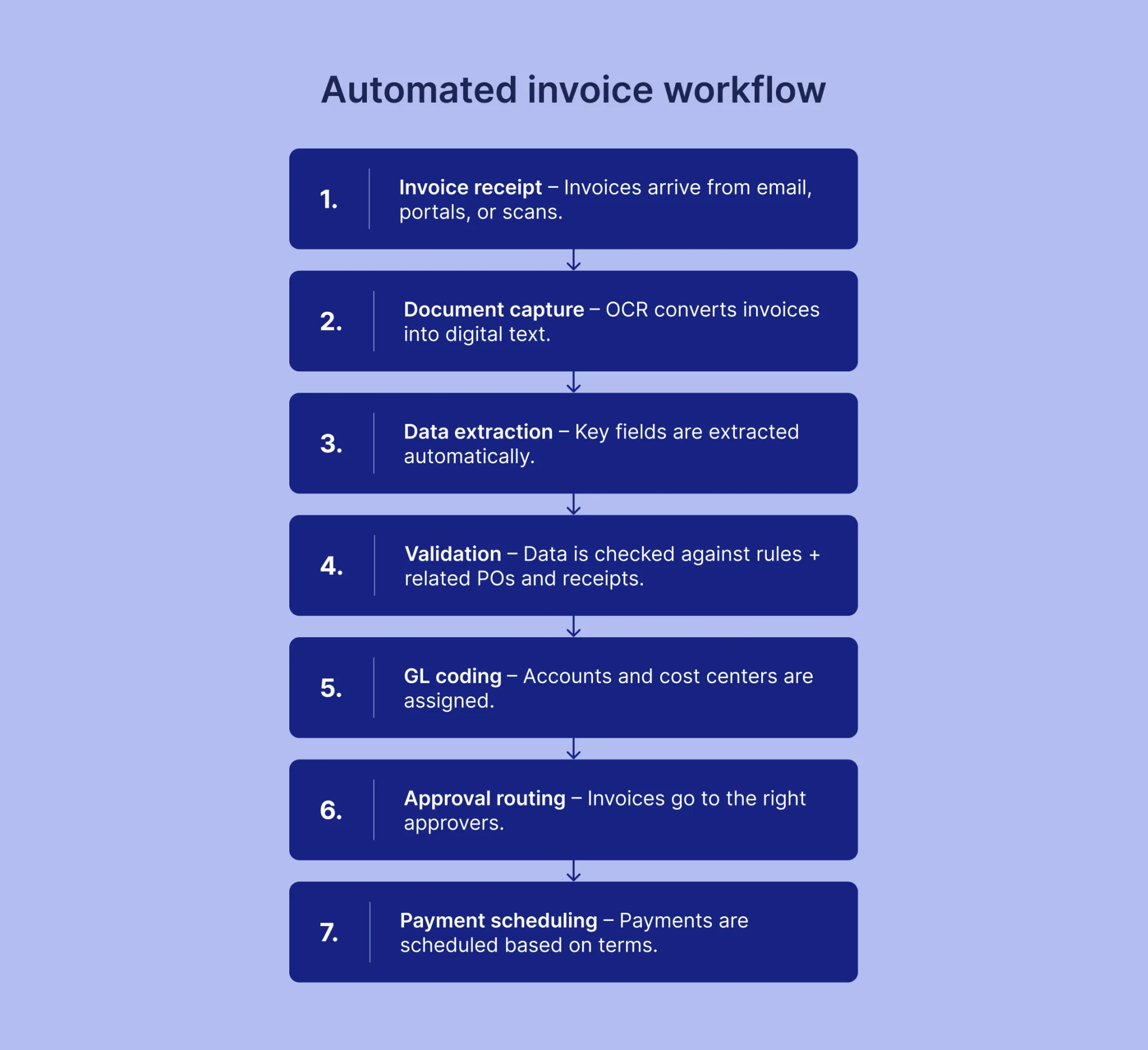
The automated invoice workflow moves through seven distinct stages, start to finish:
- The invoice enters the queue as soon as it arrives, no matter which of the intake channels brought it in.
- OCR processes it into text in a matter of seconds, whether from a native PDF or a flatbed scan.
- Machine learning extracts vendor names, vendor numbers, invoice numbers, dates, line items, taxes, and totals in just one or two seconds per document.
- Validation lines up those numbers with purchase orders (POs), contracts, receipts, and guidelines that apply. Thousands of invoices are usually filed without manual intervention. The few that usually have either a mismatch or a duplicate. Missing data is also flagged at this point, before going downstream.
- The system determines a general ledger (GL) code and cost center based on past data, automatically applying department allocations based on predetermined rules.
- Next comes the process of sending the bill for approval, which depends on the value of the invoice and its department.
- The invoice’s standard terms are used for payment (unless you need an early-payment discount or a cash flow adjustment).
These exceptions can arise at any point in the process. The score on a particular document may not be high enough, or it may fail the validation step. If either of these happens, then the document is passed to the AP personnel along with the problem identified.
What are the key benefits of AI invoice processing?
AI invoice processing helps businesses save time and reduce costs by automating data entry, validation, and approvals while lowering the risk of errors and duplicate payments. It also supports faster, more reliable payments, which, in turn, improves vendor relationships and helps capture early payment discounts and manage cash flow more effectively.
How much time can businesses save with invoice automation?
An invoice that used to take 17.4 days to process now takes only 3.1 days, according to the Ardent Partners' AP Metrics that Matter in 2025 report. That’s an 82% reduction in staff effort and time that can be spent on financial analysis and vendor management (all the work that doesn’t scale simply by adding more heads to a data-entry queue).
A study by PayStream Advisors also found that automation improves productivity by 33% while reducing processing costs by 42%. As invoice volume grows, a company can scale its processing capacity without hiring more staff to keep up.
What cost reductions can you expect from automated invoice processing?
The largest percentage of savings comes from labor costs. When invoice data entry, validation, and routing are automated, it’s no longer necessary to add staff to match bigger invoice volumes.
Paper and storage costs are mostly eliminated once documents go digital, leading to no printing, no postage, no physical storage, and no filing capabilities to maintain. Depending on the volume of invoices a company processes, annual savings can reach the thousands and even tens of thousands of dollars.
Early payment discounts are easy to miss in manual workflows — the terms exist, but invoices aren’t approved quickly enough to meet the deadline. 5,000 invoices per year, for example, typically results in between $30,000 and $150,000 in additional annual savings.
How does AI reduce human errors in invoice management?
According to the American Productivity & Quality Center (APQC) research, error rates drop to less than 0.8% with automation, from roughly 2% in manual processing. The highest-performing systems consistently push that figure below 1% through continuous validation from within the workflow itself.
One of the most obvious wins comes from duplicate payments: AI checks the invoice number, amount, date, and vendor before payment to catch resubmitted or duplicate invoices before they’re paid twice. Here are a few examples of what AI catches:
- A total that doesn’t match the PO;
- A GL code that’s clearly wrong;
- An absent PO reference.
Can invoice automation improve vendor relationships?
If processing is done automatically, on-time payment percentages rise from roughly 70% to 95%, while vendor relations improve very fast due to timely payments. Errors are decreased, leading to fewer refunds and credits.
Another benefit for vendors is a self-service portal that allows them to check their payment status online and avoid unnecessary calls to the accounts payable department. Timely and reliable payments result in certain benefits for a business itself, such as better prices or credit conditions from suppliers.
What impact does automation have on cash flow management?
Automation affects the speed of processing itself: when invoice processing decreases from two weeks to just a few days, finance departments can monitor payments in real time and schedule them based on cash balances.
That quick turnaround time enables a business to claim early payment discounts: according to the Institute of Financial Operations and Leadership, capture rates climb from about 58% in manual processing to 85-95% once approvals are fast enough.
Days Payable Outstanding (DPO) becomes easier to manage, as well. Real-time dashboards show future payment commitments, helping your team forecast and plan cash flow.
Above all that, AI-driven predictive analytics let finance teams know how much cash they need to retain and the optimal time to make a payment. Too early and they miss out on a discount; too late and they risk consuming their available working capital. That kind of insight lets a finance team know when their excess cash is safe to spend.
What features should you look for in AI invoice processing software?
Look for AI invoice processing software that combines accurate data extraction with matching, exception handling, automated approvals, and validation to catch errors before payment. It should also integrate with your accounting or ERP systems, support your currencies and languages, and provide strong security, audit trails, and real-time visibility.
What are the must-have features in modern invoice automation tools?
Most vendor pitches tend to offer variations of the same seven capabilities, but the most important for genuine invoices are matching and exception-handling.
- Data capture and extraction uses a combination of OCR plus machine learning to read invoices from any source: email, scanned documents, digital PDFs, or EDI feeds. No need to type any data by hand, either.
- Approval routing automation transfers invoices to the right approver, depending on the amount, department, cost center, or vendor.
- Three-way matching automatically reconciles the invoice against its PO and receipt before payment.
- Exception handling flags non-compliance and duplicates for review with an escalation path for anything that fails to adhere to policy.
- Real-time dashboards provide ongoing access to status and trend information on key indicators, including bottlenecks, expenditure patterns, and returns.
- Mobile approvals let decision-makers approve invoices away from their desks.
- Audit trails automatically record all actions, approvals, and changes to support compliance and internal controls.
Misconfigure matching and exception handling, and the rest of these features will just keep automating work that didn’t have to be automated in the first place. In Precoro, these features are handled by AI Crews that process invoices touchlessly, so your team has more time to focus on strategic sourcing and process improvement — things that need active human input.

How important is integration with existing accounting systems?
The value of an AI-driven invoice automation platform is only as high as its link to the company’s accounting system. If there’s no seamless integration with QuickBooks, NetSuite, Xero, Microsoft Dynamics, Sage, or an existing ERP, your team will need to enter every invoice manually, erasing most of the time savings automation was supposed to provide.
A proper integration goes both ways: invoice data automatically feeds into the general ledger, while vendor records and the chart of accounts flow back the other way. Purchase order details are included in the mix, so you don’t have to enter data on either side.
Speed also matters here. A batch upload that syncs once a day or once per shift creates a significant visibility gap that real-time or near-real-time sync resolves. This is important during vendor evaluation, specifically, as having a pre-built connector for your ERP can reduce implementation and ongoing maintenance.
What role does automatic data validation play?
Line-item errors and duplicate invoices are caught before the approval stage. Additional data validation keeps the spending within approved limits and makes sure GL codes are correct. Besides that, it confirms whether a specific vendor has the authorization to bill the organization.
Should your invoice software support multi-language and multi-currency processing?
Invoice processing becomes somewhat more complicated with international operations because of the need to support multiple languages and currencies. Otherwise, automation will require a manual review for every foreign invoice.
On the language side, solutions like Precoro provide support for English, German, French, and Spanish interface languages, while its Intelligent AP Automation is even more advanced and supports Norwegian, Japanese, Hebrew, Swedish, and Traditional Chinese, among others.
Currency is very similar: all external costs are converted to the company’s default currency, maintaining the original currency value on record for audit purposes.
Of course, none of this is relevant for any company that only deals with domestic vendors. But it’s definitely something worth considering in advance if a company has plans to expand into the global market. Adding support for multi-currency and multi-language tends to be far more expensive later than at the beginning of implementation.
What security features are essential for invoice processing systems?
Invoice data is considered financial data, so security expectations should be high by default and cover the following features:
| Feature | What it does |
|---|---|
| Data encryption | Secures invoice data in transit and at rest, so capturing or stealing storage won't automatically expose all the data inside. |
| Role-based access | Permissions designated per end user, deciding who can view, edit, approve, or touch a specific vendor or category down to individual invoice types. |
| Multi-factor authentication | An additional verification so that a stolen password alone won't be enough to get in. |
| Compliance certifications | SOC 2 Type II, ISO 27001, and GDPR are all proof of the platform's compliance with both internal security requirements and outside audits. |
| Audit trail | Tracking of each user interaction with each invoice and any changes, down to exact timestamps. |
| Fraud detection | Alerts to any odd submissions, like a slightly different bank detail, an odd line item, or requests outside the normal range. |
Regulated industries like financial services or healthcare often have security mandates that not all invoice processing solutions can satisfy in their entirety.
How can AI handle different types of invoices and exceptions?
AI invoice processing can handle a wide range of invoices, regardless of their source or format, automatically sending anything uncertain to a human reviewer. It quickly processes easy invoices and catches complex ones for review, which is exactly what keeps automation fast without sacrificing accuracy.
Can AI process invoices in various formats (PDF, email, scanned documents)?
AI systems have no preference or bias in terms of presentation or the delivery method of an invoice. Digital PDFs, scanned paper, email attachments, and even a photo are all processed the same way.
Multi-page invoices are scanned smoothly, too. The system recognizes the page breaks to maintain context throughout the entire document. For instance, a line-item table that spans several pages will still be read correctly without anything missing.
Imagine two different invoices landing in the same queue an hour apart: one’s a clean, native PDF received directly from the ERP of a large distributor; the other’s a slightly distorted photo of a handwritten receipt shot on someone’s phone and emailed. Despite everything, the system would read each invoice with the same speed and accuracy. Both invoices will exit the queue with their fields extracted and ready for validation.
Convenience is only a part of what that flexibility provides. A vendor who’s allowed to continue using the same invoice format will likely continue to submit on time. After all, they don’t have to learn new portals or templates each time.
How does automation handle non-standard or complex invoices?
Non-standard invoices that contain irregular layouts, mixed content, handwritten notes, or an unconventional format aren’t rejected outright in a competent invoice automation system. All data extractions are assigned a confidence score, with everything below a certain level held back for human review.
One invoice with several billing entities and an invoice with a prorated charge are both passed on to a human reviewer automatically, even when every field is read correctly. The same happens for a payment term the system isn’t familiar with; reading the data correctly doesn’t mean the decision is right.
What happens when the AI encounters unclear or missing information?
Not all invoices come through clean, be it due to an empty field or a number that doesn’t add up. Some documents are too degraded to be read with any kind of confidence and need a human review from the start.
Common triggers for manual review include:
- Illegible text or severely degraded document quality;
- Missing purchase order numbers when PO matching is required;
- Conflicting amounts in totals and line item sums;
- Unrecognized vendor information that doesn’t match existing master records;
- Invalid or missing tax identification numbers (TIN) required for compliance.
Regardless of the trigger, the invoice will be routed to whoever’s responsible for that issue. If the same problem has already been recorded, then the software will provide the existing guideline, so the reviewer doesn’t have to come up with a solution again.
The invoice can proceed after a reviewer makes the necessary changes, without any separate approval or resubmission. Routing’s original purpose was to fix a specific issue with a person, after all.
How are invoice discrepancies and duplicates detected automatically?
The matching and duplicate checks that identify the majority of invoice errors were discussed previously: the same PO check, the same vendor/amount/date checks that identify a resubmission. What companies really need to watch out for is any behavior that deviates from a vendor’s normal pattern.
That’s where historical pattern analysis comes in. An invoice with an unusually large amount for that vendor, or an instance of payment terms not matching what your records state — either one can trigger a flag for review, even if all the individual data fields are in order. A submission frequency pattern that spikes out of nowhere is treated the same way, which can be a sign of fraud disguised as a regular invoice.
The aggressiveness of the analysis requires some tuning: tighter tolerances catch more issues but send more invoices for human review, while looser tolerances make automatic scanning faster but increase the risk of letting a real discrepancy through. Most companies aim for something in between these two opposites, tweaking things as they learn how each vendor operates and how much they can trust them.
Manual vs. AI-led invoice processing (comparison)
Look at how manual invoice processing stacks up against AI invoice automation, and you'll notice that the difference isn't just a handful of points: the approval cycle that was (roughly) a 10-20 day effort manually is 1-3 days with automation. The same sort of leap occurs almost everywhere else in the table below.
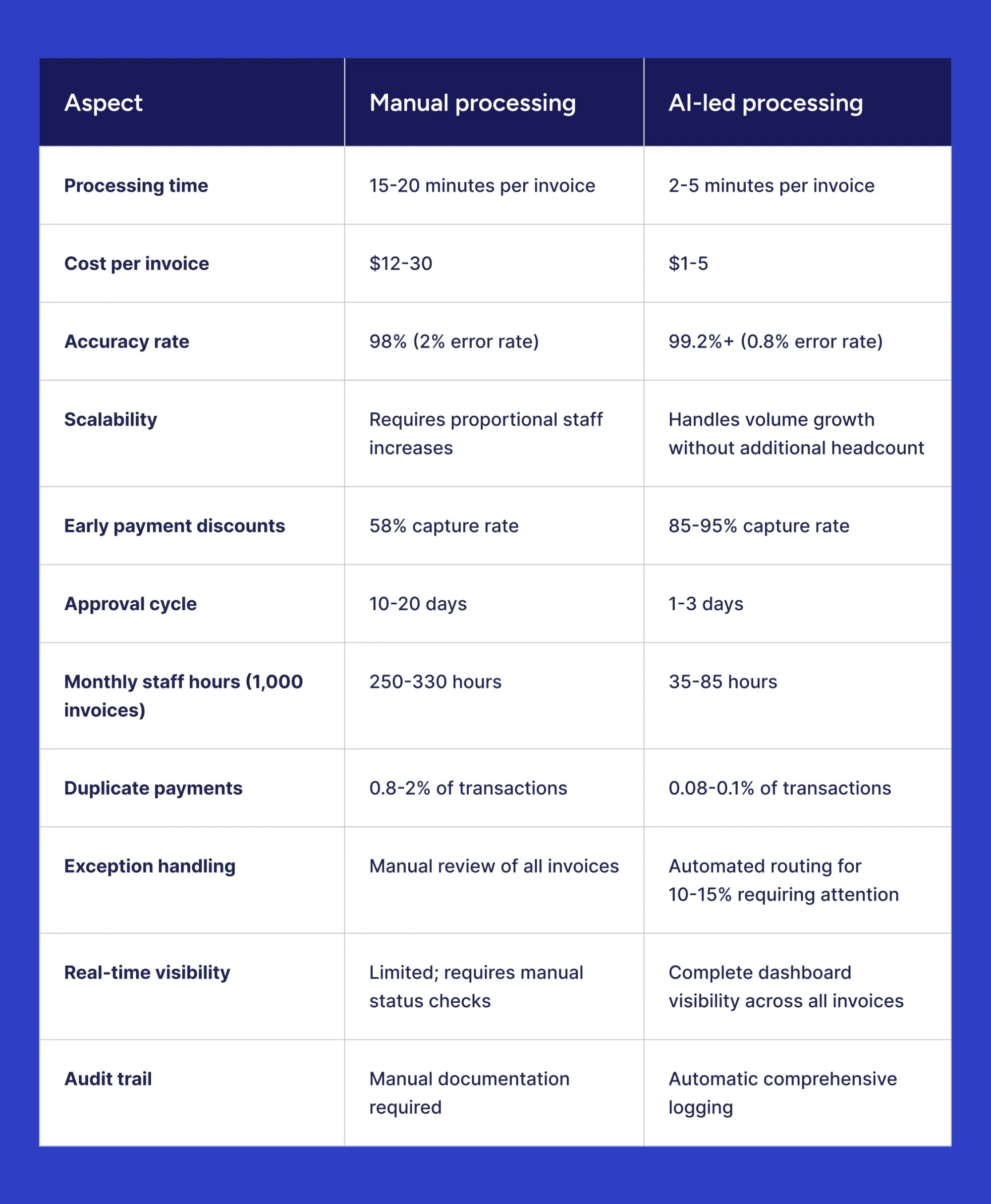
The same trend persists across every row, and in most cases by a wide margin. Savings compound quickly enough over labor and error correction, not to mention captured payment discounts. Many large-volume businesses tend to make their money back within 6-12 months after the switch.
However, some of the smaller businesses might find that the math doesn’t hold up the same way. A handful of invoices per month isn’t worth switching over in most cases, which makes manual processing a more sensible option until business grows.
What are the implementation steps for AI invoice automation?
AI invoice automation adoption involves five steps: assess, prepare, launch, train, and ultimately measure if it worked. A smart organization that considers each step and involves key stakeholders early on will get there quicker and also have higher buy-in at launch.
What does it take to get ready for AI invoice automation?
Only two metrics truly matter for spend automation, and those are invoice volume per month and the current weariness of the manual process.
Volume drives all math here: companies with at least 100 invoices per month see positive ROI afterward. The effect gets stronger if there are over 500 invoices/month. The software costs typically surpass labor expenses if the company processes fewer than 100 invoices monthly, though.
That said, pain can sometimes justify implementation even before volume does. Regular late payments, high error rates, lost invoices, staff working overtime, discount loss, vendors complaining about late payments — even a single one of these factors shows that the current workflow is under stress, even if the volume numbers don’t show it yet. Rapid growth also adds urgency, as automating before manual processing becomes a bottleneck is a lot easier than doing so after the fact.
Any business with properly documented approval workflows and consistent vendor management practices starts off with a head start here. Learn what gaps should be closed before implementation can begin:
- Clean up data in different ways (via record deduplication or naming convention standardization)
- Identify all current processes like GL coding rules, approval hierarchies, spending thresholds, or exception procedures;
- Figure out integration requirements early on, as anything that requires a connection (ERP, accounting, payment, procurement) should be identified upfront;
- Establish baseline metrics — a “before” to compare the “after” with;
- Involve stakeholders in the process at this stage, including AP staff, approvers, IT, and finance leadership members;
- Figure out specific “after” metrics — success values that you’d count as a “win” for implementation in cost, speed, accuracy, or adoption rates.
How long does it typically take to deploy an AI invoice system?
Cloud-based systems with pre-built ERP connectors go live faster than on-premises deployments with custom integration measures.
The implementation timeline as a whole scales with organizational complexity, so small businesses with simple setups can go live within 4-8 weeks. Medium organizations with multiple approval workflows and more complex integrations may take between 8 and 16 weeks, while large enterprises, especially those with legacy software or international entities, take up to 12-20 weeks or even longer, depending on the number of customizations necessary.
Implement AI systems one phase at a time, starting with vendors that send the most invoices, to bring value sooner and lower the risk of the entire project stalling.
What training is required for staff to use automated invoice tools?
AP staff typically require 2-4 hours to cover submissions and exception handling. Users responsible for resolving flagged items require some extra time. Approvers need a lot less, about 30-60 minutes in total, to learn how to review and approve invoices via web or mobile devices. Administrators require more training than the previous two, as they need to cover topics like configuration, user management, workflow adjustments, and reporting.
Modern AI invoice processing platforms like Precoro have intuitive interfaces that help users become productive quickly.
How do you measure ROI after implementation?
Companies can see the ROI through figures tied to processing itself:
- Time per invoice;
- Total hours spent on processing per month;
- Cost per invoice.
Risk and accuracy provide the other side of the story. Fewer errors and duplicate payments translate into less time spent resolving those problems later on. The growth of both the discount-capture percentage and DPO indicates that the business is holding onto its cash for longer before making a payment.
Adoption is also worth tracking. However, it’s best to do it separately from financial numbers, with factors such as:
- How much of the volume is actually running straight through the entire process;
- Whether staff reports the system as something they trust with their work.
What challenges might you face in machine learning-based AI processing?
Automation implementation rarely runs into technical friction during adoption. Instead, scope and change management seem to matter a lot more, and the same could be said about how comfortable people get during the transition. The technology itself is rarely the limiting factor. Knowing what these kinds of obstacles look like should make it easier to handle them and turn a rocky rollout into a smooth one.
What are the common obstacles during invoice automation adoption?
Data quality surfaces first in most cases: duplicate records and inconsistent GL code usage are incredibly common, while incomplete vendor information adds even more cleanup work before automation can deliver its value.
Depending on the processes your company already has, integration complexity can range from the simplicity of modern cloud systems to the rigidity of legacy infrastructures. This step has to be properly scoped as early as vendor selection to keep both costs and schedules in check.
Specific configuration issues also come from process inconsistencies. Both approval workflows and spending policies require standardization before automation can enforce them consistently.
Vendor compliance requires patience. How vendors submit their invoices won’t change overnight, no matter what your new system prefers. Clear, ongoing communication is invaluable here.
Companies should keep their expectations realistic. New algorithms require a learning period to start being truly useful, so don’t expect them to cover every single issue from the start. That discrepancy between expectations and the system’s actual capabilities tends to be the common root of dissatisfaction post-rollout.
How do you handle resistance to change from your team?
Concerns about job security and comfort with existing processes are the most common denominators of resistance to change.
Ownership follows naturally when people help define requirements and test the system. The job-security concern has to be addressed directly, though: automation targets tedious parts of the work without erasing the job itself. Most organizations prefer to redeploy people to higher-value activities following automation.
Momentum also matters. Early wins can come from straightforward, high-volume invoice types, which can convince skeptics far better than any amount of explaining could. Maintain the training and support resources during the rollout. As the staff becomes more proficient with the new tools, they’re more likely to stop resisting and start relying on them.
What if your invoices are too complex or varied for automation?
If invoices are too complex or overly diverse, it’s recommended to start small. The overwhelming majority of companies test the system with their straightforward, highest-volume vendor. Anything genuinely unconventional can be processed manually until the solution becomes a more justifiable option.
That’s usually enough to make automation worthwhile even within a mixed invoice load: it’s easier to automate most of the volume and have a human handle the rest. You don’t need to automate all your invoices on day one, but it’s important to know if you can process enough invoices at the start to justify the switch.
How do you ensure data accuracy during the transition period?
The single best way to gain confidence early is to run both manual and automated processes side by side, comparing the two before committing to the solution.
Review the output heavily at the beginning. Check different automated invoices early on and reduce manual checks once the system proves itself. That way, your team doesn’t waste time on double-checking, but also doesn’t cut oversight too soon.
A clear guideline should also be established for situations that automation can’t resolve. When should someone override a system’s suggestion? How should one report an extraction error? Escalation rules are also worth establishing before the first ambiguous case shows up.
Sometimes, validation checkpoints catch issues before they compound, like invoices above a certain threshold or ones from a vendor with no history. Such cases require manual sign-off regardless of the system’s confidence in processing them.
The majority of companies find that once they reach a 30-60-day period of automated accuracy, they can return to operating at the standard exception-driven level.
Which industries benefit most from AI invoice processing?
The specific value that AI invoice processing delivers in each industry varies a lot, even though the approach itself proves its worth all around. The highest returns tend to become evident in high-volume processes and complex supply chains. Businesses in highly regulated industries experience an advantage through built-in audit trails.
How does invoice automation transform financial services companies?
Financial services operate under regulatory obligations to have complete, defensible documentation. Invoice processing automation solutions deliver that by design, with every action or approval being logged automatically, including all subsequent modifications. There’s no need to assemble evidence by hand for regulatory reviews anymore.
A multi-entity structure is more complex. Many financial services organizations have multiple subsidiaries or divisions, or even entirely distinct entities. Nevertheless, invoices still need to be routed and consistently kept separate across all of them. When you factor in the volume those companies typically handle, the efficiency improvements and the compliance benefits both grow alongside automation.
Why is AI invoice processing crucial for retail and e-commerce businesses?
Both retail and e-commerce deal with a different mix of issues: a volume with drastic seasonal changes, and sprawling vendor bases with completely different invoice formats. Here’s how these issues impact the sector:
- Seasonal spikes overwhelm manual processing enough to delay payments at highly critical times.
- Large, varied vendor bases with hundreds or thousands of suppliers make consistent manual handling practically impossible.
- Thin margins result in processing cost reductions flowing straight to the bottom line.
- Quick inventory turnover demands payment cycles to be fast enough, so suppliers prioritize your business in high-demand times.
Automation handles seasonal peaks without the need for temporary hires, reads any format a vendor uses, and tracks ever-growing e-commerce catalogs and vendor lists.
What advantages does automation offer to manufacturing firms?
Manufacturing thrives in PO-based procurement: all raw materials and sub-components, along with external service providers, funnel through purchase orders before shipping anything. Three-way matching automation is ideal for this exact use case.
Let's look at an example of a manufacturer of mid-sized batteries and EV chargers, Green Cell. The company runs a factory in Poland and warehouses in the UK and France, and it processes 500–600 purchase orders a month. Each site orders its own materials and services, but corporate finance still needs to see one big picture of the total amount owed and to whom.
Automated three-way matching checks every invoice from a supplier against both the PO and the receipt before it goes into the payment queue. Budget usage updates in real time, so finance can see how each purchase fits into the overall budget.
Multi-location visibility operates similarly at the corporate level, helping leadership see the full picture across locations without losing location-specific approval rules.
How do professional services firms leverage AI for invoice management?
Professional services firms bill differently. Their costs have to be tracked against a specific client engagement or matter, down to the project level. Automation here helps handle some topics that used to consume AP’s time:
- Automatic invoice coding based on vendor history;
- Tracking which vendor costs get billed back to which client;
- Faster approvals so contractors and temporary staff get paid promptly.
The primary automation case here hinges on the accuracy of client-profitability tracking, since professional services firms process fewer invoices than retail or manufacturing firms.
Evaluating and selecting AI invoice processing software
Feature comparison is only one aspect of vendor selection, as implementation support and pricing transparency matter just as much as the general capabilities of a platform.
| Criterion | What to verify |
|---|---|
| Track record | Customer references you can talk to directly, preferably from your industry and size range |
| Implementation support | A realistic implementation timeline and a structured plan for onboarding |
| Pricing transparency | Licensing, implementation, support, and per-transaction fees all have to be revealed upfront |
| Integration | Existing connectors for your specific ERP or accounting system |
| Scalability | No platform switch required as volume grows |
| Financial stability & roadmap | Active and ongoing investment in the platform's development |
| Trial availability | A chance to test with your own invoices before committing |
Demo the tool to accounts payable staff and approvers as well. They'll actually be working with the new software, so their perspective on exception handling and workflow creation is more valuable than a sales deck. Vendors that support a phased rollout are usually in a better position: the company sees the value well before the system goes live organization-wide.
What does the future hold for AI invoice processing?
AI invoice processing technology evolves rapidly and keeps getting better and better over time. The next stretch of development seems to be pointing towards automation requiring as little human supervision as possible to operate efficiently.
What emerging trends are shaping invoice automation technology?
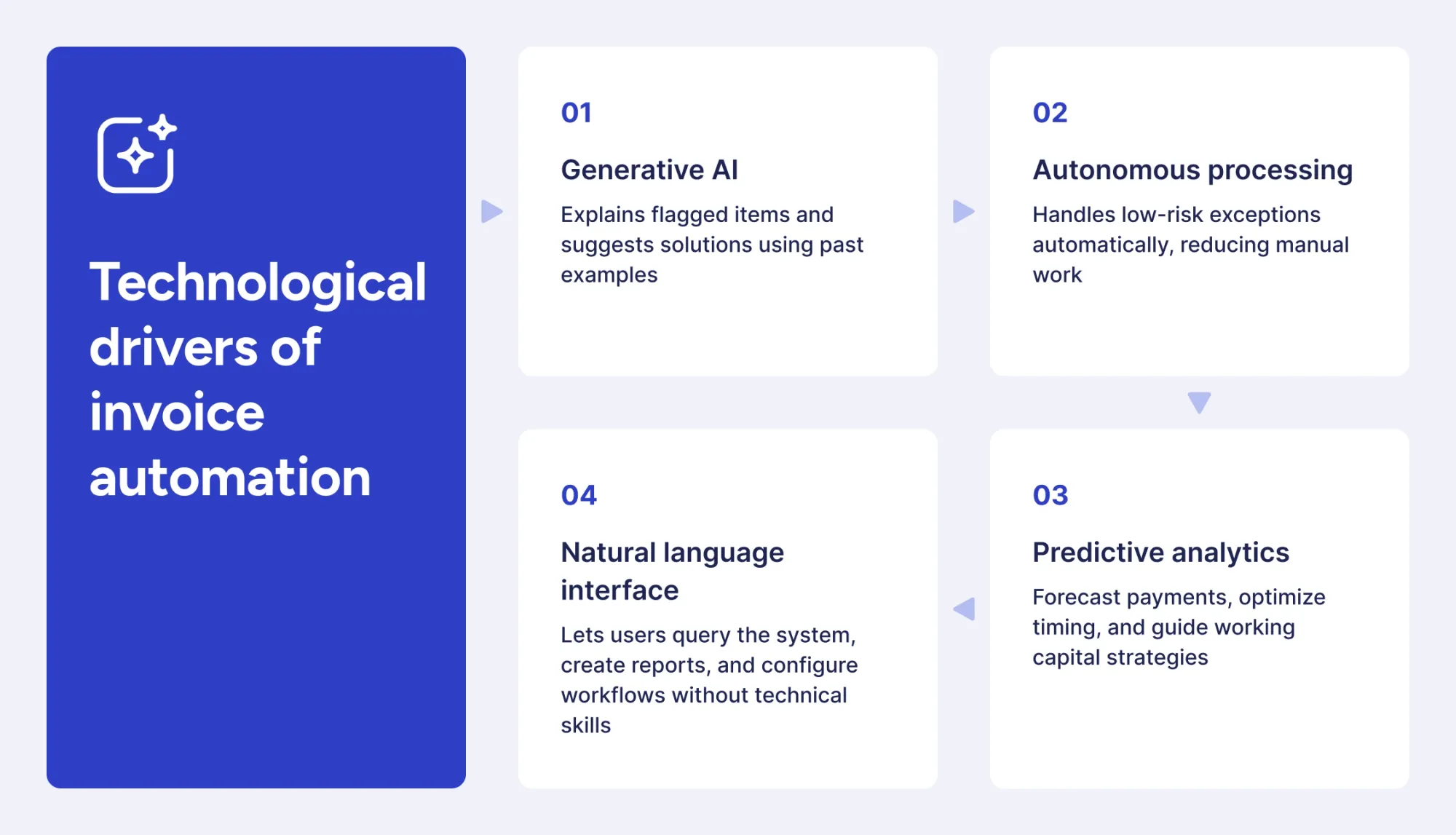
In a way, generative AI technologies instill trust in the automated systems. If an exception gets flagged, it offers an explanation and a solution based on the precedent set by previous similar cases.
Autonomous processing also grows rapidly, with many systems now capable of resolving more low-risk exceptions without human intervention.
Even predictive analytics are getting smarter on top of their current capabilities: fewer false positives around cash collection timing, stronger working-capital recommendations.
Natural language interfaces bridge the gap for non-tech users, who can simply ask human questions or pull custom reports without rummaging around through the settings menu. Fine-tuning a workflow this way could be the next big breakthrough.
How will AI invoice processing evolve in the next five years?
Over the next five years, these systems are likely to become more capable and more integrated with other tools, while the underlying approach remains largely the same.
Touchless processing continues to grow. Processes that are already at 80-90% today might move to 95%+ within those five years, as confidence scoring improves and edge cases are better managed.
Integration will keep expanding beyond accounting systems, covering procurement, payment networks, vendor portals, and banking systems. A seamless connection between these solutions helps create a closed loop from purchase requisition through to payment reconciliation.
Learning speeds up in its own way. A new vendor’s invoice format takes a dozen examples to recognize reliably now, but within five years, it’ll be enough to have just a few of those examples in most cases.
Systems are also expected to start trading data directly with budgeting and forecasting tools, providing finance with a more comprehensive picture of where the business stands.
How will blockchain impact future invoice management?
Blockchain could be used in the future to authenticate invoices and automatically fund them via smart contracts, removing approval steps altogether for routine transactions and reducing the risk of fraud. Vendor onboarding should also become a less tedious process if that happens.
That kind of world isn’t yet upon us, though. Vendor participation is still thin, and blockchain integration with existing systems remains difficult. Regulations around this topic are also still unresolved. It’s worth watching, of course, but no one should bet their implementation plan on it just yet.
Best practices for AI invoice processing
These practices help companies implement AI invoice processing and tackle employee resistance.
- Starting with high-volume vendors delivers quick wins while the system learns your patterns.
- Master data should be cleaned up in advance through record deduplication, naming standardization, and other measures.
- Define your tolerances based on the level of risk your company is willing to accept.
- Monitor exceptions that keep recurring in your data over time.
- Bring stakeholders in early, from selection through testing.
- Document baseline metrics before measuring ROI against them.
- Train every user group, from AP staff to admins.
- Tell vendors exactly what to submit and how to submit it.
- Review workflows quarterly against real performance data.
- Expect the system to keep evolving, and try to plan for it.
Automation isn’t something that can be a one-and-done endeavor. Smart organizations know that and are prepared to keep tuning configurations and rule sets over time.
Frequently asked questions
Yes, this upside is one of the most underutilized ones. By looking at the entire company’s purchasing habits, the system can detect multiple vendors that provide the same kinds of goods or services and quantify how much a large-scale purchasing consolidation could save.
Non-PO invoices work well enough on their own, as the system relies on vendor information and past invoices to determine GL code assignments, while approval still routes as usual, depending on the amount and department. Straight-through rates usually run higher for PO invoices, but not enough to justify keeping non-PO invoices manual.
95-99% is the realistic range for a standard invoice. Document quality remains the primary factor, with a clean and high-resolution scan improving reading results substantially in any case, followed by vendor format consistency and the number of similar invoices that have already passed through the system.
Audit preparation alone tends to become a lot faster, with every approval and flagged exception being logged automatically to save most organizations 40-60 hours a year that they would have to spend assembling records manually otherwise.
Turn AI invoice processing into daily efficiency. Book a Precoro demo.