34 min read
What is Accounts Payable Automation? AP Automation Benefits & Best Practices
Finance teams lose time, money, and supplier trust to invoice backlogs and slow approvals. Learn how AP automation works and how to implement it for fast, measurable results.

Managing accounts payable manually often means dealing with slow approvals, scattered invoices, and constant back-and-forth between finance and other teams. As invoice volumes grow, these processes become harder to control and more prone to errors.
Accounts Payable (AP) automation changes this by using software to handle invoice capture, approval workflows, and payments in a structured, consistent way. Instead of relying on emails and manual entry, finance teams get a clearer, faster, and more reliable process.
In this article, we’ll explain what AP automation is, why it matters for modern finance teams, and how to implement it in a way that delivers real, measurable value.
Read on to find out:
What is accounts payable automation, and how it works
How to streamline AP automation workflows
Accounts payable automation vs. manual accounts payable
Integrating AP with your accounting system
Key benefits of AP automation in 2026
How AP automation differs for SMBs and enterprises
Which AP processes to automate first
KPIs to evaluate AP automation
Common risks and challenges
How to choose AP automation vendor
Best practices for implementation
Real-world use cases of AP automation
The future of AP automation with AI
How Precoro supports AP automation
Key takeaways
FAQs
What is accounts payable automation, and how does it work?
Accounts payable automation uses software to digitize and control end-to-end AP processes, including invoice capture, validation, approval workflows, and payment execution.
AP automation reduces reliance on manual processing, which is often slow and error-prone. In manual AP workflows, invoice processing can take several days per invoice and requires multiple touchpoints across finance and other teams.
For finance teams processing dozens or even hundreds of invoices per month, AP automation typically leads to faster cycle times, lower processing costs per invoice, improved accuracy, and better visibility over liabilities.
Understanding the accounts payable process
The AP process encompasses all of the steps a business takes to manage money it owes to its vendors and suppliers. The process starts when an invoice is received (following a purchase or service delivery), and ends once the payment has been confirmed and recorded in the general ledger. Between those two points, AP teams handle:
- Invoice receipt
- Data capture
- Three-way matching against purchase orders and receipts
- Approval routing
- Payment scheduling
- Reconciliation
Each of these manual steps creates room for delays and errors. An invoice can sit in a shared inbox waiting for approval, a data entry mistake can lead to a vendor dispute, or a missed payment can mean losing an early-payment discount. Over time, these small issues add up and create significant operational costs in a manual AP process.
The accounts payable process is one of the highest-volume administrative workflows in any finance function, covering multiple departments and systems.
What manual accounts payable tasks are most commonly automated?
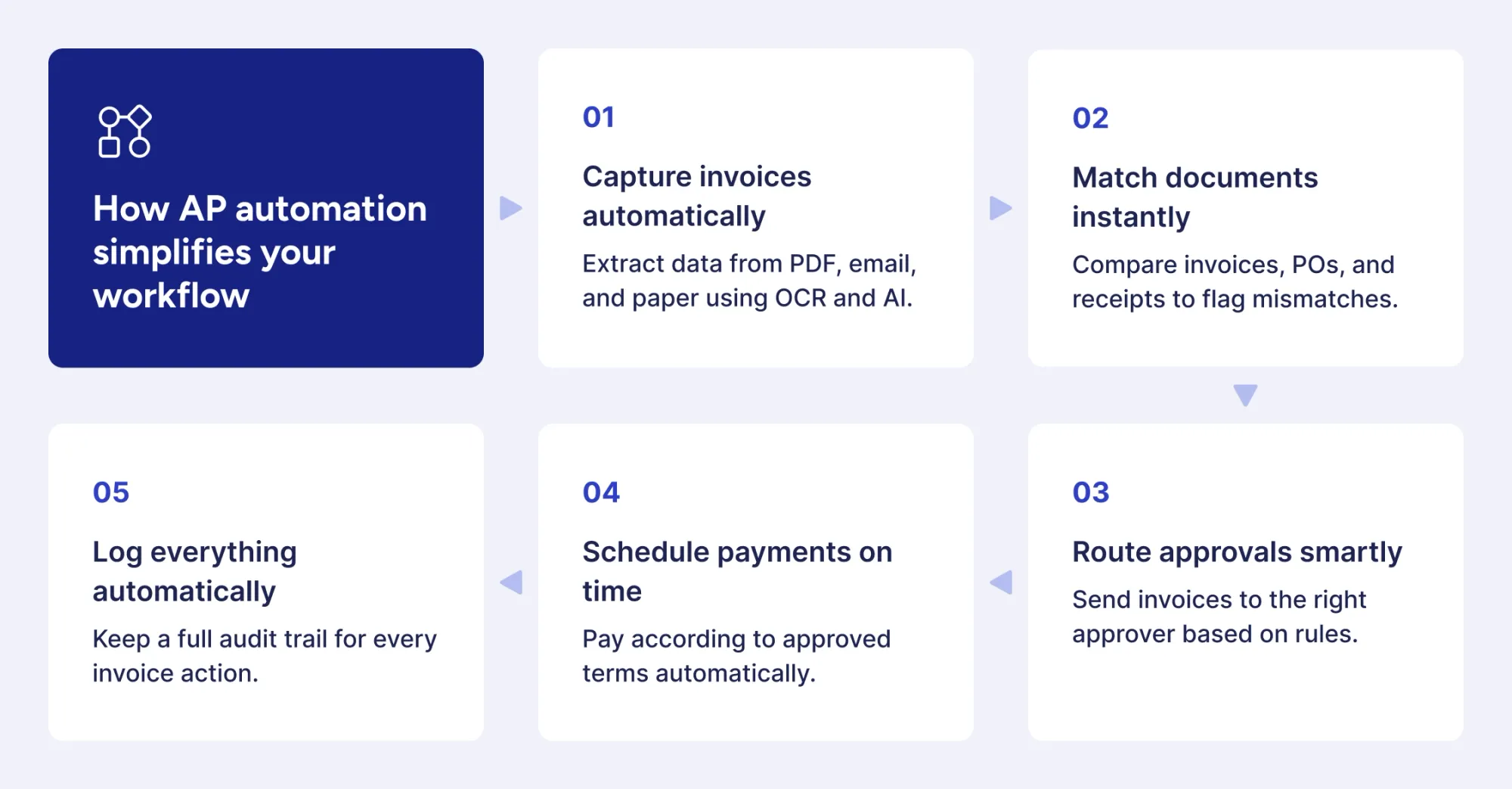
AP automation is designed to remove or significantly reduce the most time-consuming manual tasks in the accounts payable process while strengthening internal controls. The most commonly automated tasks include:
- Invoice capture and data extraction — Optical Character Recognition (OCR) and AI-based tools extract vendor name, invoice number, line items, and amounts from PDF, email, and paper invoices without manual keying.
- Three-way matching — AP automation software compares invoices against purchase orders and goods receipts automatically, flagging discrepancies for human review rather than requiring staff to check each document manually.
- Approval routing — The system routes invoices to the correct approver based on predefined rules, which account for amount thresholds, department, cost center, or vendor type.
- Payment scheduling and execution — Payments that meet approval criteria are scheduled and executed according to vendor terms.
- Audit trail and recordkeeping — Every action taken on an invoice is logged automatically, which creates a complete, timestamped record for compliance and audit purposes.
The accounts payable tasks that benefit most from automation are high-volume, rule-based, and time-sensitive — exactly the kind of work that makes up the core AP process.
Why should finance teams prioritize AP automation now?
Finance teams that still manage accounts payable manually are facing a growing gap between their current operating costs and what’s possible with automation.
Three key factors are driving the shift toward AP automation: rising invoice volumes, stricter compliance requirements, and the growing maturity of modern AP technology.
Modern AI-driven AP automation tools can understand unstructured invoice formats, learn vendor-specific patterns, and detect anomalies that could be an indication of fraud or duplicates. Technology that once required significant IT resources to implement is now available as cloud-based solutions that easily integrate with existing accounting and Enterprise Resource Planning (ERP) systems.
Finance teams that don’t adopt these solutions aren’t just staying the same — they’re taking on costs and risks that competitors have already reduced.
The business case for AP automation is strongest when invoice volumes are rising, but headcount can’t keep up, or when audit and compliance requirements are becoming more demanding. For most finance teams, at least one of these pressures is already in place.
Roles of the AP team in automation
Accounts payable automation doesn’t eliminate the AP team—it changes their role.
Instead of spending time on manual data entry and chasing approvals, AP teams focus on higher-value work such as managing vendor relationships, handling exceptions, and monitoring automated workflows.
With automation in place, tasks that once required significant manual effort can be handled with fewer people, freeing the team to concentrate on exception resolution, vendor queries, and process improvements.
The AP team is also instrumental in setting up approval rules, monitoring Key Performance Indicators (KPIs), and making sure that AP automation rules reflect current business policies and vendor agreements.
How to streamline AP automation workflows?
AP automation doesn’t just remove manual tasks; it also removes the delays between them.
In manual AP processes, the biggest time losses often happen during handoffs, not within individual steps. For example, an invoice might be captured successfully but then wait days for a matching check, or an approved invoice might sit in a queue before payment is scheduled.
With AP automation, each step is connected. As soon as one stage is completed, it automatically triggers the next, eliminating idle time between tasks and keeping the process moving continuously. For example, Precoro uses Approval SLA rules to reduce waiting time after invoice capture by setting clear time limits for each approval step.
Once an invoice is captured, it’s automatically routed into the approval workflow. The system automatically sends approvers reminders about pending and overdue documents waiting for their review.
This feature helps prevent invoices from sitting idle in queues, increase user accountability, and assess the performance of each approver and the team as a whole.
The efficient AP workflow requires two things before it can deliver the expected results: standardized inputs and clearly-defined rules. Suppliers need to submit invoices in approved formats, and approval hierarchies must be documented before automation is fully implemented. When these basics are in place, AP automation works more effectively from day one and delivers results closer to its full potential.
Accounts payable automation vs. manual accounts payable: What’s the real difference?
The difference between manual and automated accounts payable is measurable at every stage of the process. As invoice volumes increase, the gaps in cost, speed, and accuracy become even more significant.
How do error rates, costs, and processing times compare?
Manual AP processing is inherently less efficient because every human touchpoint introduces the risk of errors. Industry benchmarks show that manual invoice processing typically costs between $12 and $40 per processed invoice, while AP automation manages to bring that number down to $2–$4 per invoice.
Speed improves as well: manual invoice cycles average at about 14.6 business days from receipt to payment, compared to roughly 3–5 business days (or less) with automation.
Error rates also create a compounding impact. Even a ~2% error rate in high-volume environments can result in hundreds of duplicate payments, mismatched purchase orders, or incorrect entries each year.
What are the hidden costs of manual AP processes?
The direct costs of manual accounts payable, such as labor and processing fees, are relatively easy to measure. The hidden costs, however, are harder to quantify and often even higher.
Delays in approvals can lead to late payment penalties. Unpredictable payment timing can weaken supplier relationships. And early payment discounts are often missed because manual workflows can’t consistently meet tight deadlines.
There is also an opportunity cost that rarely shows up in benchmarks. It includes time spent on data entry, email follow-ups, and manual reconciliation — time that could instead be used for forecasting, vendor negotiations, or financial analysis.
In the end, the cost of manual AP isn’t just financial. It’s also the lost time and capacity that could be creating more value elsewhere.
Reducing manual data entry in accounts payable
Manual data entry is one of the highest-risk activities in a traditional AP workflow. Its impact goes far beyond a single invoice:
- Duplicate payments — The same invoice keyed twice results in overpayments that are costly and time-consuming to recover.
- Reconciliation failures — Miskeyed amounts create discrepancies between the AP ledger and bank records, which require manual investigation to resolve.
- Audit exposure — Inconsistent or incomplete records that result from manual entry create compliance risk during internal or external audits.
- Vendor disputes — Incorrect payment amounts or missed invoices damage supplier trust and can delay future orders or services.
AP automation removes manual data entry at the point of capture, preventing these errors before they enter the system and reducing downstream risks across the entire process.
At what scale does automation become necessary?
There’s no strict threshold for when a company must adopt AP automation, but there are practical patterns.
Organizations processing fewer than 100 invoices per month can often manage AP manually with a small, well-organized team. However, once volumes reach roughly 200–500 invoices per month, the benefits of automation (faster processing, fewer errors, and reduced approval delays) typically outweigh the option of simply adding more staff.
For mid-market and enterprise companies, the question is usually not whether to automate AP, but which processes to automate first and how quickly to scale.
Note:
And invoice volume isn’t the only factor. A business processing 150 invoices per month across multiple entities, currencies, or approval layers will often need automation sooner than a single-entity company with the same volume.
Integrating AP with your accounting system
AP automation doesn’t work in isolation. Most of its value depends on how well it integrates with the systems around it.
How do AP workflows connect with ERP, procurement, and accounting processes?
The accounts payable function sits at the intersection of procurement, finance, and operations. This means invoice data needs to be reflected across multiple systems at once, including:
- The ERP (to record the liability)
- The procurement system (to close the purchase order)
- The general ledger (to code and post the expense)
When these systems aren’t connected, AP teams are forced to transfer and reconcile data manually. That’s where delays, inconsistencies, and errors usually appear.
AP automation solves these issues by integrating with the wider finance and procurement tech stack and syncing data automatically between systems. For example, Precoro actually connects the end-to-end procurement process with automated accounts payable in a single platform. On top of that, it integrates with accounting and ERP tools like QuickBooks Online, NetSuite, Xero, Sage Intacct, and Microsoft Dynamics 365 Business Central.
While exact integrations vary by vendor, the principle is consistent: every manual transfer removed by integration is one less reconciliation issue created later.
Integrating purchase orders into AP automation
Purchase orders are the foundation of a controlled AP workflow. Without them, invoice validation depends on manual judgment. With POs in place, AP automation can systematically match, verify, and approve invoices without checking every detail manually.
When purchase orders are stored in a separate system from AP, this foundation weakens. AP teams must manually look up PO information for matching, then discrepancies are detected late, and invoices often sit in exception queues while teams wait for the necessary data.
When PO data is integrated (as in Precoro), the process becomes seamless. As soon as a vendor submits an invoice, the system automatically pulls in the related purchase order and receipt data. Unit prices, quantities, and delivery confirmations are matched automatically. If everything aligns, the invoice moves directly to payment. If not, the system flags the exact discrepancy, so the AP team can resolve the issue quickly without searching across multiple systems.
Because of this, PO integration is a core (but often overlooked) requirement for AP automation that aims to reduce exceptions rather than simply digitize manual work.
Key benefits of AP automation in 2026
The business case for AP automation is well-established at this point. By 2026, a synergy between advanced AI features and established ERP integrations means clearly defined and achievable benefits.
How much time and cost savings are realistic in 2026 with AP automation?
The per-invoice savings are relatively easy to calculate at this point. What matters more for finance leaders is how the savings from AP automation compound at scale.
For example, an organization processing 1,000 invoices per month at a manual cost of $15 per invoice spends about $180,000 annually on invoice processing alone. If AP automation reduces that cost to $4 per invoice, annual savings exceed $130,000 even before factoring in reduced late payment fees, captured early-payment discounts, or the value of freed-up staff time.
That last point is especially important. AP automation doesn’t just reduce costs but also changes how finance teams spend their time. Instead of manual processing, AP staff are typically reassigned to exception handling, vendor management, and financial analysis, which creates far more value for the business.
At the same time, modern cloud-based AP automation platforms have significantly shortened implementation timelines. What once required months of IT-heavy deployment can now be rolled out in weeks for mid-market companies, which shortens the payback period.
For most organizations processing 500+ invoices per month, the return on investment typically falls within 6–12 months.
How does automation improve supplier relationships and payment terms?
Suppliers notice when payment patterns become consistent and predictable.
One of the less easily measured but very real benefits of AP automation is stronger vendor relationships. Reliable, on-time payments build trust over time, which can lead to better terms, priority service, and stronger negotiating power.
AP automation supports this consistency by removing bottlenecks and delays in the approval process. Invoices that are automatically captured, matched, and approved are paid on time, without manual delays. At the same time, vendors can track invoice status through self-service portals instead of chasing updates from AP teams, reducing friction on both sides.
Dynamic discounting goes a step further by turning predictable payment processes into a financial advantage. When cash flow and payment timing are visible, finance teams can offer early payment in exchange for a discount, creating value for both the buyer and the supplier.
Companies using AP automation to support dynamic discounting programs typically achieve annual savings of around 1–2% of addressable spend, which becomes significant at scale.
What compliance, auditability, and fraud-reduction benefits arise?
Manual AP processes cause compliance risk, not necessarily through negligence but through structural gaps.
When approvals are handled via email, invoice data is entered manually, and payment decisions rely on individual judgment, the risk of errors and fraud increases as a natural result of the process. AP automation reduces this risk by closing these gaps through structured workflows, standardized data capture, and controlled approval rules.
The compliance and fraud-reduction benefits that AP automation delivers include:
- Complete audit trails — Every action on each invoice is logged automatically with a timestamp and user record, which gives auditors a full, unambiguous history without requiring manual reconstruction.
- Segregation of duties — System-based approval rules ensure that the person approving an invoice isn’t the same person executing the payment.
- Duplicate payment detection — AP automation can identify potential duplicate invoices before payment by comparing vendor details, amounts, and invoice numbers across the system.
- Fraud anomaly flagging — The system flags unusual activity, such as abnormal invoice amounts, new bank details, or out-of-cycle submissions, for review before payment is made.
- Faster audit readiness — Auditability is often only fully appreciated during an actual audit. In manual AP processes, reconstructing records can take weeks, while automated systems provide the same audit-ready documentation in minutes.
How do AP automation tasks differ for SMBs vs. enterprise companies?
The primary purpose of accounts payable automation stays the same across all company sizes. However, the complexity of the ecosystem into which it has to integrate differs substantially, which affects everything from the most important features to the implementation timeline.
The number one priority for SMBs is almost always ease of use and speed. A small finance team generating a few hundred invoices a month doesn't require a deeply customizable approval structure or multi-currency reconciliation capabilities.
What it does need is the ability to reliably capture the document, route it quickly to the correct individual, and connect with the accounting system already in use. The barrier that accounts payable automation removes for SMBs is time — specifically, the hours per week that a small team spends on tasks that software can handle in seconds.
Enterprise organizations face a different problem entirely. It’s not time per invoice that drives the business case — it’s control, visibility, and consistency across a system that may span dozens of entities, currencies, and regulatory environments. A single late payment is a minor inconvenience for an SMB. For an enterprise processing tens of thousands of invoices monthly across multiple subsidiaries, the same structural weakness becomes a compliance exposure and a cash flow management failure at scale.
| Dimension | SMB priorities | Enterprise priorities |
|---|---|---|
| Approval workflows | Simple, 1–2 level routing | Multi-tier, role-based hierarchies |
| Integration depth | Accounting platforms (QuickBooks, Xero) | Full ERP integration (SAP, Oracle, NetSuite) |
| Multi-entity support | Single entity, occasionally two | Multiple entities, currencies, and tax regimes |
| Implementation timeline | Days to weeks | Weeks to months |
| Compliance requirements | Basic audit trail | SOX, GDPR, industry-specific controls |
| Primary success metric | Hours saved per week | Cost per invoice, DPO, exception rate |
The “right” AP automation solution is not the one with the most features, but the one that matches the complexity of an organization. For SMBs, overinvesting in enterprise-grade tools often means spending more time configuring the system than getting value from it. On the other hand, enterprises that choose a simpler solution may only solve basic problems, while more complex needs remain unaddressed.
Which accounts payable processes should be automated first and why?
Initiating AP automation without a clear rollout plan is one of the main reasons implementations underdeliver. The sequence in which processes are automated directly affects how quickly value is realized and how much disruption the team experiences along the way.
How do you prioritize based on volume, value, and error rates?
Not all AP processes deserve the same level of urgency when it comes to automation priorities. The strongest candidates share three characteristics:
- They occur frequently.
- They carry meaningful financial risk when they go wrong.
- They currently consume a disproportionate amount of staff time.
A simple prioritization framework applies three main filters:
| Process | High volume? | High error risk? | High financial value? | Priority |
|---|---|---|---|---|
| Invoice data capture | ✓ | ✓ | ✓ | First |
| Approval routing | ✓ | ✓ | ✓ | First |
| Three-way matching | ✓ | ✓ | ✓ | First |
| Payment execution | ✓ | — | ✓ | Second |
| Vendor onboarding | — | ✓ | — | Third |
| Expense reconciliation | — | — | ✓ | Third |
Processes that rank highly across all three criteria deliver the fastest and most measurable returns from automation.
Should invoice capture, approval routing, or payments be automated first?
If you need to sequence AP automation, start with invoice capture. It’s the entry point to the entire workflow, and if data extraction isn’t reliable, every downstream step will also have errors. Trying to automate approvals before fixing invoice capture is like optimizing a pipeline with a broken valve at the start.
Once capture is stable, the next step is approval routing. This is where most of the day-to-day time savings show up — fewer exceptions, faster approval cycles, and less chasing invoices across email threads.
Payment automation should typically come last. Not because it’s less important, but because it carries a higher financial risk and should only be introduced once upstream processes are consistently clean.
A good signal that you’re ready for payment automation is when exception rates for captured and matched invoices are stable and low (typically under 10%), and approval cycle times are predictable. Automating payments before that point simply pushes upstream errors into the payment stage, making them harder and more expensive to fix.
Optimizing the payment process in accounts payable
Payment optimization is where AP automation starts giving finance teams real control over cash. Instead of just processing payments, you can decide when and how money leaves the business — hold cash longer, pay early for discounts, or choose lower-cost payment methods.
One of the easiest wins is moving away from paper checks. Each check typically costs $4–$6 when you include printing, postage, and manual handling. Electronic payments like ACH or virtual cards are significantly cheaper and faster to process.
So if your team is still issuing a high volume of checks, simply switching to electronic payments can immediately reduce costs.
How do you measure readiness for automation in your current processes?
AP automation readiness isn’t just about budget or choosing a vendor. It’s about whether your current processes and data are clean enough for automation to improve them, not just digitize existing issues.
Before implementing AP automation, finance teams should assess:
- Vendor master data quality — Are supplier records complete, deduplicated, and current? Automation depends on accurate vendor data to reconcile invoices and route payments correctly.
- Process documentation — Are approval hierarchies, spend thresholds, and exception handling rules clearly defined and consistently applied?
- Invoice format diversity — What proportion of invoices arrive as structured PDFs versus scanned paper or non-standard formats? Higher format diversity requires more capable capture tooling.
- ERP and system landscape — Are the systems that accounts payable automation needs to connect with well-documented and integration-ready?
- Exception volume — A high current exception rate signals process problems that automation will inherit unless they are addressed first.
If you find gaps in several of these areas, fix those first. Businesses that clean up vendor data, document approval rules, and address common exception causes before implementation consistently see faster time-to-value and fewer post-go-live issues.
Managing AP automation workload efficiently
Workload management is crucial during the transition period between manual and fully automated AP. During the implementation, the team is forced to run two processes at once (manual and automated), creating a temporary workload spike that many organizations fail to properly account for. Anticipating this overlap is what separates a smooth rollout from a chaotic one.
A brief but focused transition window is important for efficient change management. It’s always much more practical to automate one process, stabilize it, and then move on to the next one instead of attempting a full workflow overhaul at once. That way, the team’s capacity recovers faster, exceptions become easier to diagnose, and the business can gradually build confidence in its systems instead of risking it all on a single go-live.
The human side matters just as much as the technical one. Team members who have managed manual AP processes for years may feel skeptical or concerned (especially about job security), so it’s important to address those concerns early and openly.
Be explicit about what will change and involve the AP team early. Walk them through how their roles will evolve, have them help set up approval rules and exception handling, and highlight quick wins as soon as they happen. This approach reduces resistance and helps people get comfortable with the new system faster.
Use the team’s existing knowledge. They know which vendors cause issues, where exceptions usually happen, and how work actually gets done. Bringing them into the setup process leads to more accurate workflows and fewer fixes after go-live.
What metrics and KPIs should you track to evaluate AP automation?
What gets measured gets managed. Clear KPIs help finance teams find the baseline they need to demonstrate progress, identify underperforming areas, and make a clear case for continued investment.
How do you measure invoice processing time and cost per invoice?
Start with two core metrics: invoice processing time and cost per invoice. These give you a clear baseline to measure improvement before comparing yourself to benchmarks.
To calculate cost per invoice:
- Add total AP department labor costs for the period.
- Include software, infrastructure, and payment processing fees.
- Add estimated cost of error correction and rework.
- Divide the total by the number of invoices processed in the same period.
To calculate invoice cycle time:
- Measure from the date an invoice is received to the date payment is scheduled.
- Measure PO-backed and non-PO invoices separately to spot friction.
- Monitor average, median, and 90th percentile (to catch outliers).
The key efficiency metric in AP automation is the touchless processing rate — the percentage of invoices that move through the entire workflow without any manual intervention.
If it’s below 60%, it usually indicates problems with invoice capture, matching, or approval routing. High-performing AP teams typically reach 80–90%, showing that most invoices are processed automatically end-to-end.
What KPIs indicate improved accuracy and fewer exceptions?
Accuracy metrics show whether AP automation is truly working or just shifting errors further down the process. They should always be tracked alongside efficiency metrics to get a complete view of performance.
| KPI | What it measures | Strong benchmark |
|---|---|---|
| First-pass match rate | % of invoices matched to PO and receipt without manual intervention | >85% |
| Exception rate | % of invoices requiring manual review or correction | <10% |
| Duplicate invoice detection rate | % of duplicate submissions caught before payment | >95% |
| Approval cycle time | Average time from invoice receipt to approval (days) | <2 days |
| Supplier query volume | Number of payment status inquiries from vendors per month | Declining trend |
Supplier query volume is a useful indirect indicator of AP automation health. A steady decline in vendor payment inquiries is a simple signal that the system is working as intended. When suppliers no longer need to follow up on payment status, it usually means invoices are processed consistently, and all relevant information is shared with them automatically.
How do you calculate ROI and payback period for Accounts Payable automation?
ROI calculation for accounts payable automation consists of two primary components: direct cost savings and indirect value gains. Both matter, but finance leaders typically focus on direct savings because they are easier to quantify and defend in budget discussions.
Direct savings to quantify:
- Lower cost per invoice × annual invoice volume
- Eliminated late payment penalties
- Captured early payment discounts that were previously missed
- Fewer duplicate or incorrect payments
Indirect value to estimate:
- Staff hours redirected to higher-value work
- Audit preparation time reduced
- Fraud losses avoided through automated controls
Basic ROI formula:
ROI = (Annual savings — Annual automation cost) / Annual automation cost * 100
A theoretical example:
- Annual invoice volume: 6,000
- Cost reduction per invoice: $8 (from $14 to $6)
- Annual direct saving: $48,000
- Annual platform cost: $18,000
- One-time implementation cost (year one): $15,000
- Total year-one cost: $33,000
Year 1 results:
- ROI: 45%
- Payback period: approximately 8 months (based on monthly savings vs. total investment)
From year 2 onward, once implementation costs are no longer included, the same setup delivers 160%+ ROI on direct savings alone, excluding additional benefits like freed-up staff time, faster audits, and improved early payment discount capture.
What common AP automation risks and challenges should organizations anticipate?
The benefits of AP automation are significant, but only when the associated risks are properly understood and managed. Companies that treat risk assessment as an afterthought often run into the same avoidable problems.
How do you address data privacy, security, and vendor risk?
Invoice data as a whole is a lot more sensitive than one might expect. Every invoice that passes through an accounts payable automation platform contains vendor banking details, contract values, and internal cost center information — all of which is valuable to fraudsters and also subject to regulatory protection in most cases. When data is processed in a cloud-based AP platform, the vendor’s security effectively becomes part of your own security posture.
That’s why vendor due diligence should focus on three key questions:
- How is data encrypted both in transit and at rest?
- What access controls are in place to limit who can view or modify invoice and payment data?
- Does the vendor hold a current SOC 2 Type II certification?
SOC 2 Type II certification is a widely recognized standard showing that a vendor’s security controls are not only defined, but also independently tested over time. It’s often considered a baseline requirement for organizations operating under SOX, GDPR, or other financial compliance regulations.
Data retention is where privacy requirements often create challenges. For example, GDPR requires that personal data isn’t stored longer than necessary. However, many companies implement AP automation without clearly defined retention rules, which creates a compliance gap that grows with every processed invoice.
Defining retention policies before go-live is much easier than trying to audit and fix years of stored data after the system has already been running.
What pitfalls cause automation projects to fail or underperform?
Here are the most common reasons accounts payable automation projects fail to deliver their promised value:
- Automating a broken process — Software accelerates whatever process it is given. An approval workflow with unclear ownership or inconsistent rules will produce faster confusion, not faster approvals.
- Underestimating integration complexity — ERP and accounting system integrations routinely take longer and require more IT involvement than vendors' pre-sales estimates suggest. Budget for it explicitly.
- Insufficient executive sponsorship — AP automation that is championed only at the team level stalls when it encounters resistance from procurement, IT, or finance leadership. A clearly named executive owner who can resolve cross-functional blockers is essential.
- Going live without a parallel run period — Switching off manual processes entirely on day one leaves no safety net when exceptions arise. Running both processes in parallel for a defined period catches gaps before they become payment failures.
- Measuring too late — Organizations that don’t establish a performance baseline before go-live cannot demonstrate ROI afterward, which makes it difficult to justify further investment or expansion.
These problems often appear in underperforming implementations. That’s why it’s better to prepare for them early rather than diagnose them after go-live.
How can you mitigate resistance from staff and stakeholders?
Resistance to AP automation rarely comes from a single source.
As noted earlier, the AP team’s resistance is often driven by concerns about job security. However, the more difficult challenge usually comes from stakeholders who were not involved in the initial decision, including:
- CFOs questioning whether ROI projections are realistic
- IT teams brought into integration work without prior alignment
- Procurement teams concerned that AP automation may overlap with their ownership of PO and vendor management processes
The most effective way to address this resistance is to involve stakeholders early in the process.
A CFO who helps define ROI methodology is far less likely to challenge the results later. An IT lead who reviews integration requirements before vendor selection is more likely to support the rollout rather than block it. A procurement manager who contributes to PO matching rules gains ownership of the outcome instead of feeling displaced.
Early involvement turns skeptics into contributors — and in most cases, contributors become advocates once the system is live and delivering results.
How do you choose the right accounts payable automation vendor?
Choosing an accounts payable automation vendor isn’t a feature comparison exercise. The right vendor is one whose solution fits your current operational complexity, can scale as your organization grows, and provides enough hands-on support during implementation to ensure a smooth transition.
Evaluating an AP automation solution for your organization
The biggest mistake with vendor evaluation is prioritizing a solution with the biggest feature list. A tool that is decent at many things can rarely excel in specific areas your company needs. The evaluation should begin with an internal brief (invoice volume, current exception rate, ERP environment, approval complexity, compliance requirements) — all before even a single vendor demo is scheduled.
Total cost of ownership is, ultimately, the metric that matters most. License fees are easy to compare, but they rarely show the full cost. The real differences between AP automation vendors show up in implementation, integration work, support plans, and the internal IT effort needed to keep systems connected.
A cheaper license can become expensive if it requires heavy middleware or ongoing manual reconciliation between systems. In many cases, a higher-priced native solution ends up costing less over 3+ years because it reduces integration and maintenance overhead.
What core features should you require for the right accounts payable automation solution?
The question for each feature is not whether the vendor offers it — most do. The primary question should be about how well a solution performs within your specific constraints.
| Feature | The right evaluation question |
|---|---|
| Invoice capture and OCR | What is the extraction accuracy rate for unstructured or non-standard invoice formats? |
| Approval workflow configuration | Can finance admins modify approval rules without IT support? |
| Three-way matching | Which fields are matched, and what happens when discrepancies are detected? |
| Exception management | Does the system show specific discrepancy details or only flag items for review? |
| Payment execution | Which payment methods are supported natively, and what are the transaction fees? |
| Reporting and analytics | Can custom KPI dashboards be built without developer involvement? |
| Audit trail | Is the full action history exportable in auditor-ready formats? |
Exception management is often overlooked, even though it has a major impact on day-to-day AP performance. Most vendors focus their demos on invoice capture rates and approval workflow flexibility, but exception handling is just as important when assessing how much manual work will remain after go-live. A system that only flags exceptions without explaining or categorizing them doesn’t remove bottlenecks — it just shifts them into a new queue for manual review.
How important are integrations with ERPs, banks, and procurement systems?
For accounts payable automation to work as a connected financial workflow (rather than an isolated tool), three integrations are essential.
ERP integration is the foundation. Without it, approved invoices and payments must be manually posted to the general ledger, reintroducing the same manual work AP automation is meant to remove. A direct ERP connection ensures that all AP transactions are automatically reflected in financial reporting in real time, without finance teams acting as a bridge.
Banking integration connects approval to execution. Once payments are approved, they are sent directly to the banking system for processing and reconciliation. This integration removes the need to log into separate banking portals and reduces manual steps in payment execution. Remittance data is also transferred automatically, which helps reduce supplier follow-ups and simplifies reconciliation on both sides.
Procurement system integration enables effective three-way matching. If purchase orders sit in a separate system that doesn’t connect to AP, matching often requires manual lookup and slows down processing. When systems are connected, PO data is available immediately when an invoice arrives, allowing automatic matching and more precise exception handling instead of generic manual review.
Note:
Precoro combines procurement functionality and accounts payable automation in a single platform, meaning purchase orders and invoices already exist within the same system. As a result, you have faster three-way matching that doesn’t rely on data reconciliation between separate tools. It also means spend is controlled at the request and approval stage before invoices even arrive.

Together, these three integrations determine whether AP automation delivers end-to-end efficiency or simply digitizes a middle step while leaving manual work at both ends.
What questions should you ask about implementation support and SLAs?
Just as accounts payable automation software varies across vendors, so does the quality of implementation. Even a functionally strong platform can take months to deliver results if it’s poorly configured, forcing teams to work around gaps that should have been addressed before launch.
Ask vendors these questions directly — and pay close attention not just to their answers, but to how specific and practical those answers are:
- What does your implementation methodology look like, and what are the defined milestones? Vague answers here signal a vendor that treats implementation as a handoff rather than a managed process.
- Who owns the implementation — an internal team, a partner, or a hybrid? Third-party implementation partners introduce variability in quality and accountability.
- What is your guaranteed uptime SLA, and what remedies apply when it is breached? Anything below 99.5% warrants scrutiny for organizations with high invoice volumes.
- How is ongoing support structured after go-live? Dedicated customer success management versus a shared support queue makes a meaningful difference in how quickly configuration issues are resolved.
- What does your escalation path look like for critical issues — for example, a payment processing failure? The answer reveals whether the vendor has a mature incident response process or improvises under pressure.
- Can you provide references from customers of a similar size and ERP environment? A vendor confident in their implementation track record will answer this without hesitation.
The goal of these questions is not to find a vendor with perfect answers. It’s to find one whose responses are specific, consistent, and verifiable — because clarity during the sales process is the best predictor of accountability during implementation.
Best practices for implementing AP automation software
The biggest difference between fast and slow accounts payable automation implementations is execution discipline. The checklist below brings together the most important practices from this guide into a single pre-implementation and go-live reference.
Before implementation:
- Document approval hierarchies, spend thresholds, and exception handling rules before touching any software configuration.
- Clean and deduplicate vendor master data — automation inherits whatever quality of data it’s given.
- Establish a performance baseline: current cost per invoice, cycle time, exception rate, and touchless processing rate.
- Define success criteria and measurement methodology before go-live, not after.
- Secure a named executive sponsor who can resolve cross-functional friction during rollout.
- Confirm integration requirements with IT and request field-level mapping documentation from the vendor.
During implementation:
- Automate one process at a time — invoice capture first, then approval routing, then payment execution.
- Run manual and automated processes in parallel for a defined period before switching off the old workflow.
- Involve AP staff in configuring approval rules and exception workflows — their process knowledge improves configuration quality.
- Test exception handling explicitly, not just the clean invoice path.
After go-live:
- Monitor touchless processing rate, exception rate, and approval cycle time weekly for the first 90 days.
- Iterate on approval rules and capture configurations rapidly based on early exception patterns.
- Track ROI against the baseline established before implementation.
- Schedule a formal performance review at 90 days and again at 6 months
What are real-world use cases of AP automation?
The strongest business cases for accounts payable automation are grounded in real customer results, not just industry benchmarks. The following examples are derived from case studies of companies across different industries and sizes.
How have companies reduced days payable outstanding (DPO) or improved cash flow?
The connection between Accounts Payable automation and cash flow improvement isn’t always direct, but it’s consistent. The increased speed of invoice processing means that liabilities are reconciled sooner, payment timing becomes deliberate, and finance teams have a clear, up-to-date view of what is still outstanding.
Tymit, a UK-based fintech company, experienced this shift firsthand. Before implementing accounts payable automation, their financial analyst's month-end close took approximately one month to complete. Process improvements brought that down to two weeks. After integrating Precoro into their AP workflow, the same close now takes a matter of days. For a fast-growing company doubling in size year over year, that speed isn’t just operational — it’s a cash flow management capability.
Ridgeline Discovery, a biotech organization based in Switzerland, reduced invoice processing time by 90% within the first month of implementation. Their COO put it plainly: he is far less concerned about approaching the end of the quarter than he was before. That confidence comes directly from knowing that invoice data is accurate, current, and accessible — not scattered across emails and spreadsheets waiting to be reconciled.
Capital City Public Charter School got rid of late payment fees entirely after automating their AP process. A task that previously took anywhere from hours to a full week — locating the right PO, confirming receipt, and approving payment — now takes under 30 seconds.
Three companies, three different industry segments, but the same final outcome: accounts payable automation transforms invoice processing and payment management into a controlled and predictable process.
What measurable gains have mid-market and enterprise customers reported?
The outcomes Precoro customers report span cost reduction, processing speed, and organizational scale — and they tend to compound as organizations expand their use of automation beyond initial implementation.
TESTEX, a global textile certification institute with 25+ branches, achieved a threefold increase in order processing speed and cut approval cycle time in half within the first month of implementation. For an organization running ISO-accredited laboratories across multiple countries, that speed improvement translates directly into fewer delays in the supply of critical lab consumables.
PassportCard, an international insurance provider with operations in four regions, consolidated procurement across its entire group of companies within a single year. This timeline would not have been possible without a platform capable of supporting multiple entities, approval hierarchies, and regional structures simultaneously.
How are different industries using AI-driven AP automation uniquely?
Across industries, accounts payable automation tackles the same issue: too much manual work and too little visibility. But the pressure points differ by business, and in some cases, AP automation depends on AI.
| Industry | Primary AP challenge | Automated solution |
|---|---|---|
| Biotech & pharma | Non-standard lab supply invoices, audit compliance, multi-entity structures | AI-powered OCR handles unstructured and non-standard invoice formats that rule-based capture cannot process reliably |
| Logistics & transportation | Distributed locations, high invoice volume, ERP licensing costs | Centralized procurement layer with touchless processing at scale; AI classification routes invoices by location and cost center automatically |
| Financial services & fintech | Fast growth, month-end close pressure, spend visibility | OCR-powered invoice capture and accounting system sync reduces manual reconciliation during month-end close |
| Insurance | Multi-entity complexity, budget deviation tracking | Real-time deviation alerts and multi-entity consolidation replace manual cross-company reporting |
| Renewables & energy | Multi-country operations, project-level budget control | Automated PO-to-invoice matching links invoices to project budgets across entities without manual cross-referencing |
| Education | Paper-based processes, duplicate payments | Automated duplicate detection and digital approval workflows replace manual document handling |
| Textile & certification | ISO compliance standards, lab consumable tracking | Custom field automation maps compliance codes across high-volume consumable orders without manual entry |
The most suitable industries for AI-driven accounts payable automation are not always those with the highest invoice volumes. They are the ones where invoice errors have serious operational consequences: a mislabeled lab supply in a certified testing facility, a late payment that disrupts a critical vendor in a supply-constrained logistics network, or a budget overrun in a multi-entity energy project.
What does the future hold for accounts payable automation with AI?
As of 2026, AI is no longer a future addition to AP automation — it’s already embedded in the capture, matching, and anomaly detection capabilities of leading platforms. However, AI still has a long way to go from invoice processing to the ability to handle the entire AP cycle with minimal human intervention at every point in the process.
Will full end-to-end autonomous accounts payable become feasible, and when?
The honest answer is: partially, and sooner than most finance teams expect for routine transactions — but not fully, and not across all scenarios anytime soon.
Structured invoices from known vendors that match existing purchase orders and fall within approved thresholds are already close to autonomous processing on well-configured systems. This category is likely to reach near-full autonomy within the next two to three years, as AI confidence scoring improves and finance teams become more comfortable delegating execution rather than just routing approvals.
Exceptions are where the real complexity remains. Disputed invoices, first-time vendors, and transactions that fall outside established patterns still require contextual judgment that AI handles inconsistently today. Agentic AI — systems that can resolve ambiguity and take multi-step actions without human input — will eventually reduce this gap, but expecting reliable enterprise-scale handling of complex AP exceptions within two years is overly optimistic. A five-year horizon is more realistic.
Full end-to-end autonomous AP is best understood as a spectrum rather than a single milestone. Most organizations will reach 80–90% autonomy by transaction volume long before they achieve the same level of autonomy across complex cases.
How should organizations prepare for emerging AI capabilities and regulatory changes?
Two converging forces define the near-term AP landscape. The first is the global expansion of e-invoicing mandates. Governments across the EU, Latin America, and Asia-Pacific are progressively requiring real-time invoice reporting to tax authorities, which makes structured, machine-readable invoice data a must rather than just an operational advantage.
The second is AI governance. As autonomous payment execution becomes technically feasible, auditors and regulators will ask harder questions about how AI-driven AP decisions are made and overridden. Clean audit trails, documented approval logic, and human review checkpoints for high-value transactions will be the evidence that demonstrates control.
The practical preparation is the same in both cases: invest in data quality now, evaluate vendors on their AI development roadmap rather than just current features, and treat regulatory monitoring as an ongoing finance function.
How does Precoro support accounts payable automation?
Precoro is a procurement and accounts payable automation platform built for mid-sized companies that need strong process control without the complexity of enterprise ERP systems. It focuses on delivering capabilities that matter most without the heavy IT involvement.
For accounts payable specifically, Precoro covers the full invoice lifecycle:
- OCR-powered invoice capture — extracts data from emailed, scanned, and PDF invoices automatically.
- Three-way matching — matches invoices against purchase orders and receipts without manual cross-referencing.
- Configurable approval workflows — routes invoices based on amount thresholds, department, and cost center rules that finance admins can update without IT involvement.
- Duplicate detection — flags repeat invoice submissions before payment is made.
- Real-time budget tracking — updates automatically with every approved transaction.
- Native integrations — connects directly with NetSuite, QuickBooks Online, Xero, and Sage Intacct.
What consistently sets Precoro apart in practice is what customers repeatedly highlight: fast implementation, intuitive interfaces that non-finance teams actually adopt, and a customer success model built around dedicated support rather than ticket queues. Riverstone Logistics went live in six weeks across more than 80 locations. Ridgeline Discovery reduced invoice processing time by 90% within a month. Tymit shortened its month-end close from around a month to just a few days.
Precoro also connects AP with procurement in a single workflow, linking purchase requests, purchase orders, goods receipt, and invoices in one system for full spend visibility and control. For organizations that don’t need a procurement layer, Precoro also offers a standalone AP automation setup with separate pricing, focused purely on invoice processing, budgeting, and approvals.
For organizations evaluating accounts payable automation, Precoro offers guided product tours as a starting point to assess whether the platform fits their requirements.
Key takeaways
- Accounts payable automation replaces manual invoice handling with software that captures, matches, routes, and pays without human intervention at every step.
- The cost of manual AP processing ranges from $12 to $40 per invoice — automation brings that figure to $2–$4.
- Invoice capture should be automated first; payment execution last, and only once upstream processes are stable.
- The right accounts payable automation vendor isn’t the most feature-rich one — it’s the one calibrated to your organization's actual complexity.
- Clean vendor data, documented approval rules, and a defined performance baseline are prerequisites, not afterthoughts, for automation that delivers.
- AI is already embedded in leading AP platforms and advancing toward autonomous exception handling — organizations that invest in data quality now will be best positioned to benefit.
AP automation FAQs
Yes — but the business case is different. For organizations processing fewer than 100 invoices per month, the primary gain is not cost-per-invoice reduction but time recovery and error elimination. Even at low volume, manual AP creates reconciliation gaps, duplicate payment risk, and approval delays that automation resolves without requiring enterprise-scale investment.
Initial implementation for mid-market organizations typically takes between two and six weeks for core workflows — invoice capture, matching, and approval routing. Payment automation and deeper ERP integrations add time depending on system complexity. Full stabilization, when exception rates have dropped and the team is operating confidently without manual fallbacks, generally takes three to six months.
Yes — multi-entity and multi-currency support are standard capabilities in most modern accounts payable automation platforms, including Precoro. The key evaluation question isn’t whether the vendor supports it, but how approval hierarchies, charts of accounts structures, and tax treatments are configured across entities. Organizations like PassportCard consolidated procurement across four regions within a single year using Precoro.
Book a Precoro demo to see AP automation in action.