









 Explore Precoro's features




















If you still think only IT benefits from AI, look around. Around 80% of organizations have already started experimenting with AI in at least one business function. Both procurement and vendor management sit high on that list, but many businesses still don’t have a lasting vendor management strategy and address partnership issues only when they arise.
Given the number of third parties involved, vendor management should rely on extensive planning and preparation. When push comes to shove in actual vendor relations, the reality is dull: the entire process mostly comes down to periodic review and scorecards. That tempo, however, simply doesn’t work with the current climate. Disruptions and bankruptcies happen daily, and don’t wait until the next review cycle. They require 24/7 monitoring, which is where AI can help.
Despite the headlines, AI doesn’t act on your behalf or make independent supplier decisions. On the contrary, it has three clear objectives: detect patterns, automate repetitive tasks, and interpret provided input. It needs one prerequisite—a clean, structured data foundation it can rely on, which is exactly what Precoro helps you build.
Key takeaways:
- AI improves vendor management when it runs on centralized supplier data.
- ML, NLP, GenAI, RPA, and agentic AI solve different problems and are best used together.
- Dirty data and dark data are the main barriers to AI adoption, and many organizations report major financial impact from poor data quality.
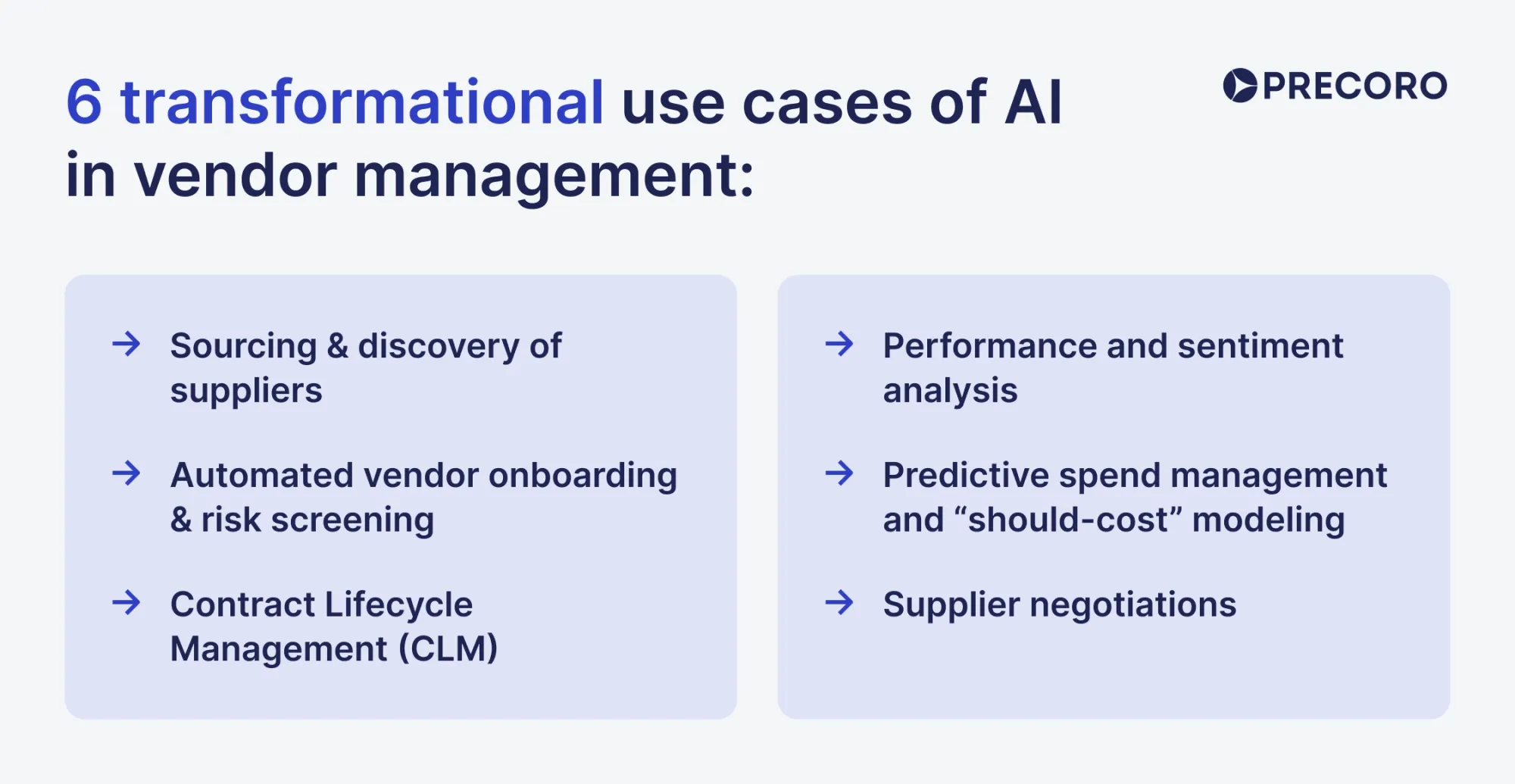
- Six use cases are most useful for AI vendor management: supplier discovery, supplier risk assessment with AI, contract term extraction, communication signals, predictive analytics, and negotiation support.
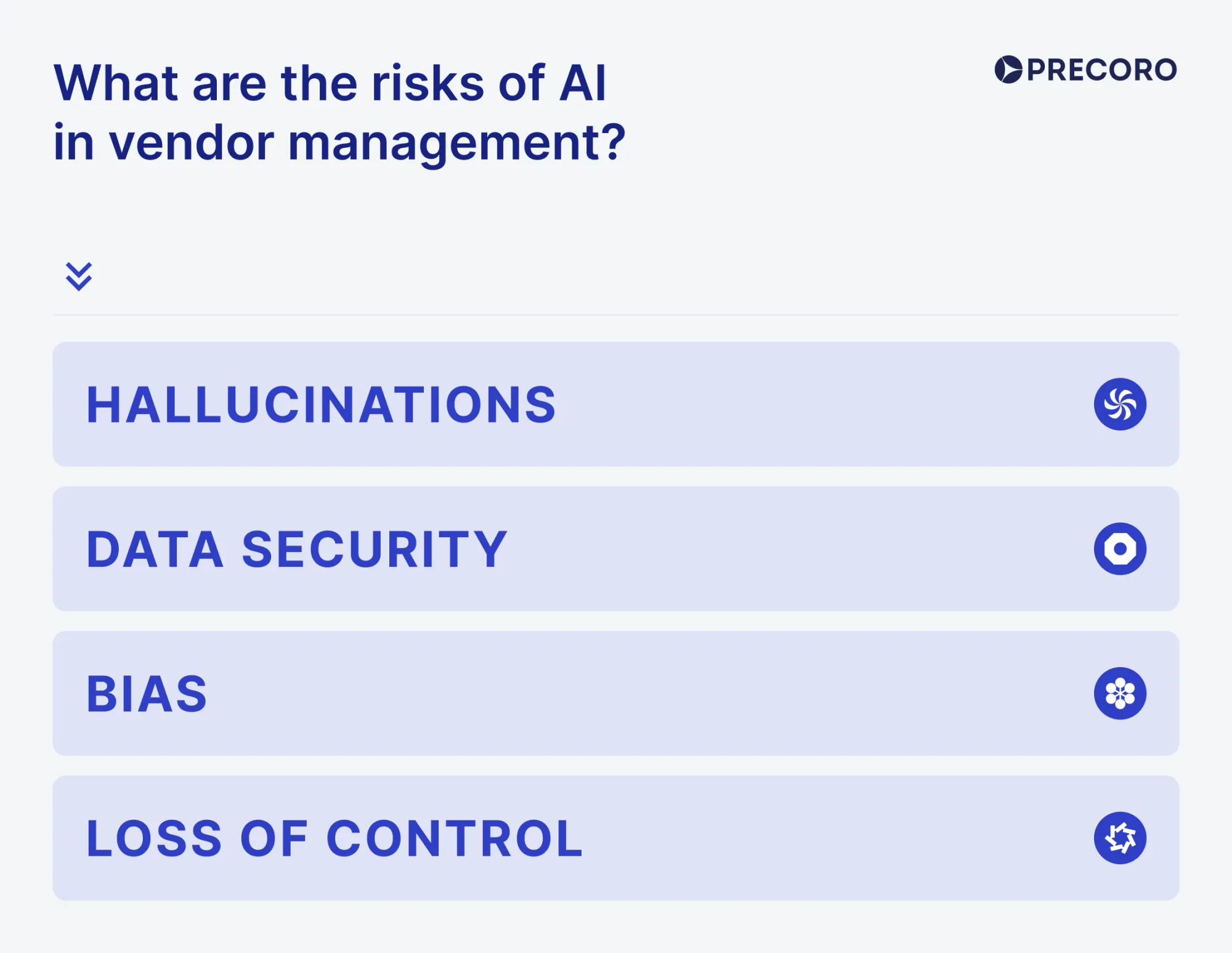
- The main risks are hallucinations, data leakage, bias, and loss of control.
Continue reading to learn more about AI vendor management, how data quality impacts the output, where to use AI in partnerships, and how to implement it alongside your other tools.
What is AI in vendor management?
AI vendor management combines statistical models and language tools that spot patterns in supplier data, automate repetitive tasks, and extract key terms and risks from unstructured text, such as contracts, emails, and third-party risk signals.
What types of AI are used in vendor management?
Although AI is often discussed as a single technology, it’s an umbrella term for several technologies that solve completely different problems. When organizations say they’re “using AI,” they may be referring to predictive procurement analytics, AI contract analysis tools, or large language models, and those aren’t the same thing.
Machine learning (ML)
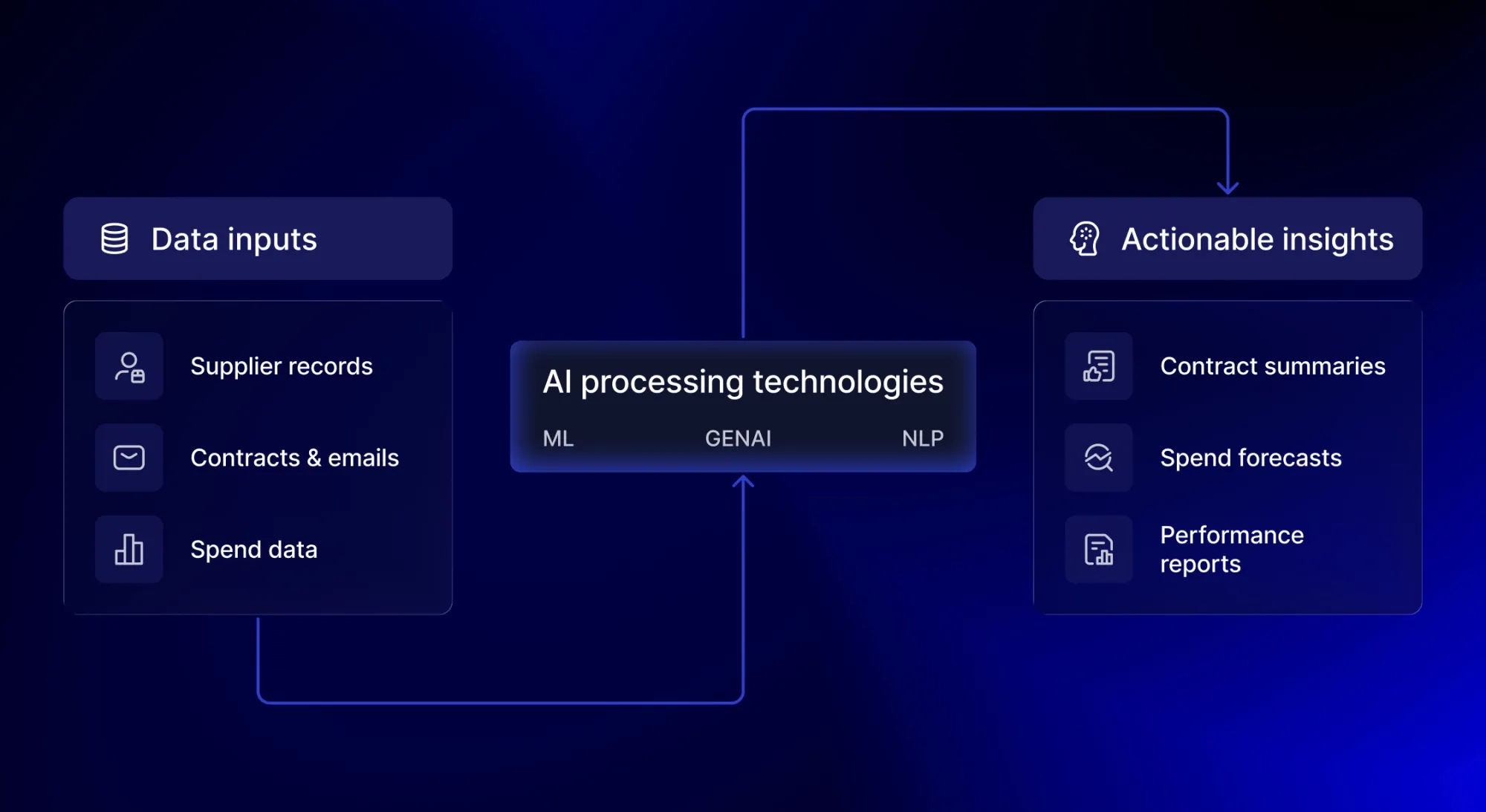
Machine learning is the most established form of AI in procurement. Its main strength is reading structured information: it detects patterns and forecasts based on organized, fixed-format data that’s easy to parse, such as spend history or delivery timelines. If you want to process free-text or other document content without clearly defined fields, you need natural language processing on top of ML.
For example, machine learning for spend analysis can analyze several years of purchasing data to identify pricing trends. If a supplier’s prices begin increasing outside normal seasonal patterns, the system can flag the anomaly. Similarly, models can assess historical delivery performance to predict which suppliers are statistically more likely to miss deadlines in the future.
Natural Language Processing (NLP)
Unlike ML, natural language processing focuses on the language itself. It converts unstructured data into structured insights you can analyze, which matters in vendor management because much of the useful work happens in contracts, SLAs, and policies. Instead of manual reviews, for instance, NLP can scan these documents for specific clauses, such as automatic renewals, liability limits, termination penalties, or price-escalation terms.
NLP in the supply chain can also analyze supplier communications. For example, if it finds repeated references to “delays,” “shortages,” or “temporary disruptions” in correspondence, you’ll be aware of operational instability before any performance metrics change.
Generative AI
Generative AI is the newest mainstream layer in the AI spectrum. It’s based on large language models trained to generate text in response to prompts. GenAI tools are often used for drafting and summarization, which are among the most repetitive tasks. It can also answer questions about vendor data when that data is accessible to the tool. That’s exactly what Precoro’s AI Assistant does: it delivers quick insights from your existing purchasing data in seconds.
However, generative AI in procurement doesn’t verify facts by default. It produces outputs based on learned patterns and the data it receives, so mistakes can happen. Review all outputs before acting on them.
Robotic process automation (RPA)
While technically not AI, robotic process automation (RPA) can be combined with artificial intelligence for an intelligent automation approach. RPA uses software bots to handle high-volume, repeatable tasks by following defined rules. It can interact with other systems the way a person would, like copying data or sending notifications.
If your vendor management process is automated anywhere in the workflow, it likely relies on RPA. You’ll usually see it in basic P2P automations, such as approval routing and renewal alerts.
The downside of RPA is that it’s still rule-based. Besides following the rules, it can’t interpret intent or propose suggestions. Plus, if the process changes but you forget to adjust the rules, the bot can fail.
Agentic AI
Agentic AI is essentially the next step in organizational automation, with 100% of enterprises planning to expand adoption in 2026. Rather than follow fixed rules, an AI agent can plan and execute a sequence of actions to complete a task.
AI agents especially shine in supplier communication scenarios and can run the entire interaction end-to-end. It’s helpful for drafting messages: the tool can gather context from connected systems, draft a supplier message, route it for approval, then send and log the communication once a user approves it.
During a negotiation, the agent could compile supporting price history and delivery data and compose a counteroffer with key trade-offs. In fact, 50% of companies are expected to use an AI contract analysis or a negotiation tool by 2027.
With more autonomy, however, comes the need for more governance. Develop clear guardrails before adding an AI agent to your workflow. Build a reliable base layer of data, define approval workflows with thresholds for each purchase type, and, most importantly, always include human review in the process.
How poor data chips away at your AI processes
The effectiveness of AI heavily relies on the quality of data you put into it. If the vendor records you feed the AI system are inaccurate or inconsistent, the results will be the same. AI will only scale the problem. That’s what the computing field calls “garbage in, garbage out”—even if the model or algorithm behind AI is completely logical, that logic can’t compensate for faulty data.
Dirty data, inaccurate or incomplete information that’s unreliable to use, costs companies a fortune. Over 25% of data and analytics professionals who struggle with poor data quality report losses exceeding $5 million annually, and 7% estimate losses exceeding $25 million annually.
Dark data is essentially raw, unused potential hidden in your systems. Any information that companies successfully collect during their day-to-day operations but don’t use for other purposes, like predictive procurement analytics or business negotiations, is considered dark.
On average, 55% of global organizational data remains unused, and the reason behind that is quite simple. Sometimes the format is inconsistent and hard to work with, or the data requires too many resources and expertise that your team doesn’t have. In other cases, you might not even know it exists, as it’s automatically generated in a system no one monitors.
Checklist: Is my data ready for AI vendor management?
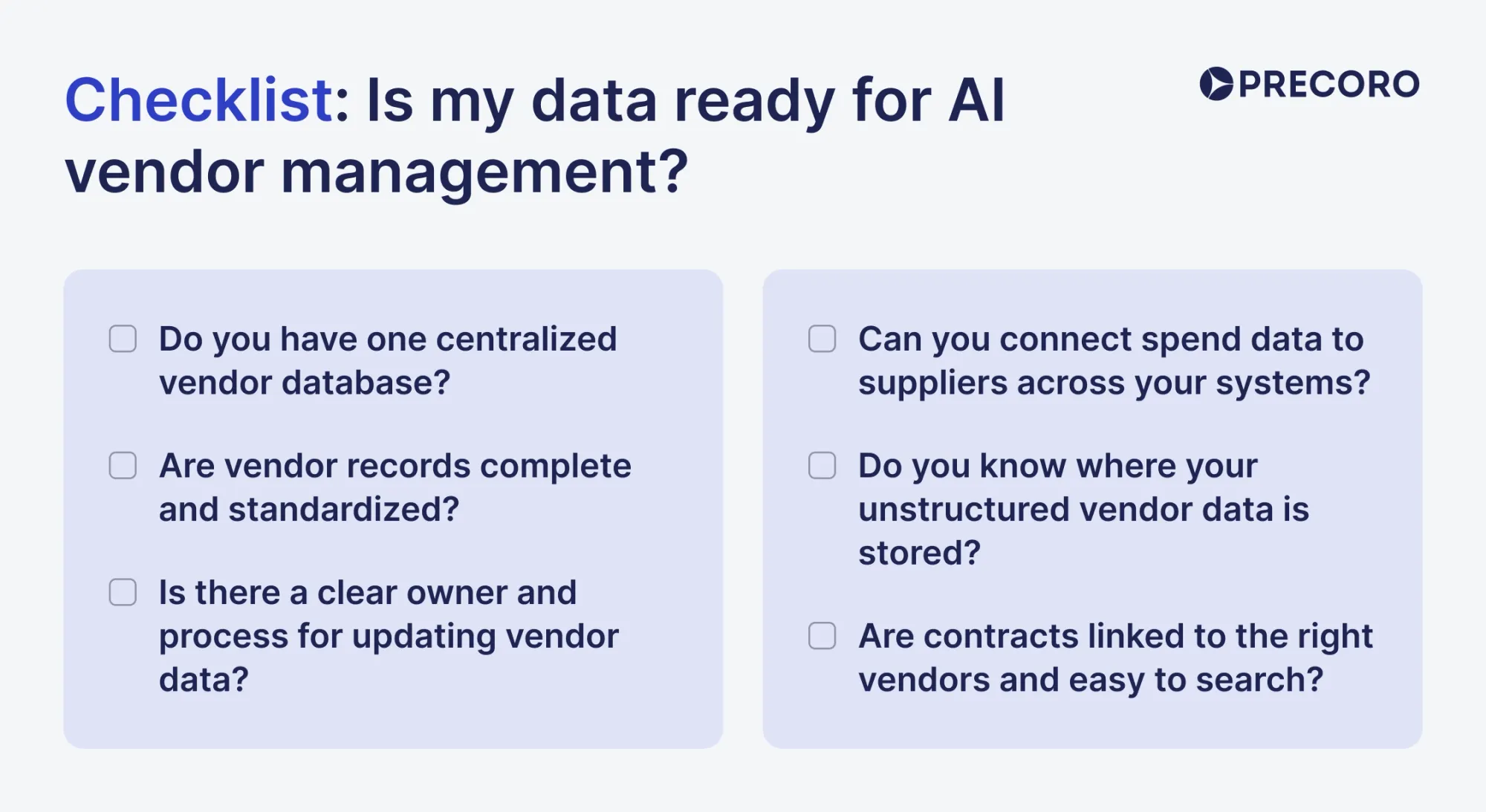
AI is on the rise, but the data needed for it certainly isn’t. In fact, 92% of organizations admit they're not ready for AI, primarily because of fragmented data. If you’re unsure where your company stands, use this simple checklist to assess data readiness. Each “yes” means you’re ready to add AI on top of that area, while each “no” indicates what you need to improve.
1) Do you have one centralized vendor database?
Yes: Having a single place for all supplier information is half the journey towards AI adoption. All vendor data is centralized in a single system, synced with your other tools in real time. Your team can see an accurate view of total spend and link POs or invoices to the needed supplier.
No: Supplier information is scattered across multiple sources, from spreadsheets to legacy ERPs that don’t integrate with modern software. Teams create vendor documents on the go, and you regularly have to remove duplicates or move wrongly filed records under the wrong supplier.
2) Are vendor records complete and standardized?
Yes: Each supplier has a single record in your system, and all transactions, invoices, and contracts are tied to it. All related info, like legal name or tax data, is added under that same profile. Your automated vendor onboarding process includes a self-service registration form with required fields, so you get all the necessary information in a single go.
No: The same supplier might appear under slightly different names, with missing or outdated details. Invoices are often linked to the wrong record. Vendor attachments are sent outside the system to different team members. Suppliers onboard through a series of back-and-forth messages where they send their info to your company.
3) Are contracts linked to the right vendors and easy to search?
Yes: Your team can quickly look up and see the terms your company agreed to with each supplier. Contracts are stored in a secure, protected environment, with access granted only to those directly involved. Plus, invoices are kept in the same system as contracts, so you can quickly check whether they meet the requirements. Additionally, you have an auto-renewal policy and automatic reminders for contract due dates.
No: Your contracts are stored completely separately from supplier records, and you frequently have to search through folders and inboxes for them. Any of these scenarios sound familiar to your team: missing a renewal deadline, overlooking a price escalation clause, or approving an invoice that doesn’t match agreed-upon terms.
4) Can you connect spend data to suppliers across your systems?
Yes: You can see granular data on what your company spent per supplier and across multiple entities. Whether it’s a monthly spreadsheet or a customizable report you can export in seconds, there’s a clear way to access and trace spend back to the right vendor. The vendor management system you’re using syncs easily with your other tools, so supplier records are always kept consistent.
No: You track spend across several systems that don’t integrate, or each business unit uses its own tool and process. There’s no factual report with a breakdown of transactions; you only have estimates per supplier. That alone makes forecasting unreliable and limits what AI can realistically analyze.
5) Do you know where your unstructured vendor data is stored?
Yes: You know where contracts, email threads, certificates, and onboarding documents are stored, and can quickly access them. This information is actually used in operational decisions, for example, spotting early warning signs in emails or using contract terms to fuel negotiations.
No: All such data is scattered across inboxes, shared drives, and attachments. You may miss warning signs in supplier communications, overlook expired certificates, or forget key contract terms simply because they’re hard to find. Decisions are mainly based on partial information rather than the full picture.
6) Is there a clear owner and process for updating vendor data?
Yes: A single employee (or an entire team if your company is large) is responsible for maintaining vendor records. There’s a clear process for updates and reviews. They regularly update vendor data and bank details, delete duplicates, and alert on fraudulent documents. You’re confident that the data used for AI is going to be fresh and relevant.
No: No one is held accountable for vendor data updates. The task is usually assigned to whoever’s free at that moment. You often have to re-check bank details or delete duplicates right before working with AI. Reports are typically treated more as guidelines than reliable truths.
💡Rule of thumb: If you answered “no” to more than two questions, your data isn’t ready for AI. Focus on cleaning and standardizing your vendor data before investing in any AI vendor management tool. Adding artificial intelligence is tempting, but it won’t be as effective without a clean data foundation.
6 transformational use cases of AI in vendor management
AI is undeniably here to stay, and it can help in many areas, but some applications may be more effective than others. Only 4% of all AI use cases are related to supplier management, and only 8% are in production. We broke down the key stages of the vendor management process where AI has the most impact and discussed potential drawbacks to be aware of.
Sourcing & discovery of suppliers
Companies often stick with their current vendors because research is time-consuming. An employee can spend upwards of 40 hours comparing suppliers and come up with only a handful of viable options. Enter AI, and supplier discovery time drops by 90%.
AI-powered sourcing solutions can scan large supplier datasets, analyze publicly available data, and filter the list to vendors that meet your criteria. It doesn’t even have to be a dedicated tool. Even general-purpose GenAI tools like ChatGPT, Perplexity, or Gemini can help surface vendor information from publicly available sources, but access to real-time web data depends on the specific tool and configuration.
Potential drawbacks
The success of automated sourcing depends entirely on where the data was sourced. Unfortunately, AI tools may be biased toward suppliers with a more curated digital presence, overlooking those that are the perfect fit but less visible online. Additionally, if you use outdated data, the discovery results won’t be reliable.
Technologies
- Machine learning for supplier comparison based on structured criteria.
- NLP in the supply chain for reading supplier information.
- Generative AI for drafting RFIs or RFPs and summarizing research.
Automated vendor onboarding & risk screening
Manual onboarding can get expensive, costing companies thousands. Partially, it’s because an employee has to gather information in pieces. The vendor submits a form through sourcing software, sends documents via email, and might even follow up on something by text.
AI solutions typically offer a self-registration form that suppliers themselves can complete without employee input, while OCR extracts information from onboarding documents. Real-time risk screening is finally possible with tools that scan external sources for red flags in vendor behavior.
Potential drawbacks
There’s always a chance that supplier risk assessment with AI may show a false positive and essentially flag that there’s something wrong with the supplier when there’s not. Always review the output and fact-check potential issues yourself, especially when it comes to sensitive information like tax status or bank details.
Technologies
- OCR to extract data from PDFs.
- NLP to understand unstructured data.
- Machine learning for spend analysis based on historical patterns.
Contract lifecycle management (CLM)
Contract management is one of the most common use cases of AI in vendor management. Risks here are usually hidden in plain sight. Contracts can renew automatically without enough supervision. Insufficient knowledge of penalties can unknowingly expose the business to liabilities.
NLP-driven CLM tools or AI contract analysis software can scan contracts at scale and extract key terms into structured fields, such as renewal dates and notice periods. Teams can then set renewal alerts, flag missing clauses, and schedule more regular contract reviews.
Potential drawbacks
The first main concern is data security—uploading a contract with confidential information into a tool without guaranteed security is risky. 68% of organizations suffered from data leakages, triggered primarily by employees pasting data into public LLMs.
Another trade-off is that some contract clauses have nuances that only human critical thinking can pick up. Some terms depend on context that cannot always be added to the tool, such as additional attachments and previously negotiated exceptions.
Technologies
- NLP in the supply chain to extract information from unstructured data.
- OCR to scan PDFs.
- Generative AI to summarize and create first drafts.
Performance and sentiment analysis in supplier communication
Performance scorecards usually focus on measurable KPIs, such as whether delivery is always on time or how many orders arrived incomplete. But the early warning signs can often be found in regular correspondence with the supplier. They may reply more slowly, often mention shortages, or walk back on promises. These issues can easily slip your attention if you’re dealing with hundreds of suppliers every day.
Nowadays, tools with NLP capabilities are often used to analyze sentiment in supplier communication, whether in email threads or a dedicated ticketing system. Use these findings not as proof of dropping performance, but as a reminder to check in on a vendor and assess backup options.
Potential drawbacks
AI still can’t replicate all the capabilities of a human brain, so sentiment analysis can misread tone across cultures and languages. Additionally, sharing any correspondence with confidential information without prior consent from the supplier raises serious compliance concerns. Finally, the output may lack context, especially if most communication occurs over the phone or in offline meetings.
Technologies
- NLP for sentiment signals in unstructured data.
- Machine learning for trend detection across performance metrics.
Predictive spend management and “should-cost” modeling
Spend reports tell you what has already happened. Predictive procurement analytics builds on that and estimates what’s likely to happen next, such as cost increases or demand spikes. Such tools use both your internal company history and external market signals to create accurate forecasts. And it’s quite useful: AI-driven forecasting has been reported to reduce errors by 20–50% in supply chain management.
Should-cost modeling goes a step further than historical spend analysis. You can estimate what a fair price should look like based on key cost drivers like raw materials, labor, logistics, and market factors, then compare it to the supplier’s quote. This process requires a lot of time and effort when done manually, but AI-powered predictive procurement analytics can complete it in minutes.
Potential drawbacks
Forecasts inherently rely on data quality, so they will be unreliable if the data is inconsistent. Similarly, if the supplier has a unique production process or delivers a high-quality product that justifies the prices, should-cost models can miss the mark.
Technologies
- Machine learning for spend analysis and anomaly detection based on structured data.
- NLP to analyze unstructured data.
- Generative AI to provide explanations based on the analysis.
Supplier negotiations
Your preparation often determines the final outcome of supplier negotiations. If the team comes in knowing about market benchmarks and supply chain trends, they already have the upper hand. Instead of opening hundreds of tabs for research, you can use AI negotiation tools to analyze historical data and market reports and summarize them in a usable negotiation brief. Such systems can also help create structured counteroffers and scenarios, so less experienced team members can prepare in advance.
Potential drawbacks
AI can suggest unrealistic tactics if the model lacks sufficient situational context. That’s why it’s crucial not to depend on AI research entirely—fact-check it and draw your own conclusions before you act.
Technologies
- Generative AI to create negotiation scripts and brief summaries.
- RAG-based AI (RAG) that extracts information from verified internal documents rather than the tool’s memory.
- Machine learning to analyze patterns based on historical transactions.
How to use Generative AI chatbots in vendor management
Perhaps the biggest game-changer among AI technologies for companies has been generative AI. At least 89% of organizations planned to expand their use of generative artificial intelligence in 2025, a sharp uptick from previous years' figures. Public GenAI tools like Claude, ChatGPT, and Gemini made artificial intelligence accessible to wider audiences, not just technical teams or enterprise IT departments.
Here are a few ways to use LLMs as your assistants in vendor management.
How to draft RFPs with generative AI in procurement
RFP teams certainly seem to be among the most active adopters of AI, with 68% already using it in their processes. This isn’t surprising when you consider how repetitive the task actually is. Companies submit 153 RFPs per year on average, each with its own requirements and separate vendor contacts. Provided that you give generative AI in procurement enough information about the RFP structure and specifics, it can generate a solid first draft.
Here are the key steps to follow to create a usable RFP draft with LLMs in minutes:
- Analyze core RFP structure.
Seasoned proposal experts who have worked with the company’s RFPs for years are probably already familiar with the key elements of the proposal. However, if you’re not, review several RFPs yourself to see which sections they include and how the documents are structured. This knowledge will help you make sure AI doesn’t miss anything.
- Upload relevant documents.
You need to build a knowledge base that the LLM can rely on. Less is more in this case—5-10 of the company’s best RFPs are enough for the model to replicate the draft and not get overly creative with its response. Add any product- or project-specific documentation so the LLM can accurately describe the project's scope and the supplies or services you require.
If the document contains confidential information that’s not publicly available, like phone numbers or addresses, consider removing it before uploading it to any public tools you’re not sure are secure. It’s always better to err on the side of caution when dealing with AI.
- Enable Retrieval Augmented Generation (RAG) for the LLM.
Basic models of GenAI chatbots aren’t enough to create a usable RFP draft. For more accurate results, you will most likely need to use LLMs with Retrieval Augmented Generation (RAG) enabled.
Unlike basic versions, which tend to hallucinate and base their answers only on the initial prompts, these setups can search a larger library of materials you provided and use the most relevant sections to answer your query. The output then reflects your existing language and standards.
- Write a specific, detailed prompt.
LLMs aren’t mind-readers. No matter how many documents you upload to them, a simple prompt like “create an RFP” won’t produce a strong result. Instead, describe in detail what exactly you want AI to do, including proposal guidelines, scope of work, vendor qualifications, timelines, and any structural constraints. On the bright side, however, this prompt is completely reusable: you only need to change a few details, and it’s good to go.
Scroll down for our mini-guide on prompt engineering for AI vendor management.
- Review and iterate.
The draft you get is a work in progress, not the finished product. Review it, change anything that doesn’t align with your needs, and most importantly, adjust the prompt based on these changes. For instance, if the final draft doesn’t include pricing limitations, add this line to the prompt and rerun it.
How to accelerate supplier communication with generative LLMs
Vendor management involves constant communication, with managers sending dozens of emails back and forth. Most of it follows familiar patterns: you follow up on delays, ask for missing documents, clarify scope, or loop in another employee to escalate. You probably have rewritten the same email you’ve sent a hundred times already. Generative AI in procurement can draft a clear, professional response in seconds and free up time for more strategic work.
Here’s what to do:
- Give the model context. Describe the situation, what you want to achieve with the message, and what tone of voice you would like to use.
- Add an example of your regular message. Completely optional, but it’ll give AI an idea of what your typical tone of voice sounds like.
- List any constraints. If the message should be short, mention it. AI can get overly wordy, especially in basic versions, so it’s important to set a threshold.
- Review the final text. That’s the golden rule of any AI workflow—a human should always review the final output.
- Save it as a template for future use. The final draft can easily be used in similar situations.
An example of a prompt to draft a message would look like this: “Supplier missed the delivery deadline by two weeks and hasn’t provided an updated timeline. Draft a firm but constructive 200-word message requesting corrective action.”
How to summarize long vendor documents
If you’re managing vendors, you have to deal with extensive documentation, as well as messages and emails. There are vendor scorecards, quarterly reviews, and questionnaires, all of which can easily run 30–50 pages. Most teams don’t have time to read every line, but sometimes they need to, to find out specific insights. Thankfully, one of the most common uses of generative AI in procurement is to summarize extensive documents into a concise, skimmable brief.
Start with:
- Provide the source document. Upload the report into an approved, secure tool, or paste the relevant sections.
- Tell the model what output you want. Ask for a specific format and which insights you’d like to summarize, such as top risks or key takeaways.
- Require evidence for every claim. Ask the model to quote the exact sentence or section it used for each takeaway, so you can verify it quickly.
- Review. Confirm any statement before you share it internally.
Mini-guide on how to write prompts for vendor management: RFP example
The final output of AI depends entirely on the prompt. A vague request will lead to a draft of the same quality. The model won’t understand the context until you provide it, so the instructions should be detailed. A strong vendor management prompt should be detailed and include the basics that LLMs can’t guess, such as the role, main task, and the scope of work. For instance, a prompt for RFP drafting would typically consist of:
- Role and main objective of AI. Although seemingly unnecessary, this detail gives LLM a baseline for the behavior you expect.
- Proposal guidelines and sources. Reference the documents you uploaded, such as RFPs, policy documentation, or product specifications.
- Scope of work. Describe exactly what you are buying and what the vendor will be responsible for delivering.
- Vendor qualifications. List the minimum requirements suppliers must meet, such as certifications, experience, capacity, or regulatory compliance.
- Evaluation criteria. Explain how proposals will be assessed and specify factors like pricing, technical capability, delivery timelines, and risk considerations.
- Timelines. Define submission deadlines, any expected milestones, and project start and completion dates.
- Constraints. Specify any formatting limits the proposal must follow, such as word count, the required template AI should use, or a file type.
Example prompt for an RFP draft
Use this prompt template as a baseline to build your own request.
You are a procurement manager (RFP specialist) with a task to create an RFP to solicit proposals from vendors for [products or services] for a [specific project]. Use the tone and structure from the uploaded documents [Example RFP 1] and [Example RFP 2]. Use only those documents and the details below. If something is missing, write “Not provided” and list questions at the end.
Scope: [List project requirements].
Qualifications: [List specific vendor requirements and deliverables].
Evaluation criteria: [List metrics].
Timeline: proposals due [date], project start [date], completion target [date].
Constraints: keep the RFP under [X] pages and require responses in [format].
What are the risks of AI in vendor management?
Despite its many benefits, AI vendor management poses several risks that every company should be aware of before adoption. Any tool rollout should be preceded by in-depth research and consultations with field experts who can provide an unbiased opinion on the topic. Watch out for the following risks:
Hallucinations
Although AI models keep improving and produce better outputs, their hallucination rates can still reach as high as 79% even in newer versions. GenAI can write a convincing answer without any sources. For instance, it can extract key clauses from a contract, but in reality, it may completely rewrite all terms listed in it.
Without additional review, you risk opening disputes with high-performing suppliers or entering negotiations without any proof. Ask AI to quote the exact lines it used and list what it couldn’t find. Review the entire output and cross-reference with the original document.
Data security
Vendor management data often includes sensitive information, such as bank details and tax documents. If staff paste that content into public AI tools, it can leak further and expose your company to legal disputes and penalties. Educate employees on how to use AI and which data they can use in which tools.
Bias
Artificial intelligence isn’t inherently objective. AI may favor vendors with more polished websites and stronger marketing positioning, and completely overlook those that better fit your needs but aren’t as well-known online. Similarly, if you’ve worked with the same suppliers for years and used their data in your AI tools, models can reinforce the same choices. The solution is to update your data regularly and write detailed prompts with clear evaluation criteria and vendor qualifications.
Loss of control
Complete reliance on automation can quickly erode your company's visibility into what’s actually happening in vendor relations. If all messages, onboarding, and reports are processed through AI without any human input, errors and hallucinations can easily slip through and affect final purchasing decisions. Treat AI as an assistant and a tool, and don’t rely on it completely. Always verify any output it produces and regularly review any automation processes set up in the system, like routing rules or auto-messages.
How to add AI vendor management to existing software
Most companies aren’t a blank slate. Most of the time, they already have a vendor management system in place. Some use shared drives with supplier files, but others, mid-sized businesses in particular, go a step further and use an ERP or P2P software. That system essentially becomes a data foundation for AI. If it’s inconsistent, the output will be inconsistent too.
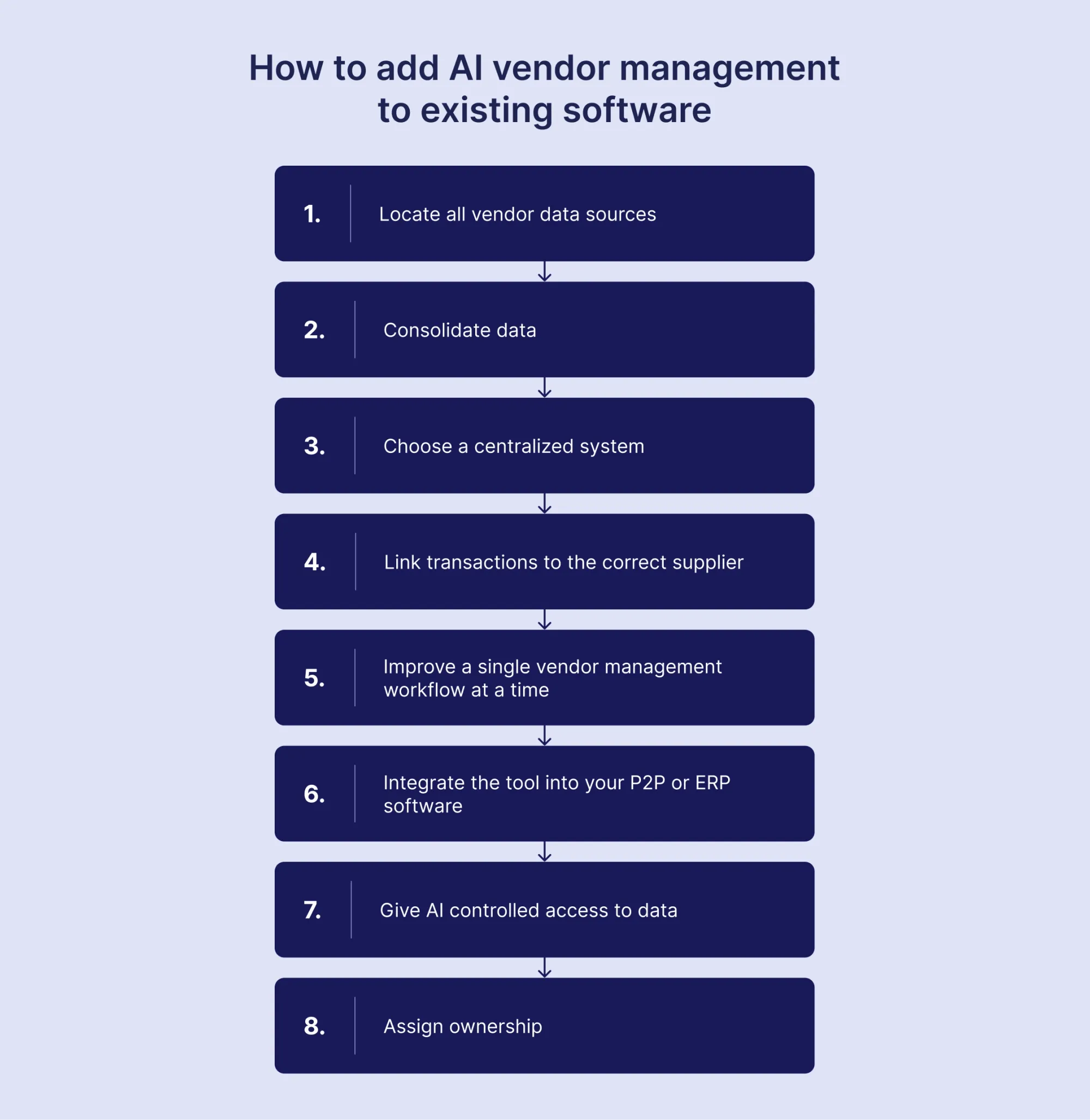
Companies follow these steps to integrate AI vendor management within their existing tech stack:
1. Locate all vendor data sources
Carefully map out every location where your company collects and stores vendor data. Everything, from ERPs and accounting software to shared folders and personal inboxes, counts. A total list of every data source will help you spot which places should be kept and optimized, and which don’t align with your policies and future vendor strategy.
2. Consolidate data
Get rid of any side spreadsheets and combine all supplier records in a single system, whether it’s a spreadsheet record or dedicated vendor management software. Any folders with duplicates or tools that aren’t integrated with the main system also have to go. They only create conflicting entries that can confuse the team. Having backup copies of all files is fine, but they should clearly be labeled and identical to the main repository.
3. Choose a centralized system
If the company is small and managing a dozen suppliers, doing it with a spreadsheet or written records is fine. But the more suppliers you get, the more you risk losing time in the search. At this stage, centralized procurement is necessary. After cleaning the data, it should reside in a single structured platform that serves as the master data source for all suppliers.
In Precoro:
- Supplier data is stored in a single database.
- Mandatory fields can be set for automated vendor onboarding forms.
- Supplier Portal lets vendors register without an employee’s help.
- New suppliers go through a defined approval workflow.
- Data automatically syncs with accounting or ERP systems.
- Contracts have renewal alerts.
- Employees are guided to purchase from pre-approved supplier catalogs.
- 3-way matching automatically compares documents.
- AI-powered OCR can extract data from invoices.
- An AI Assistant can provide quick insights based on existing data.
4. Link transactions to the correct supplier
Check whether the same supplier exists under multiple names or IDs. Merge those records so each vendor has only one unique ID. Next, review recent POs, invoices, receipts, and payments to make sure they point to the correct supplier record. If transactions are linked to outdated or duplicate entries, reassign them. Finally, set a rule: no transaction can be processed unless it’s tied to an approved, active vendor.
5. Improve a single vendor management workflow at a time
Start slow and brainstorm where AI can make the most impact in the near future. Keep the scope narrow. If you try to implement AI everywhere in the process from the jump, you’ll lose sight of mistakes or inefficiencies that only slow down day-to-day work.
6. Integrate the tool into your P2P or ERP software
Connect your central vendor system to your ERP so supplier records, invoices, and payment data stay consistent across tools. Integration can either be done through a custom API or a native connection in the software itself, which should be another thing to consider when you pick vendor management software.
7. Give AI controlled access to data
Limit AI to the data it needs for the workflow you chose. Start with read-only access and require approvals for any action that changes records or affects suppliers. Instruct employees not to upload any sensitive or confidential data, such as contracts or company information, without prior security clearance.
8. Assign ownership
Choose one person or assign a small team responsible for vendor data quality. Make it clear who approves new suppliers, who updates records, and who reviews changes to bank details or tax information.
Set a simple routine: check for duplicates monthly, review inactive vendors quarterly, and verify key compliance documents before they expire. Write down the rules and follow them. Without clear ownership and regular checks, even clean data will lose its structure.
What to remember
AI can make vendor management more proactive, but it’s only possible if the basics are already in place. Machine learning spots patterns in spend and performance. NLP extracts insights from contracts and supplier communication. Generative AI in procurement can draft, summarize, and standardize language-heavy work. Together, these tools form a true AI powerhouse that accelerates your team's work and frees up time for strategic tasks that require human input.
However, if the data isn’t consistent, AI will produce unreliable output and only waste your team’s time. Start with data discipline and centralize vendor records with clear ownership and security guardrails. Treat AI as a co-pilot and connect it to your workflows slowly, one use case at a time. With a narrower scope, you get cleaner and more reliable results.