









 Explore Precoro's features



















The world is changing fast, and when it comes to business development, one wants to focus on strategic priorities and optimize processes across all departments. Efficient purchase order management helps ensure essential business needs are covered while using fewer administrative resources.
This blog article will cover everything about purchase order management and why it matters so much for growing businesses.
Purchase order in procurement lifecycle
A purchase order (PO) is an official document sent by a business (buyer) to an external supplier (vendor) that confirms the intention of purchasing specific goods or services and contains all the necessary information about it.
Once a supplier approves the purchase order, it becomes a legally binding document. The purchase order process is an integral part of a procurement cycle as a whole.
Purchase order lifecycle at a glance
| Stage | Typical owner | Key output |
|---|---|---|
| Purchase requisition | Requester / department | Approved purchase requisition |
| Review & approval | Manager / finance / procurement | Authorized purchase request |
| Supplier selection | Procurement | Selected supplier and agreed terms |
| PO creation | Procurement / purchasing | Complete purchase order |
| PO approval | Authorized approver | Approved PO |
| PO issuance | Procurement | Issued PO / supplier confirmation |
| Order fulfillment | Supplier / requesting department | Payment record and closed PO |
| Receipt & verification | Receiving team / requester | Goods receipt or service confirmation |
| Invoice matching | Accounts payable | Matched and approved invoice |
| Payment & PO closure | Finance / accounts payable | Payment record and closed PO |
What is purchase order management, and why is it important?
Purchase order management is the process of creating, approving, sending, tracking, matching, and closing purchase orders. It helps organizations control purchasing commitments, monitor spending against budgets, maintain accurate records, and coordinate procurement, finance, and suppliers.
It involves defining specific actions and privileges for all participants in the supply chain and acting upon them using specialized tools and means of communication.
Customary ways to manage purchase orders include spreadsheets and e-mails, often followed by phone calls. In this case, small changes to order information lead to unnecessary complications. Repeated manual communication becomes harder to manage as PO volume and the number of participants increase.
Efficiency-oriented procurement managers can enhance performance using PO systems customized with regard to the organization’s specific needs. Software allows for a general overview and in-depth, detailed information on purchase orders in a centralized system.
Purchase order management vs. procurement
Procurement is the broader process of acquiring goods and services. It includes identifying business needs, sourcing and evaluating suppliers, negotiating terms, purchasing, and managing supplier relationships.
Purchase order management, by contrast, focuses on the purchase order lifecycle. It covers the creation, approval, issuance, tracking, matching, and closure of purchase orders.
The key difference is scope: procurement manages the end-to-end purchasing process, while PO management controls the activities and workflows specifically related to purchase orders.
This distinction matters because each of these terms is designed for different goals and metrics. The following table will thoroughly explain the key differences between purchase order management and procurement.
| Specific areas | Purchase order management | Procurement |
|---|---|---|
| Scope | Focuses on managing purchase orders | Covers the complete purchasing and sourcing functions |
| Main activities | PO creation, approval, dispatch, tracking, receiving, matching, and closure | Sourcing, supplier selection, negotiation, purchasing, contract management, and spend analysis |
| Primary Objective | Control individual purchasing commitments and transactions | Optimize how the organization acquires goods and services |
| Key stakeholder | Requesters, approvers, procurement team, finance, and suppliers | Procurement, finance, operations, department managers, and suppliers |
| Technology | Purchase order management software, an enterprise resource planning (ERP) system, or purchasing tools | Broader procurement software, sourcing, spend, contract, and supplier tools |
How does the purchase order management process work?
PO workflows vary by organization, industry, purchasing policy, and approval structure.
- Issue of a PO. A relevant department issues a purchase order containing the PO number, the company's details, information about the goods or services that ought to be bought, and delivery details. It can be created from scratch or from a purchase requisition.
- Approval. PO goes through the approval workflow established in the company. There can be one or several stages. If not approved, it is returned for review.
- PO dispatch. A purchase order is sent to a vendor via a predefined channel of communication.
- Negotiating PO details. Upon receiving a purchase order, the vendor goes through it to confirm whether it is possible to meet all the requirements, such as prices, amount, delivery terms, etc. If necessary, adjustments are negotiated.
- Acceptance of PO. Whether and when a purchase order creates an enforceable contract depends on applicable law, contractual terms, prior agreements, and the parties’ conduct.
- Delivery. Required goods or services are delivered to the buyer in accordance with the accepted purchase order.
- Invoicing. The supplier then issues an invoice for purchased goods or services.
- Three-way matching. The buyer conducts control and matching of the purchase order, goods received note, and invoice. This step is essential during PO invoice processing.
- Invoice payment. Upon successful matching, the accounting department is notified, and the invoice is paid in due time.
- Archiving. The purchase order, goods received note, invoice, and other supporting documents should be retained according to applicable business recordkeeping requirements and the company’s internal retention policies. For U.S. businesses, the IRS notes that how long records should be kept depends on the action, expense, or event the document records.
Once in a while, a company receives a customer order that’s too large to fulfill with available inventory. Replenishing inventory immediately would require a substantial cash injection, which isn’t always an option. That’s when business owners can seek assistance with purchase order financing — a financial instrument for businesses that seek to fulfill large orders without straining their cash flow.
Essential information to include in every purchase order
Accurate purchase orders give both buyers and suppliers a clear record of what has been agreed. Missing or incorrect information can lead to delivery errors, invoice disputes, delayed payments, and unnecessary administrative work.
Every PO should typically include:
- A unique number
- Buyer and supplier details
- Order date
- Description of the goods or services
- Quantity and unit of measure
- Agreed on the unit price and the total price
- Applicable taxes, discounts, and additional charges
- Delivery location
- Required delivery date
- Payment terms
- Currency
- Relevant contract or quotation reference
- Requester and approving authority
- Any special delivery, quality, or service requirements
Key stages of the PO process and purchase order lifecycle
The exact process differs between organizations, but most types of purchase orders move through a similar lifecycle.
It usually starts with a purchasing need. An employee submits a purchase requisition or purchase request, which is reviewed based on the company policies and budget availability. Once approved, a PO is created with the required supplier, pricing, quantity, and delivery information.
The typical lifecycle then follows:
The PO may also remain partially open when only part of the order has been delivered or invoiced.
Purchase order management in the procure-to-pay (P2P) purchasing process
Purchase order management sits at the midpoint of the procure-to-pay (P2P) cycle: it is the stage that converts an approved requirement into a formal, trackable commitment with a supplier. Everything upstream (requisitioning and approval) feeds into it, and everything downstream (receiving, invoice matching, and payment) depends on it.
The wider purchasing process typically begins when an employee identifies a need and submits a purchase requisition. After the request is reviewed and approved, the organization selects the appropriate supplier and issues a PO. Then it becomes a reference point for receiving goods or services, checking invoices, and authorizing payment.
A purchase order (PO) is more than an ordering document. It serves as the organization's approved commercial commitment, defining the agreed quantities, pricing, delivery terms, and conditions against which receiving, invoicing, and payment can be verified.
When the procurement process is digital, purchase order information flows automatically from one stage to the next. This removes repetitive data entry across spreadsheets, emails, accounting software, and separate management systems while improving accuracy, speed, and visibility throughout the P2P cycle.
Purchase order management and accounts payable integration for finance teams
Procurement and accounts payable (AP) should share PO, receipt, and invoice data so invoices can be checked against authorized purchases.
Procurement establishes what the organization is authorized to buy, while accounts payable verifies that supplier invoices align with those approved commitments. By matching invoices against purchase orders and receipts, the finance team can confirm products or services, quantities, prices, and terms before approving payment.
Integration also prevents unnecessary data re-entry. Instead of manually transferring PO information into accounting or AP tools, connected management software can make approved purchasing data available throughout the transaction.
Three-way matching in purchase order management
Three-way matching compares three records before an invoice is approved:
- The purchase order: what the organization agreed to buy.
- The receipt: what was actually delivered.
- The supplier invoice: what the supplier is requesting payment for.
Three-way matching is a common accounts-payable control used to compare purchase orders, receipts, and invoices before payment.
In a manual process, employees may need to compare these documents line by line. Automated systems can match the information and direct only exceptions to employees for review, reducing repetitive order processing work.
Roles of the procurement team in the purchase order approval process
The procurement team helps ensure that purchase orders comply with company policies before commitments are made to suppliers.
Depending on the organization's structure, procurement may be responsible for checking supplier selection, negotiated prices, contractual terms, budget coding, and required documentation.
Clear responsibilities are particularly important when approval thresholds vary according to PO value, department, location, category, or project. An automated workflow can route each request to the appropriate people based on predefined rules, helping maintain control without requiring procurement to manually coordinate every approval.
The role of purchase order management in the procure-to-pay procurement process
Purchase order management connects approved purchase requests with receipts, invoices, and payments. It ensures that every order is properly authorized, documented, and tracked from the moment a PO is created until the supplier is paid.
Purchase order ownership between procurement and accounts payable
Ownership of purchase orders should be divided based on the responsibilities of procurement and accounts payable rather than assigned entirely to one department.
Procurement typically owns the purchasing side of the PO lifecycle. This includes supplier selection, commercial terms, accuracy, approval compliance, supplier communication, and changes to the original order.
Accounts payable becomes more involved once invoices are received. Its key responsibilities include:
- Verifying invoices against approved purchase orders and receiving records.
- Investigating discrepancies in quantities, prices, terms, or other invoice details.
- Confirming payment requirements before an invoice is approved.
- Processing approved invoices according to the agreed payment terms.
Connecting purchase orders, receipts, and invoices through three-way matching
A PO tells the organization what should be delivered. A receipt records what was actually delivered. An invoice, on the other hand, shows what the supplier expects to be paid. Connecting these three records creates an auditable trail across the transaction.
Modern order management systems can connect these documents using common numbers, supplier details, line items, quantities, and prices. This allows automated matching to handle standard transactions while employees focus on exceptions requiring judgment.
Common purchase order management challenges
Even organizations with established purchasing procedures can experience problems if PO controls are inconsistent, highly manual, or fragmented across multiple systems. The most common issues generally involve inaccurate data, weak visibility, delayed approvals, unauthorized purchasing, and poor coordination between requesters, procurement, finance, and suppliers.
Purchase order errors caused by a manual process
Manual work increases the risk of mistakes because employees repeatedly enter, copy, update, and transfer purchasing information between emails, documents, spreadsheets, and accounting systems.
Common errors include:
- Incorrect quantities or prices
- Duplicate PO numbers
- Wrong supplier information
- Missing delivery details
- Incorrect cost centers or budgets
- Outdated supplier terms
- Unrecorded PO changes
- Orders sent before receiving proper authorization
Reduced spend visibility from poor purchase order management
Poor PO management makes it difficult to understand how much money the organization has actually committed.
Accounting records may show what has already been invoiced or paid, but open purchase orders represent future financial commitments that also need to be considered. When purchasing information is dispersed across emails and spreadsheets, managers may overlook these commitments and approve additional spending.
The impact of poor PO management on supplier relationships
Weak PO management affects suppliers as well as internal teams.
- Suppliers rely on accurate purchase orders to understand quantities, pricing, delivery requirements, billing instructions, and payment terms. Incorrect or frequently changing POs can create uncertainty about what the customer actually expects.
- Poor controls can also lead to disputed invoices and delayed payments. For example, if procurement approves a price change but the PO is never updated, accounts payable may reject the supplier's invoice because it no longer matches the original order.
- Consistent PO procedures create clearer expectations and reduce avoidable disputes. Suppliers know which terms have been authorized, while internal teams have a documented basis for checking deliveries and invoices.
Managing purchase orders outside the standard workflow
Not every purchase follows the ideal workflow. Urgent requirements, supplier changes, price adjustments, shortages, and operational emergencies can require exceptions.
The objective shouldn’t be to prohibit every exception. Instead, businesses need clearly defined procedures for managing non-standard purchase orders without losing visibility, accountability, or financial control.
Handling emergency and non-standard purchases
Emergency purchases may be necessary when waiting for the standard purchasing cycle could stop operations, compromise safety, delay a customer commitment, or cause a more significant financial loss.
Organizations should define what qualifies as an emergency and who has the authority to bypass normal steps. A controlled exception procedure might require the requester to document:
- Why is the purchase urgent
- Why the normal process could not be followed
- Supplier and estimated cost
- Approving manager
- Relevant budget
- Supporting quotation or documentation
Managing purchase order changes after approval
An approved PO may need to change because of updated quantities, revised prices, delivery changes, substitutions, freight charges, or other commercial adjustments. These changes should be documented rather than agreed informally with the supplier while leaving the original PO unchanged.
- Organizations should determine which changes require reapproval. For example, an organization might require reapproval when the PO value increases by 25%; the actual threshold should follow company policy.
- A controlled amendment workflow should preserve the original PO, record what changed, identify who made the change, and obtain additional approval when predefined thresholds are exceeded.
- The updated PO should then be communicated to the supplier so that procurement, receiving, the supplier, and accounts payable are all working from the same information.
Preventing duplicate orders
Duplicate POs can result in duplicate deliveries, unnecessary commitments, and additional work for both buyers and suppliers. They often occur when different employees submit the same request or fail to see that another PO has already been created. Centralized visibility, unique PO numbering, and duplicate checks can reduce this risk.
Preventing retrospective purchase orders
Retrospective purchase orders present another control problem. These are created after goods or services have already been ordered or received, often because an employee bypassed the normal purchasing process.
Organizations can reduce retrospective purchasing by making the approved buying process easy to follow, clearly communicating "no PO, no purchase" policies where appropriate, tracking exceptions, and identifying departments or suppliers associated with repeated non-compliance.
Best practices for an effective purchase order management process
Defining and implementing the right purchase order management practices benefits and optimizes the purchasing process. It helps minimize counterproductive actions and boost productivity. The following are several suggestions to optimize purchase order management.
How do you analyze and customize purchase order workflows?
Workflows might differ based on the company size and type, and even vary internally across departments. It’s important to evaluate current inventory management practices and to analyze systemic issues.
Find bottlenecks in the current process and consult with competent decision-makers and stakeholders. This will allow you to design a solution that meets the specific needs of the department in question.
How do you create clear purchase order processing guidelines?
Clear purchase order processing guidelines ensure that everyone involved in procurement follows the same procedures. These guidelines can be maintained in a printed handbook or a digital knowledge base, but they should be easy to access and understand.
Effective guidelines should clearly define:
- When purchasing should begin, including inventory or spending thresholds that trigger a purchase requisition.
- How purchase requests are submitted, including required information and the use of a requisition number.
- Roles and responsibilities, such as who can submit requisitions, create and track purchase orders, receive goods, and process invoices.
- Approval authority, including who must review and approve purchases at different spending levels.
- PO verification requirements, specifying any checks required before a purchase order is issued.
Documenting these rules creates a consistent purchase order process, reduces misunderstandings, and helps procurement, finance, and other departments collaborate more effectively.
How do you simplify the purchase order management process?
Use targeted approval routing: Send purchase orders and related questions only to the employees responsible for reviewing them. For example, if a PO requires one approval, there is no need to involve every procurement team member.
Keep responsibilities clearly separated: Each employee should handle tasks that correspond to their role. The person responsible for issuing purchase orders, for instance, does not usually need to process supplier invoices, which are typically handled by finance or accounts payable.
Remove unnecessary workflow steps: Review the PO management process regularly and eliminate duplicate approvals, unnecessary handoffs, and other steps that do not add control or value. A simpler workflow reduces delays while keeping responsibilities and accountability clear.
Track supplier performance KPIs to improve purchase order management
Using procurement management software, gather trustworthy insights on supplier performance. Set specific markers for each vendor and have statistics available at any time. Having supplier performance data, select the best vendor for each transaction.
Key purchase order management KPIs to track
Key performance indicators (KPIs) help organizations determine whether their purchase order management procedures are fast, accurate, compliant, and cost-effective.
Useful PO KPIs include:
- PO cycle time: Time from request or PO creation to final approval.
- First-time approval rate: Percentage of POs approved without corrections or resubmission.
- PO processing cost: Administrative cost required to create, approve, and manage a PO.
- On-time delivery rate: Percentage of orders delivered within agreed deadlines.
- PO compliance rate: Percentage of purchases completed through the approved procurement process.
- PO exception rate: Percentage requiring manual intervention due to errors, mismatches, or policy issues.
- Open PO value: Total financial commitment represented by outstanding purchase orders.
- PO closure time: Time between complete fulfillment and formal PO closure.
- Invoice match rate: Percentage of invoices successfully matched to PO and receipt data without intervention.
Purchase order management metrics that reveal process problems
Not every useful metric needs to become a formal KPI. Operational metrics can help identify where the PO process is slowing down or producing avoidable work.
Other warning signs include:
- A growing number of overdue open POs
- High levels of retrospective purchasing
- Frequent PO amendments
- Large numbers of partially received orders
- Repeated emergency requests
- Unusually high manual exception rates
- POs remaining open long after final invoicing
Digitize, automate, and integrate purchase order management
- Digitize manual work: Replace paper-based workflows and disconnected documentation with digital purchase order management processes. A centralized procurement system makes purchasing information easier to access, track, and control.
- Reduce manual errors: Managing dozens of purchase orders across spreadsheets, emails, and separate files increases the risk of data-entry mistakes, outdated information, and version-control issues. Centralizing PO data creates a more reliable source of purchasing information.
- Automate repetitive tasks: Automation can reduce manual data entry, route purchase orders for approval, and direct exceptions to the appropriate employees for review. This reduces administrative work while keeping necessary controls in place.
- Support higher purchasing volumes: Procurement software, which includes requisitions, POs, approvals, receiving, supplier management, invoice matching, and spend controls, allows organizations to manage growing transaction volumes without increasing manual work at the same rate. As purchasing activity grows, automated workflows make it possible to process more purchase orders without requiring a proportional expansion of the procurement team.
Manual review criteria for purchase orders
Standard purchase orders can be processed automatically, but certain transactions still deserve human review. Organizations can establish review criteria based on financial value, risk, supplier status, or unusual purchasing conditions.
Manual review may be appropriate when:
- The PO exceeds a defined spending threshold
- A new or unapproved supplier is selected
- Pricing differs substantially from previous purchases
- The PO falls outside the approved budget
- Payment terms are unusual
- A supplier requests advance payment
- Quantities significantly exceed normal demand
- Contract terms have changed
- The order includes unusual freight or additional charges
- A PO has been changed substantially after approval
- The purchase is retrospective or classified as an exception
Preventing purchase order approval bottlenecks without losing control
Adding more approvers doesn’t automatically improve purchasing control. Excessive approval layers can slow order processing, encourage employees to bypass procedures, and leave suppliers waiting for confirmation. A better approach is to make approval requirements proportional to risk.
Organizations can also reduce bottlenecks by:
- Setting approval thresholds by amount, department, or category
- Using substitute approvers for absences
- Sending automatic reminders
- Allowing mobile approvals
- Avoiding duplicate approval levels
- Escalating requests that remain pending for too long
- Reviewing approval-time data to identify recurring delays
Benefits of purchase order management software and how to get started
Automated solutions bring multiple benefits across the whole supply chain. Precoro, an agentic procurement and AP centralization platform, addresses the complex issues procurement managers face while remaining easy and intuitive to use.
Automate purchase order creation to improve efficiency
Purchase order creation should be smooth and straightforward. With strategic purchase order management best practices in place, you can create POs in a few clicks.
Precoro lets you customize PO templates to match your purchasing process, so users don't have to start from scratch. For repeat purchases, they can simply copy a previous PO, review the details, and submit it again.
Precoro also offers AI-powered PO Processing. Upload an existing PO as a file or image, and the system extracts the data and turns it into a structured purchase order in Precoro.
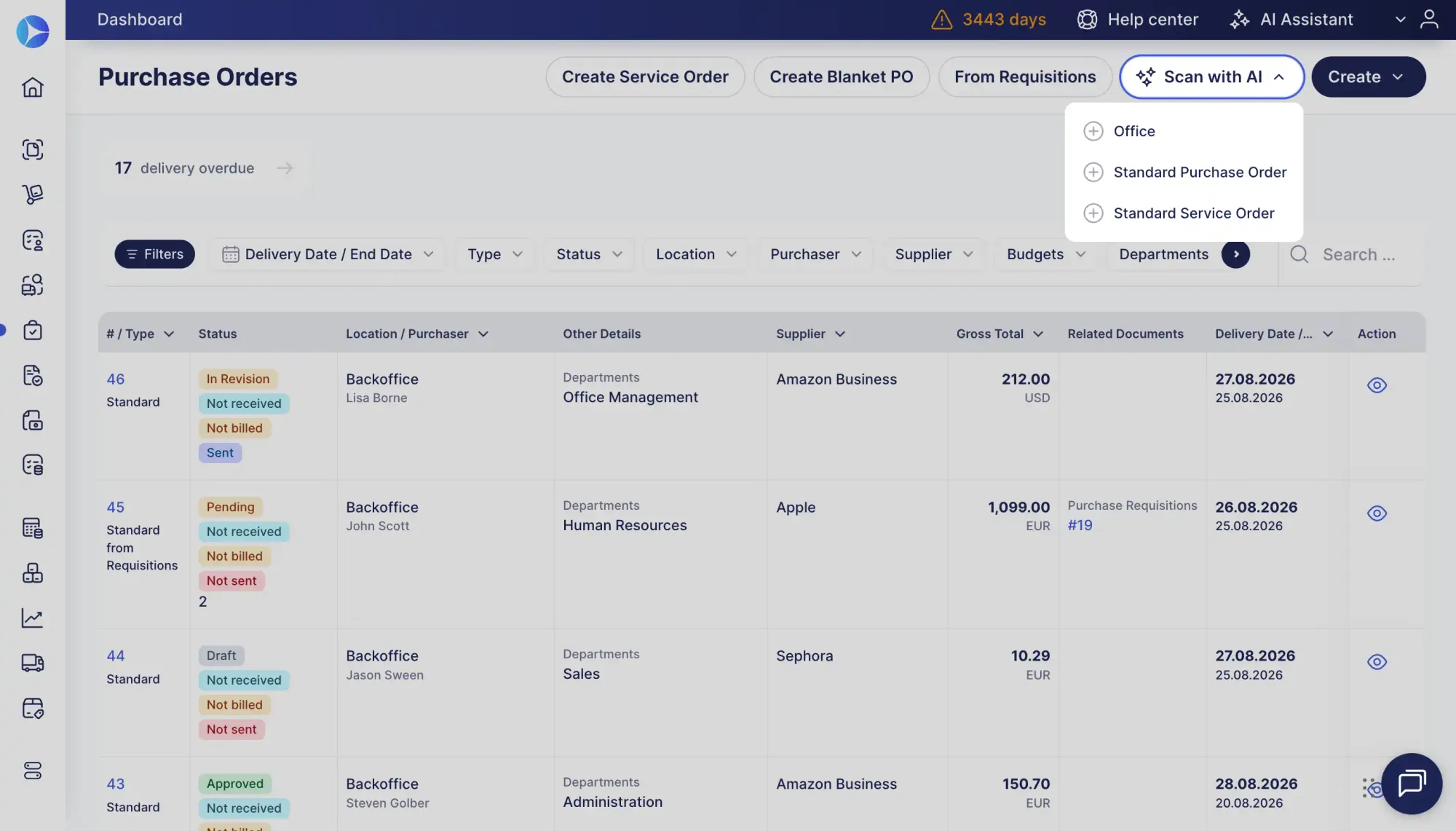
By automating data entry and reusing existing information, teams can spend less time creating POs manually and keep purchasing moving.
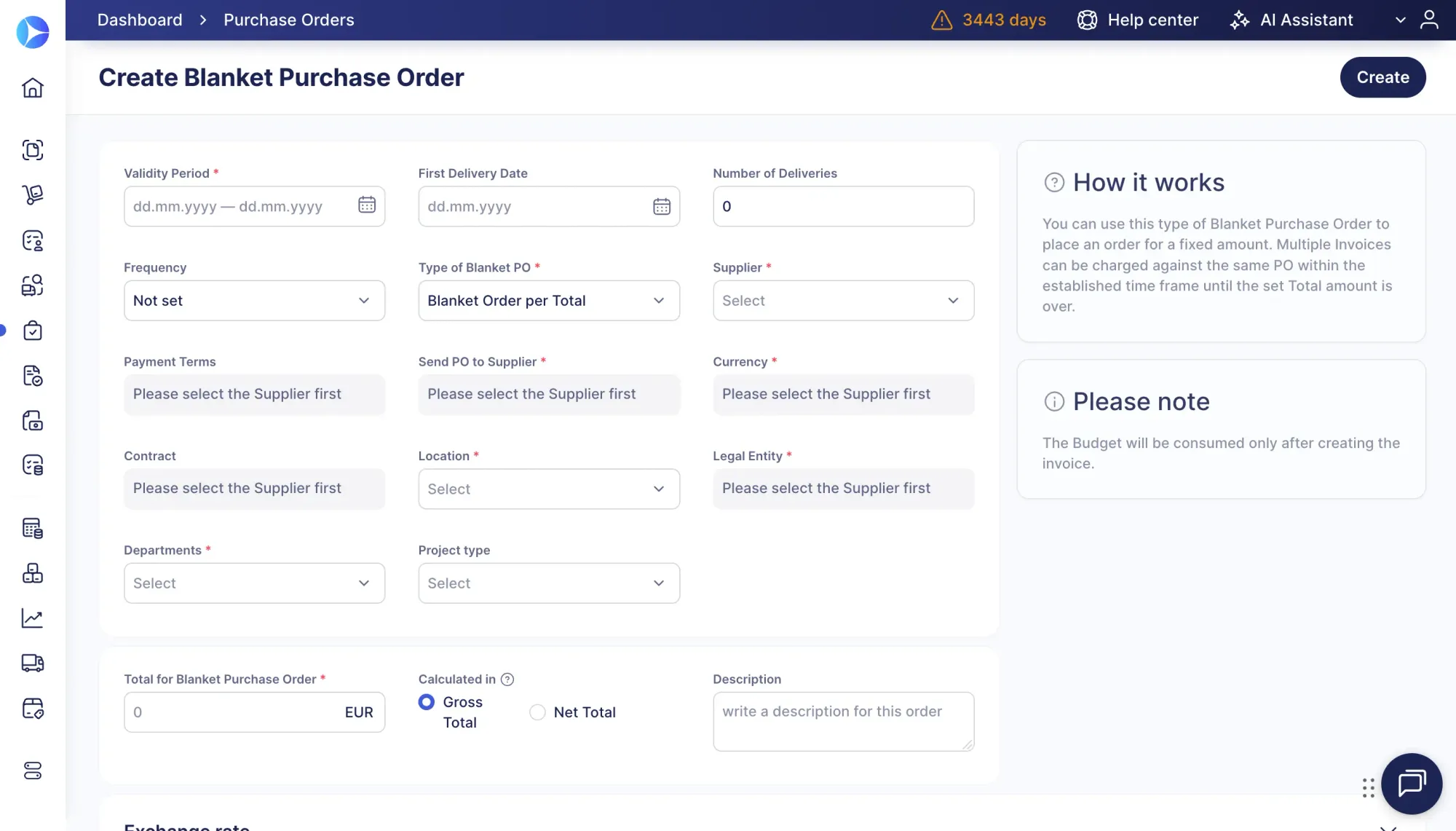
Use blanket purchase orders for recurring purchases
If your procurement process involves recurring purchases over an extended period of time, creating POs one by one might not be sustainable. To streamline the process, use blanket POs.
A blanket purchase order is a custom agreement between a vendor and a buyer that defines purchasing specific products or services repeatedly for a fixed price for a specific period of time.
Blanket POs in Precoro are created either per specific Items to order or per Total amount to spend. Using blanket purchase orders (BPOs) prevents repetitive efforts and allows for accurate planning. Striking a deal with a vendor and committing to it by initiating a blanket PO leads to more predictable pricing and purchasing regardless of potential market fluctuations.
Create custom purchase order approval workflows
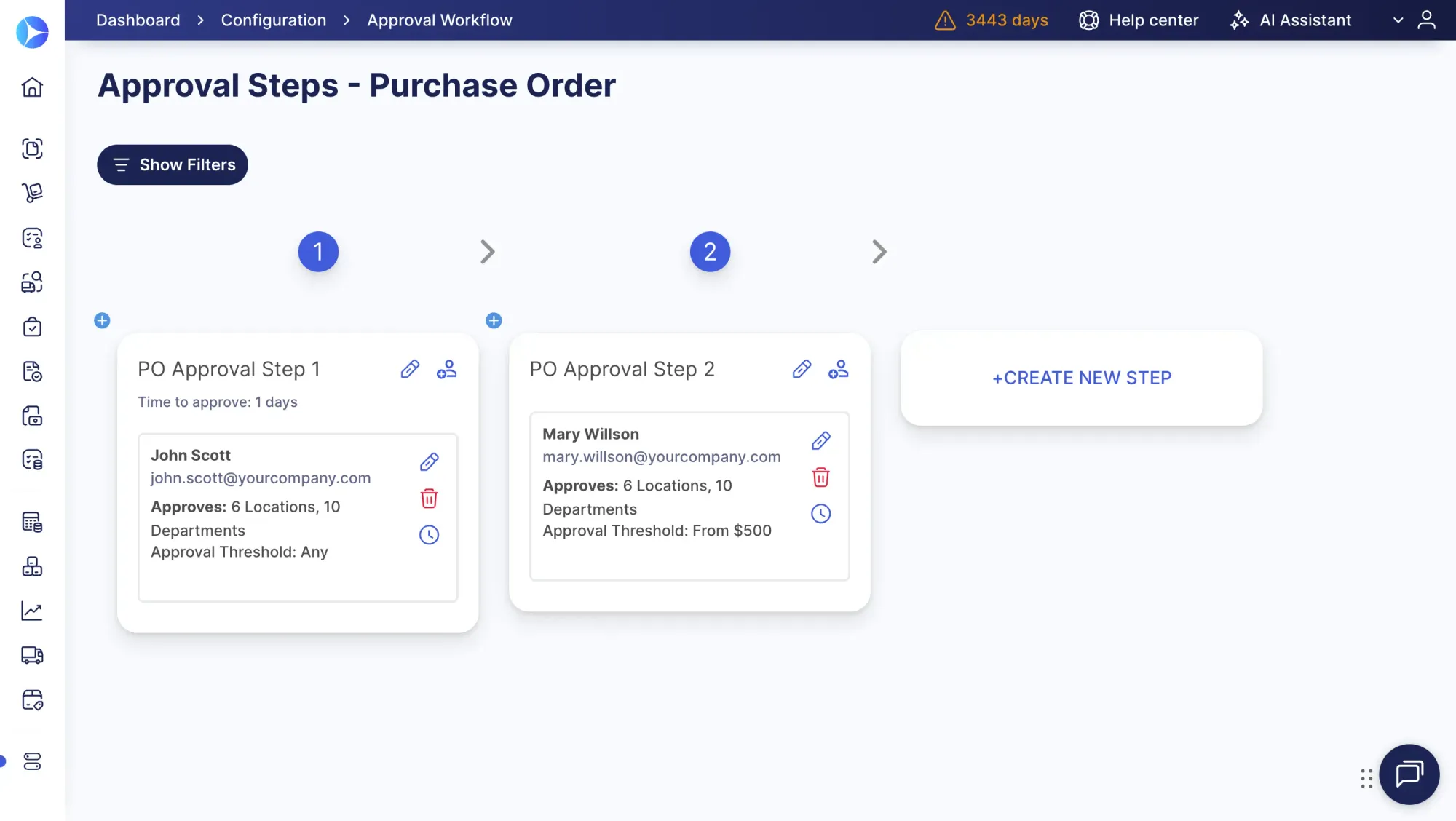
The procurement manager designs a clear approval workflow based on company size, number of issued POs, and available budget, and implements it by defining users' permissions.
The PO approval process should be neither too rigid nor too lenient. Overly complicated procedures will lead to a decline in efficiency due to the constant administrative workload.
On the other hand, keeping approval strategies too flexible, the company risks losing money by excessive or suboptimal ordering. Precoro allows customizing the approval workflow as much as your organization requires.
Define a cost threshold or span that needs approval, assign approvers based on locations or departments, or create your own criteria. Set subsequent approval steps to automate the whole process. Precoro also lets you set deadlines for each approval step and approve documents directly from Slack or the mobile app.
Use real-time purchase order tracking
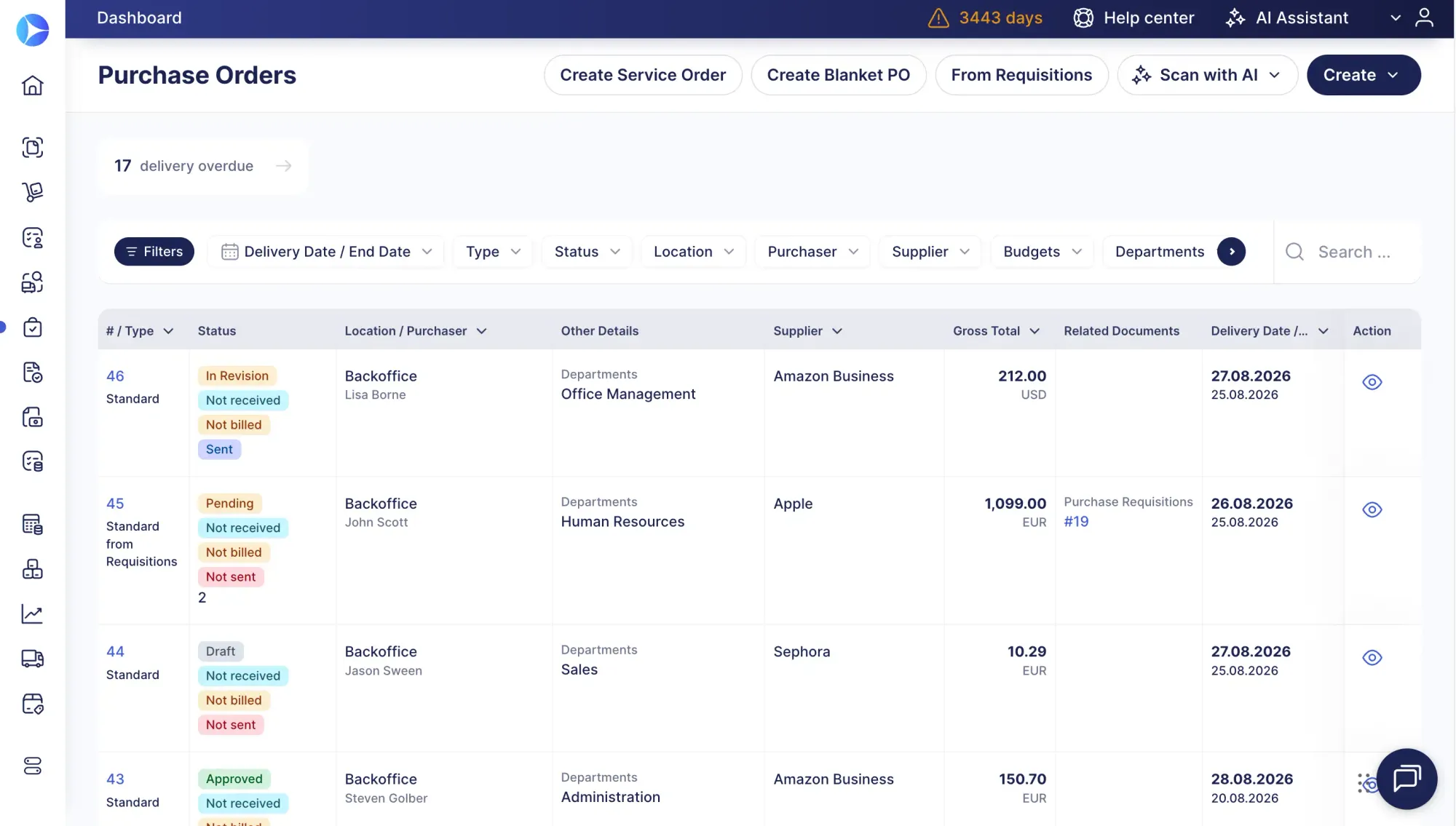
For everyone involved in the procurement process, it’s important to have information available at any given moment. With digital solutions, there is always up-to-date information on each PO.
Instant notifications on order status updates make tracking progress easy and allow for cutting back on unnecessary inquiries.
Integrate purchase order management software with your business systems
An effective PO management tool should integrate with the company’s accounting system. Connecting procurement and accounting creates a consistent flow of purchasing and financial data between the two functions.
For example, Precoro integrates with QuickBooks and NetSuite, enabling the synchronization of purchasing and accounting data between systems. This reduces the need to manually enter the same information in multiple places.
Maintain end-to-end data synchronization.
Purchasing and accounting information should remain connected throughout the process, from purchase requisition and PO issuance to invoice approval. This gives both teams access to consistent and up-to-date transaction data.
Improve efficiency and spending control.
Better integration between procurement and accounting can streamline PO processing, improve visibility into the spending pipeline, reduce repetitive administrative work, and lower operational costs.
Improve vendor management through purchase order management
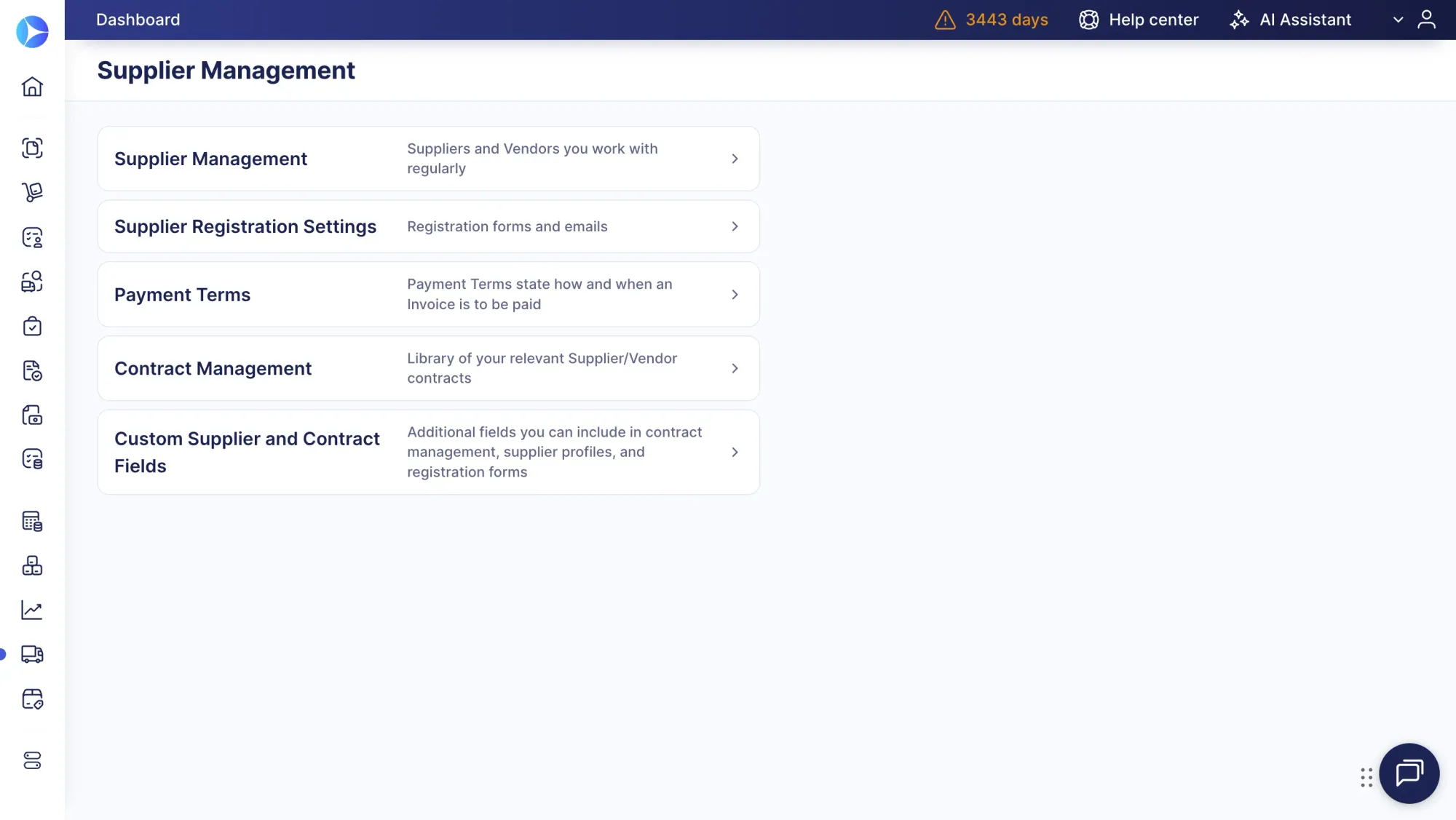
Managing POs is better with an efficient supplier management system. Here is what you can do with it:
- Centralize supplier information: Maintain a centralized database of verified supplier information, including contact details, payment terms, contracts, and other purchasing data. This gives procurement teams a reliable source of information when creating and managing purchase orders.
- Maintain supplier item catalogs: Store each supplier’s available products, pricing, and purchasing details in the system so employees can quickly select approved items when creating requisitions or POs.
- Use a supplier portal for collaboration: With Precoro’s Supplier Portal, vendors can receive purchase orders, communicate with buyers, and create invoices directly within the system. Keeping these activities in one place reduces reliance on emails and calls and helps prevent communication gaps and misunderstandings.
Improve purchase order data security and compliance
Purchase order records should be stored securely while remaining accessible to authorized employees for reviews, audits, and compliance checks. A centralized digital system can make records easier to retrieve than information scattered across spreadsheets, emails, and paper files.
When evaluating purchase order management software, organizations should consider controls such as role-based access, least-privilege permissions, user authentication, and audit trails that record important system activity. NIST’s audit logging and access-control guidance provides a useful reference for access control and audit/accountability practices.
Cloud-based platforms such as Precoro can support centralized access to procurement records, but security should be evaluated based on the specific controls, configurations, and safeguards implemented, rather than assuming that cloud deployment itself makes a system more secure.
How you can benefit from PO management
Structured PO management can benefit organizations that need formal purchasing controls, particularly as purchasing volume or approval complexity grows.
Every business has limited resources available at any given moment, and it's important to use them wisely, keep track of expenses, and optimize workflows. Organizations that rely on a mix of paper forms, spreadsheets, email, and phone calls may struggle to maintain a single current record.
PO controls can reduce certain purchasing errors and help detect or deter unauthorized transactions. Managing purchase orders means getting a better understanding of spending and making informed purchasing decisions.
How Precoro simplifies purchase order management and automation
Precoro helps companies centralize and automate purchase order management, replacing spreadsheets, emails, and repetitive manual work with a structured digital workflow.
The platform supports purchase requisition processing, purchase order creation, configurable approvals, receiving, invoice processing, and three-way matching. Approved requests can be converted into purchase orders without re-entering data, while automated routing sends each document to the correct approver.
Teams can also track PO statuses, monitor outstanding commitments, and connect receipts and invoices to the corresponding PO. This gives procurement and finance better visibility into spending and helps identify discrepancies before payment.