Best Invoice Management Software: How to Choose the Right Invoice Management System
Compare the best invoice management software of 2026: Features, pricing, and ratings for 10 top systems, plus how to pick the right fit for your business.

Invoice management software helps businesses capture, match, approve, track, and record supplier invoices. It reduces the manual work involved in processing invoices received as PDFs, email attachments, and other formats.
But not every invoice management system solves the same problems. Some automate invoice capture but leave matching and approvals to finance teams. Others may struggle to handle your invoice volume, supplier mix, or existing accounting and ERP setup. A poorly matched system can leave manual work unresolved and increase processing costs.
That’s why choosing the right platform matters. This guide explains how invoice management software works and how leading platforms compare in 2026. Rather than naming a single “best” system, we’ll give you the criteria and comparison data you need to evaluate your options.
Keep reading to find out:
How invoice management software works
Invoice management features that matter most
Invoice management system comparison
When to replace your invoice management system
Cloud-based vs. on-premise systems
How enterprise teams should evaluate vendors
How to calculate the ROI of invoice management software
What to test during a software demo
Top invoice management systems
How to implement invoice automation without disruption
FAQ
What is an invoice management system, and how does invoice management software work?
Online invoice software captures invoice data, routes invoices for approval, matches invoice details against purchase orders and receipts, and sends the approved data to your accounting or enterprise resource planning (ERP) system.
An ERP system helps organizations manage core business activities such as accounting and procurement.
With invoice software, employees don’t have to open emails, retype invoice details, or chase approvers manually. Instead, the system handles repetitive steps automatically and flags only the exceptions that require human review or a decision.
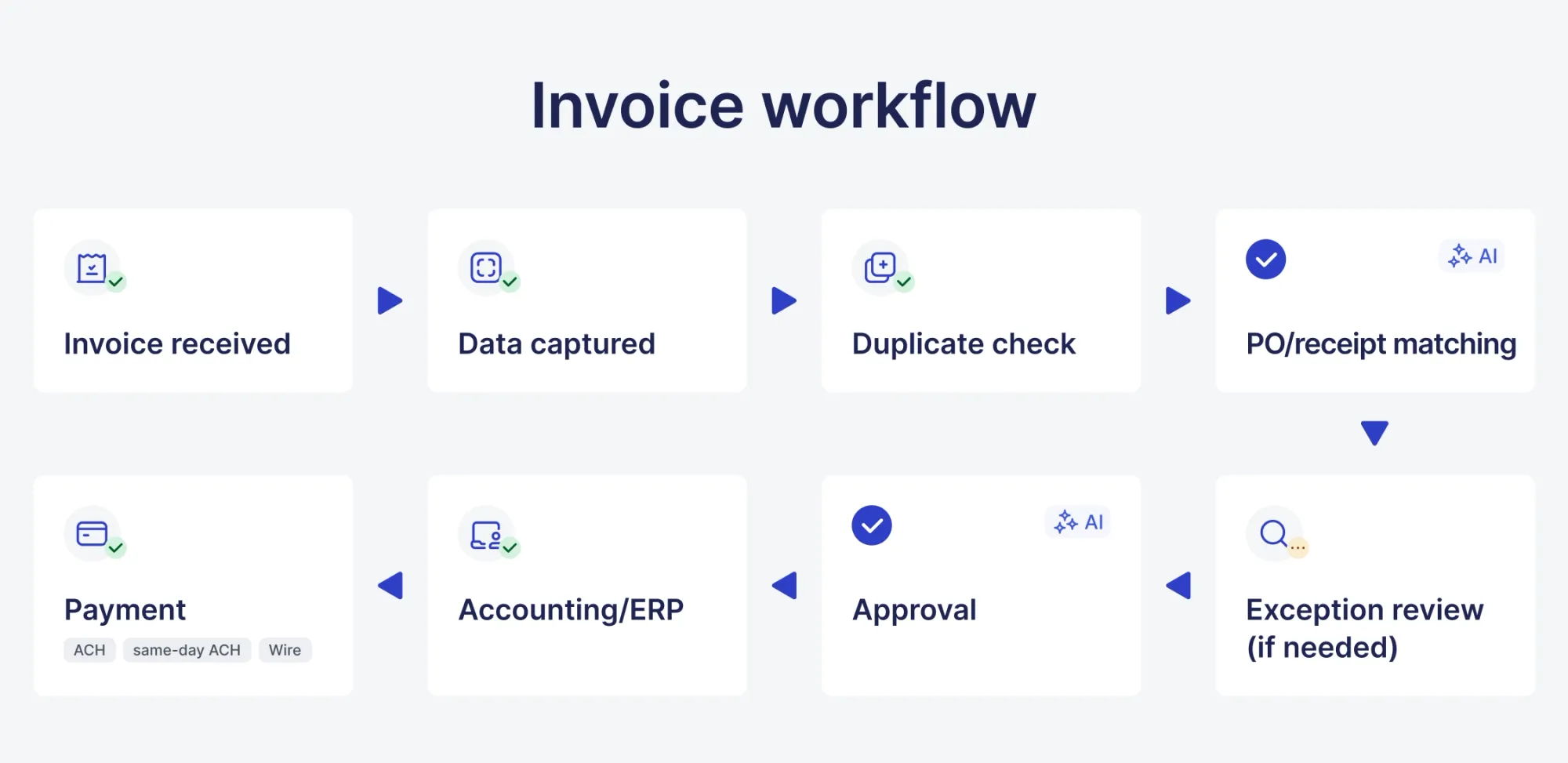
How does an automated invoice management system move an invoice from receipt to payment?
The invoice arrives through email, upload, or a supplier portal. The invoice automation software captures its data through optical character recognition (OCR) or artificial intelligence-based extraction. OCR is the process of converting a text image into a machine-readable text format.
Next, the system matches the data against an existing purchase order and goods receipt, checks for duplicates, and routes it to the right approver, taking into account pre-set rules. When the invoice is approved, it goes into the accounting system for payment. Each step of this process gets registered automatically.
In straight-through processing, an AI-driven engine captures invoice data, performs a 3-way match against the purchase order and receiving receipt, and schedules payment automatically, without human intervention.
Conversely, workflows that require final human approval automate data capture and matching validations but hold disbursements until an authorized reviewer completes final sign-off.
Invoices not connected with purchase orders go through the same process. However, they need manual review so that the correct general ledger code can be assigned and the spend authorization can be confirmed.
Invoice workflow diagram
Which parts of the invoice management process can invoice management software automate?
Depending on system configuration and invoice quality, software can automate how you capture invoices and extract data, match against purchase orders and receipts, route standard approvals, detect duplicates, and synchronize final invoice data into accounting or enterprise resource planning systems.
However, when you deal with a price mismatch on a new supplier, an invoice that doesn’t match a purchase order, or an unusual amount, human review is required to solve these problems.
Which invoice management system features matter most in practice?
The benefits of invoice management tools that reduce manual work help capture invoices accurately, approve flexibly, match reliably, and support the invoice formats your suppliers send.
How does invoice capture use OCR to capture invoice data?
Optical character recognition scans an invoice image or PDF and extracts structured data, such as vendor name, invoice number, line items, invoice amounts, and due date, without the need to retype manually.
Modern platforms like Rossum dynamically cross-reference extracted supplier details with master data (e.g., Coupa or SAP). Precoro's AI Invoice Processing works on the same principle: it pulls data straight from the incoming email or upload, then the Matching Agent cross-references it with the purchase order and creates a pre-filled invoice draft.
Conversely, legacy tools like Kofax ReadSoft Online validate suppliers via static PO lookups, whereas Docparser relies on fixed zoning and regex pattern matching to verify vendor names.

How should invoice management software handle invoice approval, invoice workflows, and exceptions?
Good invoice workflows route invoices using configurable rules, such as amount, department, vendor, or category. They escalate automatically if an approver doesn’t manage to act within a set time.
Exceptions, including mismatched amounts, missing purchase orders, and unusual vendors, need a clearly defined reviewer without waiting in a standard queue. Defined exception routing reduces the risk of invoices waiting without an assigned reviewer.
How does invoice matching help match invoice data and prevent duplicate payments?
Invoices use three-way matching to match the original purchase order and the goods receipt. Invoices that mismatch based on price, quantity, or vendor get flagged.
That’s where duplicate payment prevention occurs. Invoice management software checks incoming invoice numbers and amounts against processed invoices to reveal duplicate payments before payments are made.
How should a vendor invoice management system handle invoice formats, multi-currency, and tax requirements?
A well-designed vendor invoice management system accepts PDFs, scanned images, emailed invoices, and structured electronic invoice formats without requiring a different process for each.
If you need a system for multi-currency and multi-entity operations, opt for software that automatically converts currencies at the rate of the invoice date and configurable tax handling, such as sales tax and value-added tax based on region. Exchange-rate policy can depend on accounting rules, system configuration, and transaction type.
When organizations manage this manually across countries, it can increase the risk of tax or accounting errors, such as incorrect value-added tax calculations and inaccurate general ledger journal entries.
How do AI-powered invoice management systems improve invoice processing?
An AI-driven online invoice management system uses and learns from historical coding and approval patterns to predict GL coding and spot unusual activities that don't match a supplier's standard invoicing pattern. This way, these tools help resolve matching differences automatically.
Thus, the number of invoices that need human review gets reduced. Over time, these tools start recognizing patterns better. Explicit conditions include zero-variance 3-way match verification, pre-verified active vendor status, and stable historical patterns.
AI-powered coding and matching still work for initial processing, but not for final decision-making on higher-value or unusual invoices. Cases flagged as uncertain, such as a new vendor, an unusual amount, or a new format, need human review.
Best invoice management system comparison: Features, pricing, integrations, and best fit
| Software | Best for | Price | G2 rating | Key integrations |
|---|---|---|---|---|
| SAP Concur | Large enterprises with travel + expense + invoice needs | Custom, usage-based (about $7–11/report) | 4.1/5 | SAP enterprise resource planning ecosystem |
| Precoro | Mid-market companies with multiple entities or distributed teams | From $499/month | 4.7/5 | NetSuite, QuickBooks Online, Xero, Sage Intacct, Microsoft Dynamics 365 Business Central |
| NetSuite | Mid-market/enterprise needing full enterprise resource planning and accounts payable | Custom (about $30K–100K+/yr) | 4.1/5 | Native enterprise resource planning, broad ecosystem |
| Sage Intacct | Finance-focused mid-market, multi-entity | Custom (about $15K–30K/yr) | 4.3/5 | Salesforce, dimensional reporting |
| Stampli | Collaborative accounts payable automation, mid-market | Custom, subscription-based | 4.6 | Mid-market ERPs, ease of setup |
| Xero | Invoice management system for small businesses needing invoicing and accounting | From $13/month | 4.44/5 | Bank feeds, 1,000+ app ecosystem |
| Agentforce Revenue Management (formerly Salesforce Revenue Cloud) | Enterprise quote-to-cash and revenue billing | Revenue Cloud Growth $150/month | 4.2/5 | Customer relationship management |
| Coupa | Enterprise spend management and accounts payable | Custom, enterprise pricing | 4.2/5 | NetSuite, Oracle, SAP |
| Tipalti | Global mass payouts, multi-entity finance | From $99/month | 4.5/5 | Global payment rails, 196 countries |
| AvidXchange | Middle-market verticals (real estate, construction) | Custom, quote-based | 4.4/5 | Industry-specific workflows |
Pricing and ratings reflect publicly available data as of 2026 and can change. Confirm current figures with the vendor before purchasing.
When should you replace your existing invoice management system?
Replace your invoice management system when manual workarounds have slowed down despite using automation software. Moreover, replace it if the existing system can’t keep up with the current invoice volume or format variety.
Also, replace your existing system if it lacks integration with a newly adopted enterprise resource planning system or when support and updates can’t provide the necessary quality.
Overall, if you need to manually correct your existing invoice management system constantly. Frequent manual correction may indicate that the system no longer delivers sufficient automation value.
How can you know it's time to replace your system? An indicator can be the rising exception rate over time. This means the matching logic of your system can’t support current processing requirements. This doesn’t mean your invoices are harder to process.
Cloud-based vs. on-premise invoice management system: Which model fits your business?
Most organizations choose cloud-based invoice management software. The right choice depends on regulatory requirements, such as data localization laws and industry-specific security controls, information technology capacity, and existing infrastructure.
| Cloud-based invoice management | On-premise invoice management | |
|---|---|---|
| Pros | Fast deployment, lower upfront cost, automatic updates and security patches, accessible remotely | Full control over data location, doesn’t depend on internet access or vendor uptime, may suit strict data residency rules |
| Cons | Ongoing subscription cost, depends on vendor reliability and internet connectivity | High upfront infrastructure investment, slower feature updates, requires in-house tech support |
| Best fit | Most small to mid-sized businesses and distributed teams | Highly regulated industries or organizations with strict data residency mandates |
How should enterprise teams evaluate a vendor invoice management system?
To evaluate vendor invoice management software, enterprise teams should weigh scalability, multi-entity support, and security heavily. Otherwise, the wrong choice will result in higher costs.
Can an invoice management system scale with increasing invoice volume?
Ask vendors about the maximum tested invoice volume and find out whether processing speed slows as volume increases.
Systems processing high volumes use parallel processing and queue management so that approval times can remain consistent. Unfortunately, this aspect is often ignored until organizations face peak volume. Peak volumes can include fiscal month-end and year-end financial close and seasonal retail and supply chain inventory replenishment (Q4/holiday peak).
How should enterprise invoice management software support multi-entity and digital invoice workflows?
An enterprise invoice management system should support separate approval hierarchies, such as regional escalation thresholds aligned with local budget scale and entity-specific functional approvers.
Moreover, the system should support tax rules, such as jurisdiction-specific tax rules and electronic invoicing compliance rules. Besides, an enterprise invoice management system should support currencies per entity and consolidated reporting across entities without manual spreadsheet work.
Finally, enterprise systems should also support electronic invoicing standards, such as Pan-European Public Procurement Online (PEPPOL) or country-specific mandates.
Regulatory electronic invoicing requirements are expanding across multiple regions. PEPPOL represents a group of specifications that help establish and implement a federated electronic procurement system across different jurisdictions.
What security controls should an invoice management system have?
Invoice management systems are designed with security controls to protect against external breaches and internal fraud, so sensitive financial and banking data can be secured successfully.
Look for encryption at rest and in transit standards, SOC 2 or equivalent compliance certification, and see how quickly they spot vulnerabilities.
SOC 2 is a privacy and compliance standard that specifies how organizations should protect customer data from unauthorized access and security incidents.
How should invoice approval, permissions, and audit trails be configured?
Configure role-based permissions, such as least-privilege approval and financial data scoping, and segregation of duties (SoD) for vendor banking edits in a way that only authorized users can approve invoices.
Moreover, ensure only authorized users can edit vendor banking details, access sensitive financial data, and keep a complete, time-stamped audit trail of every action.
Make sure this audit trail is exportable and searchable, enabling finance teams and auditors to quickly access specific records during reviews.
How can automated invoice management reduce duplicate payments and invoice fraud?
Automated duplicate detection spots repeated invoice numbers or suspiciously similar amounts before payment.
Segregation of duties, which ensures the invoice approver isn't the same person who edits vendor payment details, can reduce the risk of fraud.
Anomaly detection, which often uses artificial intelligence, can also reveal invoices that don’t match a vendor's usual pattern, such as a sudden price jump or a new bank account.
How do you calculate the ROI of invoice management software?
Return on investment (ROI) is a performance metric measuring how much profit or loss an investment makes compared to its total cost.
Potential financial benefits generally come from three main sources: reduced labor cost per invoice processed, faster processing that captures more early-payment discounts, and fewer costly errors, such as duplicate payments or late fees.
To calculate ROI, compare your current per-invoice processing cost and cycle time with vendor benchmarks, such as the cost-per-invoice and cycle time benchmarks, or with a pilot period using the new system. Actual ROI is mostly based on your starting point.
Semi-digital workflows enable spotting smaller jumps, which can’t be said for workflows that still process invoices manually.
Build your own baseline numbers before purchase to reliably know what improvement to expect for your specific operation. Moreover, this way, you can also obtain a concrete benchmark to hold the vendor accountable to after go-live.
Which invoice management KPIs should you compare before and after invoice automation?
Before and after invoice management automation, track:
- Cost per invoice processed
- Average approval invoice lifecycle time
- Error or exception rate
- Percentage of invoices requiring manual touch
- Early-payment discount capture rate
Before and after-go-live comparison gives a concrete return-on-investment figure instead of a general picture of the situation.
What should you test during an invoice management software demo?
Testing during an invoice management system demo serves as a practical evaluation. The vendor should provide you with actual invoice samples instead of vendor-prepared sample invoices.
How does the invoice system handle non-PO invoices and missing purchase orders?
During the demo, test how the system handles an invoice that doesn’t have a matching purchase order. Can it route the invoice through a defined workflow, flag it for manual coding and approval, and clearly show what needs to happen next?
Non-PO invoices are common in many businesses, especially for recurring expenses such as utilities, SaaS subscriptions, and fixed-fee professional services. Your invoice management system should therefore support these invoices without forcing finance teams to create unnecessary purchase orders just to process them.
A clear workflow for non-PO invoices is an important part of effective invoice management, not an edge case.
What happens when invoice matching fails to match invoice data with a PO or receipt?
The invoice management system should flag the specific mismatch, such as price, quantity, or vendor. Then, the system should route it to a reviewer with the necessary information to resolve the invoice issues quickly, rather than flagging the invoice status as an "exception.”
When requesting a demo, ask to see the exception screen to avoid frustration after go-live.
How does a vendor invoice management system handle duplicate invoices and invoice approval exceptions?
A reliable vendor invoice management system automatically flags duplicates based on account invoice numbers, vendors, and amounts. It features a clear resolution workflow that requires no manual cross-checking.
When choosing a vendor invoice management system, focus on how it handles legitimate near-duplicates, such as a corrected reissued invoice. This way, you can avoid false-positive delays on invoices.
Top invoice management systems
SAP Concur
Customer Ratings: 4.1/5 aggregate across G2 and Capterra, from 9,444+ reviews
Advantages:
- Deep ERP integration, including three primary types of ERP integration models, ranging from deeply embedded native connections to universal, API-driven bridges.
- Strong for organizations managing travel, expense, and invoice together.
- AI-driven audit of 100% of transactions.
Shortcomings:
- Pricing isn't transparent and is based on a custom quote.
- Cost can increase because of implementation and add-ons.
Pricing:
- Base: Starting at $7/report
- Plus: Starting at $11/report
- Premium: Custom
The author's takeaway: A strong fit for businesses consolidating travel and expense with invoicing. Overpriced and not a good fit for businesses interested in standalone accounts payable invoice management.
Precoro
Customer ratings: 4.7/5 on G2, from 219+ reviews. 4.8/5 on Capterra, from 255+ reviews.
Advantages:
- User-friendly interface with fast onboarding.
- AP Automation Crew handles invoice capture, PO matching, and expense/credit note processing automatically, on top of automated approval workflows available at every tier.
- Precoro Payments lets you pay suppliers directly from an approved invoice by ACH, same-day ACH, or wire, included from the Core plan.
- E-invoicing support (UBL 2.1, CFDI, XRechnung, and other local formats) from the Automation plan up, useful if you deal with regions that mandate structured e-invoices.
- Multi-entity management lets you run multiple legal entities under one account.
- Supports multiple currencies, with a main currency plus additional ones set per supplier, and payments converting automatically at the exchange rate.
Shortcomings: Not a good fit for very small company or a large enterprise.
Pricing: Core plan: Starting at $499/month, Automation: $999/month, Enterprise: Custom, AP Automation plan: $499/month.
The author's takeaway: A top option for mid-market teams that want procurement, invoice management, and direct supplier payments in one clean, easy-to-adopt platform without enterprise-level complexity or cost. Just note that the AI Document Processing, AI Agents, and e-invoicing live in the Automation tier, not Core.
NetSuite
Customer ratings: 4.3/5 on G2, from 4,489+ reviews
Advantages:
- Full ERP beyond invoicing
- Strong integration ecosystem
- Scales from small business to large enterprise
Shortcomings:
- Higher cost and longer implementation timeline compared to standalone invoice tools.
- Inflexible for niche workflows.
Pricing: Base: $999/month, a per-user license fee of $129–$199/user/month on top of that, and add-on modules.
The author's takeaway: A good fit for businesses interested in invoicing as part of a broader ERP, not as a standalone fix for accounts payable processing problems.
Sage Intacct
Customer ratings: 4.3/5 on G2, from 4,489+ reviews
Advantages:
- Strong financial-specific features, such as continuous multi-entity consolidation and advanced spend management
- Еase of use
- Quick implementation relative to full ERPs
Shortcomings: Not a good fit for businesses interested in inventory, manufacturing, or broader operational modules.
Pricing: Base: $200–$400
The author's takeaway: A good fit for finance teams interested in deep accounting and multi-entity invoicing without paying for operational modules they won't use.
Stampli
Customer ratings: 4.6/5 on G2, from 2008+ reviews
Advantages:
- Strong collaboration for AP teams
- Ease of use
- Fast setup
- AI-assisted coding and routing
Shortcomings: Upfront budgeting gets harder because of custom pricing. Focused on AP instead of a broader procurement suite.
Pricing: Custom
The author's takeaway: Especially strong for finance teams that want better internal communication around invoices, not just automated routing.
Xero
Customer ratings: 4.4/5 on G2, from 1831+ reviews
Advantages:
- Invoicing combined with full accounting and bank reconciliation
- Large third-party app ecosystem
- Affordable entry pricing
Shortcomings:
Active businesses often outgrow the invoice and payment bill volume designed for the entry plans.
Pricing:
- Starter: $5.80/month for the first 3 months
- Standard: $10/month for the first 3 months
- Premium: $15/month for the first 3 months
The author's takeaway: A top management system for small businesses interested in invoicing linked with general accounting instead of a dedicated, high-volume AP automation tool.
Salesforce Revenue Cloud
Customer ratings:
Agentforce Revenue Management (formerly Salesforce Revenue Cloud) 4.2/5 on G2, from 1517+ reviews.
Advantages:
- Deep integration with Salesforce CRM
- Strong billing and revenue recognition
Shortcomings:
Specifically designed for revenue or billing and not for accounts payable invoice management. So, it’s not a good fit for businesses mainly interested in processing vendor invoices.
Pricing:
- Salesforce Foundations: $0
- Flex Credits: $500/100k Credits
- Agentforce add-ons: $125/month
- Agentforce Industries add-ons: $150/month
The author's takeaway: A good fit for those already deep in the Salesforce ecosystem and interested in billing or invoicing on the customer-facing side. Not a good fit for businesses interested in an accounts payable invoice management alternative.
Coupa
Customer ratings: 4.2/5 on G2, from over 570+ reviews.
Advantages:
- Strong enterprise spend management with multi-level invoice validation
- Intuitive interface
- Wide enterprise resource planning integration options, real-time master data synchronization, and automated upstream-to-downstream transaction hand-off
Shortcomings:
- Not a good fit for small teams because of enterprise pricing.
- The interface can be inconsistent across modules.
Pricing:
- Registered: Free
- Verified: $549/Year
- Premium Support: $499+/Year
- Advanced: $4,800/Year
The author's takeaway: A strong option for those already running complex, multi-module spend management. Not a good option for businesses interested in accounts payable invoice automation.
Tipalti
Customer ratings: 4.5/5 on G2, from around 424+ reviews
Advantages:
- Supports global payment operations, with payments to 196+ countries and 120+ currencies.
- Strong multi-entity and tax compliance support.
Shortcomings: May include capabilities that single-country organizations don’t require for domestic-only, single-entity businesses, such as foreign exchange (FX), a cross-border payment engine, and a KPMG-validated international tax and regulatory compliance engine.
Pricing:
Tipalti Accounts Payable: Starting at $99/month.
Tipalti Mass Payments: Starting at $249/month.
The author's takeaway: A top option for businesses interested in supporting a global, multi-currency supplier base.
AvidXchange
Customer ratings: 4.4/5 on G2, from around 329+ reviews.
Advantages:
- Industry-specific workflows for real estate, construction, and hospitality
- Strong middle-market fit
Shortcomings:
Has a lower rating than its competitors, such as Stampli, in terms of ease of setup and support responsiveness. For example:
Platform and Metrics for SAP Concur and Stampli, respectively: Ease of Setup (G2 / Capterra)~3.5 / 5.0 (7.1/10 on G2) 4.7 / 5.0 (9.3/10 on G2) Quality of Support (G2 / Capterra)~3.7 / 5.0 (7.6/10 on G2) 4.8 / 5.0 (9.3/10 on G2)
Pricing:
The author's takeaway: A good fit for businesses in one of AvidXchange's core verticals, such as real estate, commercial property management, and construction.
How do you implement an automated invoice management system without disrupting AP operations?
It’s vital to focus on a phased rollout, backed by clean data. This doesn’t make implementation its own source of accounts payable disruption.
Rushing an organization-wide migration from the start without cleaning the data and training the staff disrupts operations.
Disruptions can include duplicate and misrouted payments during ERP-to-AP data synchronization, total invoice blocking, and supplier relationship strain.
What vendor and invoice data should be cleaned before migration?
Before migration, clean up duplicate or outdated vendor records, such as inactive vendor profiles and variant profiles across subsidiaries. Additionally, standardize vendor naming conventions, such as legal entity designations vs. doing business as (DBA) names, and inconsistent formatting and punctuation.
Moreover, verify banking details, such as outdated Wire routing numbers and unverified bank account ownership. This way, you’ll avoid matching errors and payment issues after production launch (go-live).
Many keep historical invoice data in a read-only archive instead of importing the information into the new system.
Which invoice workflows should you automate first?
Automate your most standardized invoice category with the highest volume first. This can include recurring vendor invoices or PO-backed purchases. These cases are the easiest starting points with the highest impact, such as a 70% to 80% reduction in labor processing costs and a 75% compression of approval cycle times.
Save complex, unusual invoice types, including unusual contracts and one-off services, for the time when the team comfortably uses the new system.
When should automated invoice management still require human review?
Human review is required for new or unverified vendors, invoices without a matching PO, amounts above a supplier's historical pattern, and payments related to new or recently changed banking details.
In these cases, fraud and costly errors, such as payment fraud via intercepted bank account changes and ambiguous multi-line overpayments, can go unnoticed through fully automated processing.
FAQ
Free invoice management tools are suitable for very small businesses with low invoice volume and simple needs, such as freelancers and independent contractors, and single-unit consulting firms or local trades. However, these tools lack automated matching, multi-level approval workflows, and integrations. And these are features necessary for larger and more complex processes. That’s why businesses processing a large number of invoices weekly require capabilities beyond free tools' abilities.
A simple solution is enough for a business when dealing with low-volume invoices and basic approval needs, such as one or two approvers. Also, a simple invoice management solution is enough for those who don’t need complex matching against purchase orders or multi-entity reporting. If you have multi-currency needs or growing matching complexity, consider investing in a full-featured system.
AI invoice management software processes invoices faster and more accurately, enabling finance teams to have earlier, more reliable visibility into upcoming payment obligations. This way, finance teams enjoy short-term cash planning. Faster processing helps spot early-payment discounts that organizations often miss when invoices remain unprocessed for weeks in a manual system.
Test invoice management software on the invoices your suppliers actually send. Book a Precoro demo to run your own invoices through AI capture and 3-way matching, and see how approved invoices reach your ERP.