September 2026 Update: Track Savings on the Dashboard and Configure AP Automation Yourself
See how Precoro’s September updates put savings on the dashboard, give admins more control over AP automation, and expose hidden costs before you sign.

Each new entity brings more suppliers, budgets, and invoices to keep track of. At that point, faster purchasing isn't enough for mid-market companies: leadership needs proven savings and firm control over spend, without extra admin. Precoro is developed with that in mind.
In September, we focused on giving procurement teams a clearer way to show their impact to leadership and on reducing the setup work that can slow operations. On top of that, Precoro’s latest releases also help teams keep budgets aligned with actual spend as invoices are processed.
Read on to see what's new in Precoro this September.
September updates at a glance
Savings tracking on the dashboard
Two-step budget setup
Self-serve AP automation settings
Approver replacement
AI scanning for Word, Excel, and Outlook files
Supplier-added items in RFPs
Shipping and discount tracking
Redesigned document exports
PO print settings
Weekly draft reminders
Financial clarity for leadership and budget accuracy for procurement
Precoro’s September updates satisfy both ends of the process: leadership sees how much the company saves, while procurement gains more control over budget, approval, and AP configuration, with less manual work.
| Update | What's new | Business impact |
|---|---|---|
| Savings dashboard | Track total savings over time and see which suppliers contribute the most. | See procurement's impact and strengthen your position at contract renewals. |
| Budget setup | Create budgets in two steps, with intuitive design and autofill. | Launch accurate budgets sooner and bring clarity to fiscal planning. |
| Self-serve AP automation settings | Manage the Intelligent AP Automation settings independently. | Remove setup bottlenecks and get new entities processing invoices faster. |
| Approver replacement | Swap an approver at any step, with automatic document handover. | Maintain approvals through staff changes. |
| AI scanning for more file types | AI Document Processing now reads XLSX, XLS, DOCX, and MSG files. | Handle more documents with less preparation and shorter processing cycles. |
| Supplier-added RFP items | Suppliers can add shipping, taxes, discounts, or new items to their proposals. | Protect margins by catching hidden costs before the contract is signed. |
| Shipping and discount tracking | Track shipping and discounts by amount across PRs, POs, invoices, and RFPs. | Account for every shipping and discount amount in the budget. |
| Document redesign | Export every document in a polished PDF and XLSX layout. | Build credibility with suppliers through professional documents. |
| PO print settings | Choose header fields, add a legal footer for each entity, and hide internal notes. | Control what suppliers see and keep internal details private. |
| Weekly draft reminders | Get a weekly email for drafts older than 24 hours. | Prevent requests from stalling the procurement process. |
Here’s what you need to know about each update.
Keep visibility over realized savings and budgets
If you don't know exactly how much you saved, it’s harder to measure procurement performance and plan next year's budget. Precoro helps with each.
Track savings directly from the dashboard
You shouldn't have to wait for a spreadsheet to see what procurement saved. The answer is now on your dashboard.
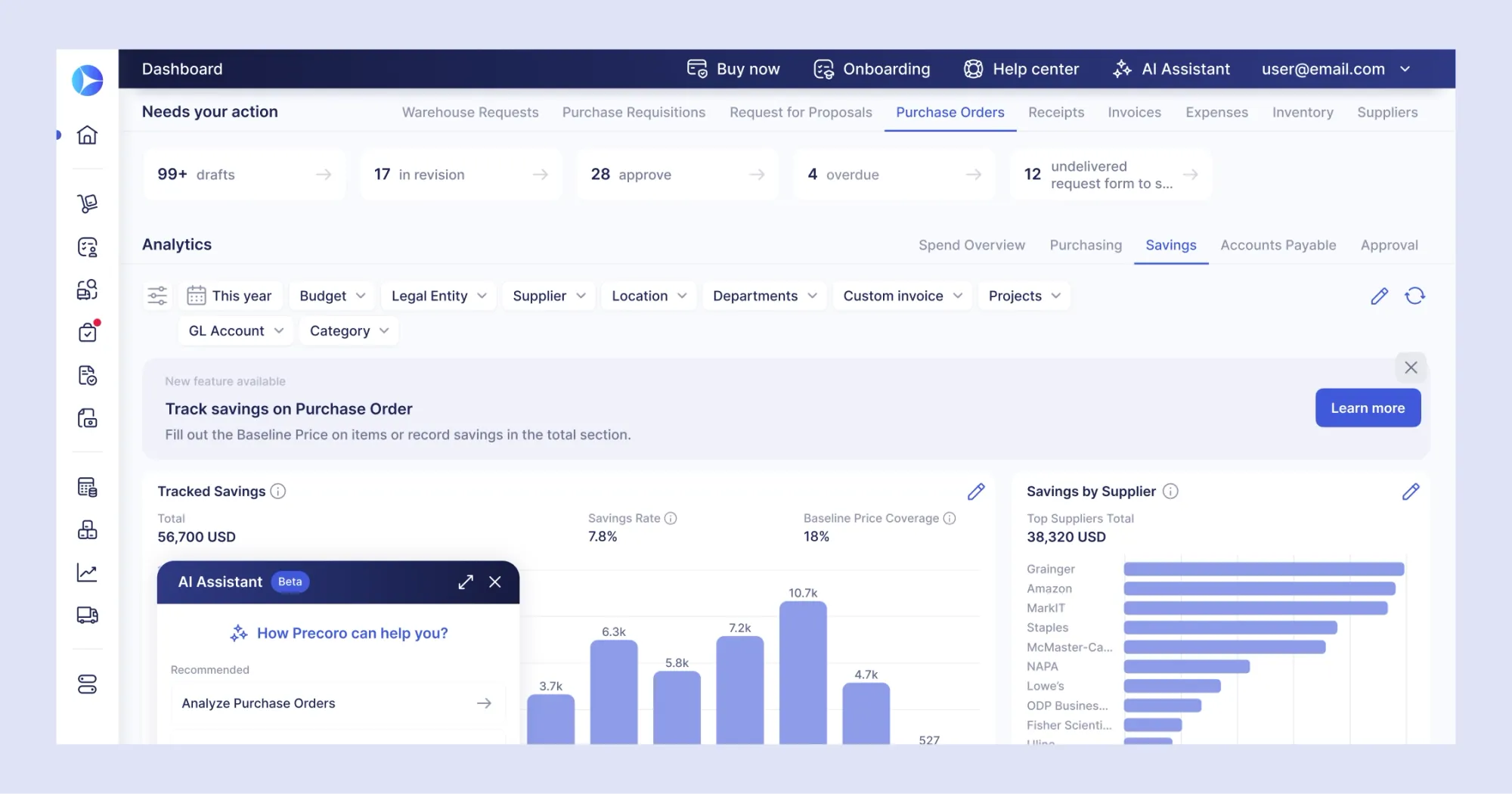
Precoro’s new Savings tab has two charts:
- Tracked Savings shows total savings over time.
- Savings by Supplier shows which vendors contribute the most.
Precoro calculates both from POs with baseline prices. When item-level prices aren’t available, your team can enter the savings manually at the PO level.
You see the immediate proof of procurement’s impact. Since the numbers come directly from purchase orders, they match what procurement works with on a day-to-day basis. Anytime you need to review the department’s performance, the data is already there.
Over time, these savings figures also make planning easier. Instead of relying on estimates, you can use your actual savings history to set more realistic budgets for the year ahead.
The same data also pays off during renewals. Some vendors deliver savings order after order, and others slowly stop. Once you see who makes the biggest impact, you know where to push in the next negotiation.
Build accurate budgets in two steps
The sooner you create the budget, the sooner it’ll be followed. Precoro’s new design makes sure that budget setup now takes only two steps and includes all the necessary info:
- General details. Enter the budget name, choose which fields it includes, and attach the needed files.
- Budget lines. Add the lines in a clear table and see whether they add up to the approved amount.
Build budgets faster and with less effort. The intuitive interface helps new employees get up to speed quickly, with autofill and line duplication reducing manual entry. If you need to see how much has been spent, hover over any line in a live budget.
Take on more volume without extra hours
Simple steps like setup and file conversions can really stall the P2P cycle if they pile up. Precoro delivers two features that give teams back more time and control over purchasing.
Configure Intelligent AP Automation on your own
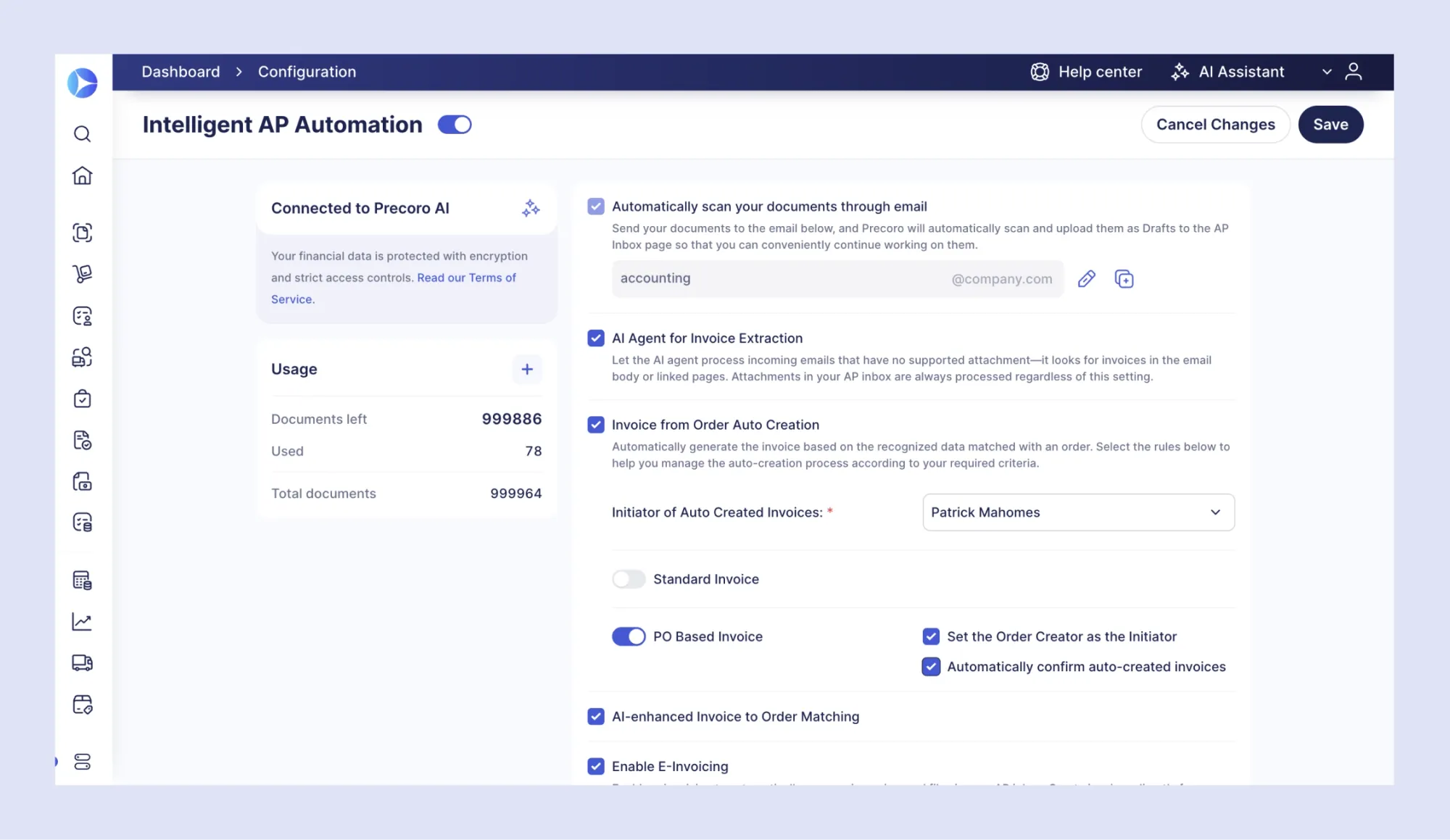
As the business grows, your AP process needs to accommodate each new entity and handle higher volumes. Until recently, changes to your AP setup have gone through a Customer Success Manager. Starting in September, admins with the Configuration role can manage Intelligent AP Automation settings directly in Precoro.
The Intelligent AP Automation tab on the Configuration page brings every setting into one place, so admins can now:
- Check connection status and usage
- Update the AP Inbox address
- Turn the AI Agent for Invoice Extraction on or off
- Set up automatic invoice creation
- Choose invoice-to-order matching rules
- Activate e-invoicing
No need to wait for a reply to your support ticket: if you need stricter governance, the rules can be changed the same day.
Keep approvals moving when your team changes
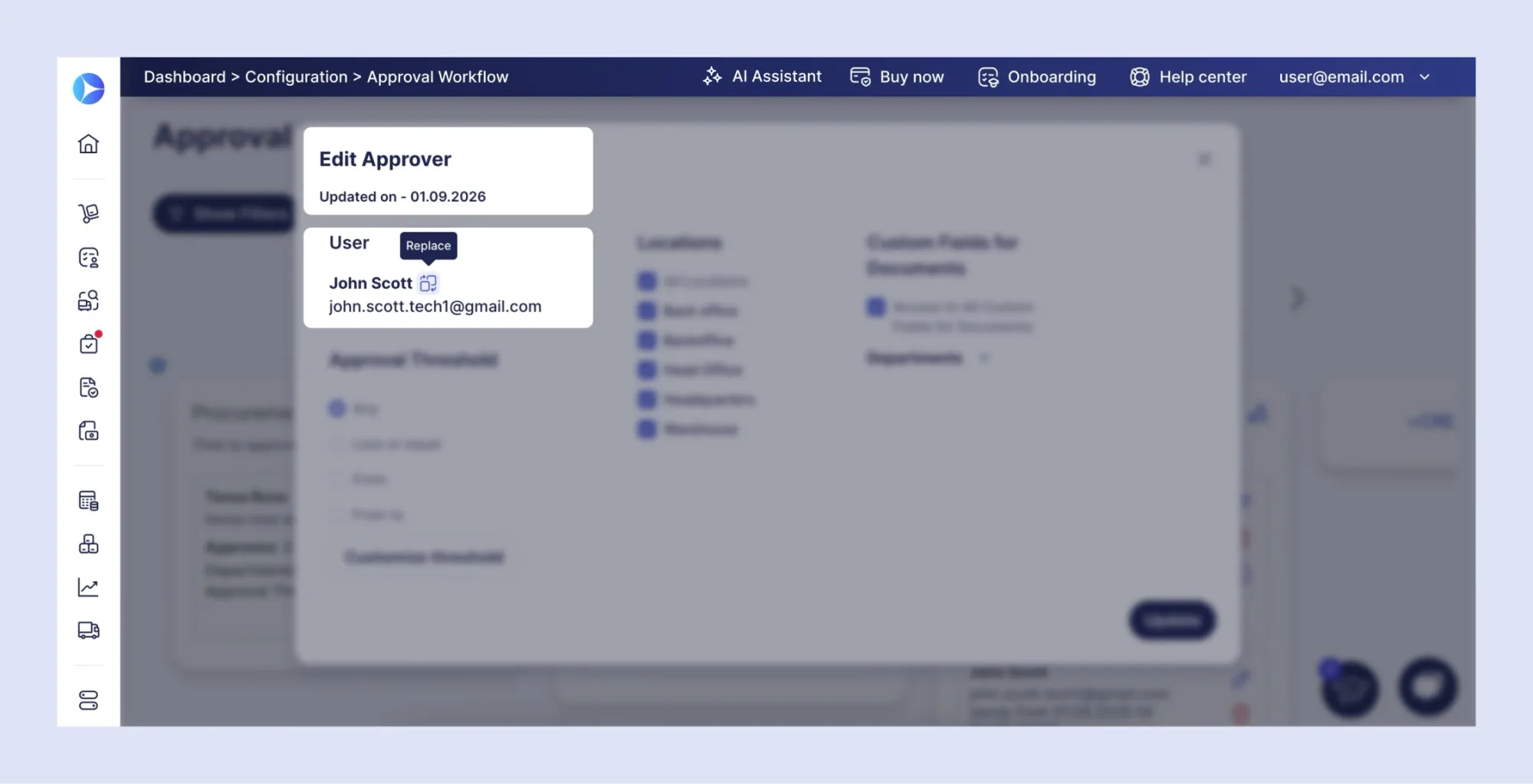
People change roles, go on vacation, or leave the company, but approval workflows shouldn't stall because of it. You can now replace the approver at any step, while the rest of the framework stays the same.
The handover happens automatically: pending requests are assigned to the new approver, so nothing sits in the inbox for long. Precoro only suggests users with the right permissions as replacements, so the change won’t weaken your approval controls. Instead, your team can keep working through staff changes and avoid hours lost to waiting on approvals.
Scan Word, Excel, and Outlook files with AI
AI Document Processing now reads XLSX, XLS, DOCX, and MSG files. Precoro creates a preview of the file and fills in the document form with the extracted details, just as it already does for PDFs and images.
Suppliers and colleagues rarely send documents in one consistent format. A quote might come as a spreadsheet, or orders are often confirmed through simpler Outlook messages. Your team no longer needs to convert these files to PDF first. They can upload the original and let AI handle data entry.
See the full cost before you sign and track it after
A negotiated total becomes essentially null if important information is missing. This month, we’ve made sure you’re covered at both ends of the purchase. Suppliers can now add missing items or fees to RFP proposals, while shipping and discounts are tracked through every partial invoice.
Catch hidden fees before you sign the contract
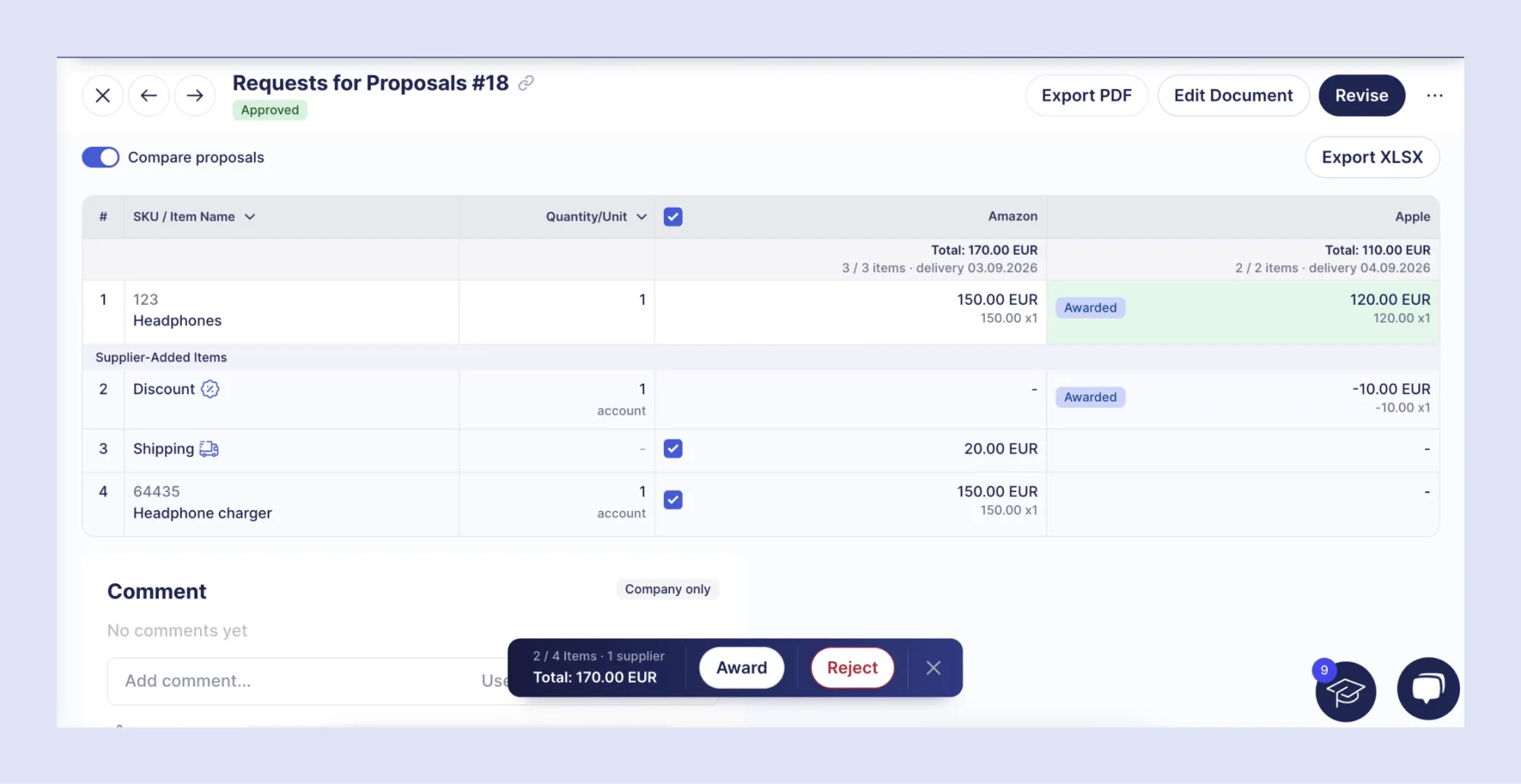
See the full total of every bid before choosing a supplier. Vendors can add shipping, taxes, discounts, or items you didn't request directly to their RFP proposals. Each added line appears in a separate Supplier-Added Items section of the comparison table.
Combined with the side-by-side comparison view released in August, your team can now compare full totals, not just unit prices. A bid with the lowest item prices can still cost more once you add shipping on top. Now you can spot that before awarding the contract.
Procurement still stays in control. Your team approves each line added by the vendor, so only the costs you agreed on make it to the PO.
Track shipping and discounts in POs and invoices
Previously, shipping and discounts were tracked by quantity, so partial invoices didn't reflect the actual amounts billed. With the latest release, budget consumption stays correct when an order is invoiced in parts.
Precoro tracks shipping and discounts by the amount on each PO, invoice, PR, and RFP. You can check the balance at a glance: each line shows the amount billed so far and the amount still open.
Control what reaches suppliers and keep requests moving
Your documents shape the suppliers’ impression of you, and your drafts determine how fast purchases move. This month, we’ve refined document layouts, given you more control, plus made sure unfinished requests don’t fall through the cracks.
Send suppliers cleaner, more professional documents
Every document you send to vendors now looks consistent and is easier to read. Our redesigned PDF and XLSX layout covers all procurement documents, from POs and invoices to warehouse and inventory records. The typography is cleaner, the spacing is more consistent, and information blocks are clearly defined.
Additionally, you can clean internal documents of unnecessary clutter. Remove signature blocks from PR and receipt exports when your approval process doesn't require them.
Control what vendors see on every PO
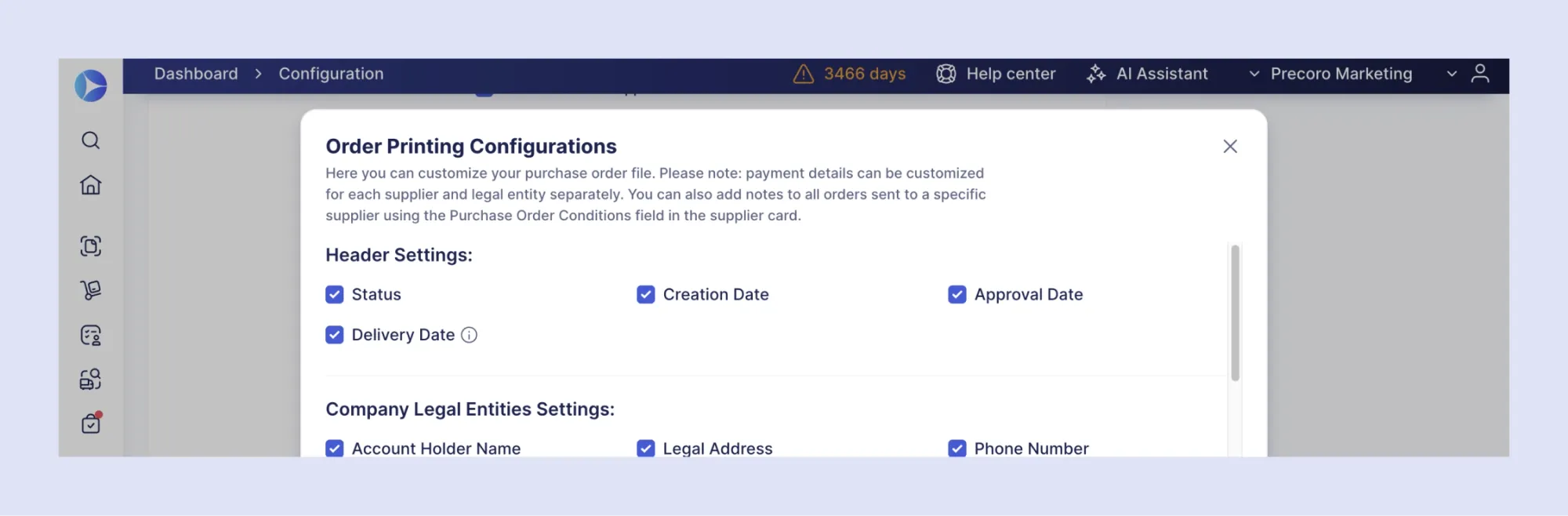
Only include information vendors need to know on the PO and keep internal data private. With September’s update, Precoro lets your team decide what information appears on PO exports.
Key dates front and center. Choose which header fields suppliers see, such as status, approval date, or delivery date. Blanket POs also include the validity period and delivery schedule, while service orders show the service period. Suppliers get the key dates upfront and don’t need to follow up.
Disclaimer on every order. Your payment and liability terms can now be added to every PO with a custom footer. The legal team writes the terms once, and Precoro applies them automatically. Companies with multiple legal entities can assign custom footers for each.
Notes only your team sees. Sensitive internal information stays inside Precoro. Hide the notes block from the PDF and Excel PO exports, so suppliers only see what’s meant for them.
Stop requests from stalling in draft
Purchases now reach approvers on time, even when employees forget to submit a request.
Every week, Precoro emails users the requisitions and orders left in draft for more than 24 hours. Each email lists up to five drafts with direct links, ready to submit in a couple of clicks. The reminder goes out on Mondays by default, and admins can adjust it for the whole company.
A draft PR can’t enter the approval flow until someone submits it. Without a reminder, employees may only notice it when the delivery is already late, or they may bypass the process altogether. Weekly reminders bring those requests back into the workflow.
See September’s updates in action
Precoro is an agentic procurement and AP centralization platform built for mid-sized businesses with distributed operations. Trusted by over 1,000 companies, it serves as a spend control and procurement layer on top of ERP systems.
Book a personalized demo to see how savings tracking and agentic AP automation could improve cost control and invoice processing across your every entity. Сheck out our product updates for more newly released features and see what we’re building next on our open roadmap.