August 2026 Update: Track Savings on POs and Compare RFPs in Precoro
Learn how Precoro’s August product updates help teams compare supplier bids, track PO savings, minimize AI processing blockers, and buy with more control.

As mid-market companies grow, procurement teams face increasing pressure to move faster, protect margins, and prove their impact on the bottom line. Precoro’s August product updates are designed around these priorities.
Precoro’s latest releases help teams secure better purchasing terms, keep routine processes moving with less manual intervention, and turn procurement savings into clear, CFO-ready data. At the same time, enhanced controls help businesses scale purchasing without losing visibility over where money goes.
Keep reading to discover what’s new in Precoro this August and how you can leverage these updates:
Compare supplier proposals side by side
Track real savings on every purchase order
Keep AI document processing moving even when information is missing
Correct recognition problems without leaving the document
Buy from DigiKey without bypassing procurement controls
Send supplier emails from your company domain
Get more context from daily reminders
Tighter spend control without adding administrative work
The August updates are connected by a common goal: to make purchasing faster and give procurement more ways to protect the bottom line. Every hour not spent comparing quotes by hand or fixing routine data errors is an hour back for work that actually moves cost, supplier performance, and growth.
| Update | What changed | Why it matters |
|---|---|---|
| RFP proposal comparison | Compare supplier bids side by side, see the lowest price per item, and split awards across vendors. | Get the best deal faster and protect margins at the sourcing stage. |
| PO savings tracking | Compare PO prices with baselines and automatically calculate savings or overspend. | Catch budget leakage early and prove procurement’s financial impact. |
| AI Document Processing updates | Precoro can handle missing suppliers and currencies without stopping the workflow. | Fewer blocked documents and less manual correction without compromising control. |
| Fix AI recognition | Report scanning mistakes directly from the document. | Improve recognition with a faster feedback loop. |
| PunchOuts | Added DigiKey integration. | Give employees faster buying while keeping approvals and budgets in place. |
| Custom sender domain | Send supplier-facing emails from your company domain. | Trusted outreach for faster vendor engagement. |
| Redesigned daily reminders | Get clearer inbox context cards for approvals, pending actions, low stock, and AI-processed AP documents. | Get rid of approval bottlenecks and review critical operational tasks directly from the inbox. |
Now, let’s take a closer look at each update.
Get the best supplier price, and see exactly what you saved
Finding a favorable supplier offer is only half the job. Teams also need a clear way to track exactly how much they saved. Both tasks are now easier with Precoro.
Compare supplier proposals side by side
Once a purchase requisition is approved, sourcing managers can turn its items into a draft RFP in a single click instead of building the request from scratch. From there, supplier proposals can be collected and compared directly in Precoro.
The new comparison view brings supplier offers into one matrix, broken down item by item. The lowest price for each item is highlighted, so it’s easy to see where each supplier offers the strongest deal.
And you don’t have to choose one vendor for the entire RFP. Select a single supplier for the full request or split the award at the item level.
That’s how you protect margins. The supplier with the lowest total proposal may not offer the lowest price on every item. By comparing and awarding line by line, teams can capture better pricing across the whole purchase instead of leaving savings on the table.
Once the winners are selected, Precoro automatically pre-fills the corresponding POs with the awarded items and prices, so there’s no need to re-enter the data manually. The original PR, RFP, and resulting POs all stay linked, giving you a complete audit trail from initial request to final order.
Track real savings on every purchase order
Once the buying decision is made, you can now track the actual savings or overspend on the purchase order.
Precoro compares the price you’re paying with a baseline price, either pulled directly from the product catalog or entered by your team. Savings are then calculated at the item level and summarized for the entire purchase order.
If the negotiated price is lower, you can see exactly how much was saved. If it’s higher than the baseline, Precoro flags the difference as overspend.
This immediate visibility helps procurement managers catch price increases and potential budget leakage before the purchase order is sent to the vendor, rather than weeks later in a spend report. At the same time, every successful negotiation comes with a clear record of the savings achieved.
Keep AI document processing moving even when information is missing
Document automation saves time only if teams don’t have to constantly step in for exceptions. This month, we’ve made AI Document Processing more resilient when documents contain information not yet configured in Precoro.
When AI scans a PO and can’t find the supplier in your account, Precoro creates the supplier profile automatically if company settings or user permissions allow it. As a result, a new supplier doesn’t block the document workflow and instead immediately enters a regular approval process.
The update also removes another bottleneck: missing currencies. If AI spots a currency that isn’t in your account yet, Precoro can add it and keep the document moving. And if AI can’t tell which currency is used, Precoro simply falls back to your company’s primary one.
Correct recognition problems without leaving the document
AI recognition gets better faster when teams can quickly tell us what went wrong.
If the system misreads a PR, PO, expense, or receipt, users can now report the recognition issue directly from the document. Describe the problem using Fix Recognition, and the feedback goes to our team to improve the processing of your future documents.
Buy from preferred suppliers without bypassing procurement controls
PunchOut catalogs give employees a convenient way to shop on a supplier’s website while keeping purchases within the company’s procurement process.
In August, we added a new integration: DigiKey. It’s useful for electronics and technology purchases, including components such as semiconductors, connectors, sensors, and development boards.
Requesters browse the supplier’s catalog and automatically pull item details straight into Precoro, rather than typing in products, quantities, and prices by hand.
The purchase then follows a structured PR or PO process, with the company’s existing approval workflows and budget controls in place.
Benefit from clarity and brand recognition with Precoro email updates
We also improved how information flows on both sides of the procurement process: internal notifications for your team and supplier-facing communications.
Send supplier emails from your company domain
Organizations can now configure a custom sender domain for supplier-facing Precoro emails.
Instead of receiving a PO or RFP from a generic system address, suppliers can receive it from your official corporate domain, such as procurement@yourcompany.com.
Get more context from daily reminders
Internal emails with daily reminders have been redesigned, too.
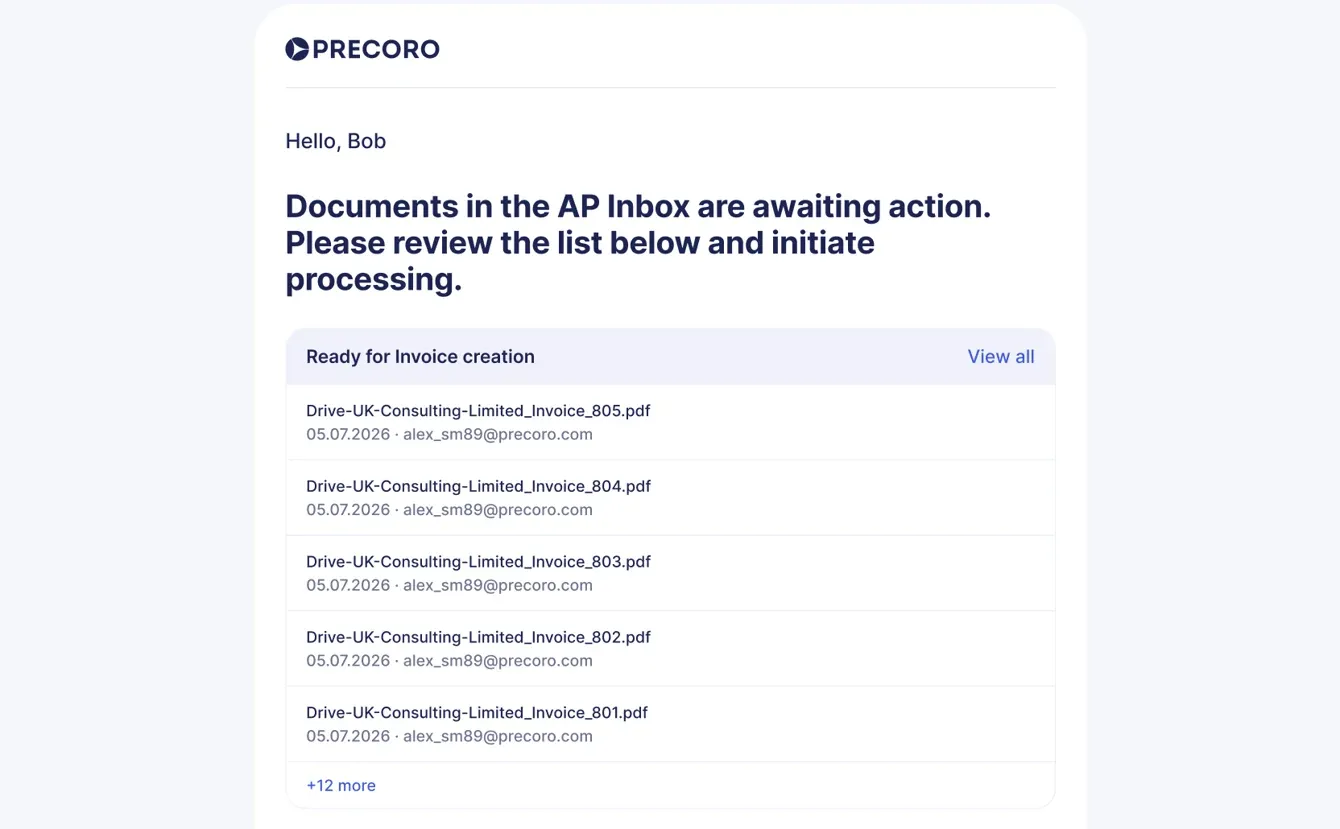
Instead of simply telling users that something needs attention, reminders now provide more context about the documents involved. Managers can get a faster overview of approvals, required actions, low warehouse stock, and AI-processed AP documents directly from their inbox.
New to Precoro?
Precoro is an agentic procurement and AP centralization platform built for mid-sized businesses with distributed operations. Trusted by over 1,000 companies, it serves as a spend control and procurement layer on top of ERP systems.
Book a personalized demo to see exactly how your processes can become more efficient and transparent with Precoro. In the meantime, you can browse our product updates for newly released features and check our open roadmap for what’s next.