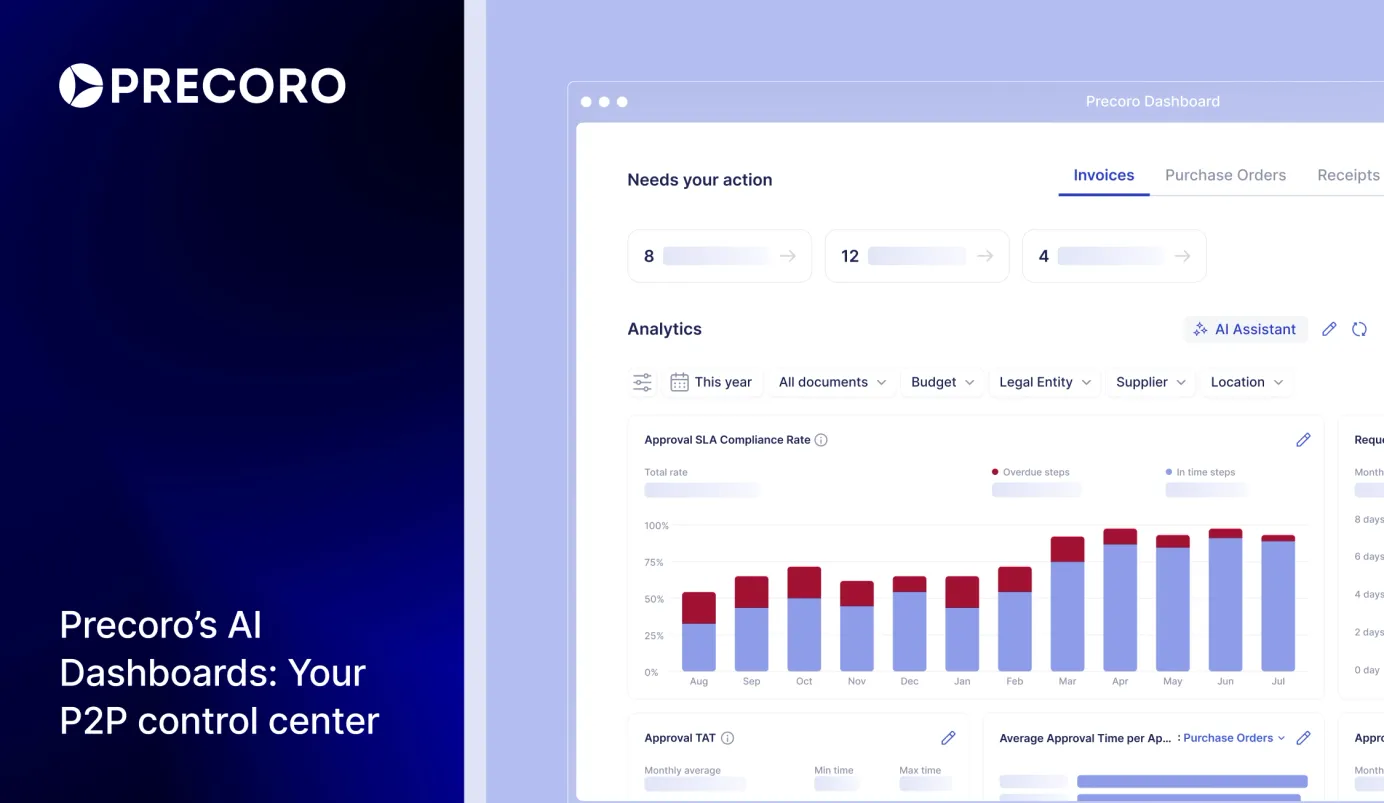
Meet Precoro AI Dashboards: Your P2P Control Center for Actionable Insights
Discover Precoro’s AI-powered dashboards to spot trends, risks, and budget gaps, so your teams can cut costs and make faster decisions in real time.

Precoro’s dashboards already centralize procurement data, spend, budgets, and approvals, making it easy to monitor the entire procure-to-pay process.
Now, AI-powered dashboards extend the P2P control center to smarter decision-making. Instead of consolidating reports at the end of the month, your team gets real-time AI-powered insights, analytics, and operational metrics in one single place. Teams instantly see who is blocking transactions, where money is going, and where it's stalling, while there is still time to act.
According to Hackett Group research, organizations piloting AI in procurement already achieve productivity improvements of up to 25% across contract management, analytics, and category management. Precoro brings that capability directly into your daily workflow.
Keep reading to see how Precoro's AI-powered dashboards help teams move from tracking spend to making faster, better decisions that improve control, efficiency, and procurement ROI.
How Precoro’s AI dashboards benefit your team
Let’s be honest: when your team has a procurement system that centralizes your purchasing — it’s one thing, when your team gets instant real-time analytics, operational metrics, and AI-powered insights in one place — it maximizes ROI. Here’s how your teams can shift from after-the-fact procurement to faster and more informed decision-making:
See operational speed with structured workflows
Before you can dive into heavy macro analytics, your team needs to clear the daily operational sludge. Precoro makes it seamless with the Needs your action section. Instead of hunting down missing documents or bugging managers for updates, users are greeted by smart, personalized infocards. One click opens a hyper-filtered queue of exactly what needs immediate attention — whether it’s a high-priority approval, a critical document creation, or a pending payment.
Crucially for your peace of mind, this view is strictly role-based. Each member sees the action he’s authorized to handle. This completely eliminates visual noise, keeps sensitive data secure, and protects your line managers from burnout. The ROI here comes from faster execution: your team logs in, clicks the card, clears their blockers in minutes, and instantly shifts their brainpower back to the strategic work.
Track, control, and optimize every procurement dollar
Hunting for committed funds and unapproved requests drains your team's energy just to find out if you're still within budget. Precoro's Purchasing tab delivers real-time visibility — you can now proactively monitor budget consumption, compare requested vs. approved amounts, and trace orders to final billing for total financial control and better business decision-making.
Here is an overview of the core charts in the Purchasing tab:
- The dynamic Spend vs. Budget chart tracks real-time consumption so you never exceed your limits.
- The Monthly Requests Value chart compares initial requests to final approvals, visualizing your exact procurement ROI.
- The Committed vs. Accrued vs. Invoiced chart breakdown shows precisely where funds are locked up, received, or billed.
- The Requisition-to-Order and Procure-to-Pay Cycle Times charts pinpoint bottlenecks to keep operations both cost-effective and lightning-fast.
Spot rogue spend before it costs you
Nothing ruins a finance leader’s day quite like surprise invoices slipping into the system, requiring the team to quickly find out who bought what without an approved PO. Precoro's Accounts Payable tab fixes that headache right away by shining a light on rogue spend and team capacity.
With the PO-Backed vs. Non-PO-Backed Invoices chart, managers can instantly spot risky, out-of-policy bills that bypass the standard workflow, making sure the business only pays for what was actually ordered. Plus, the Invoices per User metric automatically tracks which employees are handling the heaviest invoice volume, so you can easily rebalance workloads, redistribute tasks, or see who might need further training on purchasing compliance.
See bottlenecks clear as day, benefit from lightning-fast approvals
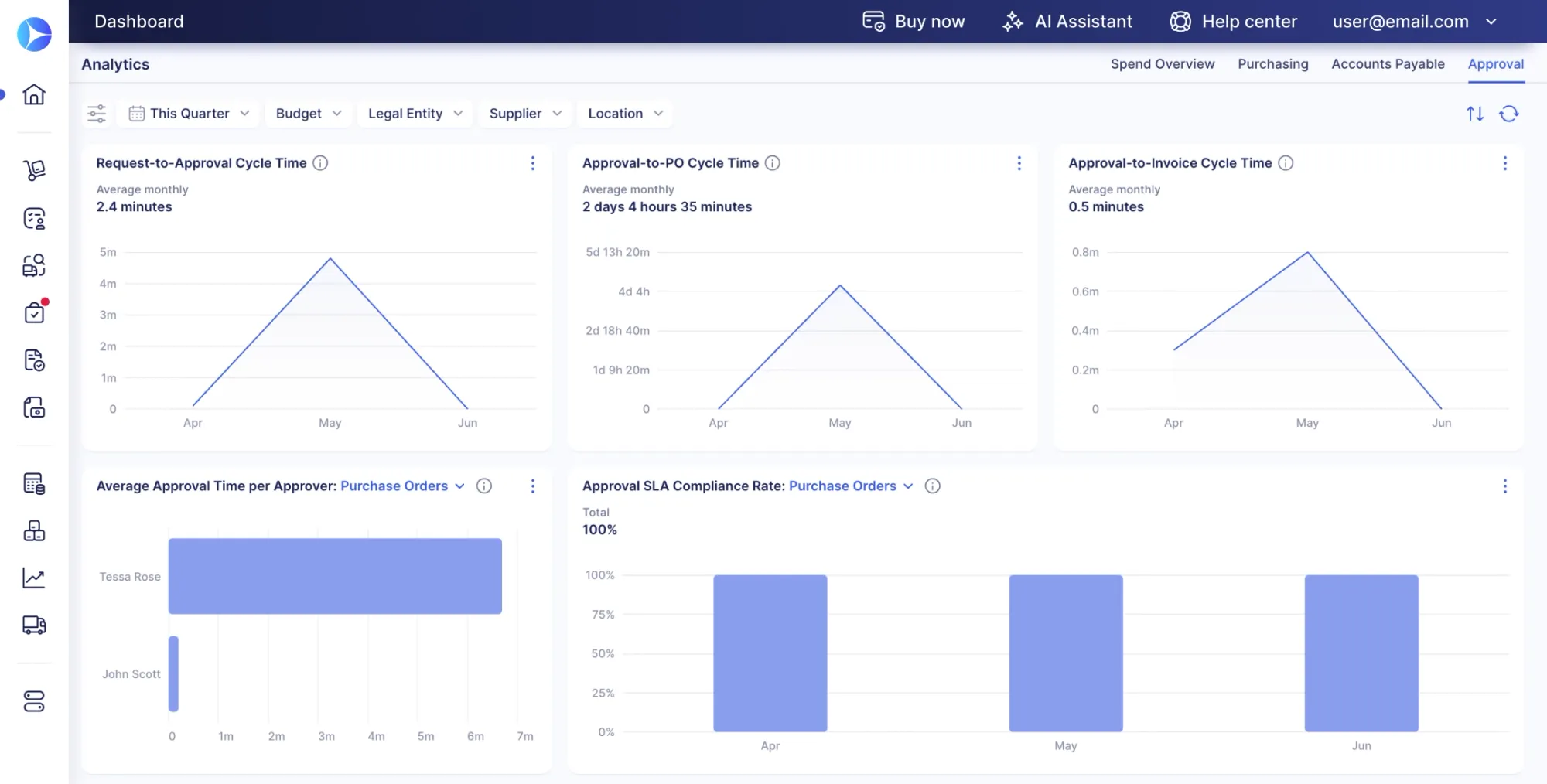
You can analyze your spend down to the penny, but you remain completely blind to the silent workflow delays that stall your entire procurement cycle. With the Approval tab, you can track exactly how efficiently documents move through the system and how much time it takes. Here is how:
- The Request-to-Approval, Approval-to-PO, and Approval-to-Invoice Cycle Time charts clearly show how long each major P2P phase takes.
- The Average Approval Time per Approver and Approval TAT (Turnaround Time) charts reveal how long each user and step takes to process documents.
Paired with the Approval SLA Compliance Rate, which shows on-time vs. overdue approvals, you can quickly see where delays happen, understand the reasons behind them, and improve the operational speed.
Master tail spend & drive strategic sourcing
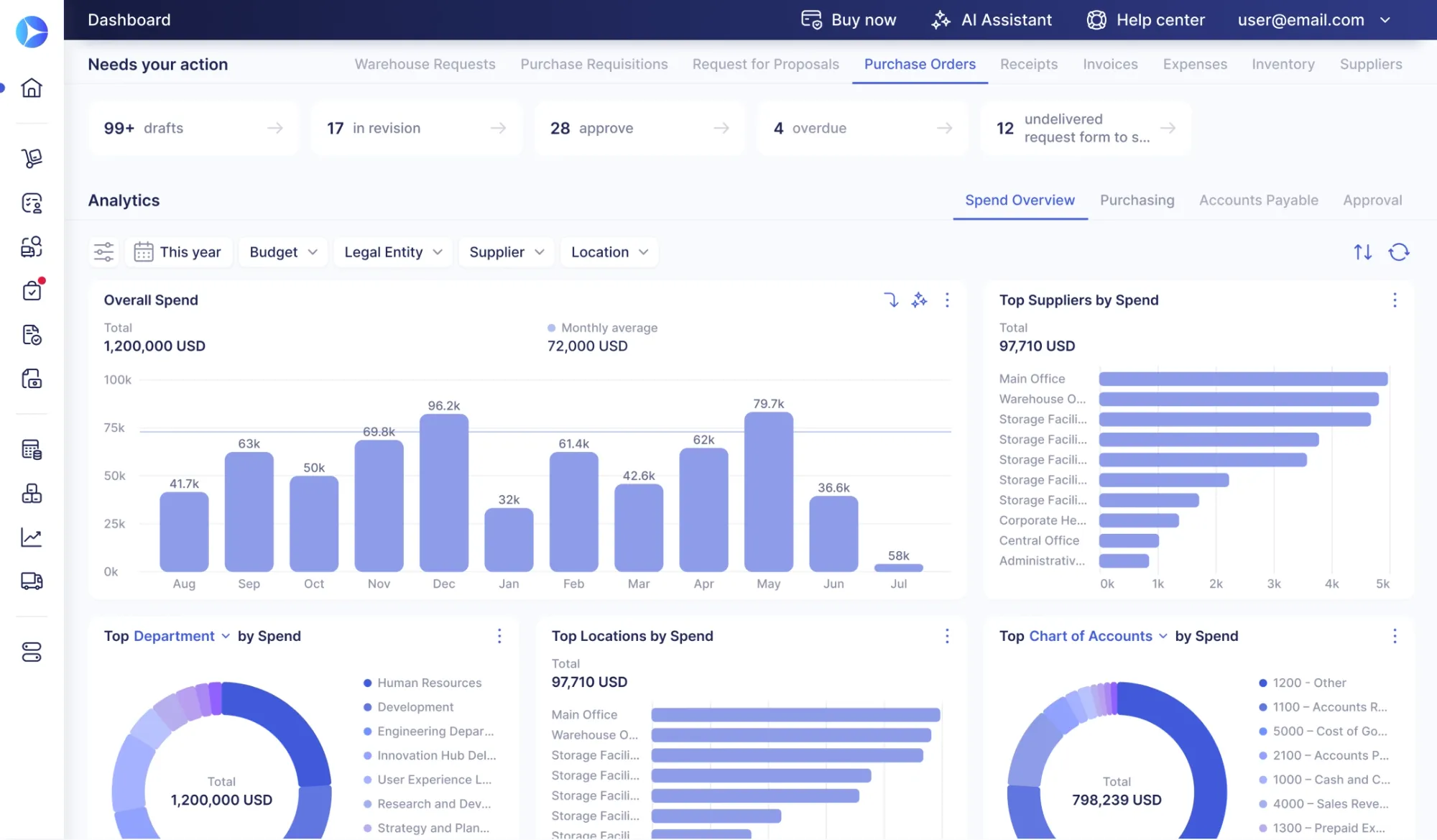
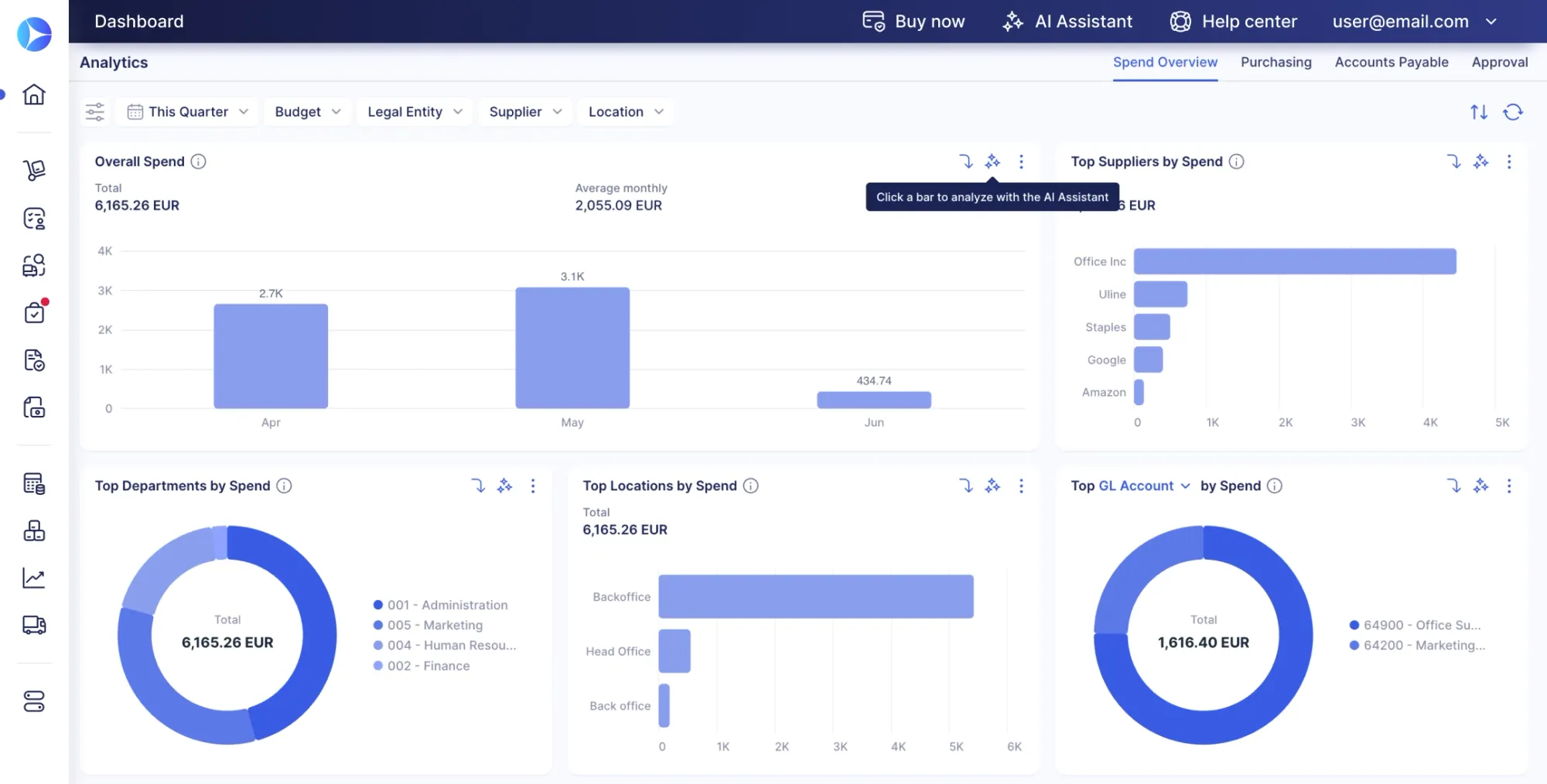
While your team tries to secure better contract terms, different departments buy identical software independently, and off-contract buying drains your budget. With the Spend Overview tab, your teams can finally see where money is being spent, where processes are slowing down, and what to do next to drive immediate ROI.
First, they need to select the period, and it’ll calculate the gross overall spend across all requisitions, orders, invoices, and expenses. Further, procurement teams can instantly track actionable top-10 charts — including Top Suppliers, Top Departments, and Top Locations.
Once the system shows the exact percentage of company funds that go to each vendor, they can easily group scattered orders. With these insights, your team can quickly spot fragmented spend, identify consolidation opportunities, and negotiate stronger bulk discounts based on real, consolidated numbers.
Enjoy enterprise-grade security & personalized workspaces
Open access to speed decisions and you risk data leaks and exposed financials; lock everything down, and operations slow to a crawl. Precoro removes that trade‑off by building role‑based permissions into the Role-Based Access & Chart Customization chart. When a user logs in, the interface automatically shows only the metrics, documents, and spend data their role allows — keeping sensitive finance information confidential and visible only to authorized executives.
Teams can also customize their analytics by toggling charts on or off to match daily needs. The result is strict permission control plus user-driven customization in a clean, distraction‑free workspace that cuts visual noise and surfaces only the most relevant insights for each person.
Put an AI assistant inside your charts and get insights all the time
Static charts won’t catch recurring patterns of maverick spend, unless you have a team of ten manually crunching data and building decks for every stand-up. But who has time for that?
Precoro’s dynamic Chart Analysis Tools change that. Instantly filter your data by period, supplier, location, or budget. Want to look closer? The drill-down feature lets your team jump from macro to micro in one click — like tapping a top supplier to see exactly which departments are buying from them.
For an even deeper dive, there is a built-in AI Assistant within AI Assistant & Chart Export to analyze your specific view. It instantly turns visual data into granular insights, helping your team spot process bottlenecks and financial risks before they escalate. Once you have the perfect view, instantly export your charts for effortless sharing in board meetings and stakeholder presentations.
Here’s a brief overview of all the tabs and charts in our AI Dashboards:
| Name | How it works | Benefits |
|---|---|---|
|
Action queue
Needs your action infocards
|
Queue of pending approvals, documents, and payments | Eliminates follow-ups and speeds up blocker resolution |
|
Purchasing
Spend vs. Budget
|
Real-time spend tracking vs budget | Prevents overruns with instant visibility |
|
Purchasing
Monthly Requests Value
|
Compares initial requisition values to final approved amounts month over month | Shows approval and funding trends |
|
Purchasing
Committed vs. Accrued vs. Invoiced
|
Breakdown of spend status: locked (committed), received (accrued), or billed (invoiced) | Improves cash flow visibility and close accuracy |
|
Purchasing
Requisition-to-Order Cycle Time
|
Measures time from request to order | Identifies bottlenecks and speeds fulfillment |
|
Purchasing
Procure-to-Pay Cycle Time
|
Tracks end-to-end time from procurement request to final payment | Exposes delays and improves cash flow |
|
Accounts payable
PO-Backed vs. Non-PO-Backed Invoices
|
Flags invoices without purchase orders | Reduces rogue spend and improves compliance |
|
Accounts payable
Invoices per User
|
Tracks the invoice volume handled by each employee | Balances workload and flags training needs |
|
Approval
Request-to-Approval / Approval-to-PO / Approval-to-Invoice Cycle Times
|
Measures the duration of each major phase in the procure-to-pay pipeline | Identifies bottlenecks and improves speed |
|
Approval
Average Approval Time per Approver & Approval TAT
|
Shows how long each approver and workflow step takes to process documents | Detects SLA delays and improves control |
|
Approval
Approval SLA Compliance Rate
|
Tracks on-time vs. overdue approvals against defined service level targets | Improves governance and SLA visibility |
|
Spend overview
Gross Overall Spend
|
Aggregates total spend across all requisitions, orders, invoices, and expenses for a selected period | Single source of truth for company spend |
|
Spend overview
Top Suppliers / Departments / Locations
|
Ranks the highest-spend entities | Enables consolidation and better negotiation |
|
AI tools
Chart Analysis Tools
|
Filter and drill into charts with AI | Speeds up analysis without analysts |
|
AI tools
AI Assistant & Chart Export
|
Provides AI insights + export-ready charts | Turns dashboards into decision-ready outputs |
|
Access
Role-Based Access & Chart Customization
|
Gives role-based dashboards and data access | Ensures relevance and protects sensitive data |
For a closer, structured overview of Precoro’s dashboards, read our Knowledge base.
What’s next on Precoro’s agenda?
Precoro is the agentic procurement and spend centralization platform that helps companies control purchasing and accounts payable end-to-end.
Trusted by over 1,000 businesses, Precoro brings workflows, data, and analytics into a single system — giving leaders full visibility and control over company spend.
AI Dashboards are only part of our AI initiatives and features. We're actively expanding AI capabilities into Intelligent Document Processing, Agents, and Data Builders, so your data stays accurate and your team stays out of the weeds at every stage of the cycle. Check our open product roadmap to track what's coming, upvote what matters to your workflow, and submit requests directly.
New to Precoro? Book a demo to see how AI dashboards help you control spend, eliminate bottlenecks, and turn procurement into a measurable driver of business value.